LogExpert is a Windows log tail with columnizers, and its --line option is unusually careful
Windows tail program and log file analyzer.
At a glance
- What is it?
- LogExpert is a C# and Windows Forms tail program, a GUI replacement for the Unix tail command, that grew out of a now-defunct CodePlex project and now offers filtering, highlighting, bookmarks, columnizers and a plugin API. It is signed through SignPath for its own binaries only, it needs .NET 10, and the README treats the CI builds as a beta.
- Who is it for?
- LogExpert fits a Windows engineer or support analyst who reads application logs all day and wants tabs, filters, bookmarks and structured columns rather than a stream of text. It does not fit a Linux or container workflow, and it does not fit a CI job that just needs the last lines of a file, where a command-line tail does the job with no runtime to install.
- Can I use it commercially?
- Check first. The repository uses a licence we do not classify automatically, so read its LICENSE file before any commercial use.
- Is it still maintained?
- Yes. The repository last received commits 2 days ago.
- What is it written in?
- Mainly C#, according to GitHub's language statistics.
Answers come from the project's GitHub data, last synced on October 25, 2026, and from our analysis. They are not legal advice.
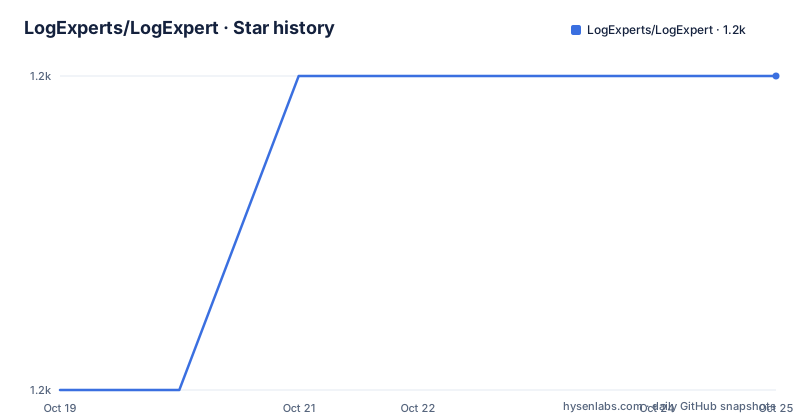
Star history
- LogExperts/LogExpert1,234 ★ · +1
| Repository | 2026-10-19 | 2026-10-25 |
|---|---|---|
| LogExperts/LogExpert | 1.2k | 1.2k |
1 Stars in the last 6 days, measured from the daily GitHub snapshot. Compare with other projects
Editorial analysis
It began as a CodePlex project that no longer exists
The first line of the README is a piece of history that explains a lot about the repository. This is a clone from (no longer exists) https://logexpert.codeplex.com/.
That tells you two things. First, this is a community rescue of a project whose original home disappeared, which is why the code carries the accumulated conventions of a long-lived desktop application rather than the shape of something new. And second, the project has outlived its origin, with a continuous commit history, tagged releases and a rewritten build on modern.NET.
What it is today is a Windows feature rich tail program, described in the README as a GUI replacement for the Unix tail command, with support for plugins, highlighting, filtering, bookmarking, columnizing and more. The repository topics list winforms, logging, logger, logger-interface and columnizer, which is a fair summary of a Windows Forms application that treats log files as a structured, navigable document rather than as a stream.
The feature list is worth reading as a list of workflow primitives. There is tail mode, an MDI interface with tabs, a search function including regular expressions, bookmarks, a very flexible filter view with the possibility of filtering to a tab, highlighting of lines via search criteria, and triggers, meaning you can create a bookmark or execute a plugin as a result of a search match. There is Unicode support, log4j XML file support, third-party plugin support, and a plugin API for more log file data sources. Two items are marked experimental: automatic columnizer determination from a file name and content, and Serilog.Formatting.Compact format support.
The last feature is unusual for a desktop tool. Portable means all options and settings are saved in the application startup directory, so the whole configuration travels with the folder you copied.
Columnizers are the extension model, and they are also a public NuGet package
Columnizers are described as plugins which split log lines into columns, and they are the most interesting extension point because they change what the window displays rather than adding a command.
The idea is that a log line is not always a line. A line of application output with a timestamp, a level, a thread and a message is four pieces of data, and a columnizer that knows the format turns it into a table you can scan, sort and filter. The feature list's mention of automatic determination of the columnizer with a given file name and content, marked experimental, is an attempt to make that automatic.
The plugin model is broader than columnizers, though. The list includes third-party plugin support, a plugin API for more log file data sources, and triggers that can execute a plugin when a search criterion matches. That last one is what turns a log viewer into a monitoring tool: you can watch for a pattern and have the application act on it.
The ColumnizerLib is published separately on NuGet, which tells you the extension surface is intended to be used by people writing their own plugins, not just by the maintainers.
dotnet add package ColumnizerLib --version 1.21.0The main package is available the same way.
dotnet add package logexpert --version 1.30.0Note that the versions in those commands, 1.30.0 for the application and 1.21.0 for ColumnizerLib, are behind the current release tag, which is v1.50.0. The NuGet package and the GitHub release are versioned independently, which is worth knowing before you pin.
The --line option is specified down to its error cases
The command line section of the README is the most precisely written documentation in the project, and it is a good sign of how the application is maintained. It is worth reading in full, because it documents the failure behaviour as carefully as the success behaviour.
LogExpert.exe "C:\logs\application.log" --line 1234
LogExpert.exe "C:\logs\application.log" -n 1234
The option opens a log at a specific line. Line numbers start at 1, as in the Go to Line function, and the value must be supplied once, as an integer from 1 through 2147483647, with exactly one log file. Sessions, the .lxj files, and Session Files, the .lxp files, are not supported with this option. Missing, invalid, repeated or out-of-range values produce a command-line error before files are opened.
The behaviour after startup is described just as carefully. LogExpert waits for normal loading and session file restoration, then selects and reveals the requested line with follow-tail disabled. A number beyond the end selects the last line, and an empty file keeps an empty selection. The same behaviour applies when forwarding to an existing instance, where the existing routing preferences choose the window and an already-open log is reused. While it loads, the latest line request wins, and navigation is applied once, so later reloads do not repeat it.
Two limitations are stated explicitly and they are the ones that matter. The option uses the loaded log's line numbering, including any preprocessing or combined rollover view, and it does not load only part of a large file or map physical file lines. Rotation, truncation or other edits can make an external tool's line number stale.
In other words, the line number is a position in the view the application has built, not an offset into the file on disk. That is a deliberate choice, and it is the reason the option is safe to use with a rolling log.
Distribution comes in five shapes, and only some of them are signed
The Download section lists the ways in. The first is the GitHub releases page, with the instruction to download the latest package, extract it where you want, and execute the application, or to download the Setup and install it. Then there is Chocolatey.
choco install logexpertThen the NuGet package for the application and the separate ColumnizerLib package shown earlier. The repository also carries a winget/ directory and a chocolatey/ directory, and the release workflow is a GitHub Actions workflow with a release.yml badge, so both package managers are first-class in the tree rather than bolted on.
The requirements are a .NET 10 desktop runtime, with a link to the Windows x64 desktop runtime installer, and the .NET download page in general. That is a hard floor on the machine: the application is a Windows Forms executable and needs the desktop runtime, not the trimmed runtime.
The code signing policy is stated in its own section and is unusually precise. Free code signing is provided by SignPath.io with the certificate from the SignPath Foundation. And then the qualifier that matters: only LogExpert's own binaries are signed, while the third-party libraries shipped with LogExpert are not signed by this project.
That distinction is the sort of detail that should change a decision on a locked-down machine. The LogExpert executable itself will pass a policy check, and the DLLs beside it in the same folder will not, so a deployment that scans the whole directory will still produce findings. Anyone deploying this into an environment with signature enforcement needs to know that before they try.
The privacy policy is a one-liner with a concrete example. The program will not transfer any information to other networked systems unless specifically requested by the user or the person installing or operating it, and the SFTP plugin only connects to the servers the user opens files from.
Building needs Visual Studio 2026, Nuke, and optionally Inno Setup
The build instructions are for contributors, and they name a specific toolchain.
Clone, fork or download the source, open the solution at src/LogExpert.sln with Visual Studio 2026, for example the Community Edition, restore the NuGet packages on the solution, and build. The output lands under bin/, with Debug and Release configurations.
The build is driven by Nuke, and the requirements for it are listed: Chocolatey must be installed, and Inno Setup 6.6.1 is optional and is used for the Setup package. There are parallel entry points in the tree, with build.cmd and build.ps1 for Windows and build.sh for the other platforms, plus Build-DebugPack.ps1 and Build-ReleasePack.ps1 for the packaging steps and a .nuke/ directory holding the Nuke build definition.
The versioning is handled by GitVersion, with GitVersion.yml at the root and two AppVeyor configurations, appveyor.gitversion.yml and appveyor-release.yml, alongside the main appveyor.yml. The CI download link points at the AppVeyor project, and the README is direct about what that build is: a continuous integration build, so always the latest and greatest changes, it should be stable but no promises, and it can be viewed as a Beta.
That last remark is the thing to hold on to. The CI artefacts are a different thing from the tagged releases, and the README says so plainly rather than pretending a continuous build is a stable channel.
Two smaller conventions round out the contributor guidance. Pull requests should target the Development branch, which is also the default branch of the repository, and translations are added through the ResXResourceManager extension, with German and English named as the reference languages, followed by a pull request for the new language.
A single maintainer holds the commit and approval roles
Committers and reviewers: Hirogen. Approvers: Hirogen.
That is a fair description of the project's governance and it is the single most important fact about the long-term outlook. The code is active, the releases come regularly, the build has been modernised to.NET 10 and Visual Studio 2026, and the documentation is unusually precise in the places where precision matters. All of that is real. And all of it passes through one approver.
For a Windows utility that people use as a tool rather than depend on as a library, that is a common and workable arrangement. The risk is concentrated rather than spread: a bus factor of one means an interruption in that person's availability stops releases, review and triage simultaneously. It also means the fork question has an obvious answer, since a project with a plugin API, published NuGet packages and a documented build is straightforward to fork if that ever became necessary.
The surrounding infrastructure is in better shape than a single-maintainer project often is. There is a.devcontainer/ directory and a.githooks/ directory alongside the.github/ workflows, a.vscode/ directory, a CHANGELOG.md, a CONTEXT.md, an ISSUE_TEMPLATE.md, a Licenses/ directory for the third-party licence texts, a global.json pinning the.NET SDK, and a Discord server linked from the README. The wiki is where the FAQ, help, information and examples live, and the High DPI section of the README even records two WinForms pitfalls to avoid, which is the kind of detail that comes from someone who has been fighting the framework for years.
The alternative is a command-line tail, and the difference is the interface
The honest alternative to LogExpert is the tool it describes itself as replacing, the Unix tail command, and on Windows the equivalent habits people build around Get-Content with a wait flag or a PowerShell pipeline.
The difference in approach is the whole point. A command-line tail gives you a stream that you read with the same tools you read everything else: grep, less, cut, sort. It is fast, scriptable, composable, and it needs nothing installed. What it does not give you is a window that holds four logs side by side, a filter that narrows a view without losing the underlying file, a bookmark you can jump back to, a column layout that turns a line into fields, or a search that triggers an action when it matches.
LogExpert trades composability for those things. The plugin API for additional log file data sources, the triggers, the columnizers and the multi-tab MDI interface are all about making a log a document you work in rather than a stream you consume. That is a good trade for an analyst who spends the day in one application and a poor one for a script.
There is a middle option worth considering too, which is the reason the project is written as a Windows application with a command line at all. The --line option is what lets an external tool, a ticket system or a script hand a specific line to the viewer, so a workflow that ends in a human looking at the log can be automated right up to the moment a person takes over. The README is explicit that the line number refers to the view's numbering rather than the file's byte offsets, and that it can go stale if the file is rotated, which is the same trade in miniature: the tool optimises for the human reading the log, not for the script that produced the number.
Editorial conclusion
LogExpert fits a Windows engineer or support analyst who reads application logs all day and wants tabs, filters, bookmarks and structured columns rather than a stream of text. It does not fit a Linux or container workflow, and it does not fit a CI job that just needs the last lines of a file, where a command-line tail does the job with no runtime to install. Before adopting it, confirm the machine has the .NET 10 desktop runtime, and note that only the project's own binaries are signed while the third-party libraries shipped with it are not.
Frequently asked questions
How do I install LogExpert on Windows?
Download the latest package from the GitHub releases page and extract it wherever you want, or download the Setup and install it. There is also a Chocolatey package with choco install logexpert, a NuGet package for the application, and a separate ColumnizerLib package for writing plugins.
What runtime does LogExpert need?
The README lists the .NET download page and the .NET 10 Windows x64 desktop runtime installer as the requirements, and it is a Windows Forms application, so it needs the desktop runtime rather than a trimmed one. The application also builds with Visual Studio 2026 and the Nuke build system, with Chocolatey required and Inno Setup 6.6.1 optional for the Setup package.
What does the LogExpert --line option do exactly?
It opens a log at a specific line, with line numbers starting at 1, an integer from 1 through 2147483647, and exactly one log file. Sessions and Session Files are not supported with it, and missing, invalid, repeated or out-of-range values produce an error before files are opened. It waits for loading, disables follow-tail, and selects the last line if the number is beyond the end of the file.
Are LogExpert's binaries code signed?
Only LogExpert's own binaries are signed, using free code signing from SignPath.io with a certificate from the SignPath Foundation. The README states explicitly that the third-party libraries shipped with LogExpert are not signed by the project, which matters for machines that enforce signature policy across an installation folder.
What is a columnizer in LogExpert?
A columnizer is a plugin that splits log lines into columns, turning a line of application output into a structured table you can scan and filter. The ColumnizerLib is published on NuGet separately, and LogExpert also supports third-party plugins, a plugin API for additional log file data sources, and triggers that can run a plugin when a search criterion matches.
Official sources
Add this badge to your README
If you maintain this project, the badge below links readers to this analysis and shows its maintenance status from the daily GitHub snapshot. Paste the markdown into your README; add ?metric=license or ?metric=stars to the image URL for a different field.

[](https://hysenlabs.com/projects/logexperts-logexpert)Star history chart for your README
[](https://hysenlabs.com/projects/logexperts-logexpert)Was this useful?