CodeAssist reports 100% completion recall, 75% top-1, and defines a metric it does not publish
Experimental IDE for building Android applicatons on Android. CodeAssist A lightweight, on-device IDE that edits *and builds* Android & Java projects, no laptop, no Gradle daemon.** What is CodeAssist?
At a glance
- What is it?
- An on-device Android IDE that replaces the Gradle daemon with its own incremental task graph and runs the Java toolchain in process, where the benchmark numbers are regenerated by CI on each release, one glossary term has no value beside it, and the readme contains no install instructions at all.
- Who is it for?
- CodeAssist is the most interesting thing in this batch on the strength of its honesty about measurement, which is worth reading before anything else. The benchmark numbers are generated by a workflow on each release, a regression suite fails CI on a quality drop, and the readme tells you which of the numbers reproduce on another machine and which do not.
- Can I use it commercially?
- Yes, with conditions. GPL-3.0 is a copyleft licence: if you distribute software that includes it, you must release that software's source code under the same licence. Running it internally without distributing it does not trigger that obligation.
- Is it still maintained?
- Yes. The repository last received commits 3 days ago.
- What is it written in?
- Mainly Kotlin, according to GitHub's language statistics.
Answers come from the project's GitHub data, last synced on November 14, 2026, and from our analysis. They are not legal advice.
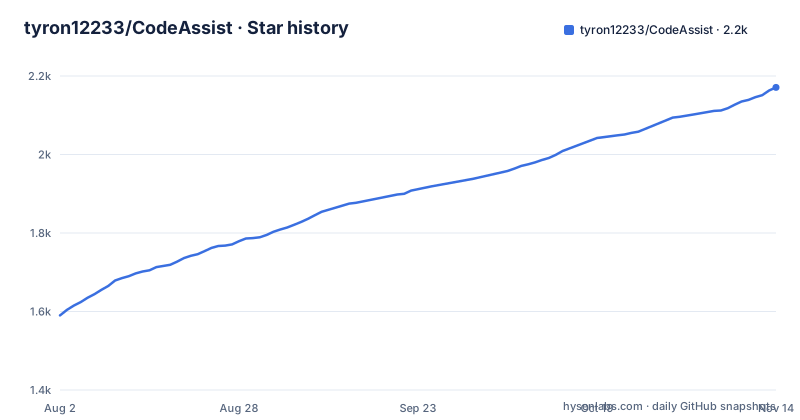
Star history
- tyron12233/CodeAssist2,171 ★ · +581
| Repository | 2026-08-02 | 2026-11-14 |
|---|---|---|
| tyron12233/CodeAssist | 1.6k | 2.2k |
581 Stars in the last 104 days, measured from the daily GitHub snapshot. Compare with other projects
Editorial analysis
It reimplements Gradle's task engine, and builds itself with Gradle
The pitch is that a full Gradle runtime is too heavy for a phone, so rather than running Gradle the project models projects itself. Three mechanisms carry that.
The first replaces the daemon. Projects become a declarative model compiled into an incremental task graph with fingerprint up-to-date checks and a persistent cache, which the readme describes as taking Gradle's good ideas without its weight. Editing one file re-runs only the affected tasks, and completion and analysis reuse a cached compilation environment instead of rebuilding it per keystroke.
The second is the memory model. Library and SDK symbol indices are stored as disk-backed immutable segments and queried in place through a bounded block cache, so the heap stays flat regardless of how large the index is. For a phone that is the constraint that matters, and it is a genuinely different answer from a desktop IDE's.
The third is the toolchain. The pure-Java tools, which it names as the Eclipse JDT compiler, the dexer and shrinker, and the signer, run in process. The one native tool, the Android resource compiler, is invoked as a subprocess. So exactly one thing crosses the process boundary.
The irony worth naming is that the project itself is a Gradle build. The repository root has `build.gradle.kts`, `settings.gradle.kts`, a `gradle.properties`, the Gradle wrapper, a `buildSrc/`, a `build-logic/` and a `gradle/` directory. That is not a contradiction: the claim is about the projects CodeAssist builds, not about how the IDE is compiled. But a reader who stops at the headline is right to wonder.
The build documentation names Gradle compatibility as one of its own three subjects alongside the task engine and the native pipelines, which tells you the compatibility surface is the real work.
The benchmark table is generated by CI and one defined metric has no value
The numbers are not typed by hand. They sit between generated markers and are rewritten by a workflow on each release, and a separate regression suite is said to fail CI on a quality regression. That is a stronger setup than most projects have.
Here is the whole table:
| Area | Metric | Result |
|---|---|---|
| Java completion **quality** | recall / top-1 / MRR | **100%** / 75% / 0.88 |
| Java completion **latency** (per keystroke) | member access / type ref | **4.3 ms** / 2.8 ms |
| Symbol **index** quality | recall / top-1 / MRR | **100%** / 90% / 0.95 |
| Symbol **index** query | prefix / fuzzy | ~4.4 µs / ~56 ns |
Two things to read carefully. First, recall is 100% while top-1 is 75% for completions. That combination is not a flaw, it is what a fixed regression corpus looks like: the expected completion is always in the list, and it is ranked first three times out of four. A reader who skims the bold number and concludes the editor is always right has misread it.
Second, the glossary beneath the table defines five terms and the table reports four metrics. The missing one is incremental tasks, defined as how many build tasks re-run after a single-file edit, with fewer meaning more precise incrementality. For a project whose central claim is that editing one file re-runs only the affected tasks, that is the one number a sceptical reader would want, and it is the one not published.
The symbol index is the stronger of the two quality rows, at 90% top-1 and 0.95 mean reciprocal rank, which is consistent with symbol lookup being a narrower problem than completion.
The readme says which of its own numbers reproduce and which do not
One line in the glossary is the most valuable sentence on the page. Latency is defined as wall-clock time to compute a completion at a keystroke, and then qualified: recorded on the maintainer's machine, so treat as indicative, while the quality metrics are deterministic across machines.
That single qualifier separates the four numbers into two categories without the author having to reorganise anything. Recall, top-1 and mean reciprocal rank are reproducible, because the corpus is committed and the ranking is a property of the implementation. The millisecond and microsecond figures are one machine's observation and are labelled as such. A project that reported all seven numbers with equal confidence would be making a different and worse claim.
The metric definitions are also precise where it counts. Mean reciprocal rank is given as the average of one over the rank of the expected item, with 1.0 meaning it is always first, which is the only definition a reader needs to check the 0.88 figure. Recall is the fraction of cases where the expected completion appears in the list at all, and top-1 and top-5 are where it is ranked first or within the first five. Top-5 is defined and never reported, which is a smaller version of the same gap as the incrementality metric.
The test count is generated by the same mechanism: 1,868 tests across 336 suites, none failing, one skipped on a framework-only CI mode. Sixty modules are described as grouped on disk by the layer they belong to, with the layout block beginning at a platform layer that carries no domain knowledge.
The block editor is a projection of one DOM, not a second representation
The block editor is the feature that could have gone wrong, and the reason it did not is stated clearly: the block tree is a live projection of the same DOM the code editor uses, so the two views cannot drift apart.
That is a different design from a visual editor with its own model. Here the blocks are derived state, and a block edit compiles down to the smallest possible source edit that expresses the change, leaving every untouched line and comment intact. The readme puts it as byte-for-byte, and the screenshots section repeats it as a live projection of the same source, byte for byte.
The interaction vocabulary follows from the projection. Typed value sockets use Scratch-style shapes for boolean, number, string and type, completion works inside a socket rather than only at statement level, there is palette search, and blocks can be dragged and dropped. Every one of those is described as mapping back into the same projection pipeline rather than being a separate code path.
Any Java file can be projected, which is a stronger claim than it sounds: the projection is not restricted to a subset of files chosen to be block-friendly. Its own documentation page is linked for the round trip, which is the right place for the details of how a structural edit becomes a textual one.
The same care appears in the Kotlin work, which is the feature most likely to be quietly overstated elsewhere. It is labelled beta in the highlights and again in the screenshot captions, and it gets its own document. Java is the mature path and Kotlin is the new one, and the readme does not blur that.
One native subprocess, and a Java toolchain running on the Android runtime
The toolchain decision has two halves and they are worth separating, because one is comfortable and the other is not.
The comfortable half is the Java one. The Eclipse JDT compiler, the dexer and shrinker, and the signing tool are all pure Java, so running them in process on the Android runtime needs no native code, no cross-compilation and no separate toolchain distribution. That is also where the code intelligence comes from, since completion, diagnostics and quick fixes are all said to be powered by the same compiler. The project is not attempting to reimplement a Java parser; it is embedding one.
The uncomfortable half is the single subprocess. The Android resource compiler is native, so it is invoked as a subprocess rather than linked, which means it has to be shipped for the target ABI, found at runtime, and matched to the build being performed. The sample plugin set includes one for the NDK, which suggests the project is already reaching toward more native territory than the readme's own summary admits.
The build chain itself is named end to end in the highlights: resolve, compile, dex, package, sign, and install. Signing is part of the on-device path, and the repository root carries an example keystore properties file rather than a keystore, which is the correct way to ship that.
Version control runs through a pure-Java Git implementation executed on the same runtime, with staging, committing, branching, merging, stashing and pushing, and GitHub sign-in to clone private repositories and open pull requests. The documentation table describes it as running JGit on ART, which is a combination that has historically been awkward, and it is listed as its own document rather than a bullet.
The readme has no install section, and the entry points live in a workflow file
There is no install instruction anywhere in the visible page. No download link, no package manager command, no build step for a user, no prerequisites list. The badge row links to the releases page and that is as far as it goes.
The documentation table explains where the real answer is. One entry covers building CodeAssist projects in CI and names two things: a headless launcher called `codeassist` and a GitHub Action. The repository root has an `action.yml`, so the action is a first-class distribution channel rather than an afterthought, and it is the one documented way to run the tool without a phone.
That makes the distribution shape unusual and worth stating plainly. A developer on a desktop gets a native launcher, a developer in CI gets an action, and a developer on a phone gets a release archive. All three are real, and only the release badge is visible from the readme.
The rest of the root is consistent with a project of this scope. There are about sixty modules, a plugin directory, two example plugins, a build-logic directory and a buildSrc directory for convention plugins, a fastlane directory for release automation, an experimental directory, a run directory, a privacy document, and a skills lock file. The licence is GPL-3.0 with a separate licence exception file, which is the arrangement a project uses when it wants to grant a carve-out to code it does not own.
The repository description field is also worth a glance. It describes the project as an experimental IDE, and the text contains a stray formatting marker and repeats the tagline immediately before the first section heading, which suggests it was assembled rather than written.
Editorial conclusion
CodeAssist is the most interesting thing in this batch on the strength of its honesty about measurement, which is worth reading before anything else. The benchmark numbers are generated by a workflow on each release, a regression suite fails CI on a quality drop, and the readme tells you which of the numbers reproduce on another machine and which do not. Very few projects do any of that. The engineering bet is the same bet the readme makes: a phone cannot host a Gradle runtime, so the project reimplements the parts of Gradle that matter, a declarative model compiled into a task graph with fingerprint checks, a persistent cache, and a disk-backed symbol index queried in place so heap stays flat. That is a lot of machinery to keep compatible with real projects, and the build documentation names Gradle compatibility as a concern of its own, so the honest question is not whether the demo builds but how much of an existing Gradle project a phone can actually resolve. Three things to verify. Whether the incrementality figure the readme defines is reported anywhere, since the glossary explains the metric and the table omits it. Whether the language you need is done, because Java is backed by a compiler that has been solving this problem for decades while Kotlin is labelled beta. And where the binary comes from, since the readme has no install section and points instead at a releases badge, a headless launcher and a GitHub Action. Teams shipping mobile tooling will find the extension model and the sample plugins worth reading even if they never run the IDE on a phone.
Frequently asked questions
How does codeassist build Android projects without Gradle?
It models projects itself. Projects become a declarative model compiled into an incremental task graph with fingerprint up-to-date checks and a persistent cache, and the Android toolchain is driven directly: the Eclipse JDT compiler, D8 or R8 and apksigner run in process, while the native aapt2 is invoked as a subprocess.
What are the benchmark numbers in codeassist?
Java completion quality is 100% recall, 75% top-1 and 0.88 MRR. Java completion latency is 4.3 ms for member access and 2.8 ms for a type reference. Symbol index quality is 100% recall, 90% top-1 and 0.95 MRR, and index queries run at about 4.4 microseconds for a prefix and 56 nanoseconds fuzzy. The table is regenerated by CI on each release.
Which languages does codeassist support?
Java is the mature path, with error-tolerant parsing, ranked completion, diagnostics and quick fixes powered by Eclipse JDT. Kotlin completion is labelled beta in both the feature list and the screenshots, and it has its own documentation page describing how on-device Kotlin completion works.
How does the codeassist block editor avoid corrupting source?
The block tree is described as a live projection of the same DOM the code editor uses, so the two views cannot drift, and a block edit compiles to the smallest possible source edit, leaving untouched lines and comments intact. The readme describes the result as byte-for-byte.
How do I run codeassist?
The readme contains no install section. The documentation table points to a document covering building projects in CI, which names a headless launcher and a GitHub Action, and the repository root contains an action.yml. Desktop and Android launchers are shipped as release artefacts, linked from a badge.
Can codeassist do Git on a phone?
Yes, using a pure-Java Git implementation run on the Android runtime, with stage, commit, branch, merge, stash and push, and GitHub sign-in to clone private repositories and open pull requests. Its documentation describes this as running JGit on ART.
Official sources
Add this badge to your README
If you maintain this project, the badge below links readers to this analysis and shows its maintenance status from the daily GitHub snapshot. Paste the markdown into your README; add ?metric=license or ?metric=stars to the image URL for a different field.

[](https://hysenlabs.com/projects/tyron12233-codeassist)Star history chart for your README
[](https://hysenlabs.com/projects/tyron12233-codeassist)Was this useful?