Lychee on Docker: two commands to a photo server, and what the template leaves out
A great looking and easy-to-use photo-management-system you can run on your server, to manage and share photos.
At a glance
- What is it?
- Lychee is a self-hosted PHP photo manager that ships two compose templates, a digest-pinned image and a Vue and Vite frontend. The trial path takes two commands, and the gap between the minimal template and the full one is where first-run problems live.
- Who is it for?
- Pick Lychee if you want your photos on your own server and are willing to run a database, a worker container and an application key you generate yourself. Pass on it if you need a subfolder install or want the extra feature set without paying, and read the upgrade guide and the compose secrets section before your first move to 7.x.
- Can I use it commercially?
- Yes. MIT is a permissive licence: you can use, modify and sell software built on it, as long as you keep its copyright and licence notices.
- Is it still maintained?
- Yes. The repository last received commits 4 days ago.
- What is it written in?
- Mainly PHP, according to GitHub's language statistics.
Answers come from the project's GitHub data, last synced on November 14, 2026, and from our analysis. They are not legal advice.
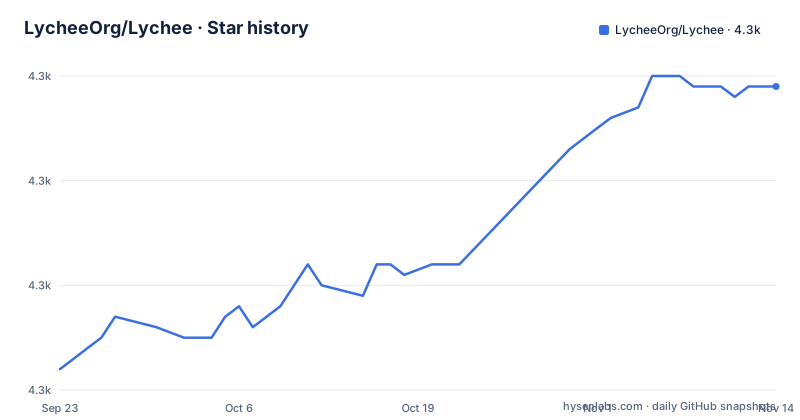
Star history
- LycheeOrg/Lychee4,329 ★ · +27
| Repository | 2026-09-23 | 2026-11-14 |
|---|---|---|
| LycheeOrg/Lychee | 4.3k | 4.3k |
27 Stars in the last 52 days, measured from the daily GitHub snapshot. Compare with other projects
Editorial analysis
Quick Try is two commands and a separate worker container
The quickest path to a running instance is two shell commands: fetch the minimal compose template from the master branch, then bring it up.
curl -O https://raw.githubusercontent.com/LycheeOrg/Lychee/master/docker-compose.minimal.yaml
docker compose -f docker-compose.minimal.yaml up -d
The site then answers on `http://localhost:8000`, and the minimal template includes a separate worker container for background jobs, so album processing does not run inside the web container. For anything longer lived the project calls the full compose file the recommended route, and images come in two flavours: `latest` for the latest stable release and `edge` for the latest development build from master. Track `edge` in production and you get unreleased code the moment a `master` build ships, so pin the tag you tested. Images are published on GitHub Container Registry and on Docker Hub.
The recommended compose file mounts three paths and hands you a placeholder password
The full compose file is where the real decisions sit. One service runs from `ghcr.io/lycheeorg/lychee:latest`, publishes `8000:8000`, and mounts three host directories into fixed container paths.
services:
  lychee:
    image: ghcr.io/lycheeorg/lychee:latest
    container_name: lychee
    ports:
      - "8000:8000"
    volumes:
      - ./lychee/uploads:/app/public/uploads
      - ./lychee/logs:/app/storage/logs
      - ./lychee/tmp:/app/storage/tmp
    environment:
      APP_URL: http://localhost:8000
      DB_CONNECTION: mysql
      DB_HOST: lychee_db
      DB_PORT: 3306
      DB_DATABASE: lychee
      DB_USERNAME: lychee
      DB_PASSWORD: lychee_password
Only the first mount, `./lychee/uploads`, holds your photos; the other two receive Laravel logs and temporary files, and both are worth putting on disk rather than letting the container discard them. The template's next comment asks you to generate the application key and paste it in without the angle brackets.
echo "base64:$(openssl rand -base64 32)"Two consequences for anyone copying this file verbatim: the shipped MySQL password is a placeholder that anyone can guess, and APP_KEY has to be generated and set. Change both, or move them into mounted secret files as described next.
Every credential can move into a mounted file through the _FILE convention
The full compose file treats credentials as files rather than values. The main one carries a commented `secrets:` section for `db_password`, `db_master_password` and `app_key`, each pointing at a file under `./secrets/` that you create readable only by the owner.
# secrets:
#   db_password:
#     file: ./secrets/db_password
#   db_master_password:
#     file: ./secrets/db_master_password
#   app_key:
#     file: ./secrets/app_key
The stated rule is broader than those three. Every confidential value behind `config/services.php`, which covers the third-party OAuth, AWS, mail and AI-vision credentials, supports the same convention: set `<VAR>_FILE` to the path of a mounted file and leave `<VAR>` itself unset. Resolution happens in `docker/scripts/01-validate-env.sh` at container startup, before Lychee or PHP ever runs.
The image build runs in stages with every base pinned by digest
The Dockerfile is a multi-stage build for Laravel Octane with FrankenPHP, and the Composer stage is pinned by sha256 digest as well as tag, `composer:2.11.0`, with `NODE_ENV` a build argument defaulting to `production`.
RUN composer install \
    --no-dev \
    --no-interaction \
    --no-progress \
    --no-scripts \
    --prefer-dist \
    --optimize-autoloader \
    --ignore-platform-reqs \
    && find vendor \
    \( -iname "*.md" -o -iname "test" -o -iname "tests" \) \
    -exec rm -rf {} +
Two details in that command matter for anyone debugging a failing build. `--ignore-platform-reqs` switches off PHP requirement checks inside the image, which is how one image installs dependencies your host PHP would have refused. The `find vendor` pass then deletes markdown files and anything named `test` or `tests` from vendor directories to slim the result, so an installed image no longer carries upstream documentation or test fixtures. If FrankenPHP is the blocker for your setup, older nginx-based images stay published as `latest-legacy` and `edge-legacy`.
The frontend is a Vite and Vue build, and lint rewrites your files
This is not a Blade app with a few static assets; the scripts say it is a TypeScript and Vue build.
"scripts": {
	"pretypecheck": "bash scripts/generate-js-types.sh",
	"typecheck": "vue-tsc --noEmit -p tsconfig.json --composite false --skipLibCheck",
	"dev": "vp dev",
	"build": "vp build && vp build --config vite.embed.config.ts",
	"build:embed": "vp build --config vite.embed.config.ts",
	"build-dev": "vp build --mode development",
	"vca": "vca -- --dir resources/js"
}
Three of these change what you can run. `dev` runs `vp dev` for local work, while `build` is two passes: the regular bundle plus a second run against `vite.embed.config.ts` for the embedded variant, so skipping one leaves you without one of the two outputs. `pretypecheck` generates types through `bash scripts/generate-js-types.sh` before `typecheck` runs `vue-tsc --noEmit`, meaning the type check consumes files that do not exist in a fresh clone. The dependencies say what the interface is assembled from: `@nuxt/ui`, leaflet with marker cluster and rotated marker plugins, a QR code package, `@mollie/api-client`, `@paypal/paypal-js`, `@lychee-org/layouts`, and two wasm packages in the same scope, `nested-set-checker-wasm` and `zxcvbn-wasm`.
Debug switches in .env.example come with warnings attached
`APP_KEY=` ships empty in `.env.example`, and the compose file expects a generated key to be set. The rest of the example file is a list of switches where each one carries a consequence.
`DEBUGBAR_ENABLED=false` comes with a warning that the debug bar disables CSP. `LOG_VIEWER_ENABLED=false` cannot be turned on in production at all: enabling it also requires `APP_ENV` to be `local`. `CLOCKWORK_ENABLE=false` is off by default and not provided on non-dev builds, with the driver left at `laravel` and storage at `storage/clockwork`. `APP_DEBUG_LATENCY` adds a fixed delay in milliseconds before requests are processed and is always disabled in production. `REQUIRE_CONTENT_TYPE_ENABLED=true` forces every API request to send a content-type header, and the file notes that this requirement prevents using the API from the API documentation page. `S3_ENABLED` is commented out and needs `AWS_ACCESS_KEY_ID` in addition to the flag. `LOG_404_ERRORS` is there too, commented out, for turning off 404 logging.
Subfolder installs are discouraged, and the upgrade guide only covers 7.0
`APP_URL` must contain the host name up to the top level domain. Subfolder installs are the part the project steers away from: you would set `APP_URL=https://lychee.test` together with `APP_DIR=/path/to/lychee`, and the example file records that LycheeOrg does not recommend `APP_DIR`. A `LEGACY_V4` switch exists to redirect old album links shaped like `https://lychee.text/#albumID/PhotoId`. That kind of small compatibility detail sits next to the bigger release story. The upgrade notice covers version 7.0 alone, warning that the docker image changed significantly and pointing to a separate upgrade guide. Releases moved three times in October: v7.11.0 (titled BROKEN) on the 12th, v7.11.1 on the 13th, v7.12.0 on the 22nd, with the last push on 2026-11-02 to the master branch, and the repository is not archived. Running from source needs PHP 8.4 or newer, Composer and npm, and a paid Supporter Edition sits beside the free project as an extra feature set.
MIT licensing, sponsorship, and a root full of quality gates
Lychee is MIT licensed, and the root carries the paperwork and the gates a self-hosted service needs: `SECURITY.md`, `CONTRIBUTING.md`, `DESIGN.md`, `.trivyignore`, `osv-scanner.toml`, `phpstan.neon` next to `phpstan-baseline.neon`, `rector.php`, `.php-cs-fixer.php`, `tsconfig.json` and `playwright.config.ts`, alongside `artisan`, `composer.json`, `composer.lock`, `package-lock.json`, `docker-compose.yaml`, `docker-compose.minimal.yaml` and `.env.example`. Below them sit the Laravel directories, `app/`, `bootstrap/`, `config/`, `database/`, `lang/`, `public/`, `resources/`, `routes/`, `storage/` and `tests/`, which is the shape of a framework app rather than a flat PHP script. The shields at the top of the root file point at a build workflow running on master, code coverage, a CII Best Practices summary for project 2855 and an OpenSSF Scorecard entry, so four signals are checkable by a reader before running this on their own server. Money comes from sponsorship: donations cover demo server costs, continuous enhancements and bug fixes, JetBrains backs the project through its Open Source Development Community Support program, and the paid Supporter Edition adds functionality on top of the free one. Contributions are welcome through `docs/Contribute.md`, which also holds the AI and Claude guidelines, and `AGENTS.md` describes the specification driven workflow used for assisted contributions.
Editorial conclusion
Pick Lychee if you want your photos on your own server and are willing to run a database, a worker container and an application key you generate yourself. Pass on it if you need a subfolder install or want the extra feature set without paying, and read the upgrade guide and the compose secrets section before your first move to 7.x.
Frequently asked questions
how to install lychee
Fetch the minimal compose template and bring it up with docker compose, then open http://localhost:8000; that setup includes a separate worker container for background jobs. For a longer lived install the project points at the full compose file, at pre-built releases on GitHub Releases, and at building from source, which requires PHP 8.4 or newer, Composer and npm.
how to install lychee on linux
No operating system specific steps are given. The paths offered are the Docker Compose trial, the pre-built release archives, and a source build that needs PHP 8.4 or newer together with Composer and npm, with images published as latest for the latest stable release and edge for the latest development build from master.
Does Lychee need an APP_KEY before the first request?
The example environment file ships APP_KEY empty, and the compose template asks you to generate one with echo "base64:$(openssl rand -base64 32)" and set it without the angle brackets. An app_key can also be supplied through the secrets convention as a mounted file.
Can Lychee run under a subfolder URL?
It can be configured that way, but the example file sets APP_URL=https://lychee.test and APP_DIR=/path/to/lychee and then states that LycheeOrg does not recommend the use of APP_DIR. APP_URL itself must contain the host name up to the top level domain.
Official sources
Add this badge to your README
If you maintain this project, the badge below links readers to this analysis and shows its maintenance status from the daily GitHub snapshot. Paste the markdown into your README; add ?metric=license or ?metric=stars to the image URL for a different field.

[](https://hysenlabs.com/projects/lycheeorg-lychee)Star history chart for your README
[](https://hysenlabs.com/projects/lycheeorg-lychee)Was this useful?