AirLLM: Running 70B and Larger Models on a 4GB GPU via Layer Streaming
AirLLM 70B inference with single 4GB GPU
At a glance
- What is it?
- AirLLM cuts inference memory by streaming model layers and experts from disk, letting 70B dense models run on 4GB and 2.8T MoE models on under 4GB. The trade-off is speed, disk space, and setup complexity.
- Who is it for?
- Adopt AirLLM if you have a single low-VRAM GPU (4GB to 12GB) and need to run dense models like Llama 3.1 70B or MoE models like DeepSeek-V3 without quantization. Avoid it if you need fast token generation, have limited disk space, or cannot tolerate a slow first run.
- Can I use it commercially?
- Yes. Apache-2.0 is a permissive licence: you can use, modify and sell software built on it, as long as you keep its copyright and licence notices.
- Is it still maintained?
- Yes. The repository received new commits within the last day.
- What is it written in?
- Mainly Jupyter Notebook, according to GitHub's language statistics.
Answers come from the project's GitHub data, last synced on November 15, 2026, and from our analysis. They are not legal advice.
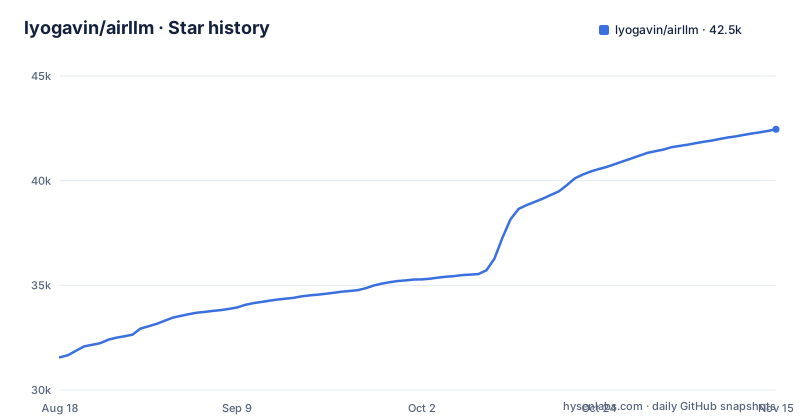
Star history
- lyogavin/airllm42,455 ★ · +10,893
| Repository | 2026-08-18 | 2026-11-15 |
|---|---|---|
| lyogavin/airllm | 31.6k | 42.5k |
10,893 Stars in the last 89 days, measured from the daily GitHub snapshot. Compare with other projects
Editorial analysis
The Memory Wall It Attacks
Large language models normally need VRAM roughly equal to their weight size. A 70B model in 16-bit needs about 140GB, which no single consumer GPU has. AirLLM attacks that wall directly: it does not quantize, distill, or prune the model. Instead, it keeps the weights on disk and loads only the active layer into GPU memory at each step. The README claims a 70B model runs on a single 4GB card, and its update notes list Llama 3.1 405B among the supported models. For sparse MoE models like DeepSeek-V3 (671B) or Kimi K3 (2.8T), it loads only the experts a token actually routes to, which is why those fit in 12GB or under 4GB respectively. This is a different trade-off from quantization: you trade speed and disk I/O for memory. The intended user is someone with a modest GPU who wants to experiment with models that would otherwise require a cluster.
Layer Streaming and Expert Routing Mechanics
The core mechanism is layer-wise decomposition. When you first load a model, AirLLM splits it into per-layer shards and saves them to disk. At inference, each forward pass loads the needed layer's weights into GPU memory, computes, then discards them before loading the next layer. The README mentions prefetching added in v2.5 to overlap loading and compute, which gave a 10% speed improvement. For MoE models, the mechanism is finer-grained: instead of streaming a whole layer, it streams only the experts a token routes to. That is how Kimi K3 at 2.8T parameters fits in 3.72GB of VRAM. The disk acts as a slow extension of VRAM. This design means the first run is always slower because the model must be split and saved. The README warns to ensure sufficient disk space in the huggingface cache directory. The n-gram embedding table in Qwen3.8-Flash-Next is file-mapped on the host, and the decoder layers stream, which is a hybrid approach for that specific model.
Installation and Basic Usage
Installation is a single pip command: pip install airllm. The API mirrors Hugging Face transformers. You call AutoModel.from_pretrained with a repo ID or local path. The README gives this example: from airllm import AutoModel; model = AutoModel.from_pretrained("Qwen/Qwen3-32B"). You can also pass layer_shards_saving_path to control where the split layers go. For compression, you pass compression='4bit' or compression='8bit' to enable block-wise quantization, which the README claims gives up to 3x speedup with minimal accuracy loss. That compression is different from typical quantization because it only quantizes weights, not activations, since the bottleneck is disk loading. You need bitsandbytes installed for that feature. The README shows a concrete example with compression='4bit' for a 70B instruct model. For newer models like Qwen3.8-Flash-Next, you need a specific transformers build from git, not a release version.
The Speed and Disk Trade-Off
The obvious cost is speed. Streaming layers from disk is far slower than keeping weights in VRAM. The README's own compression feature exists to mitigate disk I/O, not compute. Even with prefetching, the 10% improvement is modest. The second cost is disk space. The README notes that Qwen3.8-Flash-Next needs roughly 360GB of checkpoint disk, and that you can use delete_original=True to reclaim space after the split. A 671B model like DeepSeek-V3 will need hundreds of GB. If you are on a laptop with a small SSD, this is a real constraint. Also, the first run does a full decomposition, which can take a long time. This tool is not for production serving; it is for research, experimentation, or running a model once on hardware you already own.
Model-Specific Setup Pain
AirLLM is not a one-size-fits-all wrapper. Each new model brings its own requirements. The README lists three for Kimi K3: pip install compressed-tensors flash-attn, a CUDA 12 build of torch because no flash-attn wheel exists for CUDA 13, and transformers 4.56.x because the remote code does not load on 5.x. Qwen3.8-Flash-Next needs a transformers build with in-tree qwen4_exp, which today means pip install git+https://github.com/huggingface/transformers.git. Qwen3.8-27B needs transformers 5.8+. This means you cannot just upgrade transformers freely; you must pin versions per model. If you switch between models, you may need to recreate your environment. That is a maintenance burden the README does not hide. The project's release history shows active updates, with v4.0.0 in September 2026.
Compression vs. Quantization: A Different Trade-Off
AirLLM's compression is block-wise quantization of weights only. The README explains why: typical quantization quantizes both weights and activations to speed up compute, but AirLLM's bottleneck is disk loading, so quantizing weights alone reduces the data transferred. This is a clever adaptation, but it means you do not get the compute speedup that activation quantization provides. The accuracy loss is described as almost ignorable, but that claim comes from the project's own paper reference, not from independent benchmarks. If you need low latency, this approach will not compete with a model that fits in VRAM. The compression is optional; you can run without it, but then you are at the mercy of disk speed.
Alternatives: Quantization and MoE-Specific Runtimes
The main alternative is traditional quantization, such as GPTQ or AWQ, which reduces model size so more layers fit in VRAM. That approach shrinks the weights but can cost some accuracy. AirLLM's approach avoids that risk by keeping full precision weights on disk, but it pays in speed. Another alternative is to use a model that fits in your VRAM to begin with, such as a 7B or 13B model. If you have a 4GB GPU, a 7B model in 4-bit can run natively without AirLLM. The difference is that AirLLM lets you run a 70B or 671B model, but at a fraction of the speed. For MoE models, you could also use a runtime that is designed for sparse expert loading, but AirLLM's claim is that it does this generically through AutoModel. The choice depends on whether you need size or speed.
Maintenance and License
AirLLM is licensed under Apache-2.0, which permits commercial use, modification, and distribution with attribution. No legal advice here, but that is a permissive license. Maintenance is active: the last push was 2026-11-02, and the three most recent releases (v3.2.0, v3.3.0 and v4.0.0) landed between 18 August and 5 September 2026. The README shows a pattern of rapid model support, but also a pattern of version pinning. You will need to track transformers versions and possibly torch builds. The project is not archived, For a production deployment, you would need to verify each model's behavior yourself.
Editorial conclusion
Adopt AirLLM if you have a single low-VRAM GPU (4GB to 12GB) and need to run dense models like Llama 3.1 70B or MoE models like DeepSeek-V3 without quantization. Avoid it if you need fast token generation, have limited disk space, or cannot tolerate a slow first run. Before adopting, verify your exact model and transformers version support, check the required checkpoint disk (e.g., ~360GB for Qwen3.8-Flash-Next), and test with a small model first. AirLLM is a memory solution, not a speed solution; its value is enabling inference that would otherwise be impossible on your hardware.
Frequently asked questions
What is AirLLM?
A pip package that reduces inference memory usage so a 70B model runs on a single 4GB GPU card, with no quantization, distillation, or pruning involved. It is licensed Apache-2.0 and its code lives in the air_llm directory.
Does AirLLM really work?
The project reports end to end measurements rather than estimates: 5.95GB for Qwen3.8-Flash-Next on one RTX 4090, 3.33GB for Qwen3.8-27B on one RTX 3090, and 3.72GB for Kimi K3 on one RTX 6000 Ada. On the training side it reports Qwen3.8-Flash-Next under 6GB on an RTX 3060 Ti.
How to setup AirLLM?
Run `pip install airllm`, then pass a Hugging Face repo id or a local path to `AutoModel.from_pretrained`. During inference the model is first decomposed and saved layer-wise, so the Hugging Face cache directory needs room before anything is generated.
How much RAM does it take to run a 70B model with AirLLM?
The host figure given is for Qwen3.8-Flash-Next, whose roughly 51B n-gram embedding table is file-mapped on the host, where a 64GB machine is stated to be enough while decoder layers stream. That same model needs about 360GB of checkpoint disk, with delete_original=True reclaiming the originals after the split.
Is AirLLM slow?
The README gives two speed claims: a 10% improvement from prefetching added in v2.5, and up to 3x from block-wise compression at 4bit or 8bit. Since layers stream from disk, disk speed and the pinned dependency versions both land in your latency budget.
Official sources
Add this badge to your README
If you maintain this project, the badge below links readers to this analysis and shows its maintenance status from the daily GitHub snapshot. Paste the markdown into your README; add ?metric=license or ?metric=stars to the image URL for a different field.

[](https://hysenlabs.com/projects/lyogavin-airllm)Star history chart for your README
[](https://hysenlabs.com/projects/lyogavin-airllm)Was this useful?