LyraVoid/Mizuki for Astro Blog Publishing
Next-Gen Material Design 3 Blog Theme (Astro Powered)
At a glance
- What is it?
- Mizuki is a Material Design 3 blog theme built with Astro, with local or separate-repository content, Pagefind search, feeds, comments, and configurable feature pages. It offers extensive publishing options, but its README announces a move to Shirone and says Mizuki will stop receiving updates and maintenance.
- Who is it for?
- Adopt Mizuki if you want a configurable static Astro blog and accept responsibility for deployment, compatibility, and eventual migration work. Do not select it as a long-term maintained foundation without reviewing the README's migration notice and comparing Shirone with your requirements.
- Can I use it commercially?
- Yes. Apache-2.0 is a permissive licence: you can use, modify and sell software built on it, as long as you keep its copyright and licence notices.
- Is it still maintained?
- Yes. The repository last received commits 22 days ago.
- What is it written in?
- Mainly Astro, according to GitHub's language statistics.
Answers come from the project's GitHub data, last synced on October 23, 2026, and from our analysis. They are not legal advice.
Star history
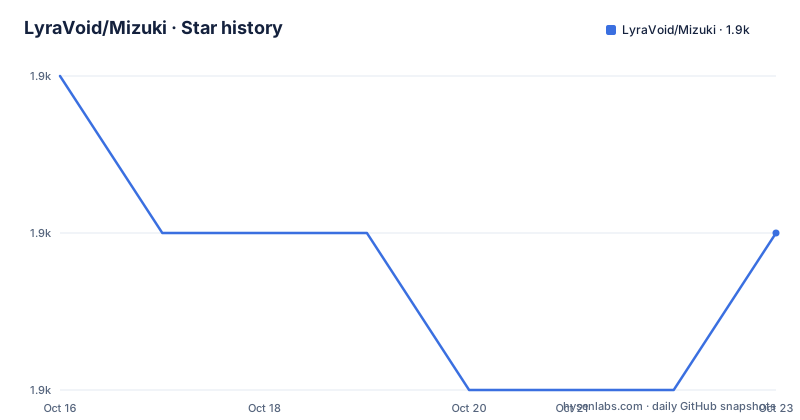
- LyraVoid/Mizuki1,900 ★ · -1
| Repository | 2026-10-16 | 2026-10-23 |
|---|---|---|
| LyraVoid/Mizuki | 1.9k | 1.9k |
-1 Stars in the last 7 days, measured from the daily GitHub snapshot. Compare with other projects
Editorial analysis
Mizuki's Astro blog scope and intended publisher
Mizuki solves the problem of building a visually rich personal blog without assembling every publishing component separately. It is intended for bloggers, developers, and technical writers who want a static site with a Material Design 3 appearance, responsive layouts, and Markdown or MDX content. The README describes it as an Astro-powered blog template built with Astro and Tailwind CSS, with Swup used for page transitions.
The feature set extends beyond conventional posts. Mizuki includes anime tracking, friend links, diaries, albums, projects, skills, devices, timelines, a filterable AI tools directory, archives, and an about page. This makes it suitable for a personal site that presents several kinds of information. It also creates a larger configuration surface than a small article theme. A publisher who needs only posts and tags may have more settings to understand than necessary.
Mizuki also supports an optional code-content separation model. Theme code can remain in the Mizuki repository while content is synchronized from another Git repository. That may help a team separate editorial changes from theme changes. It also adds an external dependency to builds and deployment. Local content remains the default, so a first-time user does not need to adopt this arrangement.
Mizuki's Markdown pipeline and search generation
According to the README, articles live in `src/content/posts/` as `.md` or `.mdx` files. The `title` and `published` frontmatter fields are required. Optional metadata includes summaries, images, tags, categories, draft status, pinning, comments, aliases, custom permalinks, bylines, and browser-side encryption.
Astro processes this content through a Markdown and MDX pipeline that includes syntax highlighting, KaTeX, Expressive Code, Mermaid, PlantUML, wiki links, responsive images, image grids, Fancybox, and HTML embeds. RSS and Atom feeds reuse the article pipeline. Encrypted posts do not enter those feeds, according to the README.
The `pnpm build` script performs several ordered tasks. It runs `scripts/update-anime.mjs`, invokes `astro build`, checks global style loading, generates Pagefind data from `dist`, and checks font loading. Pagefind therefore indexes the generated static site rather than raw Markdown files. This connects source content, Astro rendering, and client-side search indexing.
The repository also includes checks for Markdown enhancements, layout regressions, image loading, music-player loading, and encryption. The README does not claim that `pnpm test` replaces Astro diagnostics or TypeScript checking. The separate `pnpm run check` and `pnpm run type-check` scripts remain relevant for those checks.
Installing Mizuki and creating a first local article
The README requires Node.js 20 or later and pnpm 11 or later. It also declares `pnpm` as the required package manager through a `preinstall` check. The following commands clone the repository, enter its directory, enable Corepack, and install dependencies.
git clone https://github.com/LyraVoid/Mizuki.git
cd Mizuki
After entering the cloned directory, enable the package manager and install project dependencies.
corepack enable
pnpm install
For a first local build using only files in the Mizuki repository, create `.env` from `.env.example` and set `ENABLE_CONTENT_SYNC=false`. Start the Astro development server with this command.
pnpm devThe README says the blog becomes available at `http://localhost:3000`. After the server starts and the page loads, create an article through the included generator.
pnpm new-post -- <文件名>The generated Markdown or MDX article is based in `src/content/posts/`. At minimum, its frontmatter needs `title` and `published`. Local article images can sit beside the article and use relative paths such as `./cover.webp`. Shared images belong under `public/` and use root paths such as `/images/example.webp`.
The repository contains sample posts, page data, albums, and images. The README advises removing or replacing those examples before a personal deployment so that demonstration content is not published.
Configuring Mizuki identity, layout, and feature pages
The main site configuration is `src/config/siteConfig.ts`, while `src/config/index.ts` is the unified export entry. The documented configuration defines the site title, subtitle, public URL, language, time zone, theme color, and feature-page switches. `siteURL` must be replaced with the deployed public address. The example preserves a trailing slash.
The theme color configuration accepts a hue from 0 to 360 and includes a `fixed` setting. When `fixed` is true, the theme-color selector is hidden for visitors. Optional pages, including anime, diary, friends, projects, skills, timeline, albums, devices, and AI tools, have individual switches in `featurePages`.
Other modules have separate responsibilities. `src/config/navBarConfig.ts` controls navigation, `src/config/profileConfig.ts` contains identity and social links, and `src/config/sidebarConfig.ts` defines sidebar components and responsive behavior. Wallpaper and effects settings live in separate files. Comment configuration supports Twikoo or Giscus, although comments are disabled by default.
Feature content is kept outside page templates. The README maps the about page to `src/content/spec/about.md`, friend data to `src/data/friends.ts`, and anime data to `src/data/anime.ts`. Projects, skills, devices, timelines, and AI tools each use a corresponding file under `src/data/`. Local albums use `info.json` under `public/images/albums/`.
This separation makes content changes less likely to break rendering code. The README says not to edit `src/pages/*.astro` merely to change page content. That rule keeps layout logic reusable, although contributors must identify which source file controls each page.
Mizuki deployment, external services, and privacy boundaries
The README lists Vercel, Netlify, GitHub Pages, and Cloudflare Pages as deployment targets. GitHub Pages uses an included GitHub Actions workflow. Other listed hosts can connect to the repository and run the documented pnpm build. Static output is written to `./dist/`, and `pnpm preview` provides a production-build preview before deployment.
`.env.example` documents optional settings for content synchronization, IndexNow, and Bilibili integration. It includes `ENABLE_CONTENT_SYNC`, `CONTENT_REPO_URL`, `CONTENT_DIR`, `INDEXNOW_KEY`, `INDEXNOW_HOST`, and `BILI_SESSDATA`. These names are suitable for local environment files or hosting platform secrets. The example credentials are placeholders and must not be treated as configured services.
Mizuki's integrations add operational considerations. PlantUML diagrams use a public server by default, so the README warns against placing passwords, tokens, or private data in those diagrams. Bilibili session data belongs in `BILI_SESSDATA` and should not be committed. IndexNow credentials similarly belong in environment configuration rather than source control.
Browser-side article encryption is not server-side access control. The README presents it as an optional static-site feature and explicitly explains that boundary. A private article should not rely on Mizuki's encryption alone when the content requires controlled access. Encrypted posts are omitted from RSS and Atom, but that does not turn static files into a permission system.
Mizuki maintenance status and the Shirone decision
The repository is not archived, and its last push was on 2026-10-01. The README nevertheless states that Mizuki will stop receiving updates and maintenance. It directs readers to Shirone, a replacement whose architecture and experience have been restructured while retaining broadly similar functionality. A recent commit does not resolve the maintenance notice in the README.
This creates an explicit adoption decision. Existing Mizuki users may keep the theme if it meets their needs, but they may need to handle future Astro, dependency, hosting, or security changes themselves. Local modifications add another layer because they must be maintained or transferred manually. The README does not document a rollback procedure or a detailed Mizuki-to-Shirone migration guide, so custom config modules and data files need direct comparison.
The repository identifies Apache-2.0 as its license and includes `LICENSE`, `LICENSE.MIT`, and `THIRD_PARTY_NOTICES.md`. Those files provide the project's stated licensing information and third-party notices. They do not replace review of external services, bundled assets, or deployment obligations. This article does not provide legal advice.
Possible upgrade costs include reviewing `src/config/`, comparing `src/content/` and `src/data/`, checking optional integrations, and reproducing deployment settings. The separate content repository adds another step because synchronized files must be mapped into the replacement.
Shirone and simpler Astro alternatives
A simpler Astro blog starter is the relevant alternative for someone who only needs Markdown articles, tags, an archive, and static deployment. Its smaller configuration surface would make upgrades and customization easier. Mizuki offers a broader documented set of features, including Pagefind search, MDX extensions, structured personal pages, comments, feeds, music, wallpapers, and optional external content synchronization.
Shirone is the project-specific alternative named in the README. The documented difference is its restructured architecture and experience, rather than a statement that every Mizuki feature is identical. Migrators would need to compare feature pages, config files, content formats, search generation, feeds, comments, and deployment requirements against the replacement. The README does not establish that custom Mizuki files transfer without changes.
Mizuki remains appropriate for a publisher who wants its current appearance and feature model and accepts ownership of maintenance. It is the wrong choice for a team that requires documented long-term support, minimal dependencies, server-enforced private content, or a small surface for routine Astro upgrades. In those cases, Shirone or a simpler Astro starter is a better starting point.
Editorial conclusion
Adopt Mizuki if you want a configurable static Astro blog and accept responsibility for deployment, compatibility, and eventual migration work. Do not select it as a long-term maintained foundation without reviewing the README's migration notice and comparing Shirone with your requirements. Verify the Node.js and pnpm requirements, content source, encryption expectations, credentials, and deployment configuration first. The repository was last pushed on 2026-10-01, while the README says Mizuki will stop receiving updates and maintenance.
Frequently asked questions
How do I install Mizuki and start a local Astro blog?
Clone the repository, enable pnpm through Corepack, run `pnpm install`, and then run `pnpm dev`. The README says the development server is available at `http://localhost:3000` and lists Node.js 20 or later and pnpm 11 or later as requirements.
Where do I configure Mizuki's site title, URL, and feature pages?
Edit `src/config/siteConfig.ts`. It defines the site URL, language, time zone, theme color, and optional feature switches, while related settings are divided among files under `src/config/`.
Are Mizuki's password-protected articles suitable for private content?
The README describes browser-side encryption and explicitly says it is not server-side access control. Protected articles are omitted from RSS and Atom, but Mizuki alone does not provide server-enforced permissions.
Does Mizuki still receive updates and maintenance?
The README says Mizuki will stop receiving updates and maintenance and points to Shirone as the replacement. The repository is not archived, and its last push was on 2026-10-01.
Where are Mizuki feature-page data files stored?
Projects, skills, devices, timelines, anime, friends, and AI tools use corresponding files under `src/data/`. About content uses `src/content/spec/about.md`, while local albums use `info.json` under `public/images/albums/`.
Official sources
Add this badge to your README
If you maintain this project, the badge below links readers to this analysis and shows its maintenance status from the daily GitHub snapshot. Paste the markdown into your README; add ?metric=license or ?metric=stars to the image URL for a different field.

[](https://hysenlabs.com/projects/lyravoid-mizuki)Star history chart for your README
[](https://hysenlabs.com/projects/lyravoid-mizuki)Was this useful?