OkHttp 5.5.1: A pragmatic HTTP client that prioritizes RFC compliance over configurability
GitHub describes it as A meticulous HTTP client for the JVM, Android, and GraalVM.. The repository metadata lists Kotlin as its primary language. The metadata lists the Apache-2.0 license. This article stays within the project description and details documented in the GitHub repository README.
At a glance
- What is it?
- OkHttp is a Kotlin-based HTTP client for JVM, Android, and GraalVM. Its design favors strict RFC adherence and efficient defaults over exhaustive configuration, which makes it a solid choice for most applications but a poor fit for those needing to work around non-compliant servers.
- Who is it for?
- Adopt OkHttp if you need a dependable HTTP client on Java 8+, Android 5.0+, or GraalVM, and you value automatic HTTP/2 multiplexing, connection pooling, and transparent GZIP over deep customization. Avoid it if you must send GET requests with bodies, need a pluggable cache implementation, or frequently work around servers that violate RFCs.
- Can I use it commercially?
- Yes. Apache-2.0 is a permissive licence: you can use, modify and sell software built on it, as long as you keep its copyright and licence notices.
- Is it still maintained?
- Yes. The repository received new commits within the last day.
- What is it written in?
- Mainly Kotlin, according to GitHub's language statistics.
Answers come from the project's GitHub data, last synced on November 15, 2026, and from our analysis. They are not legal advice.
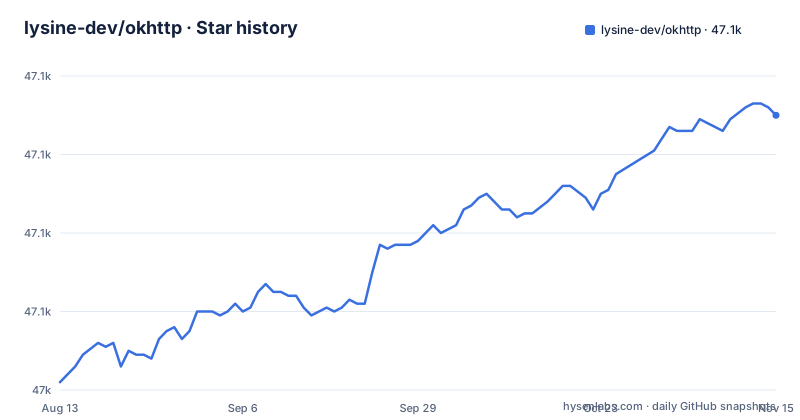
Star history
- lysine-dev/okhttp47,110 ★ · +68
| Repository | 2026-08-13 | 2026-11-15 |
|---|---|---|
| lysine-dev/okhttp | 47k | 47.1k |
68 Stars in the last 94 days, measured from the daily GitHub snapshot. Compare with other projects
Editorial analysis
What OkHttp is for and who should use it
OkHttp is an HTTP client library for the JVM, Android, and GraalVM. It solves the problem of making network requests efficient and reliable without requiring the developer to manage sockets, connection reuse, or compression manually. The intended audience is application developers who need a well-behaved HTTP client that follows modern specifications, including RFC 9110, RFC 9111, RFC 9112, RFC 9113, RFC 6455, and Server-Sent Events. The README positions it as 'efficient by default', with HTTP/2 support allowing all requests to the same host to share a socket, connection pooling reducing latency when HTTP/2 is unavailable, transparent GZIP shrinking download sizes, and response caching avoiding the network entirely for repeat requests. This makes it suitable for mobile apps, server-side JVM services, and any Kotlin or Java project that needs a dependable HTTP stack. The project's philosophy is explicit: it avoids being overly configurable, especially when configuration would work around a buggy server or contradict an RFC. That is a clear statement of intent, and it directly shapes the library's limitations.
The mechanism: connection pooling, HTTP/2, and transparent GZIP
OkHttp's efficiency comes from several concrete mechanisms. HTTP/2 multiplexing allows multiple requests to the same host to share a single TCP connection, which reduces latency and server load. When HTTP/2 is not available, connection pooling reuses existing connections to avoid the overhead of establishing new ones. Transparent GZIP means the client automatically decompresses responses that are gzip-encoded, shrinking download sizes without developer intervention. Response caching stores responses so that repeat requests can be served without hitting the network. The README also mentions resilience features: if a service has multiple IP addresses, OkHttp will attempt alternate addresses if the first connect fails, which is necessary for IPv4+IPv6 and services hosted in redundant data centers. On the TLS side, OkHttp supports TLS 1.3, ALPN, and certificate pinning, and it can be configured to fall back for broad connectivity. The library uses the platform's built-in TLS implementation, and on Java platforms it can integrate with Conscrypt, which brings BoringSSL. This is a design that favors defaults over knobs, and the documentation is clear that this is intentional.
Getting started: dependency setup and a basic request
The README provides straightforward setup instructions. For Gradle, you add the dependency with implementation("com.squareup.okhttp3:okhttp:5.5.1"). A bill of materials (BOM) is available to manage versions across artifacts: implementation(platform("com.squareup.okhttp3:okhttp-bom:5.5.1")) allows you to declare OkHttp artifacts without versions. For Maven projects, the situation is more nuanced because OkHttp is published as a Kotlin Multiplatform project. The okhttp artifact is empty in Maven; you must select okhttp-jvm or okhttp-android instead. The README gives a Maven example using okhttp-jvm version 5.1.0 with a note to remove the version after the BOM is updated. The basic usage is simple: create an OkHttpClient, build a Request with a URL, and execute it either synchronously or asynchronously. The README shows a synchronous example that returns the response body as a string, and a POST example that creates a RequestBody with a MediaType for JSON. The API is fluent and immutable, which aligns with the project's stated design principles.
Limitations and failure modes: where OkHttp is the wrong tool
The README is unusually candid about what OkHttp will not do. It explicitly lists two limitations: it does not allow GET with a body, and the cache is not an interface with alternative implementations. The first limitation means that if you need to send a payload with a GET request, perhaps for a legacy API or a non-standard service, OkHttp will not accommodate you. The second limitation means you cannot swap in a custom cache implementation; you are tied to the built-in cache. More broadly, the project's principle of avoiding configurability that works around buggy servers means that if you rely on such workarounds, OkHttp will fight you. The README states that other HTTP libraries exist that fill that gap, allowing extensive customization including potentially invalid requests. This is a deliberate trade-off: OkHttp chooses strict RFC compliance over flexibility. For most applications, this is an asset, but for those dealing with non-compliant servers or unusual requirements, it is a genuine constraint. The README also notes that MockWebServer, the included testing library, is not a full-featured HTTP testing library and is not actively developed for new features, so your testing needs may outgrow it.
Platform requirements and TLS considerations
OkHttp works on Android 5.0+ (API level 21+) and Java 8+. On Android, it uses AndroidX Startup. If you disable the initializer in the manifest, your app is responsible for calling OkHttp.initialize(applicationContext) in Application.onCreate. This is a concrete integration detail that can cause issues if overlooked. The README also mentions that OkHttp depends on Okio for high-performance I/O and the Kotlin standard library, both of which are small libraries with strong backward compatibility. Regarding TLS, OkHttp uses your platform's built-in TLS implementation. On Java platforms, you can integrate Conscrypt, which brings BoringSSL, by inserting it as the first security provider. The README includes a warning about the 3.12.x branch, which supports Android 2.3+ and Java 7+, but notes these platforms lack TLS 1.2 support and should not be used. This is a security-relevant consideration: if you are on an old platform, OkHttp's modern TLS features may not be available, and you should not use the legacy branch.
Maintenance, upgrades, and license
The README strongly recommends keeping OkHttp up to date, comparing it to auto-updating web browsers. It says the project tracks the dynamic TLS ecosystem and adjusts OkHttp to improve connectivity and security. This implies that staying on an old version is a security risk, and that upgrades are a normal part of using the library. The change log has release history, and the latest release is 5.5.1 on Maven Central. Snapshot builds are available, and R8 and ProGuard rules are provided, which is relevant for Android developers. The license is Apache-2.0, which is permissive and generally allows use in commercial projects without requiring derivative works to be open-sourced. The project is not archived, and the repository has no GitHub releases, but the README names 5.5.1 as the latest release and the last push was on 2026-10-30. The BOM helps manage compatibility across artifacts, which reduces the burden of version alignment. Overall, the maintenance cost appears low for users, but the README's emphasis on staying current suggests that you should budget for regular updates.
Alternatives and how they differ
The README itself points to the existence of other HTTP libraries that allow extensive customization, including potentially invalid requests. A concrete alternative is Apache HttpClient, which is known for its configurability. The difference in approach is fundamental: OkHttp is principled and avoids configurability that contradicts RFCs, while Apache HttpClient is designed to be flexible and permissive. Another alternative is the Java standard library's java.net.http.HttpClient, which is built into the JDK and offers HTTP/2 support. For Android developers, HttpURLConnection is a built-in option, but it is less capable and less efficient than OkHttp. The choice depends on your needs: if you must interoperate with non-standard servers, Apache HttpClient gives you the escape hatches; if you want a client that enforces correctness, OkHttp is the better bet.
Editorial conclusion
Adopt OkHttp if you need a dependable HTTP client on Java 8+, Android 5.0+, or GraalVM, and you value automatic HTTP/2 multiplexing, connection pooling, and transparent GZIP over deep customization. Avoid it if you must send GET requests with bodies, need a pluggable cache implementation, or frequently work around servers that violate RFCs. Before adopting, verify that your target platform's TLS provider matches your security requirements, and decide whether the AndroidX Startup initializer can stay enabled or if you must call OkHttp.initialize() manually. The project's commitment to spec compliance is a deliberate boundary, not a missing feature.
Frequently asked questions
What is OkHttp?
OkHttp is an HTTP client for the JVM, Android and GraalVM, written in Kotlin and published as a Kotlin Multiplatform project. It shares sockets across requests to the same host over HTTP/2, pools connections, applies GZIP transparently and caches responses.
Is OkHttp blocking?
Both paths exist. The request and response API is built with fluent builders and immutability, and supports synchronous blocking calls as well as async calls with callbacks, which the examples show through Call.execute().
How do I use OkHttp in Java?
Build a Request with Request.Builder, create it from a shared OkHttpClient with newCall, and call execute() for the synchronous form, as in the download and post examples. Responses are consumed inside a try-with-resources, and the client is meant to be shared rather than created per request.
How do I use OkHttp in Android?
OkHttp works on Android 5.0 and later, API level 21 and later, and uses AndroidX Startup by default. If you disable the initializer in the manifest, your app must call OkHttp.initialize(applicationContext) in Application.onCreate.
How do I add the OkHttp library in Android Studio?
With Gradle, add the single coordinate implementation("com.squareup.okhttp3:okhttp:5.5.1"), which is the version the README names as the latest release. A bill of materials is also published so multiple OkHttp artifacts can be declared without versions.
Official sources
Add this badge to your README
If you maintain this project, the badge below links readers to this analysis and shows its maintenance status from the daily GitHub snapshot. Paste the markdown into your README; add ?metric=license or ?metric=stars to the image URL for a different field.

[](https://hysenlabs.com/projects/lysine-dev-okhttp)Star history chart for your README
[](https://hysenlabs.com/projects/lysine-dev-okhttp)Was this useful?