RetroPie-Setup turns a Raspberry Pi into an emulator host, and its newest tag is from 2022
Shell script to set up a Raspberry Pi/Odroid/PC with RetroArch emulator and various cores
At a glance
- What is it?
- RetroPie-Setup installs emulators and an EmulationStation front end on a Raspberry Pi, Vero4K, ODroid-C1 or Ubuntu PC, but its README covers the install path and little else. The newest release tag is 4.8 from 2022, and the documented clone gives you master, four years of commits newer.
- Who is it for?
- RetroPie-Setup fits someone with a spare Raspberry Pi running Raspberry Pi OS who wants a menu of emulators and is comfortable running a script under sudo. It does not fit a Mac, an ODroid-C1 owner hoping to skip the wait, or anyone who needs to know how games get added, because the README only points to the docs site for general answers.
- Can I use it commercially?
- Check first. The repository uses a licence we do not classify automatically, so read its LICENSE file before any commercial use.
- Is it still maintained?
- Yes. The repository last received commits 7 days ago.
- What is it written in?
- Mainly Shell, according to GitHub's language statistics.
Answers come from the project's GitHub data, last synced on November 15, 2026, and from our analysis. They are not legal advice.
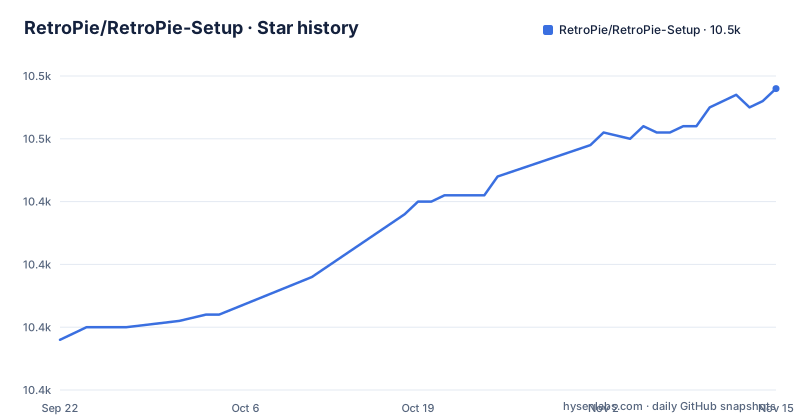
Star history
- RetroPie/RetroPie-Setup10,458 ★ · +40
| Repository | 2026-09-22 | 2026-11-15 |
|---|---|---|
| RetroPie/RetroPie-Setup | 10.4k | 10.5k |
40 Stars in the last 54 days, measured from the daily GitHub snapshot. Compare with other projects
Editorial analysis
Two ways in, and only one of them ships an image
RetroPie publishes a bootable pre-made image for the Raspberry Pi, published through the releases section of the repository and through retropie.org.uk. Those images are described as the route for anyone who wants a ready-to-go system, so the shortest path from an SD card to a working front end involves no script at all.
The other route is the shell script in this repository, which sets up a machine you already have. EmulationStation is the graphical front end either way, and the goal is the same in both cases: many emulators and games on one box, with a menu in front of them.
The image is the Pi-only half of the story. The Vero4K, the ODroid-C1 and a PC running Ubuntu are pointed at the script instead of a ready-made disk, so an evaluation on those three platforms starts from a system somebody has to configure by hand.
The install path assumes a Debian-family host and root
Getting the script onto the machine takes three commands, and the first is housekeeping rather than RetroPie at all. APT repositories are refreshed, the distribution is brought forward, and Git has to be present before the repository can be cloned:
sudo apt-get update
sudo apt-get dist-upgrade
sudo apt-get install git
The clone is shallow, which keeps the download small and leaves no history to inspect afterwards:
cd
git clone --depth=1 https://github.com/RetroPie/RetroPie-Setup.git
Then the script runs from inside its own directory, as root:
cd RetroPie-Setup
sudo ./retropie_setup.sh
Read those blocks as consequences rather than convenience. A dist-upgrade can move the distribution under you before a single emulator is installed, and the first run is said to install additional packages that are needed. Running this means changing the machine well beyond what a reader asked for.
The supported platform list is fixed, and a Mac is not on it
Four combinations of hardware and system are named: Raspberry Pi OS, previously called Raspbian, on the Raspberry Pi, OSMC on the Vero4K, and Ubuntu on the ODroid-C1 or on a PC. That list is the whole of it, and one detail is easy to skim past: the Vero4K is meant to run OSMC, not Raspberry Pi OS, and the PC route assumes a machine that already speaks apt.
macOS and Windows go unmentioned, and every command given is an apt-get call under sudo, which is the Debian family. Someone following the Raspberry Pi instructions on a Mac meets the first wall at the package manager, and this repository documents no alternative path for it.
The gap carries over to the image route. retropie.org.uk publishes the ready-made disk for the Raspberry Pi, and the other three platforms are expected to bring their own system and run the script on it.
Binary installs are a Raspberry Pi shortcut the other platforms do not get
On the Raspberry Pi the script offers two routes for each package: install a prebuilt binary, or build from source. Binaries are the recommended option there, and the reason given is blunt: building everything from source takes a long time.
For the other supported platforms there is no binary option at all. The ODroid-C1, the Vero4K and a PC running Ubuntu get a source install only, which turns a first run into a compile session whose length the project warns about without measuring.
That is the difference between evaluating this on a Pi and evaluating it on a PC. On the Pi you are picking between two package sources. Elsewhere you are picking between starting now and waiting, and the documentation offers no third option.
Two entry scripts, a scriptmodules directory, docs in another repository
The repository is mostly shell. retropie_setup.sh is the entry point you run, retropie_packages.sh sits beside it, and the tree also holds scriptmodules/ and ext/ directories. platforms.cfg sits at the top level as well, and the README says nothing about what it holds. AUTHORS, CONTRIBUTING.md, COPYRIGHT.md and LICENSE.md complete the tree.
Documentation lives somewhere else entirely. Answers to the frequent questions are on retropie.org.uk/docs, and anyone who finds a gap there is invited to open a pull request against the separate RetroPie-Docs repository rather than this one.
The GitHub licence field carries no standard identifier, so the terms that apply are the ones written out in LICENSE.md and COPYRIGHT.md. Anyone planning to build on this needs to read those two files directly, because there is no short licence name to check against.
The newest tag is 4.8 from 2022, and the documented clone gives you master
The release list stops at version 4.8, published on 2022-03-14, following 4.7.1 in November 2020 and 4.7 two days earlier. The repository itself is not idle: the last push to the default branch is dated 2026-10-31.
Those two facts pull in opposite directions. The documented install clones master with --depth=1, so what lands on your machine is four years of commits past the newest tag. The code that runs is master, not the 4.8 tree that any version-specific reading describes.
For a reader deciding whether to run this, the split is worth keeping straight. Read the tag for version history, read master for the code that will actually execute, and say which one a bug was found on. No documented procedure installs a specific tag.
The README stops before games, and never mentions undoing the install
Everything documented ends at the first successful run of retropie_setup.sh. Where game files go, which emulators arrive by default, and what the menu looks like once EmulationStation is up are all unanswered. Questions about ROMs, their legal status, and the ordinary matter of copying a game onto the machine are answered elsewhere or not at all in this repository.
Uninstalling sits in the same silence. No rollback command, no list of what the script changed, and no mention of what a partial run leaves behind when a source build fails partway through.
Both gaps land on the same person: whoever just ran a script under sudo and now owns a machine they did not fully configure. the README points to retropie.org.uk/docs for frequently asked questions, and the trade is clear. This repository is an installer, not a manual.
Editorial conclusion
RetroPie-Setup fits someone with a spare Raspberry Pi running Raspberry Pi OS who wants a menu of emulators and is comfortable running a script under sudo. It does not fit a Mac, an ODroid-C1 owner hoping to skip the wait, or anyone who needs to know how games get added, because the README only points to the docs site for general answers. Before running anything, decide between the pre-made image and the script, then confirm which platform you are on, because binary installs exist on the Pi alone.
Frequently asked questions
Is RetroPie good for beginners?
The shortest route is a bootable pre-made image for the Raspberry Pi, downloadable from the releases section or retropie.org.uk, which needs no script at all. The script route is longer: refresh APT, upgrade the distribution, install Git, clone the repository, then run retropie_setup.sh under sudo.
How do I access the RetroPie setup script from the command line?
Clone the repository, change into the directory it created, and run the script with sudo: cd RetroPie-Setup, then sudo ./retropie_setup.sh. EmulationStation, by contrast, is the graphical front end this script sets up.
Can RetroPie-Setup run on a Mac or on Windows?
The documented platforms are Raspberry Pi OS on the Pi, OSMC on the Vero4K, and Ubuntu on the ODroid-C1 or a PC. macOS and Windows are not mentioned, and every command given is an apt-get call under sudo.
Does RetroPie-Setup install from binaries on a PC or an ODroid-C1?
No. Binary and source installs are both offered on the Raspberry Pi, while the other supported platforms have a source install as their only option. Building everything from source takes a long time, which is the reason binaries are recommended on a Pi.
Official sources
Add this badge to your README
If you maintain this project, the badge below links readers to this analysis and shows its maintenance status from the daily GitHub snapshot. Paste the markdown into your README; add ?metric=license or ?metric=stars to the image URL for a different field.

[](https://hysenlabs.com/projects/retropie-retropie-setup)Star history chart for your README
[](https://hysenlabs.com/projects/retropie-retropie-setup)Was this useful?