macos_ui declares macOS support while running anywhere Flutter does
Flutter widgets and themes implementing the current macOS design language.
At a glance
- What is it?
- macos_ui is a Flutter widget set that reproduces the macOS design language. Its pubspec declares macOS as the plugin platform, three features need native code, and the default branch is dev while the badges still point at GroovinChip.
- Who is it for?
- macos_ui suits a Flutter team that wants a native-feeling macOS desktop client and can run its build on a Mac. It does not suit a team that needs one codebase to look right on Windows and Linux, since non-macOS support is not guaranteed and three named features need native calls.
- Can I use it commercially?
- Yes. MIT is a permissive licence: you can use, modify and sell software built on it, as long as you keep its copyright and licence notices.
- Is it still maintained?
- Yes. The repository last received commits 62 days ago.
- What is it written in?
- Mainly Dart, according to GitHub's language statistics.
Answers come from the project's GitHub data, last synced on October 23, 2026, and from our analysis. They are not legal advice.
Star history
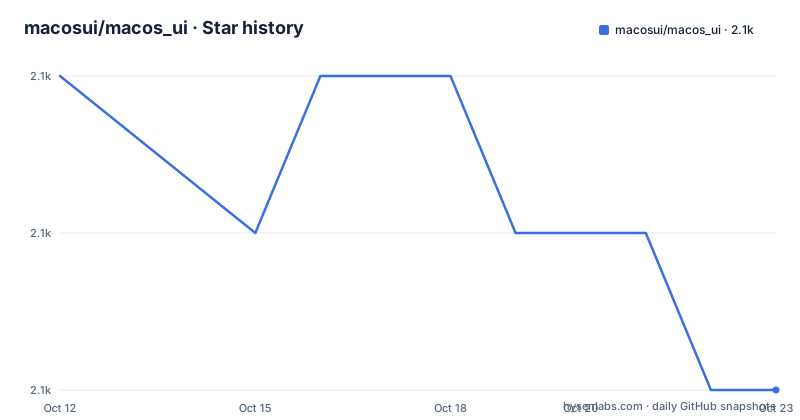
- macosui/macos_ui2,133 ★ · -2
| Repository | 2026-10-12 | 2026-10-23 |
|---|---|---|
| macosui/macos_ui | 2.1k | 2.1k |
-2 Stars in the last 11 days, measured from the daily GitHub snapshot. Compare with other projects
Editorial analysis
The package declares macOS and admits it runs anywhere
macos_ui is a set of Flutter widgets and themes built to match the macOS design language, and it carries an honest warning about its own platform story. Because it calls native code, it specifies macOS as a plugin platform in pubspec.yaml, which is why pub.dev shows it as macOS-only. The README then says the package technically works on any platform Flutter supports, but that you get the best results on macOS and that non-macOS support is not guaranteed. Three specific features break that promise: anything related to macos_window_utils, the MacosColors.controlAccentColor() function, and the MacosColorWell widget. A macos/ directory at the repository root is the plugin platform declaration, and the example/ project carries android/, ios/, macos/ and web/ subdirectories, so the sample is configured for more platforms than the package claims to support. That mismatch between the pub.dev badge and the example project is the first thing to understand: you can build it elsewhere, you just cannot rely on it.
Flutter 3.35.0 is a hard floor from 2.2.0+1 onward
Version compatibility is handled with an explicit escape hatch. Starting with 2.2.0+1, macos_ui requires Flutter 3.35.0 or higher, and the reason given is a deprecation in Flutter 3.35.0. If you are on an older Flutter, pub resolution does not fail outright: only version 2.2.0 remains available when you run flutter pub get. That is a deliberate compatibility valve for teams stuck on an older toolchain, and it also means your resolved version depends on your Flutter version in a way that is easy to miss in a lockfile. The package is developed against Flutter's stable channel, and the README recommends building on stable to keep the experience smooth. The CI signals line up with that: badges for Flutter Analysis, Pana Analysis and codecov are all wired up, so static analysis and coverage are checked automatically rather than left to reviewers.
MacosWindow is the frame everything else hangs from
Layout starts with MacosWindow, described as the basic frame for a macOS-style layout. It takes a Sidebar on the left, an optional TitleBar at the top, and the remaining body is normally filled by a MacosScaffold. A sidebar can also go on the right through MacosWindow.endSidebar, which is the property to reach for rather than trying to reorder the left one. The scope is provided by MacosWindowScope, and that is how the sidebar toggles: MacosWindowScope.of(context).toggleSidebar(). There is a catch attached to that call, and it is the kind of detail that costs an afternoon if you miss it. Your MacosScaffold has to be wrapped in a Builder widget for the toggle to work properly. Without the Builder the scope lookup happens in the wrong context and the sidebar simply will not respond. The remaining layout widgets in the same family are ToolBar and SliverToolBar for the title bar area, MacosListTile, and MacosTabView for tabbed content.
Toolbar popups are clipped by the window, not by the widget
There is a layout constraint in Flutter that leaks straight into this package's behavior, and the README documents it under its own heading. Flutter does not let UI elements overflow the bounds of the window, so popups are constrained to whatever space the window currently offers. The practical consequence is a sizing rule for your whole application window: if you put a widget that creates popups in the toolbar, such as ToolBarPopupButton, you should not allow the window to be resized below the height of your tallest popup. That is a constraint on the minimum window height, not just on the button. It is the kind of defect that shows up late, when a user drags the window small and a menu is cut off, and it cannot be fixed inside the widget because the clipping is done by the framework above it. Set the minimum size deliberately at the window level before you add toolbar popups, not after.
The widget catalog is grouped by control type
Widget coverage is grouped by control type in the README table of contents, and that grouping tells you how complete the set is. Buttons run from MacosCheckbox and HelpButton through RadioButton, PulldownButton, PopupButton, PushButton, MacosSwitch and MacosSegmentedControl. Dialogs and sheets are MacosAlertDialog and MacosSheet. Fields and labels cover MacosTextField, MacosSearchField and MacosTooltip. Indicators split into progress (ProgressCircle and ProgressBar) and level (CapacityIndicator and RatingIndicator). Selectors are MacosDatePicker, MacosTimePicker and MacosColorWell, and MacosColorWell is one of the three items that need native code, so it belongs in the selectors group but not in a cross-platform build. Icons are handled by MacosIcon. There is also a section on older macOS versions, which is the only hint that the package tracks historical design changes rather than only the current one. Interactive examples live at https://macosui.github.io/macos_ui/#/ and guides and codelabs at https://macosui.dev.
The default branch is dev and the badges still point at GroovinClip
The repository metadata is worth reading before you plan an upgrade. The default branch is dev, which means the working branch is not the conventional main or master, so a plain clone and build gives you unreleased work rather than a tagged state. Every CI badge in the README is built from workflows under the GroovinChip/macos_ui repository rather than macosui/macos_ui, and the codecov badge that points at the current repository carries a token query parameter inline. That layout is what a project looks like after being handed over, and it is not wrong, but it does mean the badge URLs do not all describe the same repository. The most recent published version is 2.2.2 from 2025-10-19, with 2.1.0 from 2024-09-19 and 2.0.2 from 2023-10-12 before it, so releases are infrequent and the dev branch carries a meaningful amount of work. If you pin a version, you pin a state that may be well behind the widgets the README describes.
Where macos_ui is the wrong choice
The clearest wrong case is a cross-platform desktop application. macos_ui will compile off macOS, but the README is explicit that the result is not guaranteed and that three features fail outright, so a Linux or Windows user gets a degraded experience that no test suite will catch for you. Control accent colors, color wells and anything going through macos_window_utils are the concrete casualties. The second wrong case is a team that wants a single visual language across mobile and desktop. The package is a faithful macOS look and nothing else, and Flutter's own Material and Cupertino sets remain the supported choices for the other platforms. Third, if your application depends on popups anchored to toolbar controls and users can resize the window freely, the framework clipping described above will produce menu truncation you cannot fix in the widget layer. Design references are provided for anyone extending the theme: a macOS Sonoma Figma kit, the macOS Human Interface Guidelines, and Apple's macOS design resources.
Editorial conclusion
macos_ui suits a Flutter team that wants a native-feeling macOS desktop client and can run its build on a Mac. It does not suit a team that needs one codebase to look right on Windows and Linux, since non-macOS support is not guaranteed and three named features need native calls. Before adopting, check that MacosWindowScope.of(context).toggleSidebar() works inside your Builder wrapping, fix a minimum window height that fits your toolbar popups, and confirm your Flutter version clears the 3.35.0 floor.
Frequently asked questions
Does macos_ui work on Windows and Linux?
It technically runs on any platform Flutter supports, but pub.dev lists macOS only because the package declares macOS as its plugin platform. Non-macOS support is not guaranteed, and macos_window_utils features, MacosColors.controlAccentColor() and MacosColorWell do not work there.
What Flutter version does macos_ui require?
Version 2.2.0+1 requires Flutter 3.35.0 or higher because of a deprecation in Flutter 3.35.0. On an older Flutter, only version 2.2.0 is available to you when you run flutter pub get.
How do I toggle the sidebar in a macos_ui layout?
Call MacosWindowScope.of(context).toggleSidebar(). Your MacosScaffold must be wrapped in a Builder widget for the toggle to work properly.
Why do my macos_ui toolbar popups get cut off?
Flutter does not allow UI elements to overflow the window bounds, so popups are constrained to the available space. Avoid resizing the window below the height of your tallest popup when using widgets such as ToolBarPopupButton.
Where can I see macos_ui widgets running?
An interactive widget gallery is hosted at https://macosui.github.io/macos_ui/#/, and guides and codelabs are at https://macosui.dev. The repository also carries an example/ project.
Official sources
Add this badge to your README
If you maintain this project, the badge below links readers to this analysis and shows its maintenance status from the daily GitHub snapshot. Paste the markdown into your README; add ?metric=license or ?metric=stars to the image URL for a different field.

[](https://hysenlabs.com/projects/macosui-macos-ui)Star history chart for your README
[](https://hysenlabs.com/projects/macosui-macos-ui)Was this useful?