Moodiary: the diary app that syncs only when you tell it to
A fully open source cross-platform diary app written in Flutter and Rust.
At a glance
- What is it?
- Moodiary is a Flutter and Rust diary application that works offline with no account, and its repository leaves most decisions to docs.moodiary.net. What the tree does show is an export list four formats wide, an import path that reads only Markdown, and a development branch that outruns its own tags.
- Who is it for?
- Adopt Moodiary when you want a diary that runs with no account and no server, and you are willing to read docs.moodiary.net for everything the README leaves out. Do not adopt it if your notes must sync through a managed service, or if you need a documented source build today, because the repository offers a download link and no build steps.
- Can I use it commercially?
- Yes, with strict conditions. AGPL-3.0 is a network copyleft licence: if people use a modified version over a network, for example as a hosted service, you must offer them its source code under the same licence.
- Is it still maintained?
- Yes. The repository last received commits 1 day ago.
- What is it written in?
- Mainly Dart, according to GitHub's language statistics.
Answers come from the project's GitHub data, last synced on October 23, 2026, and from our analysis. They are not legal advice.
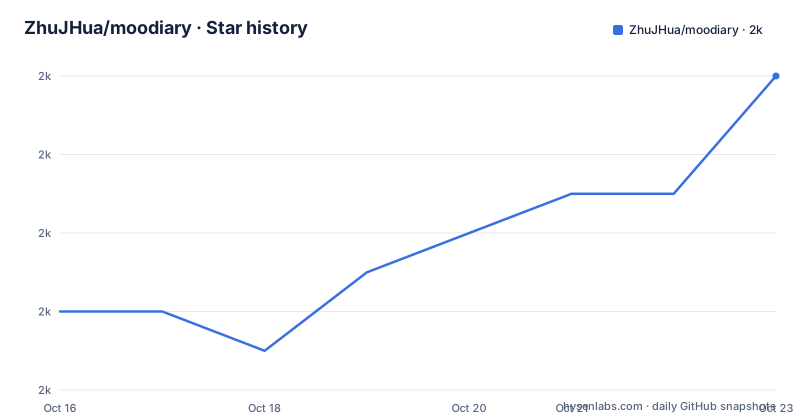
Star history
- ZhuJHua/moodiary2,040 ★ · +6
| Repository | 2026-10-16 | 2026-10-23 |
|---|---|---|
| ZhuJHua/moodiary | 2k | 2k |
6 Stars in the last 7 days, measured from the daily GitHub snapshot. Compare with other projects
Editorial analysis
An offline diary whose only documented install is a download
Moodiary is a diary application for people who write entries on their own device and do not want an account between them and the text. Its README documents one install step and nothing more: take an installer from the project's release page, install it, and start writing. No account, no API key and no server address sits on that path.
https://github.com/ZhuJHua/moodiary/releasesOnce installed the app works offline out of the box, and that single claim carries most of the weight in the design. Rich text entries with images, audio and video, full-text search, per-category filtering, light and dark modes, imported fonts including variable fonts, a password backed by biometrics, a weather panel and export to four formats all sit behind a local-first app rather than behind a sync account. Everything beyond that one sentence lives at the documentation site.
https://docs.moodiary.netA forum sits on its own address for questions the docs do not cover.
https://answer.moodiary.netThe practical consequence for an engineer weighing this project is that the repository can tell you what exists and not what any of it costs, so the docs are a required reading step rather than an optional one.
Two toolchains share one tree with no Cargo manifest at the top
Take the top level of the repository and the shape of the project is legible. `mobile/` holds the application, `packages/` holds shared Dart code, `i18n/` holds translations, `tool/` holds developer scripts, and `res/` holds images such as the social banner and the sponsor payment picture. Version pinning is explicit, with `.fvmrc` at the root beside `pubspec.yaml` and `pubspec.lock`, and the README badge names Flutter `3.47.2`.
.fvmrc
.gitattributes
.github/
.gitignore
.mcp.json
.vscode/
CHANGELOG.md
CLAUDE.md
LICENSE
README.md
README.zh.md
cliff.toml
devtools_options.yaml
i18n/
mobile/
packages/
pubspec.lock
pubspec.yaml
res/
tool/
Two entries are unusual in a repository that also ships an installer. `CLAUDE.md` and `.mcp.json` sit next to `.github/` and `.vscode/`, so agent instructions and a Model Context Protocol server configuration live in the same tree as the app. Then there is the gap worth naming: the description calls the app written in Flutter and Rust, the primary language is Dart, and the entries above contain no Cargo.toml, so the Rust half is not visible from the root. The default branch is `develop`, which means a fresh clone hands you the integration branch rather than what most people install.
Export writes four formats, import reads a Markdown zip
Export and import are not mirror images in Moodiary, and the difference shows up before you trust either side. The export side writes Markdown, Word, PDF or a long image. The import side reads a Markdown zip or a local backup, and nothing else is listed. A diary exported as PDF or Word therefore has no documented path back into the application, and re-entry depends on the Markdown zip or on restoring a local backup. The README also stays quiet on whether an imported Markdown zip keeps embedded media and on whether categories survive the trip. Read the two lists as a portability map: Markdown is the format that leaves and comes back, Word and PDF are presentation formats for sharing, and the long image flattens an entry into something to post rather than something to re-import. For anyone who intends to let this application own an archive, that map is the part to check first, because a format with no import path becomes a one-way door the day you want out.
Three sync backends and one optional encryption switch
WebDAV, S3 / MinIO and LAN sync, each with optional end-to-end encryption, decide when entries leave the device. That choice is what lets the app claim to work offline and still be used on more than one device, because no service of its own stands between a phone and a desktop. The lock is a separate layer again: a password backed by biometrics guards the application itself, which is a local gate rather than a transport one. Two gaps in this line deserve attention from anyone weighing the project against a managed service. The README does not say what the optional encryption covers, whether it applies to the WebDAV and S3 payloads, the LAN path and exported files, or only some of them. It also does not document key handling or what happens to entries restored onto a device that no longer holds the key. A password backed by biometrics says nothing about how diary text is protected at rest while the app sits closed and unlocked, and no local encryption claim is made for the database anywhere in the repository.
An assistant that talks to whichever provider you supply
The Assistant line in the feature list is short and consequential: connect any OpenAI- or Anthropic-compatible provider for chat and diary tools. Two words do the work. Any means no vendor is fixed, so you point the app at a hosted endpoint or a local one yourself. Compatible means the provider has to speak one of those two API shapes, and the README does not list which endpoints have been exercised against it. What the repository does show is the loop built around that feature. `.mcp.json` at the top level configures a Model Context Protocol server and `CLAUDE.md` holds instructions for an agent working in this tree, which reads as an agent-assisted development setup shipped alongside the application. Diary tools is broader than chat, and nothing in the README says whether the assistant can rewrite a stored entry after the fact or only draft new ones. An app whose data stays local can still become a networked one the moment this feature is switched on, so what gets sent and what the provider keeps are the two questions to put to the documentation.
Saved places and footprints put a coordinate in every entry
Location enters the diary through a single feature line: pick or fetch the weather, save places and reference them from entries, then view your footprints on a map. Saved places are the durable half, because once a place is attached to an entry the entry carries a coordinate, and a weather reading attached to the same entry dates that coordinate. Reconstructing a trip from a diary afterwards works because those two pieces travel together. It also means the local database holds a record of where you have been and not only what you wrote, which is a different privacy posture from a text-only diary and is not discussed in the repository. The README does not say where the weather is fetched from, whether that fetch needs a key of its own, or whether entries can be written without it. Nor does it say whether footprints are computed on the device from stored places or requested from a map service, and a map view that needs a network round trip behaves differently from the rest of the app the moment the connection drops.
Commit prefixes, translations and a sandwich request
Upkeep is described through tooling rather than prose. `cliff.toml` is the configuration for git-cliff, which builds the project's dated change file from conventional commit prefixes, so the history a new user reads is generated from commit text rather than typed by hand. `devtools_options.yaml` beside it points at the same habit for developer tooling, and `README.zh.md` paired with `README.md` says documentation is kept in two languages, with `i18n/` carrying translations into the app. The sponsorship block belongs to the same picture: the README asks for a sandwich, lists sponsor names between comment markers, and points at a payment image stored inside the app tree at `mobile/res/sponsor/wechat.jpg`. The last push was on 2026-10-06, yet the tags jump from v2.7.2 on 2025-01-27 and v2.7.3 on 2025-03-02 straight to v2.8.1 on 2026-09-07, so development on the default branch moves faster than the installers do. Check which of the two you are holding before you judge how active the project is.
Three structural alternatives and what each one costs
Naming a competitor would tell you little here, because the difference is architectural. The nearest structural alternative is a folder of Markdown files inside a notes application or a synced directory. Entries are plain text from the start, nothing needs exporting, and there is no second application to install. What that route gives up is the editor, the media embedded in entries, categories with full-text search, weather attached to a place, and the password backed by biometrics. Moodiary answers with its own Markdown export and Markdown zip import, which is a path out rather than a live workspace. The second alternative is an account-backed diary where somebody else runs the sync. It wins on multi-device setup and gives up the property this project is built on, that the app works offline out of the box and the sync backend is a choice among three named ones. The third path is forking the code yourself, since the project is published under AGPL, which attaches source-sharing conditions to modified builds offered over a network. If your reason for picking a diary is owning the text, these three deserve to be weighed against each other. If your reason is fast capture across several devices, a local-first trade may not pay for itself.
Editorial conclusion
Adopt Moodiary when you want a diary that runs with no account and no server, and you are willing to read docs.moodiary.net for everything the README leaves out. Do not adopt it if your notes must sync through a managed service, or if you need a documented source build today, because the repository offers a download link and no build steps. Before you commit, check what the optional end-to-end encryption covers, and confirm you can live with import accepting only a Markdown zip or a local backup.
Frequently asked questions
Does Moodiary need an account or a server before I can write my first entry?
No. The documented setup is to download an installer from the project's release page, and the app works offline out of the box. WebDAV, S3 / MinIO and LAN sync are configured later, by choice.
Can I get my diary out of Moodiary if I stop using it?
Export writes Markdown, Word, PDF or a long image. Only a Markdown zip or a local backup is listed as an import source, so Word, PDF and long images are one-way out of the app.
How do I build Moodiary from source?
The repository does not document a build. It holds `pubspec.yaml`, `pubspec.lock`, `mobile/`, `packages/` and `.fvmrc` at the top level, and sends every other instruction to docs.moodiary.net.
What does the app lock protect, and what does end-to-end encryption cover?
The app lock is a password backed by biometrics, which guards the application itself. The README does not say what the optional end-to-end encryption covers, or how key recovery works.
Does the Moodiary assistant send my diary text to an AI provider?
The assistant connects to any OpenAI- or Anthropic-compatible provider for chat and diary tools, so entries can leave the device once you switch it on. The README does not document what context is sent or what the provider retains.
Can I fork Moodiary and ship my own build?
The code is published under AGPL, which attaches source-sharing conditions to modified builds offered over a network. Whether that fits a particular distribution plan is a question for whoever handles licensing where you work.
Official sources
Add this badge to your README
If you maintain this project, the badge below links readers to this analysis and shows its maintenance status from the daily GitHub snapshot. Paste the markdown into your README; add ?metric=license or ?metric=stars to the image URL for a different field.

[](https://hysenlabs.com/projects/zhujhua-moodiary)Star history chart for your README
[](https://hysenlabs.com/projects/zhujhua-moodiary)Was this useful?