csv-parser: a streaming JavaScript CSV parser
Streaming csv parser inspired by binary-csv that aims to be faster than everyone else
At a glance
- What is it?
- csv-parser turns Node.js readable streams into records without requiring the input file to be loaded as one string. It suits applications that need configurable CSV handling, but its event API and incomplete strict-mode documentation require closer inspection.
- Who is it for?
- Adopt csv-parser when Node.js streams, configurable delimiters, and record-at-a-time processing matter. Do not choose it if Promise-based control flow is required or if its strict-mode documentation does not cover the CSV dialect you must accept.
- Can I use it commercially?
- Yes. MIT is a permissive licence: you can use, modify and sell software built on it, as long as you keep its copyright and licence notices.
- Is it still maintained?
- Yes. The repository last received commits 169 days ago.
- What is it written in?
- Mainly JavaScript, according to GitHub's language statistics.
Answers come from the project's GitHub data, last synced on October 23, 2026, and from our analysis. They are not legal advice.
Star history
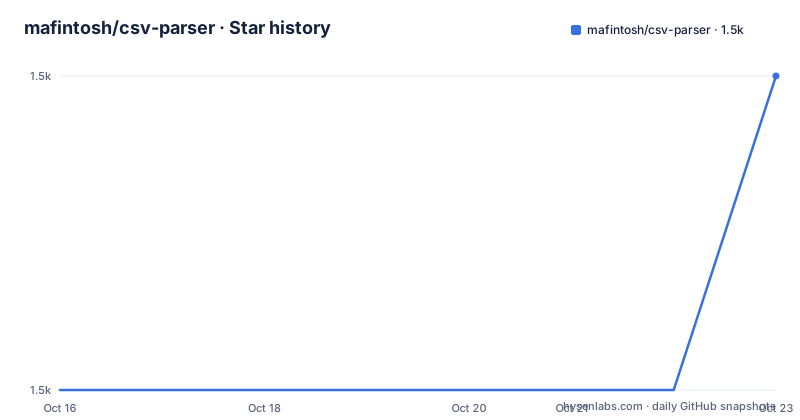
- mafintosh/csv-parser1,503 ★ · +1
| Repository | 2026-10-16 | 2026-10-23 |
|---|---|---|
| mafintosh/csv-parser | 1.5k | 1.5k |
1 Stars in the last 7 days, measured from the daily GitHub snapshot. Compare with other projects
Editorial analysis
Why csv-parser fits Node.js stream pipelines
csv-parser addresses the problem of processing CSV records in a Node.js application without first collecting the complete file. The library is aimed at developers who already work with streams and want each parsed row delivered through the normal data-event interface. Its package description and README identify it as a streaming parser inspired by `binary-csv`, with compatibility goals tied to the `csv-spectrum` acid test suite.
The central workflow is simple: create a readable stream, instantiate the parser with `csv()`, and pipe the source into it. The parser then emits one JavaScript object per record. This design is more useful than a whole-file conversion when the input is large, arrives progressively, or can feed another processing stage. It also avoids requiring the application to hold the complete raw file in memory.
The README presents the output as an array of row objects, with the first CSV line used as headers by default. That is an important distinction. csv-parser is implemented as a stream parser, but the documented usage still collects emitted rows in an array when the application wants one final value. The streaming capability is present, but whether memory stays bounded depends on how the consuming code handles each emitted record.
The repository is not archived, and its last push was on 2026-05-07. That indicates repository activity within the six-month period considered for maintenance status. The listed releases nevertheless end with `v3.0.0` from 2020-12-03, while `package.json` declares version `3.2.1`. Before adoption, the version actually resolved from the package registry should therefore be checked rather than inferred from the release list.
Installation and the first Node.js parse
The README documents installation through npm and yarn. The package manifest declares Node.js `>= 10`, which differs from the README note that requires Node v8.16.0 or higher. For current installations, the package manifest is the stricter documented runtime requirement.
Install the package from a Node.js project with:
npm install csv-parserThe following example reads `data.csv`, sends the stream through `csv()`, and prints the resulting rows at the end event. The file is assumed to contain the header line `NAME,AGE` followed by the two data rows shown in the README.
const csv = require('csv-parser')
const fs = require('fs')
const results = []

fs.createReadStream('data.csv')
  .pipe(csv())
  .on('data', (data) => results.push(data))
  .on('end', () => console.log(results))
The documented result contains objects with `NAME` and `AGE` properties. Values such as `24` and `22` are shown as string content in the usage example, so consumers that need numbers or dates must perform their own conversion. That behavior matters for downstream validation, aggregation, and storage code.
For a first project-level check, create the sample file exactly as documented, run the script with Node.js, and confirm that the end handler receives the two row objects. This verifies the basic pipe path before adding options.
Headers, column mapping, and dialect controls
csv-parser exposes options for files that are not simple comma-separated, unquoted tables. The default separator is `,`, the default newline is `\n`, and the default quote and escape characters are both `"`. Each delimiter or newline option is documented as a single-character string. Applications can configure these values when reading tab-separated files or files with a different line ending.
Header handling has several distinct modes. By default, the first line supplies property names. An array of strings can be passed directly when the caller already knows the columns:
csv(['Name', 'Age'])When both options and headers are needed, the documented form places `headers` inside the options object. Setting `headers: false` uses column indexes as keys. If a file already contains a header line and the caller supplies external headers, the README says to use `skipLines: 1` or `mapHeaders`. Failing to account for this distinction can cause the header line to appear as data.
The parser can transform headers through `mapHeaders`. The callback receives `header` and `index`, may return a replacement string, or may return `null` to remove the header and its column from the results. The following maps headers to lowercase:
csv({
  mapHeaders: ({ header, index }) => header.toLowerCase()
})
Values can be changed through `mapValues`, which receives `header`, `index`, and `value`. This is the documented place to normalize case or perform application-specific conversion. The README does not state that these callbacks are asynchronous, so callers should not assume Promise-returning transformation support.
Streaming behavior, comments, and resource boundaries
The parser is oriented toward stream processing, and the API includes controls for comments and input size. By default, comments are disabled. Setting `skipComments: true` skips lines beginning with `#`. A string value supplies a custom leading comment marker. Since CSV has no universally defined comment syntax, this option is useful for known upstream formats but can change the meaning of legitimate data that begins with the configured character.
The `skipLines` option accepts a number and defaults to `0`. It controls how many lines are skipped before headers are parsed. This is distinct from `skipComments`, which is intended for comment lines encountered during parsing. Combining them requires care when a file has both a preamble and comment records.
The `maxRowBytes` option limits the number of bytes per row. The documented default is `Number.MAX_SAFE_INTEGER`, and the README warns that an error is thrown when a row exceeds the configured value. This is a real safeguard for unexpectedly large records, but it is not a complete memory policy. The parser can still emit records, and an application that pushes every result into an array can retain the parsed dataset even when the source file was streamed.
The README also documents `raw: true`, which prevents UTF-8 decoding. That option can be relevant when input encoding or byte-level handling is controlled elsewhere, but the README does not describe character decoding for every possible input representation. The parser is therefore a good fit for known CSV conventions, not a universal answer for arbitrary binary or malformed data.
API limitations and the Promise alternative
The documented example is event-based. Consumers attach handlers such as `data` and `end`, which works naturally in a stream pipeline but requires explicit control over errors, completion, and downstream asynchronous work. The README identifies `neat-csv` as the option when a Promise-based interface to `csv-parser` is needed. That is a real difference in approach: csv-parser exposes a Node.js stream, while the named alternative wraps that style for callers that prefer promises.
The README's `strict` section ends after introducing the option and does not define its exact validation rules. This matters for adoption. CSV dialects differ in how they treat malformed quotes, inconsistent column counts, and extra fields, and a project should not select strict parsing based only on the option name. The implementation and tests would need to be reviewed before relying on `strict: true` for files with known defects.
There is also no documented rollback procedure, deployment guide, or migration note for version upgrades in the README. The package manifest supports linting, tests, coverage, security auditing, type declaration tests, and a benchmark script, but those commands do not by themselves describe an application rollback. The project also uses an older JavaScript toolchain in its declared development dependencies, so an upgrade review should inspect compatibility with the surrounding Node.js release and package manager.
License and verification scope for adopters
The repository declares the MIT license in both the repository description and `package.json`. That identifier should be checked against the actual `LICENSE` file before distributing a combined work or embedding the package in a product. The repository description does not provide a legal interpretation, so the practical step is limited to identifying the declared license and verifying the file shipped with the version being installed.
The package manifest includes a `csv-parser` executable under the `bin` entry and identifies `index.js` as the main entry point. Published files are limited to `bin/csv-parser`, `index.js`, and `index.d.ts`. This is useful when checking what consumers receive from npm, although the README does not document the command-line syntax in enough detail to provide a safe example here.
Before adopting the parser, check the resolved package version against `package.json`, confirm that the runtime meets `>= 10`, and inspect the behavior of custom separators, quoted fields, comments, skipped lines, and row limits with representative files. The project is suitable for standard Node.js stream-based CSV ingestion, but the README leaves strict-mode details and rollback behavior unspecified.
Editorial conclusion
Adopt csv-parser when Node.js streams, configurable delimiters, and record-at-a-time processing matter. Do not choose it if Promise-based control flow is required or if its strict-mode documentation does not cover the CSV dialect you must accept. Verify `headers`, `skipLines`, `mapValues`, `maxRowBytes`, and `strict` against representative files before moving production data through the parser.
Frequently asked questions
How do I install csv-parser in Node.js?
The README documents `npm install csv-parser` and `yarn add csv-parser`. The package manifest requires Node.js `>= 10`, which is stricter than the README note about Node v8.16.0 or higher.
How does csv-parser handle headers?
By default, the first line supplies the property keys for each row. You can pass an array of header strings, use `headers: false` to use column indexes, or use `mapHeaders` to transform header names. If supplied headers replace a header line already present in the file, the README says to use `skipLines: 1` or `mapHeaders`.
Does csv-parser support tab-separated files and custom line endings?
Yes. The `separator` option changes the column delimiter, and the `newline` option changes the line-ending character. Each is documented as a single-character string, with defaults of `,` and `\n`.
Can csv-parser return a Promise instead of a stream?
The documented interface is stream-based. The README points to `neat-csv` when a Promise-based interface to `csv-parser` is needed.
Official sources
Add this badge to your README
If you maintain this project, the badge below links readers to this analysis and shows its maintenance status from the daily GitHub snapshot. Paste the markdown into your README; add ?metric=license or ?metric=stars to the image URL for a different field.

[](https://hysenlabs.com/projects/mafintosh-csv-parser)Star history chart for your README
[](https://hysenlabs.com/projects/mafintosh-csv-parser)Was this useful?