MGit Android Git Client: Local Repositories and Remote Clones
A Git client for Android.
At a glance
- What is it?
- MGit is an Android Git client for cloning, creating, inspecting, merging, rebasing, committing, and pushing repositories. Its feature set is practical for phone and tablet use, but the documented scope excludes proprietary vendor APIs and requires Android 5.0 or later.
- Who is it for?
- MGit suits developers who want a self-contained Android interface for ordinary Git repository work, especially local repositories and remote clones over HTTP(S) or SSH. It is a poor fit for workflows that require proprietary vendor APIs or an integrated text editor.
- Can I use it commercially?
- Yes, with conditions. GPL-3.0 is a copyleft licence: if you distribute software that includes it, you must release that software's source code under the same licence. Running it internally without distributing it does not trigger that obligation.
- Is it still maintained?
- Yes. The repository last received commits 51 days ago.
- What is it written in?
- Mainly Java, according to GitHub's language statistics.
Answers come from the project's GitHub data, last synced on November 7, 2026, and from our analysis. They are not legal advice.
Star history
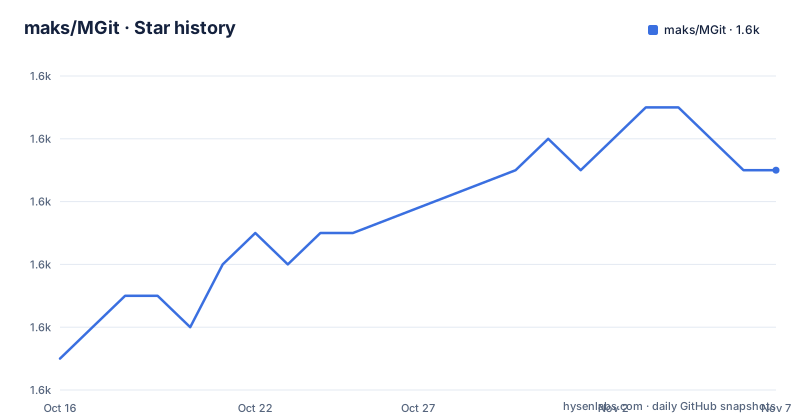
- maks/MGit1,591 ★ · +6
| Repository | 2026-10-16 | 2026-11-07 |
|---|---|---|
| maks/MGit | 1.6k | 1.6k |
6 Stars in the last 22 days, measured from the daily GitHub snapshot. Compare with other projects
Editorial analysis
MGit Repository Scope and Target Users
MGit addresses a specific gap for developers who need Git operations on Android without using a desktop client. The repository identifies the application as a Git client Android App and describes its audience through support for phones, tablets, and laptop form factors. The documented feature list covers the repository lifecycle rather than a narrow command, including creating local repositories, cloning remote repositories, importing existing repositories, browsing files, and searching local repositories.
The client is aimed at people who already understand repository workflows. It supports branches, tags, commits, staged files, merges, rebases, cherry-picks, diffs, and pushes. Authentication is available through username and password, with optional saving of those credentials, while SSH URLs can use a private key and its passphrase. That makes the application relevant to individual developers working with generic Git servers over HTTP(S) or SSH.
The project explicitly lists proprietary vendor APIs such as GitHub as a non-goal. MGit is therefore better understood as a general Git interface than as a hosted service integration with a specific vendor. The README does not document hosting dashboards, pull requests, issue management, or API-specific authentication. It also says that all branches are downloaded during a remote clone, which is a different operating model from a shallow or selective clone workflow, although the documentation does not explain whether partial history options are available.
MGit Repository Architecture and Git Operations
The repository is an Android application written primarily in Java. Its top-level layout includes `app/`, Gradle build files, settings, wrapper scripts, documentation, and GitHub configuration. The README also states that new functionality is intended to use Kotlin and Rx as part of a planned major restructure, while the existing application uses the Data Binding Library. This describes a planned development direction, not a claim that every current screen has already been rewritten.
The documented user flow is centered on a repository list and a repository detail area. A remote repository begins with a URL and a local repository name. MGit stores repositories in the same local directory by default, and that directory can be changed in settings. Once cloned, the app can browse files, inspect short commit messages, compare commits with `git diff`, view `git status`, stage modified files, and inspect the index.
The operations map closely to standard Git concepts. MGit documents branch and tag checkout, remote branch checkout, branch merging, rebasing, cherry-picking, file resets, commit creation, and push. This is a substantial command surface for a mobile client, although the README does not describe conflict resolution, hooks, submodules, worktrees, garbage collection, or repository signing. Those omissions limit what can be concluded about advanced Git workflows.
MGit Installation and First Remote Clone
The README does not provide a source-build installation command, Gradle invocation, or release archive instructions. It points users to the Google Play and F-Droid listings, so installation from those distributions is the documented path. The repository includes `gradlew`, `gradlew.bat`, `build.gradle.kts`, and `settings.gradle.kts`, but no build command is given in the README that can be copied without guessing the project configuration.
For the first real use, open the app and select the `+` icon to add a repository. Enter a remote URL, then enter a local repository name. The README warns that this is not a full path because repositories are stored together in one local directory, which can be changed in MGit settings. Press `Clone`. If the remote requires credentials, MGit can prompt for them before downloading all branches.
The documented SSH forms are:
ssh://username@server_name/path/to/repo
ssh://username@server_name:port/path/to/repo
The HTTP(S) form is:
https://server_name/path/to/repoThe username is required in an SSH URL. The README states that MGit tries to connect as root by default when no username is supplied.
MGit Local Repository Creation and File Editing
A local repository can be created without a remote. Select the `+` icon, choose `Init Local`, enter the requested name, and MGit creates an empty repository in its managed storage location. After that, the repository can receive imported content or changes made through the Android environment. The README also documents importing an existing repository copied from a computer.
File editing is intentionally external. As of version 1.5.7, MGit no longer includes an internal text editor. A separate Android editor is required, and the README identifies Viper Exit, formerly Turbo Editor, as an open source editor that has been tested to work with MGit. Other editors may work when they support File Providers, but the documentation does not guarantee compatibility with every editor or file type.
This division reduces the amount of editing code inside the Git client, but it adds an application dependency and makes file-type handling dependent on the external editor. A user who needs a self-contained editing workflow may find that boundary inconvenient. The README does not document how MGit invokes an editor, which MIME types it requests, or what happens when an editor does not return a modified file.
MGit Git History, Staging, and Branch Work
MGit exposes common repository inspection and history operations through its Android interface. The documented capabilities include browsing short commit messages, viewing `git status`, adding modified files to the stage, checking staged state, and comparing commits with `git diff`. Users can also reset a file with `git checkout <file>`, which the README describes as resetting changes to that file.
Branch operations include checking out local branches and tags, checking out remote branches, merging branches, rebasing, and cherry-picking. The application can save committer information, prompt for a password, optionally save a username and password, commit changed files, and push merged content. This sequence covers a recognizable Git loop: inspect the working tree, stage changes, commit, merge or rebase, and push.
The feature list does not explain how MGit presents conflict markers, detached HEAD, failed pushes, interrupted rebases, or rejected credentials. It also does not claim support for Git LFS, submodules, shallow history, or multiple remotes. Those are material omissions for a production workflow. The documentation is sufficient for understanding the intended command surface, but not for predicting every UI state during a failed Git operation.
MGit Protocol and Authentication Limits
MGit supports HTTP(S) and SSH, including SSH with a private key passphrase. Username and password authentication is documented, and saving credentials is optional rather than mandatory. Private key management is listed as a supported feature, which indicates that MGit has a repository-level workflow for SSH identities rather than limiting users to anonymous URLs.
The URL examples use a standard SSH port or an explicitly specified non-standard port. For HTTP(S), the README gives a generic `https://` form. It does not document certificate management, proxy configuration, custom HTTP headers, credential helpers, OAuth, or token-specific authentication. The absence of vendor API support is intentional according to the project goals, so the documented scope focuses on general Git repository operations.
The password feature also requires attention. The README says that MGit can save a username and password, but it does not describe encryption, storage location, revocation, or behavior after a password changes. Users evaluating MGit should not infer those details from the feature list. The documentation also does not state how private keys are protected on the Android device.
MGit Alternatives and Maintenance Cost
A real alternative is the desktop Git command line combined with a terminal or editor on a workstation. The difference is operating environment. MGit packages repository management into an Android application with screen-based browsing and external file editing. The README does not name a competing Android project, so a product-level comparison cannot be made from the available documentation.
MGit is licensed under GPLv3, and the README states that code written by the maintainer may, at the maintainer's option, also be used under the MIT license. That licensing statement does not itself provide legal advice, and consumers should review the repository license files for the applicable terms.
The repository is not archived. Its last push was on 2026-09-18, while the listed releases are v1.7.0 from 2023-01-02, v1.6.3 from 2022-05-10, and v1.6.2 from 2022-03-27. This release history does not by itself establish how frequently fixes will arrive. The repository layout indicates an ongoing restructuring plan, but the README does not document a migration guide, upgrade policy, or compatibility process for users moving between releases.
Editorial conclusion
MGit suits developers who want a self-contained Android interface for ordinary Git repository work, especially local repositories and remote clones over HTTP(S) or SSH. It is a poor fit for workflows that require proprietary vendor APIs or an integrated text editor. Before adopting it, verify that your repositories use supported Git protocols, that the device can provide credentials, and that an installed editor supports the file types you need.
Frequently asked questions
How do I clone a repository in MGit?
Select the `+` icon, enter the remote URL and a local repository name, then click `Clone`. MGit downloads all branches and may prompt for credentials.
Does MGit include a text editor?
No. As of version 1.5.7, file editing is handled by an external Android editor. The README identifies Viper Exit, formerly Turbo Editor, as a tested option.
Which Git protocols does MGit support?
MGit supports HTTP(S) and SSH. SSH can use a private key passphrase, and the documented URL syntax supports standard and non-standard SSH ports.
Does MGit support GitHub-specific features?
The README lists proprietary vendor APIs, including GitHub, as a project non-goal. Its documented feature set focuses on general Git repository operations rather than vendor API integration.
Official sources
Add this badge to your README
If you maintain this project, the badge below links readers to this analysis and shows its maintenance status from the daily GitHub snapshot. Paste the markdown into your README; add ?metric=license or ?metric=stars to the image URL for a different field.

[](https://hysenlabs.com/projects/maks-mgit)Star history chart for your README
[](https://hysenlabs.com/projects/maks-mgit)Was this useful?