nix-output-monitor for readable Nix builds
Pipe your nix-build output through the nix-output-monitor a.k.a nom to get additional information while building.
At a glance
- What is it?
- nix-output-monitor, or nom, wraps supported Nix commands and parses JSON build logs into a live dependency tree. It improves status visibility but adds parsing assumptions, terminal constraints, and sometimes duplicate evaluation work.
- Who is it for?
- Developers should adopt nom when a live build tree is worth the wrapper's parsing and terminal constraints, especially when internal JSON logs are available. Operators should avoid it for unsupported Nix commands, highly customized Nix stores, or workflows where duplicate evaluation is unacceptable.
- Can I use it commercially?
- Not without permission. GitHub finds no licence file in the repository, and without a licence all rights are reserved by default: you may read the code but not reuse it. Check the README, or ask the authors, before using it.
- Is it still maintained?
- Yes. The repository last received commits 19 days ago.
- What is it written in?
- Mainly Haskell, according to GitHub's language statistics.
Answers come from the project's GitHub data, last synced on November 7, 2026, and from our analysis. They are not legal advice.
Star history
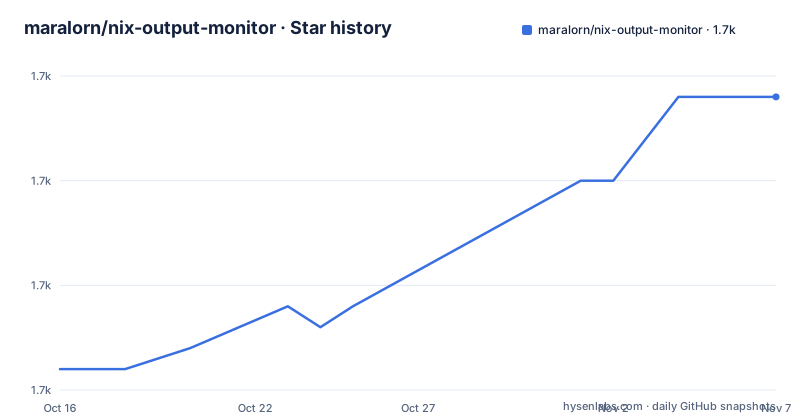
- maralorn/nix-output-monitor1,694 ★ · +13
| Repository | 2026-10-16 | 2026-11-07 |
|---|---|---|
| maralorn/nix-output-monitor | 1.7k | 1.7k |
13 Stars in the last 22 days, measured from the daily GitHub snapshot. Compare with other projects
Editorial analysis
Why nom wraps Nix build commands
nix-output-monitor addresses a visibility problem in Nix builds. Nix can emit many status lines while evaluating derivations, downloading sources, waiting for remote work, and producing results, but those lines do not always present the overall operation as a compact dependency tree. nom sits between a supported Nix command and the terminal. Beginning with version 2.0, the `nom` executable can stand in for `nix` for three commands: `build`, `shell`, and `develop`. It also provides `nom-build` and `nom-shell` aliases for the corresponding Nix v1 commands.
The intended users are Nix and NixOS developers who run builds long enough to benefit from persistent status information, or who work with remote builders where distinguishing active builds from waiting transfers matters. The display associates a derivation with its direct dependencies and uses colors, running times, median durations from recent builds, and a summary across packages and hosts.
This is an output monitor, not a replacement build engine. Nix remains responsible for evaluation, fetching, building, and returning an exit status. nom parses what Nix reports and redraws the terminal as the operation proceeds. That division makes it useful when raw build logs are difficult to scan, but it also means the quality of the display depends on how accurately Nix communicates each stage.
How nom turns Nix logs into a live tree
The preferred integration asks Nix for internal JSON logs and pipes both standard output and standard error into nom with `--json`. For `nix build`, the more direct interface is `nom build <args>`, which the README describes as behaving like `nix build <args>`. The project also supports human-readable parsing when JSON cannot be enabled, but explicitly recommends JSON because it supplies more informative output.
The dependency graph represents each derivation as an entry. Its children are direct dependencies, and nom selects a relevant portion intended to occupy roughly one third of the terminal. A build appears only at its lowermost displayed dependency, which helps prevent duplicate entries. The display tries to retain running and failed work, downloads, and uploads, although it does not print every direct child.
Status is encoded visually through colors. Running builds, completed builds, planned builds, and failures each have distinct color treatment. Downloads and uploads add directional indicators, while running time receives its own marker. The interface also displays the median duration of the previous 10 builds for derivations with the same name after the hash, followed by a summary across packages and hosts.
According to the implementation description, nom combines four information sources. It parses JSON or human-readable Nix output, checks the Nix store for build results in human-readable mode, queries `.drv` files for the `out` output path, and caches timing data in `$XDG_STATE_HOME/nix-output-monitor/build-reports.csv`.
Installing nom and running the first build
The nixpkgs route is the shortest documented installation path. The package attribute is `pkgs.nix-output-monitor`; the README notes that `nixos-unstable` may provide a newer version. Installation should use the reader's normal nixpkgs method because the project does not prescribe a separate operating-system package command.
For a checkout, the documented Cabal installation requires `cabal-install`:
cabal installThis command runs in the checked-out repository. The README also says that the project can be built with Nix, installed with `nix-env`, or included through its flake output in a NixOS configuration.
nix buildAfter nom is installed, use `nom` in place of `nix` for the supported modern commands. For example, this asks nom to behave like `nix build` while presenting monitored output:
nom buildFor the older `nix-build` path, the documented JSON pipeline is:
nix-build --log-format internal-json -v |& nom --jsonThe `|&` operator is significant because it redirects stderr as well as stdout. If the same Nix command is invoked through an installed symlink, the documented form is `nom-build <args>`.
A practical first check is the terminal rendering. Missing symbols may indicate that the selected font does not include them. The README recommends a Nerd Font such as `pkgs.nerdfonts` and lists `pkgs.foot` as a preferred terminal choice, while noting that terminal behavior varies.
Modern command wrappers and their evaluation cost
The direct `nom build <args>`, `nom shell <args>`, and `nom develop <args>` commands cover the modern Nix operations documented by the project. The latter two have an implementation trade-off that users should notice. nom calls `nix shell` or `nix develop` twice: the first invocation overrides `--run exit` and monitors its output, while the second invocation passes output through to the user.
That design exists to acquire the JSON operation data, but it doubles evaluation time, as the README states. It may still be acceptable when evaluation is quick or the added visibility matters, but it is the wrong choice for a costly evaluation path where invoking Nix twice is inconvenient. `nom build` is described without this doubled evaluation behavior.
The aliases `nom-build` and `nom-shell` use the JSON-based approach and propagate error codes. That error propagation matters in scripts because a presentation wrapper should not disguise a failed Nix operation as success. nom also passes through human-readable content it does not understand, which makes human-mode piping usable with tools such as `nixos-rebuild` or `home-manager`, provided those tools cannot be given `--log-format internal-json -v`.
Only the listed commands are documented as drop-in operations. The README says to open an issue for other Nix commands, so treating nom as a general replacement for every `nix` subcommand would go beyond the documented support boundary.
Human-readable parsing when JSON is unavailable
Nom can parse ordinary Nix output instead of internal JSON. The documented pipeline redirects both streams because relevant Nix status information may be written to stderr:
nix-build |& nomThis mode has two practical benefits. It works with surrounding tools such as `nixos-rebuild` and `home-manager` when adding the required Nix flags is not straightforward, and it preserves unrecognized input instead of discarding it. That pass-through behavior makes it easier to place nom around a script that emits more than Nix status lines.
The project nevertheless recommends `--log-format internal-json -v` or the provided aliases because JSON mode gives more information. Human-readable mode also checks the Nix store for build results and relies more heavily on parsing log wording. The README warns that its parser may be too strict or too loose for situations its author did not anticipate. As a result, a display that looks plausible can still be incomplete or misclassified.
Color handling is another difference between the two modes. Colored text works as expected in JSON mode. In human-readable mode, the README gives an `unbuffer` command from the `expect` package:
unbuffer nix-build |& nomThis is intended to preserve color from redirected text. The pipe syntax remains `|&`, so omitting stderr redirection would discard input that the monitor expects to inspect.
Terminal, store, and parser constraints
The largest technical constraint is nom's terminal presentation. It repeatedly clears and redraws output, and the README says this is brittle with some terminals and terminal widths. Symbol visibility also depends on font coverage. Neither JSON mode nor human-readable mode removes the final act of rendering a dynamic graph in a terminal.
The implementation also assumes that the Nix store is at `/nix/store`. Projects or operators using a different store layout would need to test that assumption before adopting the monitor. Human-readable mode adds parser risk because it infers state from textual output. JSON mode reduces that specific parsing problem, but it does not resolve every display or Nix-version issue.
There is a documented warning that the displayed build tree may be incomplete when `nix build` is used with Nix versions older than 2.10. The README also notes that remote work can appear to be running when it is actually waiting for uploads or downloads, because that is how Nix reports the state. This is not nom inventing activity, but it is still a limitation for users who need exact remote-worker interpretation.
The limitations section states that failures may occur in expected and unexpected ways. Its reassurance is bounded: the author does not expect the program to damage anything beyond the terminal. That is not a substitute for testing nom in CI logs, constrained terminal widths, custom Nix configurations, or scripts that depend on precise stderr content.
Raw Nix output as the lower-complexity alternative
The direct alternative is to run Nix without nom and accept its standard output and error log. This removes the log parser, live tree renderer, terminal redraw behavior, timing cache, and doubled evaluation used by `nom shell` and `nom develop`. It is also the safer fit for an automated environment where the terminal does not support interactive redraws.
The practical difference is visibility rather than build correctness. nom turns Nix's activity stream into a dependency-oriented display, adds timing context, and continues passing through input it does not understand. Raw Nix output preserves the original messages but requires the reader to interpret activity across many log lines. The choice is therefore between a simpler direct invocation and a monitored interface whose extra information comes with parser and terminal dependencies.
Maintenance metadata shows that the repository is not archived and that its last push was on 2026-08-28. The listed releases are older, with `v2.0.0.0` dated 2022-10-15 and `v1.1.3.0` dated 2022-03-21. The README says releases and sources are available from `code.maralorn.de`, and that executable behavior follows SemVer starting with version 2.1.0. It gives no stability guarantee for the Cabal library component. No license is identified in the repository metadata, so redistribution and dependency implications cannot be determined from the available project documentation.
Editorial conclusion
Developers should adopt nom when a live build tree is worth the wrapper's parsing and terminal constraints, especially when internal JSON logs are available. Operators should avoid it for unsupported Nix commands, highly customized Nix stores, or workflows where duplicate evaluation is unacceptable. Before adoption, verify that the installed nom version supports the required Nix command, confirm whether build results are written to `$XDG_STATE_HOME/nix-output-monitor/build-reports.csv`, and test the chosen terminal and font.
Frequently asked questions
How do I install nix-output-monitor?
The README lists three installation routes: `pkgs.nix-output-monitor` from nixpkgs, `cabal install` in a checkout, or installation through Nix and the repository's flake output.
Which Nix commands can nom run?
The documented modern commands are `nom build`, `nom shell`, and `nom develop`. The `nom-build` and `nom-shell` aliases cover `nix-build` and `nix-shell`, but other Nix commands are not documented as supported.
Should I use nix-output-monitor with JSON or human-readable logs?
The README recommends `--log-format internal-json -v` with `nom --json` because it provides more informative output. Human-readable mode is available for cases where JSON cannot be enabled, but it depends more heavily on log parsing.
Official sources
Add this badge to your README
If you maintain this project, the badge below links readers to this analysis and shows its maintenance status from the daily GitHub snapshot. Paste the markdown into your README; add ?metric=license or ?metric=stars to the image URL for a different field.

[](https://hysenlabs.com/projects/maralorn-nix-output-monitor)Star history chart for your README
[](https://hysenlabs.com/projects/maralorn-nix-output-monitor)Was this useful?