handcalcs: rendering Python calculations as hand-written LaTeX in Jupyter
Python library for converting Python calculations into rendered latex.
At a glance
- What is it?
- handcalcs turns Python calculation code into LaTeX that shows the symbolic formula, the numeric substitution and the result. It is built for engineers who need their arithmetic to be checkable by eye, and it works as a Jupyter cell magic or a function decorator.
- Who is it for?
- Adopt handcalcs if your calculations live in Jupyter notebooks or plain Python functions and someone else has to verify the arithmetic by hand, which is the case for most structural and mechanical design work. Skip it if your output is a chart, a simulation trace or a dataframe where nobody reads the intermediate steps; the LaTeX rendering adds nothing there.
- Can I use it commercially?
- Yes. Apache-2.0 is a permissive licence: you can use, modify and sell software built on it, as long as you keep its copyright and licence notices.
- Is it still maintained?
- Yes. The repository last received commits 1 day ago.
- What is it written in?
- Mainly CSS, according to GitHub's language statistics.
Answers come from the project's GitHub data, last synced on November 15, 2026, and from our analysis. They are not legal advice.
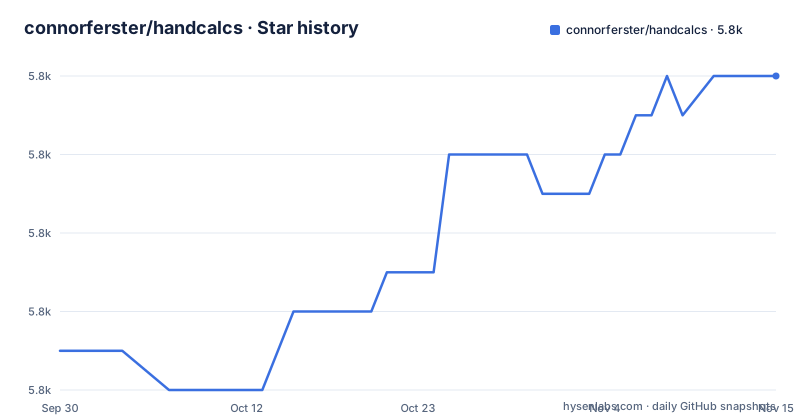
Star history
- connorferster/handcalcs5,812 ★ · +7
| Repository | 2026-09-30 | 2026-11-15 |
|---|---|---|
| connorferster/handcalcs | 5.8k | 5.8k |
7 Stars in the last 46 days, measured from the daily GitHub snapshot. Compare with other projects
Editorial analysis
The problem handcalcs solves for engineers who must show their work
A Python script computes a beam deflection and prints 12.4. Nobody can check that number without redoing the algebra. The value is correct or it is not, and the script gives no evidence either way. handcalcs exists to close that gap: it renders the calculation so the symbolic formula appears first, then the same formula with the numbers substituted, then the result. The README describes the goal as formatting a calculation "as though you wrote them by hand", and states that because the substitution step is shown, anyone can check the calculation by hand.
The audience is narrow and specific. The README's disclaimer names design engineering calculations, and its example computes a hypotenuse from site-drawing measurements. If your work product is a design calculation that a reviewer, a checker or a regulator will read line by line, the rendered form is the deliverable, not a side effect. If your work product is a model, a plot or a service, handcalcs is the wrong layer to invest in.
How the rendering pipeline works: cell magic, decorator and the LaTeX it emits
The first entry point is a Jupyter cell magic: import handcalcs once, then start any cell with %%render. From a script, HandCalcs takes a renderer, such as LatexRenderer from handcalcs.renderers, and renders a string or a .py file. On a function, @handcalc(renderer) returns the result and the rendered calculation.
The README describes handcalcs 2 as a rewrite around a parsed node tree and pluggable renderers. The runtime dependencies in pyproject.toml are innerscope, jinja2, pfst and platformdirs. There is no symbolic math engine in the dependency list, so the substitution you see is the numeric evaluation of the expression, formatted next to its unevaluated form.
In handcalcs 2, options move from %%render arguments to # hc: comment commands.
Installing handcalcs and rendering your first calculation
The package installs from PyPI. handcalcs 2.0 is a release candidate, so the README asks for it by version: a plain pip install handcalcs installs 1.x, and the README's command is pip install "handcalcs>=2.0.0rc2". Python 3.11 or newer is required.
pip install handcalcsThe exporters extra adds Jupyter export options and resolves to nb-hideinputs in pyproject.toml; the excel and word extras add the Excel and Word renderers.
pip install "handcalcs[exporters]"Once installed, the shortest path is a Jupyter cell. Import handcalcs once, then start a cell with %%render.
import handcalcs%%render
a = 2
b = 3
c = 2*a + b/3What you should see is the typeset calculation in place of the code cell output: the three assignments with their substituted values and the result for c.
For code that is not in a notebook, render a string or a .py file with any renderer; on a function, @handcalc(renderer) returns the result and the rendered calculation.
import pathlib
from handcalcs import HandCalcs
from handcalcs.renderers import LatexRenderer

latex = HandCalcs(LatexRenderer())(pathlib.Path("beam.py"))
Where handcalcs breaks down or is the wrong tool
The rendering is a source transformation, not a symbolic solver. The substitution shown next to each formula is the numeric value of that expression, so a calculation whose meaning depends on algebraic manipulation (cancelling terms, solving for an unknown, rearranging an inequality) will not be presented that way. You get what the Python evaluated, annotated with the expression text.
The README has a "Gotchas" section, which is a fair signal that the translation has edges. The dependency list is the other signal: there is no unit library among the runtime dependencies. pint and forallpeople appear only in the test dependency group in pyproject.toml, so they are used to test handcalcs, not required by it. Whether a quantity object renders with its units intact is therefore not something the README documents, and you should not assume it. If your calculations are dimensioned, verify that path in a throwaway notebook before you build anything on top of it.
One constraint the README calls out matters in practice: Jupyter cells can run out of order, and because handcalcs looks up values in the notebook's namespace, a cell run out of order with re-used variable names can render a beautiful but completely incorrect calculation. Run the notebook top to bottom before you rely on it.
handcalcs compared with SymPy and forallpeople
SymPy is the obvious comparison and the difference is one of purpose. SymPy is a computer algebra system: you build symbolic expressions, manipulate them, solve them, and it can print LaTeX. handcalcs takes the opposite route. You write ordinary Python that evaluates to numbers, and handcalcs recovers a readable LaTeX form of that code with the numeric substitution shown. SymPy can rearrange an equation for you; handcalcs shows you the equation you already wrote, with the numbers filled in. If your problem is "solve for x", SymPy is the tool. If your problem is "show the reviewer every step of how x was computed", handcalcs is.
forallpeople is a units library and appears in the test dependency group of pyproject.toml, which shows the two are used together in testing. They are not alternatives: forallpeople handles dimensional quantities, handcalcs handles presentation. The pairing is the natural setup for a dimensioned calculation, but note again that the README does not spell out the integration, so the combination is something you confirm rather than something you are promised.
A third point of comparison is the plain f-string or a hand-written Markdown cell. That costs nothing and needs no dependency, and for a calculation you will never re-run it is the honest choice. handcalcs pays off when the calculation is parameterised and re-run, because the rendered output updates with the code and cannot drift out of sync with the numbers the way a manually typed document does.
Maintenance, licence and what an upgrade costs
The repository is not archived, and the last push was on 2026-10-30. The most recent releases listed are the pre-releases v2.0.0rc2 from 2026-10-29 and v2.0.0rc1 from 2026-10-24, following v1.11.0 from 2026-01-23. The release titles are informal (v1.11.0 is labelled "I shoulda done this a while ago"), which is consistent with a small, single-maintainer project rather than a release-managed product. The runtime dependency set is small: innerscope>=0.8.0, jinja2>=3.1.6, pfst>=0.3.2,<0.4 and platformdirs>=3.0.0. pfst is the one to watch, since pyproject.toml notes that as a 0.x package its API may change between minor versions.
The main upgrade cost is the move from 1.x: the README describes handcalcs 2 as a rewrite around a parsed node tree and pluggable renderers, and says most notebooks need only a few changes: import handcalcs instead of import handcalcs.render, and # hc: comment commands instead of %%render arguments.
Licensing is Apache-2.0, declared in pyproject.toml as the classifier "License :: OSI Approved :: Apache Software License" and shipped as a LICENSE file at the repository root. Apache-2.0 is permissive and includes an explicit patent grant, which matters if you are embedding the library in a commercial engineering toolchain. It is not a copyleft licence, so it does not force you to publish your own calculation code. That is the extent of what the repository states; for anything beyond it, read the LICENSE file itself.
Editorial conclusion
Adopt handcalcs if your calculations live in Jupyter notebooks or plain Python functions and someone else has to verify the arithmetic by hand, which is the case for most structural and mechanical design work. Skip it if your output is a chart, a simulation trace or a dataframe where nobody reads the intermediate steps; the LaTeX rendering adds nothing there. Before committing, check one thing: whether your unit library survives the round trip, since the project lists pint and forallpeople only in its test dependency group and the README does not document unit handling. Run a single decorated function with your units attached and read the rendered substitution before you rewrite a real calculation sheet.
Frequently asked questions
What are hand calcs?
In this project the term describes a calculation presented the way it would be written by hand: the symbolic formula, then the same formula with the numbers substituted, then the result. handcalcs renders Python code in that form through renderers such as Markdown, LaTeX, HTML and ASCII text, and the README states that because the substitution step is shown, anyone can check the calculation by hand.
How do you do hand calculations?
With handcalcs you write ordinary Python that evaluates to numbers, either in a Jupyter cell prefixed with %%render or on a function with @handcalc(renderer), and the library renders the formula, the substitution and the result. The README describes this as Python calculations, as though you wrote them by hand.
How do I install handcalcs?
The README gives pip install "handcalcs>=2.0.0rc2" for the 2.0 release candidate, since a plain pip install handcalcs installs 1.x; Python 3.11 or newer is required. Extras add the Excel and Word renderers (handcalcs[excel], handcalcs[word]) and Jupyter export options (handcalcs[exporters]).
Can handcalcs be used outside Jupyter?
Yes. From a script you can render a string or a .py file with any renderer, and on a function @handcalc(renderer) returns the result and the rendered calculation. Renderers include HTML for web pages and ASCII text for terminals and logs.
Official sources
Add this badge to your README
If you maintain this project, the badge below links readers to this analysis and shows its maintenance status from the daily GitHub snapshot. Paste the markdown into your README; add ?metric=license or ?metric=stars to the image URL for a different field.

[](https://hysenlabs.com/projects/connorferster-handcalcs)Star history chart for your README
[](https://hysenlabs.com/projects/connorferster-handcalcs)Was this useful?