Sidecar: A TUI Hub for CLI Agents, Diffs, and Task Tracking
Use sidecar next to CLI agents for diffs, file trees, conversation history, and task management with td
At a glance
- What is it?
- Sidecar is a Go-based terminal UI that wraps CLI coding agents with split panes for diffs, files, and TD task tracking. It is ready for daily use but demands tmux and a willingness to live in the shell.
- Who is it for?
- Adopt Sidecar if you already run CLI agents like Claude Code or Codex and want a unified terminal workspace without leaving the shell. Skip it if you prefer a GUI editor or if your team does not use TD for task tracking.
- Can I use it commercially?
- Yes. MIT is a permissive licence: you can use, modify and sell software built on it, as long as you keep its copyright and licence notices.
- Is it still maintained?
- Yes. The repository last received commits 22 days ago.
- What is it written in?
- Mainly Go, according to GitHub's language statistics.
Answers come from the project's GitHub data, last synced on October 4, 2026, and from our analysis. They are not legal advice.
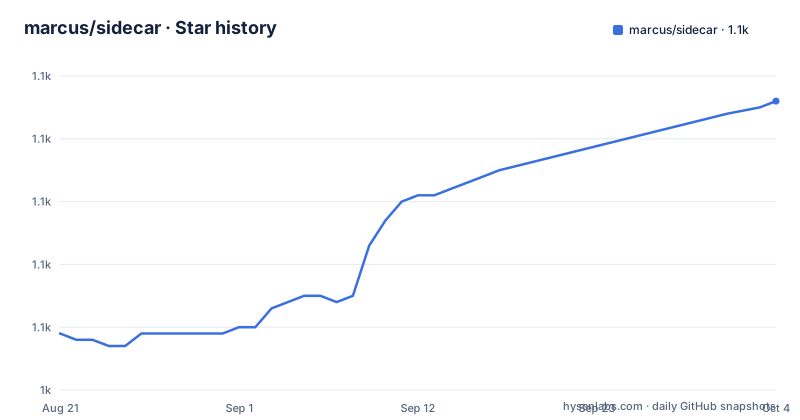
Star history
- marcus/sidecar1,086 ★ · +37
| Repository | 2026-08-21 | 2026-10-04 |
|---|---|---|
| marcus/sidecar | 1k | 1.1k |
37 Stars in the last 44 days, measured from the daily GitHub snapshot. Compare with other projects
Editorial analysis
What Sidecar Actually Solves
Sidecar targets a specific pain: developers who run CLI coding agents (Claude Code, Codex, Gemini, Cursor, OpenCode, Pi) in a terminal and need to see diffs, files, and task state without alt-tabbing to an editor. The README's tagline, 'You might never open your editor again,' is the pitch. Instead of splitting your terminal emulator horizontally, Sidecar gives you an embedded terminal with split panes for git diffs, a file browser, and a monitor for TD tasks. It is for people who already live in the shell and use TD, a task system designed for AI agents that work across context windows. If you do not use TD or do not run agents from a terminal, Sidecar solves a problem you do not have.
How Sidecar Works: tmux, Plugins, and Split Panes
The architecture is a Go binary that runs as a terminal user interface (TUI) with a plugin system. The core is a workspace that hosts embedded interactive terminals, which the README says have 'full tmux integration.' That integration is the foundation: tmux provides the terminal multiplexing, and Sidecar layers split panes on top. You open targets with `sidecar open`, which accepts file paths with line numbers, TD issue IDs, `--diff` for the current git diff, or provider resources like Jira and GitHub issues. Those open in split panes beside the terminal. The Sessions screen aggregates agent activity across all configured projects, categorized by status like Needs Attention or Working. The Git plugin auto-refreshes on file system changes and shows syntax-highlighted diffs. The design is modular, with plugins for workspaces, git, TD, and files, each with its own documentation. The data flow is straightforward: Sidecar watches the file system, reads git state, and queries TD, then renders that in the TUI.
Getting Sidecar Running: Commands and Configuration
Installation is simple. On macOS, `brew install marcus/tap/sidecar` builds from source to avoid Gatekeeper warnings. On Linux or WSL, the one-liner `curl -fsSL https://raw.githubusercontent.com/marcus/sidecar/main/scripts/setup.sh | bash` downloads and runs a script. You need Go 1.26+ only if building from source. After install, run `sidecar` from any project directory. You can specify a project root with `--project /path/to/project`. For configuration, `sidecar setup` opens the in-app Configuration UI directly on the Setup page. That page runs system readiness checks for tmux version, truecolor support, project roots, and `AGENTS.md` instructions, with one-key repairs. Projects are stored in `~/.config/sidecar/config.json`, and you can add them manually or via the UI. The project switcher, triggered with `@`, lets you switch between configured projects without restarting. The README shows a config snippet with a `projects.list` array, each entry having a `name` and `path`. Debug logging is available with `--debug`, and `--version` prints the version.
Limitations and Failure Modes
The most obvious limitation is the dependency on tmux. The README lists tmux version as a readiness check, and the embedded terminal relies on it. If your tmux is old or missing truecolor support, the interface may degrade or fail. The README does not state minimum tmux versions, so you must verify that yourself. Another limitation is the keybinding-heavy workflow. The README lists single-key shortcuts like `ctrl+n` for new shells, `n`/`D` for worktrees, `a` to launch agents, `m` for merge, `8` for Sessions, `,` for configuration, and `@` for project switching. That is a lot to remember, and the README gives no cheat sheet. The tool is also wrong for you if you do not use TD. The TD Monitor is a core feature, but if your team uses a different tracker, that pane is dead weight. Finally, Sidecar is a TUI, so it has no GUI. If you prefer a mouse-driven editor or need visual diff tools beyond side-by-side text, this is not the tool.
Alternatives: tmux and Editor Plugins
The closest alternative is plain tmux with your own setup. You can run Claude Code in one pane, `git diff` in another, and `td` in a third, using tmux's built-in split and resize commands. That approach is more manual but has no dependency on Sidecar's specific keybindings or update cycle. Another alternative is an editor plugin, like the VS Code or Neovim extensions for Claude Code or Codex, which give you diffs and file trees in a GUI. The difference in approach is fundamental: tmux is a general multiplexer with no knowledge of agents or TD, while Sidecar is purpose-built for that workflow. Editor plugins integrate with a GUI but pull you out of the shell. Sidecar tries to keep you in the terminal while adding agent-specific conveniences like the Sessions screen and TD Monitor. If you already have a tuned tmux setup, Sidecar may not be worth the switch.
Maintenance, Updates, and License
Sidecar checks for updates on startup and shows a toast notification when a new version exists. Pressing `!` opens a diagnostics modal that shows the update command. The release cadence is active: v1.10.0 came on 2026-08-28, with v1.9.0 and v1.8.0 on the previous two days. That suggests rapid iteration, which is good for bug fixes but means you should expect frequent changes. The project is not archived, and the README says it is 'Ready for daily use' and asks users to report issues on GitHub. The license is MIT, which allows free use, modification, and distribution with attribution. No enterprise support is mentioned; you rely on the community and the author. The update mechanism is a toast, not an auto-update, so you must manually apply updates. That is a low maintenance cost, but you should check the diagnostics modal regularly to stay current.
Editorial conclusion
Adopt Sidecar if you already run CLI agents like Claude Code or Codex and want a unified terminal workspace without leaving the shell. Skip it if you prefer a GUI editor or if your team does not use TD for task tracking. Before adopting, verify that your tmux version supports truecolor, that your project roots are correctly configured, and that you can tolerate the keybinding-heavy workflow. Check the in-app diagnostics with `sidecar setup` to confirm readiness.
Frequently asked questions
What is Sidecar?
A Go terminal application for working alongside AI coding agents. It embeds interactive terminals with full tmux integration, opens task issues, files, git diffs and Jira or GitHub resources in split panes beside them, monitors agent sessions across every configured project, and adds a git status view, a file browser, a task monitor and an in-app configuration interface with system readiness checks.
How do I install Sidecar?
On macOS the recommended route is a Homebrew tap install, which builds from source and avoids Gatekeeper warnings on the prebuilt binaries. On Linux and other systems a setup script is fetched and piped to bash. Binary downloads and a manual install guide are also linked. It needs macOS, Linux or WSL, and a Go toolchain if you build from source.
How do I open a file, diff or ticket beside the terminal?
With the open subcommand: a path with a line number opens a file, a task identifier opens a task, a diff flag opens the diff, and a provider flag with a project key or a repository and issue number opens a Jira or GitHub resource in the pane. Pane layouts can be read as JSON and applied with a pane specification through the layout subcommand.
How does Sidecar handle updates?
It checks for updates on startup and posts a toast when a new version exists, with a key that opens a diagnostics modal showing the update command. Builds made outside the managed install path are deliberately left without a version stamp so that the version reader does not treat them as current releases and does not stop offering updates.
What does Sidecar check when you first run it?
The first configuration page runs system readiness checks covering the tmux version, truecolor support, the configured project roots and the presence of agent instruction files, and it offers one key guided repairs for what fails. That list reflects the dependencies: the embedded terminal is a real terminal with tmux integration, mouse scrolling and native text selection.
Official sources
Add this badge to your README
If you maintain this project, the badge below links readers to this analysis and shows its maintenance status from the daily GitHub snapshot. Paste the markdown into your README; add ?metric=license or ?metric=stars to the image URL for a different field.

[](https://hysenlabs.com/projects/marcus-sidecar)Star history chart for your README
[](https://hysenlabs.com/projects/marcus-sidecar)