Marko: HTML as the component language, with a compiler and runtime split across packages
A declarative, HTML-based language that makes building web apps fun
At a glance
- What is it?
- Marko extends HTML with tag variables, conditionals, loops and a reactivity system, and ships as a pnpm monorepo whose compiler and runtime carry separate version lines. It is a good fit if you want to write UI in near-HTML syntax and accept a compile step and a docs-site dependency.
- Who is it for?
- Marko is a sound choice for teams who want components written in something close to plain HTML, with state declared by tags like <let> and handlers written inline, and who are comfortable with a compiler in the build. It is a poor fit if you need arbitrary existing HTML to work untouched or want a framework whose whole story lives in one README.
- Can I use it commercially?
- Yes. MIT is a permissive licence: you can use, modify and sell software built on it, as long as you keep its copyright and licence notices.
- Is it still maintained?
- Yes. The repository received new commits within the last day.
- What is it written in?
- Mainly JavaScript, according to GitHub's language statistics.
Answers come from the project's GitHub data, last synced on November 15, 2026, and from our analysis. They are not legal advice.
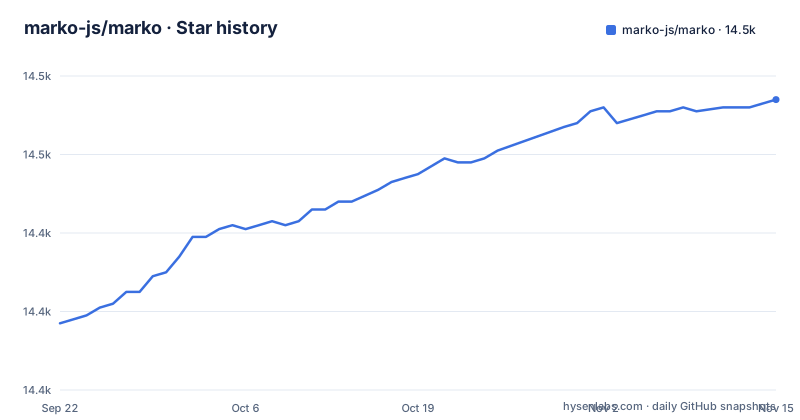
Star history
- marko-js/marko14,474 ★ · +57
| Repository | 2026-09-22 | 2026-11-15 |
|---|---|---|
| marko-js/marko | 14.4k | 14.5k |
57 Stars in the last 54 days, measured from the daily GitHub snapshot. Compare with other projects
Editorial analysis
HTML extended with components, conditionals, loops and reactivity
Marko starts from the claim that almost any valid HTML is valid Marko. On top of that markup it adds four things: custom tags that act as components, core tags for if and else branches, core tags for for loops, and a reactivity system that updates the page when declared state changes. The language reference for each of these lives on markojs.com under the custom tag, core tag and reactivity pages.
The practical effect is that a Marko file reads like a template rather than like JavaScript that returns markup. Logic is expressed as tags placed in the document, so the structure of the file mirrors the structure of the output. For teams whose designers or backend developers already think in HTML, that lowers the distance between a static mockup and a working component. The cost is that this is still a language with its own grammar, and it has to be compiled before a browser or server can use it.
Tag variables and inline handlers in click-count.marko
The canonical example is a counter in a file named click-count.marko:
<let/count=0>
<button onClick() { count++ }>
  Clicked ${count} times
</button>
Three pieces of syntax carry the whole component. `<let/count=0>` declares a piece of state with the tag variable syntax, the slash binding the name count to the tag and the value 0 as its starting point. `onClick() { count++ }` is an attribute written as a method body, so the event handler sits on the element it belongs to instead of in a separate script block. `${count}` interpolates the current value into the text. When the button is pressed the handler increments count and the reactivity system rerenders the text. There is no import, no export and no wrapper function in the file: the file name is what identifies the component.
Almost any HTML is not every HTML file
The project is careful to say almost any valid HTML is valid Marko, not all of it. Because Marko gives meaning to things plain HTML leaves alone, such as a slash after a tag name or a brace-delimited body on an attribute, some markup that a browser accepts can be read differently once it is in a .marko file. If you plan to migrate an existing site by renaming its HTML files, expect to review each one rather than assume it will compile unchanged.
The same applies to tooling. An editor or formatter that understands HTML does not automatically understand `<let/count=0>` or an `onClick()` attribute with a function body. Marko-aware tooling is part of the cost of adopting the language, and checking that your editor and linters support .marko files belongs in the evaluation, before a team commits to it.
Compiler 5.x and runtime-tags 6.x are released separately
The repository publishes several npm packages from one tree, and they do not share a version number. On 2026-11-02 it released @marko/[email protected] and @marko/[email protected] within minutes of each other, after @marko/[email protected] on 2026-10-29. A runtime at 6.4 next to a compiler at 5.42 means you cannot answer which Marko version you are on with one number.
For a project this matters when you pin dependencies or read a bug report: you need to record the compiler and the runtime separately, and when you upgrade one you should check the release notes of the other. The release flow in package.json uses changesets, with a dedicated `@ci:release-alias` step that runs scripts/publish-alias.mts, so aliased package names are part of how releases go out as well.
Starting a project goes through npm init marko and the docs site
The getting-started path is two steps. First run the initializer:
npm init markoThen read the getting-started guide at markojs.com/docs/introduction/getting-started. There is also a browser playground at markojs.com/playground for trying syntax without installing anything.
The consequence is that the repository front page is a pointer, not a manual. Beyond the counter example and the initializer, the language reference for components, conditionals, loops and reactivity is linked out to markojs.com, so plan to work from the docs site when building a real application and to use the GitHub repository for issues, source and pull requests. Questions go to the Discord server.
A pnpm workspace with snapshot tests and tracked bundle sizes
Contributors work in a pnpm monorepo: pnpm-workspace.yaml and pnpm-lock.yaml sit at the root next to a packages/ directory, and the build script runs `pnpm -r --if-present run build` across every package before building TypeScript types with `tsc -b tsconfig.build.json`. The release script reinstalls with `pnpm install --frozen-lockfile`, so changes that touch dependencies need the pnpm lockfile updated too.
Tests run through `node scripts/test-parallel.js`, with a serial Mocha alternative. Expected outputs are stored and regenerated by setting UPDATE_EXPECTATIONS=1, so a compiler change often means reviewing updated snapshot files rather than hand-written assertions. Coverage goes through zcov, linting and formatting through oxlint and oxfmt, and a `compile` script runs scripts/inspect-compiled-output.mts to show what the compiler emits. The root also holds .sizes.json and a `build:sizes` script, which signals that bundle size is checked as part of development.
Agent guidance files ship in the repository root
Alongside the usual LICENSE, SECURITY.md and contribution guidelines, the root of the repository contains AGENTS.md, CLAUDE.md, CONTEXT-MAP.md, a skills/ directory and an agent-feedback/ directory. These sit at the same level as the packages, so anyone using a coding assistant on the codebase will have project-provided context loaded alongside the source.
The project also lists an OpenSSF best practices badge, runs CI through GitHub Actions with Codecov coverage, and asks participants to follow the eBay Code of Conduct. Support runs through a Discord server, Bluesky at @markojs.com, and the @MarkoDevTeam account on X. With commits on 2026-11-02 and multiple package releases in the previous week, the project is under active development.
Editorial conclusion
Marko is a sound choice for teams who want components written in something close to plain HTML, with state declared by tags like <let> and handlers written inline, and who are comfortable with a compiler in the build. It is a poor fit if you need arbitrary existing HTML to work untouched or want a framework whose whole story lives in one README. Before adopting it, read the getting-started guide on markojs.com and pin both the @marko/compiler and @marko/runtime-tags versions you install, since they are released on different version lines.
Frequently asked questions
What is Marko?
Marko is an MIT-licensed, HTML-based language for building dynamic and reactive user interfaces. Almost any valid HTML is valid Marko, and it adds components, conditionals, loops and a reactivity system.
How do I start a new Marko project?
Run npm init marko, then follow the getting-started guide on markojs.com. The playground at markojs.com/playground lets you try the syntax in a browser first.
Is Marko still maintained?
Yes. The repository was pushed on 2026-11-02, the same day @marko/runtime-tags 6.4.8 and @marko/compiler 5.42.14 were released.
Official sources
Where developers are discussing it
Posts on Hacker News, dev.to and Lobsters that link to this repository, found by our scan of those communities. 1 in the last 30 days; newest first.
- Markojs – declarative, HTML-based language that makes building web apps funHacker News · Oct 26, 2026 · 1 points · 2 comments
Add this badge to your README
If you maintain this project, the badge below links readers to this analysis and shows its maintenance status from the daily GitHub snapshot. Paste the markdown into your README; add ?metric=license or ?metric=stars to the image URL for a different field.

[](https://hysenlabs.com/projects/marko-js-marko)Star history chart for your README
[](https://hysenlabs.com/projects/marko-js-marko)Was this useful?