i18n-node: A Minimal Translation Layer That Writes Your Locale Files for You
GitHub describes it as Lightweight simple translation module for node.js / express.js with dynamic json storage. Uses common ('...') syntax in app and templates.. The repository metadata lists JavaScript as its primary language. The metadata lists the MIT license. This article stays within the project description and details documented in the GitHub repository README.
At a glance
- What is it?
- This Node.js and Express middleware keeps translations in plain JSON, adds missing keys on the fly, and resolves locale from headers, cookies, or query parameters. It is simple, but its auto-write behavior and singleton mode demand care.
- Who is it for?
- Adopt i18n-node if you need a small, framework-agnostic translation helper for a Node.js app and you are comfortable with JSON files as your source of truth. Avoid it if you need pluralization rules, a translation management UI, or strict control over which strings enter your locale files, because the auto-add feature can silently pollute them.
- Can I use it commercially?
- Yes. MIT is a permissive licence: you can use, modify and sell software built on it, as long as you keep its copyright and licence notices.
- Is it still maintained?
- Yes. The repository last received commits 49 days ago.
- What is it written in?
- Mainly JavaScript, according to GitHub's language statistics.
Answers come from the project's GitHub data, last synced on October 21, 2026, and from our analysis. They are not legal advice.
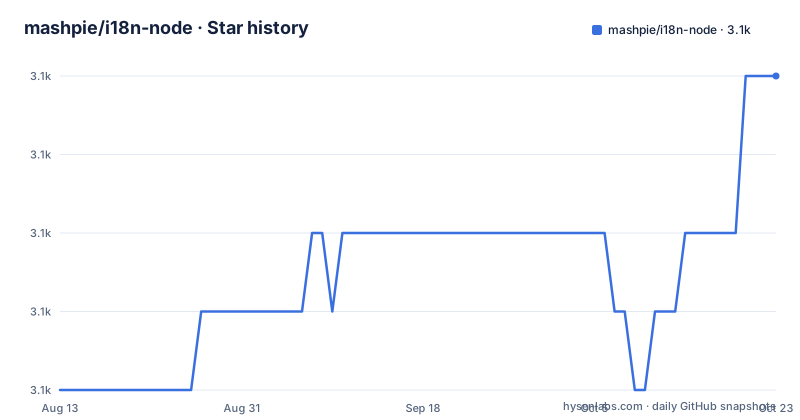
Star history
- mashpie/i18n-node3,116 ★ · +4
| Repository | 2026-08-13 | 2026-10-21 |
|---|---|---|
| mashpie/i18n-node | 3.1k | 3.1k |
4 Stars in the last 69 days, measured from the daily GitHub snapshot. Compare with other projects
Editorial analysis
What i18n-node Actually Solves
i18n-node addresses a narrow problem: giving a Node.js or Express application a translation function that works without a build step, a database, or a heavy framework. The README describes it as a "lightweight simple translation module with dynamic JSON storage." It targets developers who want the familiar __('Hello') syntax in templates and controllers, and who are willing to store language files as JSON. The project is not a full localization platform. It does not claim to handle pluralization, gender, or context-aware translation. It is for apps where a flat key-value map per language is enough, and where the team prefers editing JSON files directly. The module also supports plain vanilla Node.js HTTP servers, not just Express, as long as the framework exposes an app.use() method that passes req and res objects. That makes it a candidate for small services, CLIs, and prototypes where installing a larger solution feels disproportionate.
How Locale Detection and Storage Work
The core mechanism is straightforward. You configure a list of locales and a directory. At startup, i18n reads all locale files into memory. When a request arrives, i18n.init attaches helpers to the response object, and the __() function looks up the key in the current locale's object. The locale itself comes from the Accept-Language header by default. The README shows that you can also set a cookie name or a query parameter to override that. The first configured locale acts as the default when the browser sends no matching language. The storage format is JSON, and the README notes compatibility with webtranslateit's JSON format. The interesting part is the "dynamic" behavior: if a key is missing in the current locale, i18n adds it to the file on the fly. That means the first time your code calls __('NewFeature'), the string appears in the locale JSON automatically. This is convenient for development, but it also means your locale files change at runtime, which has implications for version control and production deployments.
Instance vs. Singleton: A Real Design Choice
The README draws a clear line between two usage modes. Before version 0.12.0, only the singleton existed: you require('i18n'), call configure(), and then use i18n.__() anywhere. That shared state works for CLI scripts, where a single process handles one task at a time. The README explicitly warns that for HTTP requests, you should not share global scope, because concurrent requests would overwrite each other's locale. So the project introduced instances. You create a new I18n object with its own configuration and state, then pass it around or attach it to the request. The documentation calls instances the "better practice" in complex setups. This distinction matters. If you use the singleton in an Express app, you risk cross-request contamination. If you use instances, you must ensure each request gets its own instance or that you reinitialize per request, which adds a small overhead. The README does not give a clear recipe for per-request instance reuse, so you have to design that yourself.
Getting It Running: Commands and Config Keys
Installation is one command: npm install i18n --save. The synopsis shows a plain HTTP server example. You create an I18n instance with locales and directory, then call i18n.init(req, res) inside the request handler, and finally use res.__('Hello'). The configuration object accepts several keys. The README lists locales, fallbacks, defaultLocale, retryInDefaultLocale, cookie, and a custom header name. The fallbacks option lets you map a locale like nl to de, and supports wildcards like 'de-*' to fall back from de-at or de-li to de. The retryInDefaultLocale option, when true, returns the translation from the default locale if the current locale lacks the key. The cookie option sets a cookie name to read the locale from, and you must enable cookie parsing in your framework, for example express.cookieParser() in older Express versions. You can also omit the locales array entirely and just provide a directory; i18n will read all JSON files in that directory and derive locale names from filenames. This is a convenient way to add a new language by dropping a file into the folder.
The Auto-Write Feature: Convenience or Trap
The most distinctive behavior is that i18n writes new strings to your locale files when you call __() with a key that does not exist. The README states: "Adds new strings on-the-fly when first used in your app." That is a double-edged sword. In development, it saves you from manually adding every key to every locale file. You just write the code, and the English file gets the key automatically. But in production, this means the application needs write access to the locales directory. If your deployment runs from a read-only filesystem, or if multiple instances write to the same files, you can get race conditions or permission errors. The README does not discuss concurrency or file locking. It also means your locale files are no longer static assets; they change under you. If a developer typos a key, that typo becomes a permanent entry in the JSON. There is no mention of a cleanup mechanism or a way to disable auto-write. The configuration options listed do not include a flag to turn it off. So you must accept this behavior or patch the module yourself.
Where It Falls Short and What to Check First
The README is honest about its scope, but it leaves gaps. There is no built-in support for pluralization. Many languages have complex plural rules, and a simple key-value lookup will not handle them. The module also does not provide a translation management interface or a way to export/import from a service like webtranslateit beyond the JSON format compatibility. The README mentions webtranslateit, but the actual integration is left to you. Another limitation is the age of some examples. The README includes gists that "worked until node 0.12.x only," and the Express 3 examples use app.configure() and express.cookieParser(), which are obsolete. The current Express 4 example exists, but the documentation is a mix of old and new. Before adopting this in a fresh project, you should verify that the module works with your specific Node version and framework. The last release, v0.15.3, is from October 2025, so maintenance is active, but the API has been stable for years. The MIT license is permissive, which is a plus for commercial use.
Alternatives and How They Differ
The main alternative in the Node ecosystem is i18next. i18next takes a different approach: it is a full-featured internationalization framework with pluggable backends, pluralization, interpolation, and a large ecosystem of integrations. Where i18n-node stores translations in plain JSON files and writes to them at runtime, i18next typically loads resources from a backend and does not modify your source files. i18next also supports synchronous and asynchronous loading, which matters for serverless or edge environments where file writes are not possible. Another lighter alternative is polyglot.js, which focuses purely on interpolation and pluralization without any file storage or locale detection. If you need locale detection from headers and cookies, polyglot.js forces you to implement that yourself. The choice comes down to complexity. i18n-node is simpler, but its auto-write behavior is a fundamental difference. If you want to avoid runtime writes, i18next with a static backend is the safer route.
Editorial conclusion
Adopt i18n-node if you need a small, framework-agnostic translation helper for a Node.js app and you are comfortable with JSON files as your source of truth. Avoid it if you need pluralization rules, a translation management UI, or strict control over which strings enter your locale files, because the auto-add feature can silently pollute them. Before committing, verify how the on-the-fly write behaves under concurrent requests and whether your deployment allows writes to the locales directory in production. Test the fallback and retryInDefaultLocale options against your actual locale list, and confirm that the cookie and query parameter detection works with your framework's request parsing.
Frequently asked questions
How do you use i18n with Node.js?
Create an instance with the I18n constructor, give it a locales array and a directory, call i18n.init(req, res) in the request handler, and read translations from the response with res.__('Hello'). The locale comes from the Accept-Language header by default, and the first configured locale is used when the browser requests none of them.
Should I use the i18n instance form or the singleton?
Both exist since 0.12.0. Instances use const { I18n } = require('i18n') and keep separate configurations and state, while the singleton shares one configuration across every require. The documentation calls instances the better practice in complex setups, and says a global scope is fine for cli-style scripts but must not be shared when serving http requests.
What does i18n stand for and what does this package do?
The package is published as i18n and described as a lightweight translation module for node.js and express.js with dynamic json storage, using the __('...') syntax in app code and templates. Its keyword list names template, i18n and l10n, and the readme does not expand the abbreviation itself.
What is the difference between i18n and l10n for this module?
Nothing in the repository discusses that distinction. The keywords cover both i18n and l10n, and the whole configuration surface is about locales, fallbacks, the default locale, and where the locale is read from, with no behaviour that depends on which term you use for it.
What does the i18n package publish, and where do the examples live?
The published files are i18n.js, index.js and SECURITY.md, with main set to ./index. Worked examples stay in the repository under examples/, including express4-cookie, express4-setLocale, node-http, node-http-autoreload and singleton, while the six gist examples linked from the readme are marked as having worked only up to node 0.12.x.
Official sources
Add this badge to your README
If you maintain this project, the badge below links readers to this analysis and shows its maintenance status from the daily GitHub snapshot. Paste the markdown into your README; add ?metric=license or ?metric=stars to the image URL for a different field.

[](https://hysenlabs.com/projects/mashpie-i18n-node)Star history chart for your README
[](https://hysenlabs.com/projects/mashpie-i18n-node)