Argbash: generated Bash argument parsing without runtime dependencies
Bash argument parsing code generator
At a glance
- What is it?
- Argbash turns declarations embedded in a Bash script into tailored parsing code. It suits developers who need repeatable argument interfaces for generated scripts but not applications requiring a general-purpose runtime parser.
- Who is it for?
- Developers should adopt Argbash when a script needs maintainable long options, positional arguments, actions, or related generated outputs and can accept generated Bash in the project. Projects needing a full runtime parser, a POSIX-only deployment without a generated parsing step, or a broadly known standard licence should first review the generated output, the LICENSE file, and the exact Bash requirements of their target systems.
- Can I use it commercially?
- Check first. The repository uses a licence we do not classify automatically, so read its LICENSE file before any commercial use.
- Is it still maintained?
- Yes. The repository last received commits 13 days ago.
- What is it written in?
- Mainly M4, according to GitHub's language statistics.
Answers come from the project's GitHub data, last synced on November 6, 2026, and from our analysis. They are not legal advice.
Star history
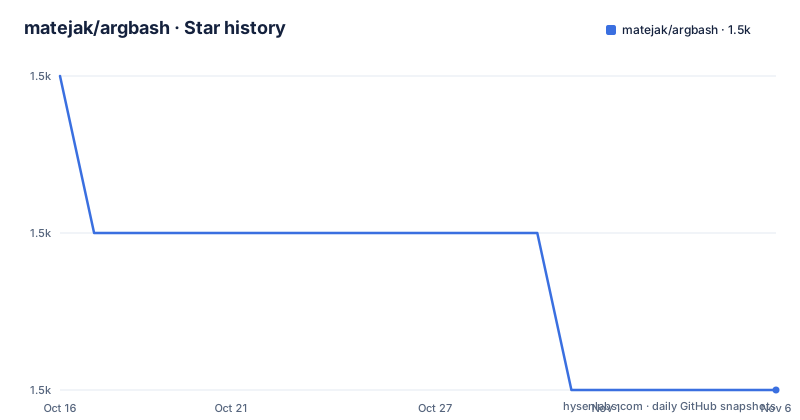
- matejak/argbash1,484 ★ · -2
| Repository | 2026-10-16 | 2026-11-06 |
|---|---|---|
| matejak/argbash | 1.5k | 1.5k |
-2 Stars in the last 21 days, measured from the daily GitHub snapshot. Compare with other projects
Editorial analysis
Why Argbash generates code instead of acting as a parser
Argbash addresses a specific weakness in shell scripting: handling command-line arguments becomes inconsistent once scripts need long options, repeated values, actions, or more than one kind of positional argument. The README says `getopt` is discouraged, while `getopts` does not support long options. It also points out the absence of a widely accepted Bash module for this task and cross-platform differences among Linux, macOS, and Windows environments.
The project does not add an Argbash runtime library to the executed script. Instead, Argbash reads an argument definition and generates Bash parsing code tailored to that particular script. This matters for distribution: the README states that the generated script can run without Argbash installed. Its user-side requirement is a Bash implementation capable of working with arrays, described as Bash 3.0 or newer.
The intended users are developers maintaining Bash utilities that accept nontrivial arguments. It is less suitable for a team that wants one imported library to parse many scripts dynamically. In that model, generated code introduces build or regeneration work that a shared parser would avoid. Argbash is also intended for repeated maintenance, not just one-time command completion. Its declarations can remain embedded in the script so a later invocation of `bin/argbash` can regenerate the parsing section.
Argbash declarations and generated parsing flow
The visible workflow is source transformation. A developer starts with a script template, adds a compact declaration of the expected arguments, and runs Argbash over that file. The generator emits parsing code for the specific interface. By default, the definitions and generated material stay within the script, although the documentation also allows generation into a separate file that the main script includes.
Supported argument shapes cover several common command-line conventions. Positional arguments may have defaults and may be fixed, variable, or unbounded. Optional arguments can consume one value, act as booleans, repeat without overwriting earlier values, or increment, which suits counters such as `--verbose`. Action arguments provide behavior associated with options such as `--version` and `--help`.
The generator is not limited to executable scripts. It can produce Bash parsing libraries and POSIX scripts using generated `getopts` code. It can also generate Bash completion, a docopt-compliant usage message, and a manpage through `rst2man`. These outputs derive from the same argument model, which reduces the risk that help text, completion, and parsing declarations drift into unrelated forms. The repository layout supports this generator approach through `bin/`, `src/`, templates under `resources/`, documentation under `doc/`, and tests under `tests/`.
That said, the README describes Bash as the normal generated target and does not claim that every available output has identical runtime behavior. A team choosing POSIX generation should verify the generated script against its actual target shells rather than assuming the Bash path and POSIX path are interchangeable.
Installing Argbash from a release archive
The README documents installation from a release archive rather than a package-manager command. Download a release from the project's GitHub releases page, unzip it, enter the release directory, and run the included Make target. The documented sequence is:
cd resources && make installThat command installs within the Makefile's default prefix. For a system-wide location, the README gives this variant:
sudo make install PREFIX=/usrThe second command may be appropriate only when installing under `/usr` is intended, because it invokes `sudo` and changes the prefix. The README does not document the default destination or provide a rollback procedure for an installation, so users who need a package-manager installation or precise filesystem inspection should check the release contents before running the Make target.
Argbash also offers an online generator for permanent Internet access and a Docker image described as equivalent in purpose to the CLI without installing it. Those routes fit different constraints. The online version adds a service dependency during generation. The Docker route isolates the generator in an image but requires container access. Neither changes the central rule stated by the README: once parsing code has been generated, executing the script does not require Argbash itself.
The generator environment has additional requirements beyond Bash. The README lists `autom4te` from the Autoconf 2.63 suite, plus basic tools including `sed`, `grep`, `cat`, and `test`. Generated-script users need only the array-capable Bash requirement, while developers regenerating the code must satisfy the fuller tool list.
Creating a first Argbash-backed script
The shortest documented starting point is `bin/argbash-init`, which generates a template. From an unpacked Argbash release, the project names that executable under `bin/`. The README also refers to the `resources/examples/simple.m4` template and its generated `resources/examples/simple.sh` result.
A first development session therefore has two concrete steps: create a template with `argbash-init`, then run `bin/argbash` over the edited script. The examples in `resources/examples` are the authoritative starting points for exact declarations.
The expected result is a Bash script containing parsing code corresponding to its declaration. The README's simple example illustrates a script with a subset of the `head` interface, while the screencast presents the same editing workflow. Since Argbash is a generator, the useful first verification is to inspect the produced shell code rather than only run the script with a valid command line.
A practical first check can focus on observable interface behavior without adding undocumented generator syntax. Run the generated script with no arguments to see how defaults and required positional arguments are handled, then invoke the options represented in the example. The repository does not claim that generated parsing replaces functional tests, so a shell parser test would need to match the project before Argbash is integrated into a release pipeline.
Regeneration, wrapping, and maintenance boundaries
Keeping argument definitions embedded creates a maintenance model centered on regeneration. When the interface changes, the declaration is edited and `bin/argbash` is run again against the generated script. This is a concrete advantage for a single maintained utility because the declaration and implementation can remain in one file. It also makes accidental drift easier to address: the parser is derived from the declaration rather than manually synchronized with help text.
Argbash also supports layering Argbash-aware scripts. According to the README, a low-level script can be wrapped by a higher-level Argbash-aware script without duplicating its code. That approach may help when one command is reused beneath another interface. The generated code still has to be incorporated into the relevant scripts, so wrapping does not remove the need to understand which layer owns each option or positional value.
The repository is not archived. Its last push was on 2026-10-12, shortly before release 2.11.0 on 2025-05-22. The earlier listed releases, 2.10.0 and 2.9.0, date from 2020, so the available release history alone does not establish a frequent release cadence. For upgrades, reviewers should compare generated output between versions because the runtime artifact can change even though the executed script has no Argbash dependency.
The README gives no compatibility matrix for every Bash target or a documented procedure for migrating an existing generated parser. Those are adoption boundaries, not details that can be inferred from the repository description.
Argbash licensing and the choice against a shared parser
The repository reports a custom licence that GitHub cannot classify, with the licence terms stored in the `LICENSE` file. This article cannot summarize permissions, restrictions, redistribution conditions, or compatibility because the licence text was not provided. Any adoption decision that depends on embedding generated code in distributed scripts therefore needs a direct review of `LICENSE`. This is a compliance boundary, not a claim that the licence is permissive or restrictive.
A real alternative is hand-written parsing using Bash built-ins and standard shell facilities. That approach avoids a generator and keeps direct control over every branch in the delivered script, but the project must define long options, values, defaults, repetition, counters, actions, errors, help, and completion itself. The README presents this burden as the reason Argbash exists.
Another alternative is a general-purpose parser loaded at runtime. That keeps parsing centralized but adds a runtime dependency, whereas Argbash emits code for an individual script and removes Argbash from execution requirements. For Argbash-aware wrappers, its declaration model also reduces duplicated low-level parsing logic. The trade-off is source generation: teams must decide when to regenerate, review generated code, and manage custom licence implications. A project with highly irregular interfaces or frequent interface redesigns should compare these costs before adopting generation.
Editorial conclusion
Developers should adopt Argbash when a script needs maintainable long options, positional arguments, actions, or related generated outputs and can accept generated Bash in the project. Projects needing a full runtime parser, a POSIX-only deployment without a generated parsing step, or a broadly known standard licence should first review the generated output, the LICENSE file, and the exact Bash requirements of their target systems.
Frequently asked questions
Does an Argbash-generated script need Argbash installed at runtime?
No. The README states that the generated parsing code can be used without Argbash installed. Generated Bash scripts still require a Bash implementation that supports arrays.
Which argument types can Argbash generate?
Argbash supports positional arguments, value-taking optional arguments, booleans, repeated options, incrementing options, and action options. Positional arguments can have defaults and can be fixed, variable, or infinite in number.
What tools are required to regenerate an Argbash script?
The documented generator requirements are array-capable Bash, `autom4te` from the Autoconf suite, and basic utilities such as `sed`, `grep`, `cat`, and `test`. The README describes the Autoconf version as 2.63 or newer.
Can Argbash generate output other than a Bash parser?
Yes. The documented outputs include POSIX scripts using generated `getopts` code, Bash completion, a docopt-compliant usage message, and a manpage generated through `rst2man`.
Official sources
Add this badge to your README
If you maintain this project, the badge below links readers to this analysis and shows its maintenance status from the daily GitHub snapshot. Paste the markdown into your README; add ?metric=license or ?metric=stars to the image URL for a different field.

[](https://hysenlabs.com/projects/matejak-argbash)Star history chart for your README
[](https://hysenlabs.com/projects/matejak-argbash)Was this useful?