Mathesar: a spreadsheet interface sitting directly on Postgres
An intuitive spreadsheet-like interface that lets users of all technical skill levels view, edit, query, and collaborate on Postgres data directly. 100% open source and self hosted, with native Postgres access control.
At a glance
- What is it?
- A Django and Svelte application that puts a grid, a query builder and a form builder in front of a live PostgreSQL database, with no extra abstractions in between. Installs with Docker, still at public beta.
- Who is it for?
- Mathesar is worth an afternoon for any team that already runs Postgres and is tired of writing one-off admin panels, because it reads and writes the same tables through the same roles that already protect them. What the repository does not settle is upgrade behaviour: the README is explicit that public beta is done and public is not.
- Can I use it commercially?
- Yes, with conditions. GPL-3.0 is a copyleft licence: if you distribute software that includes it, you must release that software's source code under the same licence. Running it internally without distributing it does not trigger that obligation.
- Is it still maintained?
- Yes. The repository received new commits within the last day.
- What is it written in?
- Mainly Svelte, according to GitHub's language statistics.
Answers come from the project's GitHub data, last synced on November 22, 2026, and from our analysis. They are not legal advice.
Star history
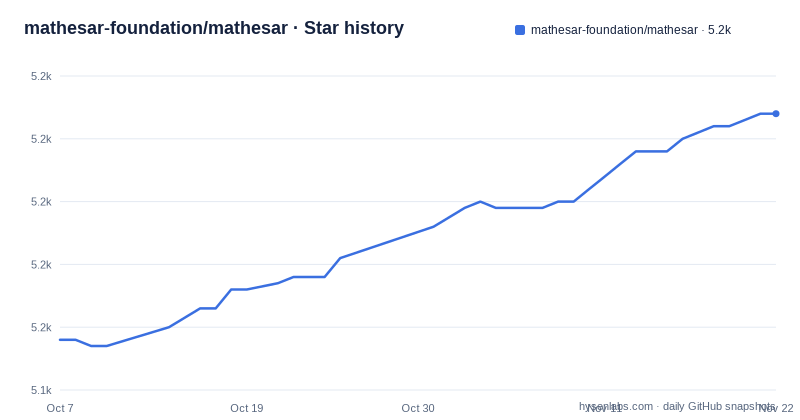
- mathesar-foundation/mathesar5,184 ★ · +36
| Repository | 2026-10-07 | 2026-11-22 |
|---|---|---|
| mathesar-foundation/mathesar | 5.1k | 5.2k |
36 Stars in the last 46 days, measured from the daily GitHub snapshot. Compare with other projects
Editorial analysis
A grid over the real schema, not over a copy of it
The central design decision is stated in the repository description and repeated in the README: Mathesar works directly against PostgreSQL databases, schemas and tables without extra abstractions. That single sentence separates it from the hosted spreadsheet products it is usually compared with. When the README says relationships in the interface are foreign keys in the database, it means the joins you see in the grid are the joins Postgres already had.
The consequence is that a table you create through the interface is a table your existing `psql` sessions, `pg_dump` schedules and BI tools see immediately. The other consequence is that Mathesar is bounded by what Postgres supports, so a feature request that needs a non-relational document store is a feature request for a different database.
The repository language on GitHub is listed as Svelte. Reading the tree confirms the split: a `mathesar/` directory for the Python side, a `mathesar_ui/` directory for the frontend, `manage.py` at the root, and a `db/` directory. It is a conventional Django project with a separate single page app rather than a server rendered one.
Installing means one compose file and three variables
The README does not carry an install command. It links to docs.mathesar.org and says installation happens in minutes, which leaves the actual steps in documentation you are not reading here. What the repository does contain is a `docker-compose.yml` whose own header comment calls it a viable production setup, plus `Dockerfile.caddy` and a separate `Dockerfile.devdb` for development.
The prerequisites are stated inside that compose file rather than in the README, which is unusual and useful. Docker v23 or newer and Compose v2.10 or newer, on Linux, Mac or Windows under WSL. The file also says explicitly that running Docker in rootless mode is not currently supported, which is the kind of sentence that saves an afternoon.
$ docker version
$ docker compose version
Configuration happens through environment variables declared under a shared `x-config` anchor, so a single block feeds every service:
x-config: &config
  DOMAIN_NAME: ${DOMAIN_NAME:-http://localhost}
  POSTGRES_DB: ${POSTGRES_DB:-mathesar_django}
  POSTGRES_USER: ${POSTGRES_USER:-mathesar}
Note what the defaults imply. `POSTGRES_DB` names an internal database for the Django application itself, separate from the database Mathesar is being pointed at, and `DOMAIN_NAME` defaults to `http://localhost`; the config comment says custom domains set the hosts at which Mathesar is reached over http or https, and the tree carries a `Caddyfile` and `Dockerfile.caddy`.
Access control inherited from Postgres roles
The feature list leads with built on Postgres, install in minutes, and Postgres based access control, in that order, which reflects how the project wants to be judged. The README says you can use existing Postgres roles within the interface, or set up your own, and that access control based on roles and privileges keeps the database secure without adding unnecessary risk.
This is the strongest argument for the project in a regulated or team setting. Mathesar does not implement a parallel permission system that could disagree with the database; it defers to `GRANT` and `REVOKE`.
The repository supports this with `django-allauth`, pinned in `requirements.txt` at version 65.14.1 with the `socialaccount` extra, alongside `django-modern-rpc` at 1.0.3 for the JSON RPC surface and `django-fernet-encrypted-fields` for storing credentials at rest. The tree also carries `sso.yml.example` and `login_page.yml.example`, so single sign-on and a custom login page are configuration files rather than code changes.
Query building, forms and migrations in one application
The features that go beyond a plain grid are worth separating by audience. The Data Explorer builds queries without requiring SQL or join knowledge, which is aimed at people who will never open a psql prompt. Forms publish a unique link and save submissions as new records, which turns the application into a lightweight intake system for external contributors. Schema migrations that transfer columns between tables in two clicks are aimed at the administrator.
A lesser feature is easy to miss and arguably the more telling one: custom data types for emails and URLs validated at the database level. That is not a frontend regex. It means an invalid email never reaches the table, because the constraint lives where `psql` will enforce it too. Given how often spreadsheet-shaped front ends are criticised for moving validation to the browser, the choice to delegate to the database is the right one.
The README documents import and export without specifying formats, and the `requirements.txt` file explains why those features are possible at all: `clevercsv` at 0.8.2 for CSV handling and `CairoSVG` at 2.9.0 for rendering. Import formats are exactly the kind of detail that belongs in the documentation rather than the README, and that is where it lives.
Public beta, three releases a year, and notes kept elsewhere
The status section is unusually honest for a project with five thousand stars. It shows Public Alpha complete, Public Beta complete, and Public, described as widely used in production environments, still unchecked. The README says plainly that the project is currently in the public beta stage. For an evaluator that is the most useful line in the document, because it tells you the authors themselves do not claim broad production adoption yet.
The default branch is `develop`, which is worth noting before anyone opens a pull request. The three most recent releases are 0.12.0 on 2026-07-02, 0.11.0 on 2026-05-28 and 0.10.1 on 2026-04-26.
The pre-1.0 version numbering suggests active development where features may move. GitHub reports the last push on 2026-11-01, and the repository is not archived, so the work is current.
Where the README stops and the external docs begin
Everything about running the thing is external. Installation, configuration variables, environment variable reference and the contributor onboarding all live on docs.mathesar.org or in `CONTRIBUTING.md` and `DEVELOPER_GUIDE.md`. The README is a project page with a table of contents, a features list and thirteen screenshots, and it is honest that it is doing that.
The screenshot headings trace the workflow: connecting a database, adding collaborators, managing table permissions, building and filling out a form, and building and viewing an Exploration.
For a reader comparing options, the honest framing is this. Mathesar competes with database admin tools on one side and with hosted spreadsheet front ends on the other, and it wins the second comparison for anyone who already has Postgres and cannot send that data to a third party. It loses the first comparison on breadth, because it deliberately does not try to be a full admin console. Check the docs for upgrade guidance and the full configuration variable reference before the second install.
Editorial conclusion
Mathesar is worth an afternoon for any team that already runs Postgres and is tired of writing one-off admin panels, because it reads and writes the same tables through the same roles that already protect them. What the repository does not settle is upgrade behaviour: the README is explicit that public beta is done and public is not. Start with the bundled docker-compose.yml on a copy of a real database, add a read-only Postgres role, and see whether the collaborative editing story matches what your team actually needs.
Frequently asked questions
What is Mathesar used for?
It is a web application that gives non technical and technical users a spreadsheet-like interface for viewing, creating, updating and deleting records in a PostgreSQL database, plus a query builder, shareable forms and import and export. Because it talks to Postgres directly, tables created through the interface are ordinary tables.
Does Mathesar need its own database?
The bundled docker-compose.yml defines an internal database for the Django application itself, defaulting to the name mathesar_django, separate from the database you connect to and manage. The POSTGRES_DB and POSTGRES_USER variables are documented as optional replacements if you prefer your own names.
How do permissions work in Mathesar?
Access control is based on Postgres roles and privileges rather than a separate permission system, and the README says you can use existing roles in the interface or define your own.
Is Mathesar ready for production use?
The README's status checklist marks Public Alpha and Public Beta as done and leaves Public, described as widely used in production environments, unchecked. The compose file in the repository is described as a viable production setup, so the intended path exists even though the stage label is public beta.
What does Mathesar run on?
Docker v23 or newer with Compose v2.10 or newer, on Linux, Mac or Windows under WSL. The compose file states that running Docker in rootless mode is not currently supported.
Official sources
Add this badge to your README
If you maintain this project, the badge below links readers to this analysis and shows its maintenance status from the daily GitHub snapshot. Paste the markdown into your README; add ?metric=license or ?metric=stars to the image URL for a different field.

[](https://hysenlabs.com/projects/mathesar-foundation-mathesar)Star history chart for your README
[](https://hysenlabs.com/projects/mathesar-foundation-mathesar)Was this useful?