matlab2tikz for MATLAB and Octave Figures in LaTeX
This program converts MATLAB®/Octave figures to TikZ/pgfplots figures for smooth integration into LaTeX.
At a glance
- What is it?
- matlab2tikz converts native MATLAB and Octave figures into TikZ and pgfplots source for inclusion in LaTeX documents. It fits reproducible plotting workflows, but third-party packages and older TeX installations can complicate conversion.
- Who is it for?
- Adopt matlab2tikz when MATLAB or Octave figures must become editable TikZ and pgfplots source inside LaTeX. Do not assume every plot converts cleanly, especially one built with a third-party package.
- Can I use it commercially?
- Yes. BSD-2-Clause is a permissive licence: you can use, modify and sell software built on it, as long as you keep its copyright and licence notices.
- Is it still maintained?
- Yes. The repository last received commits 145 days ago.
- What is it written in?
- Mainly MATLAB, according to GitHub's language statistics.
Answers come from the project's GitHub data, last synced on October 23, 2026, and from our analysis. They are not legal advice.
Star history
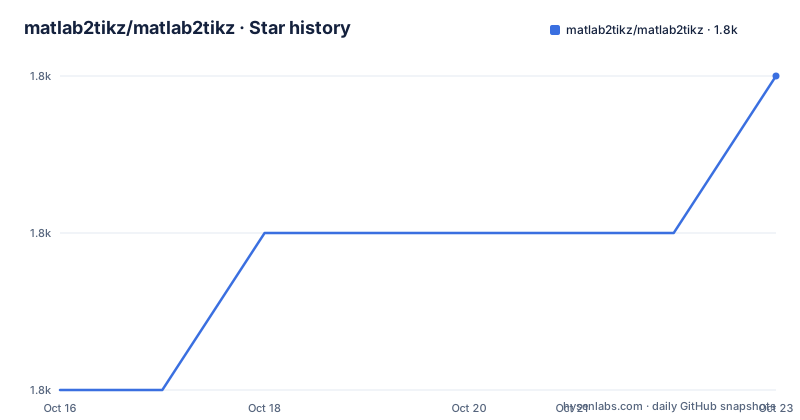
- matlab2tikz/matlab2tikz1,763 ★ · +2
| Repository | 2026-10-16 | 2026-10-23 |
|---|---|---|
| matlab2tikz/matlab2tikz | 1.8k | 1.8k |
2 Stars in the last 7 days, measured from the daily GitHub snapshot. Compare with other projects
Editorial analysis
Why Export MATLAB Figures as TikZ
matlab2tikz addresses a specific gap between interactive plotting and document production. MATLAB and Octave can create figures interactively, while a LaTeX workflow often needs graphics whose labels, axes, marks, and layout are represented as LaTeX and TikZ source. Instead of inserting a raster image, the converter writes a `.tex` file that can be included into a document with `\input{myfile.tex}`.
The intended users are MATLAB or Octave users who also build documents with LaTeX and want figure generation to remain tied to plotting scripts. matlab2tikz is not a general-purpose plotting library, a LaTeX compiler, or a replacement for MATLAB figure rendering. It is a translation layer between native figures and TikZ and pgfplots expressions.
The README says that most native 2D and 3D plots are supported. It does not promise equivalent coverage for every possible plot object. Figures produced by third-party MATLAB packages are explicitly qualified: the README says that, for these plots, conversion results may vary. That caveat makes the converter less predictable when a document depends on package-specific drawing behavior.
The MATLAB Figure-to-TeX Conversion Path
The workflow has two distinct rendering stages. First, MATLAB or Octave creates a native figure. Next, `matlab2tikz` reads that figure and writes TikZ and pgfplots commands to a LaTeX file. The resulting file is not yet a complete document. It is source that the reader includes from a LaTeX document whose preamble loads the necessary packages.
This separation gives the project a clear data flow: plotting data and presentation settings exist in the MATLAB or Octave figure, the converter translates those objects into LaTeX syntax, and a LaTeX compiler later processes the included source. The README recommends using recent stable versions of the TeX packages because older versions may or may not work depending on the figure being converted.
The converter exposes numerous options through MATLAB help rather than documenting a small fixed command-line interface in the README. Users can inspect the supported options with:
help matlab2tikzThis help command is the relevant discovery point for export controls. The README does not identify individual option names, so an option name or configuration example cannot be added without risking an inaccurate instruction.
Installing matlab2tikz in MATLAB or Octave
The documented installation is manual. Download the official ZIP or clone the repository into a directory that is easy to access. Then add the repository's `src/` directory to the MATLAB or Octave path, either through MATLAB's Set Path dialog or with `addpath` from the command window or a `startup` script.
The README does not give an exact `addpath` invocation, so there is no safe executable installation snippet to reproduce. After adding the path, MATLAB or Octave must be able to find the scripts in `src/`. This approach avoids inventing a package-manager command that the project does not document.
The LaTeX side has explicit version requirements. TikZ/PGF 3.0 or higher and pgfplots 1.13 or higher are required, while Amsmath 2.14 or higher is also listed. Standalone is optional. These are minimum documented versions, not pinned versions chosen by matlab2tikz. The README recommends the latest stable package releases and notes that older combinations may still work for some figures.
The updater warning is important for existing installations. According to the README, the updater in version 0.6.0 and older no longer works. Anyone using a release older than 1.0.0 is instructed to update manually from the official File Exchange download. The README does not document an automated migration or rollback procedure for generated LaTeX files.
Creating and Including the First Figure
Begin by creating a plot in MATLAB or Octave. For a figure that the documentation expects to convert normally, invoke the converter with an output filename:
matlab2tikz('myfile.tex');The documented result is `myfile.tex`, containing TikZ and pgfplots source. Add that file to the LaTeX document with `\input{myfile.tex}`. The parent document must load the packages used by the exported figure.
The following preamble comes from the README and includes `pgfplots`, the TikZ libraries needed by some matlab2tikz features, `grffile`, and `amsmath`:
\documentclass{article}
\usepackage{pgfplots}
\pgfplotsset{compat=newest}
\usetikzlibrary{plotmarks}
\usetikzlibrary{arrows.meta}
\usepgfplotslibrary{patchplots}
\usepackage{grffile}
\usepackage{amsmath}
\begin{document}
  \input{myfile.tex}
\end{document}
Run this document through the reader's normal LaTeX compilation process. The README does not name a particular compiler command or impose a dedicated build tool, so none is added here.
Cleaning Figures That Block Conversion
Some MATLAB figures contain elements that impede conversion. The README gives points far outside the actual figure bounding box as an example. Such objects may need removal before export, particularly when they participate in layout calculations or fall outside the visible plotting region.
For that case, the documented cleanup sequence is:
cleanfigure;
matlab2tikz('myfile.tex');
Run `cleanfigure` first so unwanted entities are removed before conversion, then export the cleaned figure to `myfile.tex`. This is a targeted response to figure content, not a general instruction to alter every plot.
The README does not explain how `cleanfigure` selects objects, whether cleanup is reversible, or which figure properties can change. It also does not document rollback for a LaTeX document after conversion. If preserving exact object placement matters, the original figure and source script should remain under version control. That is a consequence of the documented script-based workflow, not a project-specific rollback feature.
Conversion Boundaries and the Third-Party Plot Caveat
The strongest documented limitation is coverage. The README says that most native MATLAB figures, including 2D and 3D plots, can be converted. It separately warns that plots constructed with third-party packages may produce inconsistent results. That makes matlab2tikz a poor default assumption for a package-specific visualization ecosystem unless one representative figure has already been checked.
Compatibility also extends beyond MATLAB figure support. Exported code depends on a coordinated TeX environment, and the README states that older versions of its required packages may work depending on the actual figure. A successful call to `matlab2tikz` therefore does not by itself establish that every generated command will compile under an arbitrary LaTeX installation.
A real alternative is to export the figure as an image and place that image in LaTeX with standard graphic inclusion. That approach avoids translation of MATLAB drawing objects into TikZ, but it does not provide the editable TikZ and pgfplots representation that matlab2tikz is designed to produce. The practical choice depends on whether document-level editability and native LaTeX integration matter more than minimizing TeX compatibility risk. The README does not provide a direct comparison with an image-export workflow, so the distinction here is between the documented output formats and their integration costs.
matlab2tikz Maintenance, Releases, and BSD-2-Clause
The repository is not archived, and its last push was on 2026-05-31. That establishes repository activity, but the listed release history is older: version 1.1.0 is dated 2016-10-20, and version 1.0.0 is dated 2015-06-16. The README and release list do not establish a newer release cadence, so repository pushes should not be treated as evidence of packaged releases.
Upgrade cost depends on where an installation starts. Users on 0.6.0 or older cannot rely on the bundled updater because the README says it no longer works. The documented path is a manual update to 1.0.0 or newer. Existing users should also check their generated `.tex` files against current TeX packages and their own figures, since the project documents compatibility as figure-dependent.
The project uses the BSD-2-Clause license. That permits redistribution and modification under the license's conditions, but this review does not interpret legal obligations or provide legal advice. Organizations should read `LICENSE.md` for the exact terms applicable to their distribution and compliance process.
Editorial conclusion
Adopt matlab2tikz when MATLAB or Octave figures must become editable TikZ and pgfplots source inside LaTeX. Do not assume every plot converts cleanly, especially one built with a third-party package. Before adoption, verify conversion of the actual figure types against the installed TikZ, pgfplots, Amsmath, and Standalone versions.
Frequently asked questions
How do I install matlab2tikz in MATLAB or Octave?
Download the ZIP or clone the repository, then add its `src/` directory to the MATLAB or Octave path through Set Path, `addpath`, or a `startup` script.
How do I convert a MATLAB figure into a LaTeX file with matlab2tikz?
Create the figure and run `matlab2tikz('myfile.tex');`. The generated file can then be included with `\input{myfile.tex}` in a document with the required packages loaded.
Does matlab2tikz support Octave and third-party plotting packages?
The installation instructions include Octave, and the converter accepts native MATLAB and Octave figures. The README does not promise consistent conversion for plots built with third-party packages.
Official sources
Add this badge to your README
If you maintain this project, the badge below links readers to this analysis and shows its maintenance status from the daily GitHub snapshot. Paste the markdown into your README; add ?metric=license or ?metric=stars to the image URL for a different field.

[](https://hysenlabs.com/projects/matlab2tikz-matlab2tikz)Star history chart for your README
[](https://hysenlabs.com/projects/matlab2tikz-matlab2tikz)Was this useful?