Mattermost Desktop: an Electron shell that holds several servers, with config in userData
Mattermost Desktop application for Windows, Mac and Linux
At a glance
- What is it?
- The native Windows, Mac and Linux client for Mattermost, built on Electron. This article covers the server list, where settings are stored, the --data-dir flag, and what a contributor needs to build it.
- Who is it for?
- Use it if your team already runs Mattermost and you want notifications, unread badges and several servers in one window. Admins who push it to many machines should read the custom deployment guide before the installer, because the README leaves silent installs and preset server URLs to that guide.
- Can I use it commercially?
- Yes. Apache-2.0 is a permissive licence: you can use, modify and sell software built on it, as long as you keep its copyright and licence notices.
- Is it still maintained?
- Yes. The repository received new commits within the last day.
- What is it written in?
- Mainly TypeScript, according to GitHub's language statistics.
Answers come from the project's GitHub data, last synced on November 25, 2026, and from our analysis. They are not legal advice.
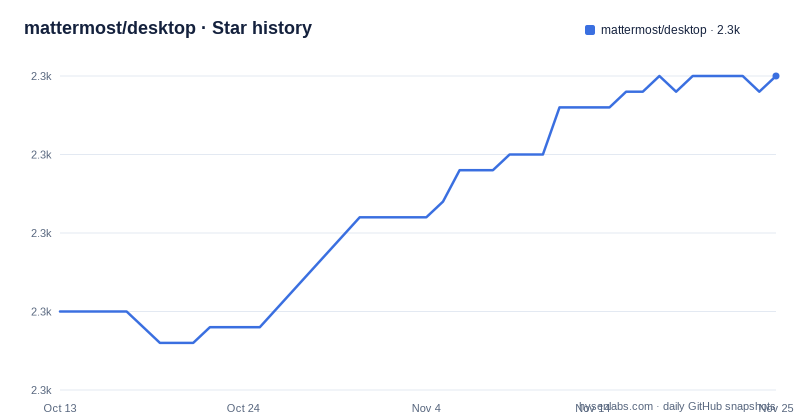
Star history
- mattermost/desktop2,290 ★ · +15
| Repository | 2026-10-13 | 2026-11-25 |
|---|---|---|
| mattermost/desktop | 2.3k | 2.3k |
15 Stars in the last 43 days, measured from the daily GitHub snapshot. Compare with other projects
Editorial analysis
An Electron wrapper that Yuya Ochiai started as electron-mattermost
Mattermost Desktop is the native client for Mattermost, the open source collaboration platform, and the repository is the code for that app. It is built on Electron and runs on Windows, Mac and Linux. The README credits the origin to Yuya Ochiai, who created it as electron-mattermost before it became the official project.
The repository is a TypeScript Electron application under the Apache-2.0 license, with `package.json` naming it `mattermost-desktop` and the product name `Mattermost`. The `desktopName` field is `com.Mattermost.Desktop`, which is the same name used in the Linux launch command further down.
The code is split along Electron's usual lines. The top level has four webpack configs: `webpack.config.base.js`, `webpack.config.main.js`, `webpack.config.preload.js` and `webpack.config.renderer.js`. Those match three build scripts in `package.json`: `build:main`, `build:preload` and `build:renderer`. Which processes need changes depends on the feature.
The application source is under `src/`, with translations in `i18n/` and end-to-end tests in `e2e/`.
One window, a server dropdown, and tabs for Channels, Boards and Playbooks
The feature list is short and about window behavior. A server dropdown gives access to multiple servers. Dedicated tabs cover Channels, Boards and Playbooks. Desktop notifications fire, and badges mark unread channels and mentions. Deep linking opens Mattermost links directly in the app, and the app can run in the background to reduce the number of open windows.
The multiple-server dropdown is the part that changes daily use. People who belong to two Mattermost instances, such as a company one and a community one, stay in one app instead of two browser tabs.
The README does not say how notification sounds, do-not-disturb or per-server notification settings behave. It lists the features as a one-line bullet each and leaves the rest to the Mattermost docs. If a specific behavior matters, such as how badges count across servers, test it with two servers before you promise it to users.
The first launch asks for a server name and URL
Install is a download and a run. The README sends you to the downloads page on mattermost.com or the releases page on GitHub. Run the installer or unzip the archive, then launch Mattermost from the Applications folder, the menu or the unarchived folder.
On the first launch, the app asks for a name and URL for your Mattermost server, with `https://mattermost.example.com` as the example. You will also need to authenticate according to your server's sign-in configuration. More detail is in the install guide at docs.mattermost.com.
The latest releases show the line the project is maintaining. `v6.3.1` and `v6.2.4` were both published on 15 October 2026, and `v6.2.3` came on 17 August 2026. Releases on two version lines do not by themselves establish that they contain the same patch. Check which branch your server version pairs with before you pick a download, because the README does not state a compatibility table.
The repository is not archived, and the last push was on 25 October 2026. The `package.json` on the default branch reads `6.5.0-develop.1`, which is ahead of every published release.
Settings live in Electron's userData folder, and --data-dir moves them
Configuration is saved into Electron's userData directory. The README gives three paths:
- `%APPDATA%\Mattermost` on Windows - `~/Library/Application Support/Mattermost` on OS X - `~/.config/Mattermost` on Linux
The settings dialog can be shown from the menu bar.
A custom data directory is set with a launch argument, one form per platform:
Mattermost.exe --args --data-dir C:\my-mattermost-data
open /Applications/Mattermost.app/ --args --data-dir ~/my-mattermost-data/
./com.Mattermost.Desktop --args --data-dir ~/my-mattermost-data/
The three lines are Windows, macOS and Linux in that order. The flag matters in a few cases. It lets you choose another location for app data, such as a separate test directory. The README does not establish whether two instances can run simultaneously with different directories; verify that behavior before relying on it.
The README does not say whether passwords or session tokens are kept in that directory or in the system keychain. If you plan to hand a laptop to another person, check the folder before you assume the old login is gone.
Rolling the app out to many machines is a separate guide
For fleets, the README does one thing: it points to a deployment guide on docs.mattermost.com. That guide covers how to customize and distribute your own build of the Desktop app, including how to distribute the official Windows app silently to end users, preconfigured with the server URL and other app settings.
So the answer to "how do I deploy this to 500 laptops" is not in the repository README. The silent-install flags and the preconfigured settings are in the linked guide, and an admin should read that page before writing a script.
There is a build-side hook for this work. `package.json` has a `check-build-config` script that compiles `src/common/config/buildConfig.ts` and runs `scripts/check_build_config.js`. A custom build with its own configuration goes through that check as part of the `check` script, alongside lint, type checks and unit tests. The README does not describe the fields in the build config, so the source file is where to look.
Building from source needs Node 24 and applies local patches
The developer guide is on developers.mattermost.com, and the README defers everything there. The repository files show some requirements anyway.
`package.json` sets `engines` to `node >=24.0.0`, and the repository carries a `.nvmrc`. The `postinstall` script runs `patch-package`, then `electron-builder install-app-deps`, then `node node_modules/electron/install.js`. A `patches/` directory sits at the top level for that first step, so a plain install applies local patches to dependencies. If you swap dependency versions, expect a patch to fail.
The `check` script runs `lint:js-quiet`, `check-build-config`, `check-types` and `test:unit` in parallel. Unit tests use Jest. End-to-end tests run through `npm run e2e`, which builds a test version first and then runs the suite in `e2e/`.
The `Makefile` covers Linux packages: `make package` produces `.deb` files under `artifacts/`. `make sign` signs them with `dpkg-sig`, and fails with exit code 128 if `gpg`, `dpkg-sig` or the `GPG_KEY_ID` variable is missing. Other platforms are built through `electron-builder.ts` and the `fastlane/` folder, which the README does not explain.
Editorial conclusion
Use it if your team already runs Mattermost and you want notifications, unread badges and several servers in one window. Admins who push it to many machines should read the custom deployment guide before the installer, because the README leaves silent installs and preset server URLs to that guide. Before rolling it out, launch it once, add your server URL, and check where the config folder lands on each platform you support.
Frequently asked questions
Where does Mattermost Desktop store its configuration?
In Electron's userData directory: %APPDATA%\Mattermost on Windows, ~/Library/Application Support/Mattermost on OS X, and ~/.config/Mattermost on Linux.
Can Mattermost Desktop connect to more than one server?
Yes. The feature list includes a server dropdown for access to multiple servers, plus dedicated tabs for Channels, Boards and Playbooks.
How do I deploy Mattermost Desktop silently on Windows?
The README sends you to the desktop app deployment guide on docs.mattermost.com. It covers distributing the official Windows app silently, preconfigured with the server URL and other settings.
Official sources
Add this badge to your README
If you maintain this project, the badge below links readers to this analysis and shows its maintenance status from the daily GitHub snapshot. Paste the markdown into your README; add ?metric=license or ?metric=stars to the image URL for a different field.

[](https://hysenlabs.com/projects/mattermost-desktop)Star history chart for your README
[](https://hysenlabs.com/projects/mattermost-desktop)Was this useful?