Worktrunk: A Git Worktree CLI Built for Parallel AI Agents
Worktrunk is a CLI for Git worktree management, designed for parallel AI agent workflows
At a glance
- What is it?
- Worktrunk is a Rust-based CLI that makes Git worktrees as easy as branches, with commands, hooks, and caching aimed at teams running multiple AI agents in parallel. This review covers its core mechanism, setup, limitations, and alternatives.
- Who is it for?
- Worktrunk is for developers who run multiple AI agents or manage many parallel feature branches and want a single tool to create, switch, list, and clean up worktrees with minimal typing. It is not for those who prefer raw Git control or who work on Windows without disabling the Terminal alias.
- Can I use it commercially?
- Check first. The repository uses a licence we do not classify automatically, so read its LICENSE file before any commercial use.
- Is it still maintained?
- Yes. The repository last received commits 1 day ago.
- What is it written in?
- Mainly Rust, according to GitHub's language statistics.
Answers come from the project's GitHub data, last synced on October 21, 2026, and from our analysis. They are not legal advice.
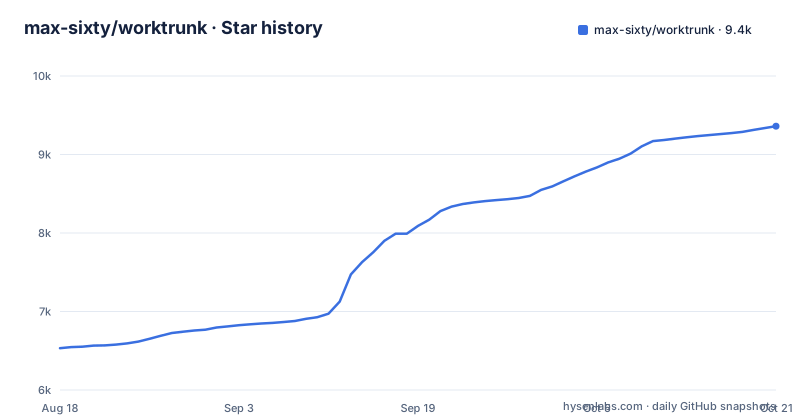
Star history
- max-sixty/worktrunk9,361 ★ · +2,829
| Repository | 2026-08-18 | 2026-10-21 |
|---|---|---|
| max-sixty/worktrunk | 6.5k | 9.4k |
2,829 Stars in the last 64 days, measured from the daily GitHub snapshot. Compare with other projects
Editorial analysis
The Problem: Git Worktrees Are Clunky for Parallel Agents
AI agents like Claude Code and Codex can now handle long tasks without supervision, so a single developer might run five to ten agents in parallel. Git's native worktree feature gives each agent its own working directory, which prevents them from stepping on each other's changes. But the UX is painful. The README gives a concrete example: starting a new worktree requires typing the branch name three times, as in `git worktree add -b feat ../repo.feat`, then `cd ../repo.feat`. That friction multiplies when you create, switch, and clean up worktrees repeatedly. Worktrunk addresses this by addressing worktrees by branch name and computing paths from a configurable template. The target user is a developer who juggles many parallel changes, especially with AI agents, and wants a faster way to manage those worktrees without abandoning Git's underlying model.
How Worktrunk Works: Branch-Named Paths and Core Commands
Worktrunk's design centers on three core commands: `wt switch`, `wt list`, and `wt remove`. Instead of typing a path like `../repo.feat`, you type the branch name. The README shows a comparison: `wt switch feat` replaces `cd ../repo.feat`, and `wt switch -c -x claude feat` creates a branch, checks out a worktree, and starts Claude in one step. The path is computed from a configurable template, which means the tool decides where the worktree lives based on your configuration. `wt list` shows branch, status, HEAD, main divergence, remote status, commit hash, age, and message, which is far more informative than plain `git worktree list` that shows paths only. Cleanup is also simplified: `wt remove` handles both the worktree and the branch, where plain Git requires two separate commands. This mechanism reduces the chance of forgetting to delete a branch or leaving stale worktrees around.
Getting Started: Install, Shell Integration, and Quick Start
Installation is straightforward on macOS and Linux via Homebrew: `brew install worktrunk && wt config shell install`. The shell integration is essential because commands like `wt switch` change directories, so without it you would have to manually `cd` after each switch. Cargo users can run `cargo install worktrunk && wt config shell install`. On Windows, there is a conflict: `wt` defaults to Windows Terminal's command, so Winget installs Worktrunk as `git-wt` instead. The command is `winget install max-sixty.worktrunk` followed by `git-wt config shell install`. Arch Linux and Conda/Pixi options exist as well, with the conda-forge feedstock being community-maintained. The quick start in the README shows `wt switch --create feature-auth`, which creates a branch and worktree and switches to it, outputting a confirmation line with the computed path. After that, `wt list` gives a table of all worktrees with status and commit details.
Beyond the Basics: Hooks, Caching, and Automation
Worktrunk includes several features that go beyond simple worktree management. Hooks run commands on events like create, pre-merge, and post-merge, which lets you automate local workflows such as running tests or formatting before a merge. The merge workflow combines squash, rebase, merge, and cleanup into one command. There is also an interactive picker for browsing worktrees with live diff and log previews, which is useful when you have many branches. A notable feature is copying build caches: `wt step copy-ignored` can share directories like `target/` or `node_modules/` between worktrees, avoiding cold starts for build tools. The `hash_port` template filter assigns a unique port per worktree, which is handy for running dev servers in parallel without conflicts. The README also mentions PR checkout with `wt switch pr:123`, aliases for custom commands, and per-branch variables for hook templates. These features suggest the tool is designed for a workflow where many worktrees are active simultaneously and each needs its own resources.
Limitations and When It Is the Wrong Tool
Worktrunk is not a replacement for Git; it is a layer on top. If you need fine-grained control over worktree placement or you rarely use more than one or two worktrees, the added abstraction may not be worth learning. The README does not document any failure modes, but the reliance on a path template means that moving or renaming a worktree outside the tool could confuse its state. The shell integration is a requirement, not an option, so in non-interactive environments like CI scripts, commands that change directories might behave unexpectedly. On Windows, the naming conflict with Windows Terminal is a real hurdle; you must either disable the Terminal alias or use `git-wt` instead, which is a second binary name to remember. The README also notes that the crates.io badge is disabled due to rate-limiting, and the license field in the metadata is NOASSERTION, even though a badge suggests MIT; this ambiguity is a concern for organizations that require clear licensing. Finally, the tool's focus on AI agents means that if you do not run agents, some features like LLM commit messages or AI-generated summaries may be unnecessary overhead.
Maintenance, Licensing, and Upgrade Cost
The repository shows active development with three releases in August 2026 alone: v0.75.0, v0.74.0, and v0.73.0, with the latest push on August 27, 2026. The README states the project was released at the start of the year and has become popular, but we cannot verify that claim from the material. The license is listed as NOASSERTION in the repository metadata, though a badge in the README links to the MIT license. This discrepancy means you should verify the license file before adopting the tool in a commercial setting. Upgrade cost appears low: installing a new version via Homebrew or Cargo is a single command, and the configuration format is likely stable given the versioning. However, the README mentions that shell integration is required, so upgrading may require re-running `wt config shell install` if shell hooks change. The project is not archived, and the maintainer states a focus on quality, but there is no long-term maintenance promise in the material. For teams that need guaranteed support, this is a risk to weigh.
Alternative: Plain Git Worktrees and Other Managers
The most direct alternative is plain Git's built-in worktree commands. The README itself compares Worktrunk to plain Git, showing that `wt switch feat` replaces `cd ../repo.feat`, and `wt remove` replaces a two-step process. The key difference is that plain Git requires you to remember and type full paths, while Worktrunk abstracts paths away and adds status information. Another alternative is a shell script or alias that wraps `git worktree add` and `git worktree remove`, but that would lack Worktrunk's hooks, cache copying, and LLM integration. There are other third-party worktree managers, but the material does not name any, so we cannot compare them. The fundamental difference in approach is that Worktrunk treats branch names as the primary identifier and computes paths automatically, whereas plain Git forces you to manage paths manually. If you only need basic worktree creation and removal, a simple shell function might suffice, but if you want a unified interface with status and automation, Worktrunk offers a more complete package.
Editorial conclusion
Worktrunk is for developers who run multiple AI agents or manage many parallel feature branches and want a single tool to create, switch, list, and clean up worktrees with minimal typing. It is not for those who prefer raw Git control or who work on Windows without disabling the Terminal alias. Before adopting, verify that the MIT license (as implied by the badge) is confirmed in the repository, since the metadata shows NOASSERTION, and check the hook and template configuration against your shell environment. Also test the shell integration in your CI or non-interactive scripts, since commands like `wt switch` change directories, which may not behave as expected in all automation contexts. The project is actively maintained with frequent releases, but its long-term viability depends on continued upstream support for Git's worktree feature and the maintainer's stated focus on quality.
Frequently asked questions
Why would I use Git worktrees with Worktrunk?
Git's native worktree feature gives each agent its own working directory so parallel changes do not step on each other, and agents such as Claude Code and Codex can run five to ten in parallel. Worktrunk sits on top of that feature to cut the typing and add status reporting.
How do I use a work tree with Worktrunk?
Run `wt switch --create feature-auth` to create a branch and its worktree, then `wt list` to see every worktree with status and commit columns. `wt switch feat` moves between existing worktrees by branch name.
How do I remove a work tree with Worktrunk?
`wt remove` removes the worktree and its branch in one step, matching the plain git sequence `git worktree remove` followed by `git branch -d`. The documentation does not describe an undo for that removal.
What are the alternatives to Worktrunk?
The fallback is plain git worktrees: `git worktree add -b feat ../repo.feat` plus a manual cd, and `git worktree list`, which returns paths only. Worktrunk adds branch-name addressing, status columns, hooks and copy-on-write build cache sharing on top of that.
Does Worktrunk have a VS Code integration?
No VS Code integration is described. The editor and agent integrations named are Claude Code and Codex, and the repository root carries hooks/, skills/, plugins/, .claude-plugin/, .codex/ and gemini-extension.json.
Official sources
Add this badge to your README
If you maintain this project, the badge below links readers to this analysis and shows its maintenance status from the daily GitHub snapshot. Paste the markdown into your README; add ?metric=license or ?metric=stars to the image URL for a different field.

[](https://hysenlabs.com/projects/max-sixty-worktrunk)Star history chart for your README
[](https://hysenlabs.com/projects/max-sixty-worktrunk)