mchehab/zbar: build and scan barcodes on Linux
ZBar is an open source software suite for reading bar codes from various sources, including webcams. This is the main repository for reporting issues and send PRs. There's a clone at at https://git.linuxtv.org/zbar.git/, and another one at https://gitlab.com/mchehab_kernel/zbar.
At a glance
- What is it?
- ZBar is a C-based barcode decoding suite for images, video devices, and application integration. Its Meson build is practical for Linux developers, but webcam scanning, GUI components, and optional bindings add distinct dependency requirements.
- Who is it for?
- Developers integrating barcode recognition into C, C++, Python, Perl, Qt, GTK, Java, or D-Bus applications can justify evaluating ZBar, especially on Linux where video4linux is available. It is less suitable for teams needing a managed scanner service, unsupported camera environments, or a turnkey modern GUI without reviewing legacy bindings and platform dependencies.
- Can I use it commercially?
- Yes, with conditions. LGPL-2.1 is a weak copyleft licence: you can use it inside commercial and closed-source software, but if you distribute changes to its own files, you must publish those changes under the same licence.
- Is it still maintained?
- Yes. The repository last received commits 25 days ago.
- What is it written in?
- Mainly C, according to GitHub's language statistics.
Answers come from the project's GitHub data, last synced on November 7, 2026, and from our analysis. They are not legal advice.
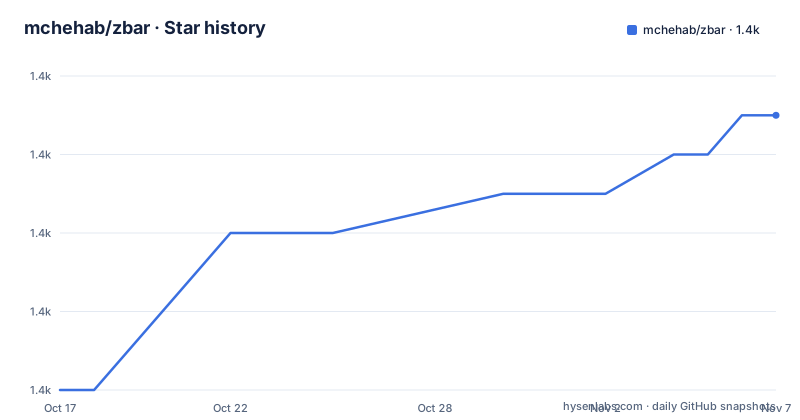
Star history
- mchehab/zbar1,389 ★ · +7
| Repository | 2026-10-17 | 2026-11-07 |
|---|---|---|
| mchehab/zbar | 1.4k | 1.4k |
7 Stars in the last 21 days, measured from the daily GitHub snapshot. Compare with other projects
Editorial analysis
ZBar's decoder library and command-line applications
ZBar addresses a specific integration problem: converting barcode symbols found in still images or live video into application-readable values. It is intended for technical users who need general-purpose software components for integration, development, research, and infrastructure. The README explicitly says the project is not a consumer-facing online service or managed platform.
The documentation identifies two basic applications. `zbarimg` decodes a barcode from a saved image, while `zbarcam` treats a video device such as a webcam as a scanner. This is more useful than providing only a recognition library because it offers both a command-line workflow and an integration layer. The included source layout also contains bindings and interface components for C, C++, Python 2, Perl, Qt, GTK, PyGTK 2.0, Java, and D-Bus.
The documented symbologies include EAN-13/UPC-A, UPC-E, EAN-8, Code 128, Code 93, Code 39, Codabar, Interleaved 2 of 5, QR Code, and SQ Code. The repository's `examples/` directory includes images for several of these formats, plus C and C++ image-scanning examples. The project therefore serves both developers who want to embed decoding into software and users who only need to decode a file.
A concrete distinction matters here. `zbarimg` is the simpler first target because it operates on an existing image and relies on ImageMagick for broad image-format input. `zbarcam` adds a live capture dependency and Linux kernel interface considerations. Choosing between them is partly a choice between a deterministic file workflow and a device-oriented scanning workflow.
Meson, Ninja, and the scanner build path
The current repository uses Meson and Ninja. From a source checkout, the README gives the basic configuration and compilation sequence below. This creates the build tree and compiles the configured components.
meson setup builddir
meson compile -C builddir
Optional interfaces and features are selected through Meson options. The documented example selects GTK 3 and Python 3 bindings while disabling video support:
meson setup builddir -Dgtk=gtk3 -Dpython=python3 -Dvideo=falseThat option set is not appropriate for a webcam deployment because it explicitly disables video. It illustrates the main build decision: do not accept every optional component by default. The library itself is described as depending only on a few standard library functions, while applications and wrappers pull in external libraries.
The dependency boundary is visible in the documentation. `zbarcam` uses the video4linux API, either v4l1 or v4l2, and the README recommends Linux kernel 3.16 or newer for full support. `zbarimg` uses ImageMagick to read many image formats, with version 6.2.6 stated as the minimum, or GraphicsMagick as an alternative. `pkg-config` is used to locate installed libraries for remaining components.
The repository's `Makefile` also provides wrapper targets such as `make`, `make check`, `make install`, `make regress`, and `make dist`. These call Meson or Ninja underneath rather than representing a separate build system. Perl bindings require a separate build and installation procedure after the library is installed, as documented in `perl/README`.
A first ZBar image scan with `examples/code-128.png`
After building and installing the configured programs, the shortest documented first use is a saved-image scan. Installation is performed through Meson:
meson install -C builddirThe repository includes `examples/code-128.png`, so a new user can exercise the decoder without arranging a camera. The command is:
zbarimg examples/code-128.pngThe README documents output of this form for that example:
CODE-128:https://github.com/mchehab/zbar
scanned 1 barcode symbols from 1 images in 0.01 seconds
The exact timing should not be treated as a performance guarantee. It is an example output associated with one image. The useful part is the structure: the program reports the detected symbology, decoded value, and number of symbols and images processed.
For a live Linux video device, the documented alternative is to start the scanner with `zbarcam` or `zbarcam-qt`. This is not merely a renamed version of the file workflow. Based on the repository layout and README, `zbarcam` adds video capture through video4linux, while `zbarcam-qt` presents the same general scanning role through a Qt application. The README says to consult each program's manual for specific options, so camera selection and other flags should not be inferred here.
The project also documents prebuilt release binaries for Ubuntu SID, macOS, and Windows in 32-bit and 64-bit forms. The Windows builds are documented as Video for Windows or DirectShow configurations. Building from the repository is preferable when a team needs control over Meson options, dependencies, and packaging.
Library bindings, GUI components, and D-Bus event delivery
ZBar's architecture separates decoding from presentation and transport. The scanner and decoder library form the central component. Applications can call that library directly, use the command-line programs, wrap it through a language binding, or receive scanned values through D-Bus. This gives integrators several paths without changing the underlying barcode vocabulary.
The C and C++ language bindings are intended for native application development. Python bindings provide non-GUI functions and require Python 2 or 3. Scanning images or video directly from Python additionally requires PIL or Pillow. Perl bindings require Perl version 5 and are built separately after library installation. The GUI bindings have narrower constraints: the Qt widget supports Qt4 or Qt5, while the GTK widget supports GTK+-2.x or GTK+-3.x.
The Python GUI documentation divides legacy and current paths. The Python 2 PyGTK 2.0 wrapper requires Python 2 and PyGTK. A GObject Introspection wrapper can work with Python 2 or 3, but the README says to enable both GTK and Python. It recommends GTK 3.x because GIR has known issues with GTK 2.x. Distribution package names depend on the platform, so the documentation gives Fedora and Debian or Ubuntu examples rather than one universal package list.
D-Bus provides a separate integration path. The documented system interface is `org.linuxtv.Zbar1.Code`, and the test program waits for ZBar events containing a barcode type and value. The README's test sequence uses `test_dbus` in one shell and runs `zbarimg examples/code-128.png` in another. This is useful when the scanner should feed another desktop application rather than expose a custom polling interface.
ZBar's dependency and platform boundaries
ZBar's scanner and decoder library has a relatively small dependency footprint according to the README, but the complete suite is not dependency-free. The easiest deployment is generally the library plus `zbarimg`. Adding webcam capture brings in video4linux and requires a compatible Linux video stack. Adding image files brings in ImageMagick or GraphicsMagick. GUI and language components add their respective runtimes and development headers.
That structure creates a real failure mode for packaging. A build can compile the core library while omitting video, GTK, Qt, Python, Perl, or Java support. A runtime then fails when an expected executable, shared library, image backend, or camera interface is missing. Teams should inspect `meson_options.txt` and `meson configure builddir` rather than assuming every README-listed component is enabled by default.
The GUI documentation also exposes age-related constraints. Python 2 and PyGTK 2.0 are documented as legacy paths, Qt4 and GTK+-2.x remain named as supported dependency versions, and the Java widget uses JNI and therefore contains machine-dependent code. These are not defects by themselves, but they affect integration planning. A project targeting only a current Python 3 and GTK 3 stack should select the corresponding options and avoid assuming that legacy widget documentation describes its preferred interface.
ZBar is therefore the wrong tool when the requirement is a managed browser service, a preconfigured consumer scanner, or a camera workflow outside the documented video backends. The README does not document hosted operation, browser camera abstractions, or camera models that can be assumed supported.
Alternative approach: decode a file first, then integrate the library
A practical alternative to live `zbarcam` scanning is the `zbarimg` workflow: capture or obtain an image first, then decode the file through ImageMagick and ZBar's decoder. The difference is architectural. `zbarimg` is a command-line file decoder, while `zbarcam` maintains interaction with a video device through video4linux. The file workflow can fit batch jobs, uploads, and controlled test fixtures more directly because its input is already an image.
For application developers, the other meaningful path is to link the ZBar library directly rather than launch either command. The repository includes C and C++ examples such as `examples/scan_image.c` and `examples/scan_image.cpp`, while Python and Perl provide their own bindings. This approach is more involved because it requires build configuration and dependency management, but it avoids treating a command-line subprocess as the application interface.
D-Bus is a third integration style when the scanner and consumer are separate desktop processes. It is less direct than a native library call and depends on the system D-Bus environment, but it lets another application consume the documented `org.linuxtv.Zbar1.Code` events. The choice should follow the boundary of the application: native code can use the library, isolated jobs can use `zbarimg`, and desktop processes can use D-Bus when event delivery is preferred.
Maintenance signals, licensing, and upgrade work
The repository is not archived, and its last push was on 2026-10-14. The recent release list includes 0.23.95 and 0.23.94 on 2026-10-11, following 0.23.93 on 2024-01-09. Those dates indicate recent repository activity, although they do not by themselves define compatibility for every optional component or platform configuration.
The project is licensed under `LGPL-2.1`, with license information in `COPYING`. That designation matters to organizations distributing binaries or linking the library, because their packaging and compliance process may need to account for the applicable LGPL obligations. This article does not provide legal advice, and the license file should be reviewed for the intended distribution model.
Upgrade work is not limited to replacing a library binary. Meson options can change which bindings and applications are built, while native Windows, macOS, and Linux builds have different dependency arrangements. The Perl bindings require a separate build after library installation, and the Java widget contains machine-dependent JNI code. A controlled upgrade should therefore compare `meson_options.txt`, `INSTALL.md`, and the target platform's dependency list before rebuilding.
The documented test command is available for a configured build:
meson test -C builddirThe Makefile also exposes narrower targets, including `make regress` and `make other-tests`, but the README's direct Meson command is the clearest starting point for a full configured test run.
Editorial conclusion
Developers integrating barcode recognition into C, C++, Python, Perl, Qt, GTK, Java, or D-Bus applications can justify evaluating ZBar, especially on Linux where video4linux is available. It is less suitable for teams needing a managed scanner service, unsupported camera environments, or a turnkey modern GUI without reviewing legacy bindings and platform dependencies. Verify the decoder library and command-line image workflow first, then test `zbarcam` against the intended video device and inspect the selected Meson options before packaging.
Frequently asked questions
How do I install and build mchehab/zbar?
The README says ZBar uses Meson and Ninja. From the repository, run `meson setup builddir` followed by `meson compile -C builddir`; optional features are selected with Meson options.
How does mchehab/zbar scan an image file?
After installing the programs with `meson install -C builddir`, run `zbarimg <file>`. The repository includes `examples/code-128.png`, and the README shows output containing its symbology and decoded value.
Does mchehab/zbar support webcam scanning?
Yes. The README documents `zbarcam` and `zbarcam-qt` for video-device scanning. `zbarcam` uses the video4linux API, with v4l1 or v4l2 support described in the documentation.
Official sources
Add this badge to your README
If you maintain this project, the badge below links readers to this analysis and shows its maintenance status from the daily GitHub snapshot. Paste the markdown into your README; add ?metric=license or ?metric=stars to the image URL for a different field.

[](https://hysenlabs.com/projects/mchehab-zbar)Star history chart for your README
[](https://hysenlabs.com/projects/mchehab-zbar)Was this useful?