Laravel Notify: backend-driven flash notifications in Laravel
Flexible Flash notifications for Laravel
At a glance
- What is it?
- Laravel Notify adds configurable toast, alert, and action-based notifications to Laravel applications. It suits developers using Blade who want frontend feedback from controller code, with separate setups for Tailwind CSS 4.x and precompiled assets.
- Who is it for?
- Laravel Notify is appropriate for Laravel applications that render Blade views and need short-lived feedback after controller actions, especially when their frontend already supports Alpine.js and Tailwind CSS 4.x. It is a poor fit for applications requiring durable inbox notifications, backend-only delivery, or non-Blade rendering.
- Can I use it commercially?
- Yes. MIT is a permissive licence: you can use, modify and sell software built on it, as long as you keep its copyright and licence notices.
- Is it still maintained?
- Yes. The repository last received commits 1 day ago.
- What is it written in?
- Mainly PHP, according to GitHub's language statistics.
Answers come from the project's GitHub data, last synced on November 6, 2026, and from our analysis. They are not legal advice.
Star history
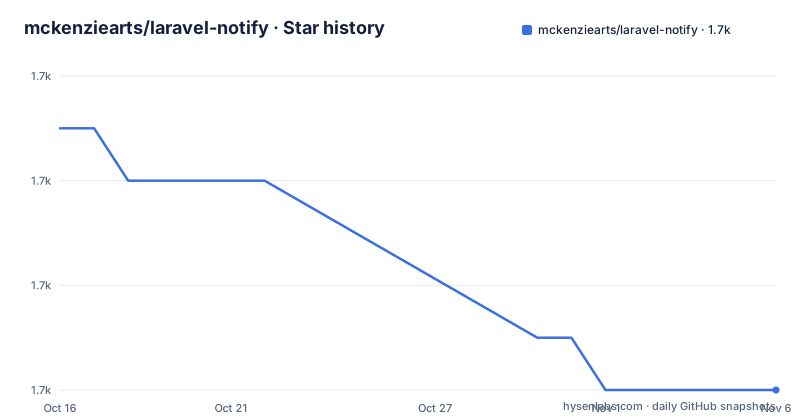
- mckenziearts/laravel-notify1,724 ★ · -5
| Repository | 2026-10-16 | 2026-11-06 |
|---|---|---|
| mckenziearts/laravel-notify | 1.7k | 1.7k |
-5 Stars in the last 21 days, measured from the daily GitHub snapshot. Compare with other projects
Editorial analysis
What Laravel Notify solves
Laravel Notify addresses a narrow frontend problem: showing a user what happened after a backend operation without building a separate notification interface for each response. It is intended for Laravel developers who dispatch information from controller code and render that feedback in a Blade layout. The package calls these messages notifications, but the examples place them in application redirects and toast interfaces rather than describing a persistent inbox or database-backed notification center.
The API starts with notify(), applies a status such as success() or error(), adds text and presentation options, then calls send(). This keeps the controller call compact. A create or store action can report success before returning back(), while the Blade component displays the resulting notification in the next page response.
The package offers five presentation models. Toast is the default. Connect accepts a title and message, Drake behaves as an alert without those text fields, Smiley uses an emoticon treatment, and Emotify uses a vector emoticon treatment. That range is useful when a product wants more visual distinction than a single generic toast, although it also means the package is primarily concerned with immediate visual feedback.
Controller-to-Blade notification flow
The documented architecture places notification creation in PHP and rendering in package-provided Blade assets. A controller builds a notification through the notify() helper and calls send() before redirecting. The application layout contains <x-notify::notify />, which gives the browser a common mount point. The layout also loads the package JavaScript and, depending on the selected integration, either builds Tailwind styles from the package views or loads precompiled CSS and JavaScript.
In the Alpine.js path, resources/js/app.js imports Alpine, assigns it to window.Alpine, and calls Alpine.start(). The package's package.json includes Alpine.js as a development dependency for its own build process, while the README also instructs application developers to include Alpine in their frontend entry point. The repository structure contains resources, src, public, and a bin/build.js script. Based on that layout, JavaScript and CSS are built from package sources into distributable assets.
The package does not document persistence, queues, channels, delivery by email, or a user notification center. It should therefore not be confused with Laravel's broader notification ecosystem. The confirmed scope is a browser-facing message defined by backend code.
Installing Laravel Notify and wiring the layout
The README identifies Composer as the installation route. Install the package, then publish both configuration and frontend assets. The two publish commands use separate tags, so both are needed when following the documented setup.
composer require mckenziearts/laravel-notifyAfter Composer completes, publish the package resources into the Laravel application:
php artisan vendor:publish --tag=notify-assets
php artisan vendor:publish --tag=notify-config
The first command publishes assets, while the second publishes the configuration file. The documentation does not provide a full application-wide install command beyond these steps, and it does not state whether Composer prompts differ between Laravel versions.
Applications using Tailwind CSS 4.x must make the package Blade files visible to Tailwind. Add the documented source directive to resources/css/app.css:
@import "tailwindcss";

@source "../../vendor/mckenziearts/laravel-notify/resources/views/**/*.blade.php";
The relative path matters because Tailwind scans package views to generate the notification styles. Then place the component near the end of the main Blade layout:
<x-notify::notify />Finally, run the application's existing asset build script:
npm run build
# or for development
npm run dev
The README states that the Tailwind build will generate the CSS used by the package views.
Using precompiled assets without Tailwind
Laravel Notify also supports applications that do not use Tailwind. This path loads the package's precompiled files through Blade directives, which avoids requiring the application build to scan the package's Blade templates. A complete minimal layout is documented as follows:
<!DOCTYPE html>
<html lang="en">
<head>
    <meta charset="utf-8">
    <meta name="viewport" content="width=device-width, initial-scale=1">
    <title>Laravel Notify</title>

    @notifyCss
</head>
<body>

    <x-notify::notify />

    @notifyJs
</body>
</html>
The README states that the compiled files are served from public/vendor/mckenziearts/laravel-notify/dist/. The CSS directive belongs in the document head, while the JavaScript directive appears after the component in this example. The component and scripts still need to exist in the application's shared layout so every intended page has somewhere to render notifications.
This route may be easier for an existing Laravel application that already relies on published vendor assets. It does not remove the JavaScript requirement implied by the interactive notification component, and the README does not document a no-JavaScript presentation mode.
Sending the first notification from a controller
The first useful operation is a controller method that calls notify() before returning back(). The basic example establishes a success status, supplies a title, and sends the notification.
public function store()
{
    notify()
        ->success()
        ->title('Saved successfully')
        ->send();

    return back();
}
The call order communicates intent: choose the status, define the content, then dispatch the notification. The README gives the same pattern for default toast, Connect, Smiley, and Emotify presentations. Selecting a model is explicit where the default is insufficient:
notify()
    ->model(NotificationModel::Connect)
    ->success()
    ->title('Connection Found')
    ->message('Success Message Here')
    ->send();
Toast is the default model. Drake is the exception because it is presented as an alert and does not support notification actions. Smiley and Emotify accept custom titles and messages like the other toast-style models.
The README excerpt does not document how the package persists the message between the request and the redirected response. It establishes the call and render contract, but not the internal transport or storage mechanism. Applications should not assume more persistence than the documentation confirms.
Timing, configuration, and notification constraints
Notifications close automatically after five seconds by default. Individual messages can override that value through duration(), whose example passes milliseconds. The documented default is read from config/notify.php through an environment variable:
'timeout' => env('NOTIFY_TIMEOUT', 5000),An individual call can use a shorter value:
notify()
    ->success()
    ->title('Saved successfully')
    ->duration(3000)
    ->send();
The package describes a long duration as a way to keep a notice open until manual closure, but its example uses 999999 milliseconds, which it labels as approximately 16 minutes. That value does not literally represent persistent display until closure, so applications with important messages should verify the component's actual close controls rather than treating the example as indefinite.
There is also a clear model constraint. Actions work with Toast, Connect, Smiley, and Emotify, but not Drake. This is not merely a style difference because it changes which API calls produce an interactive result.
Interactive actions and their security boundary
Laravel Notify can attach actions to supported notification models through Mckenziearts\Notify\Action\NotifyAction. An action may either navigate to a URL or send a request to a controller endpoint. The package describes URL actions as GET requests and controller actions as POST by default, with method() available to select another method.
use Mckenziearts\Notify\Action\NotifyAction;

notify()
    ->success()
    ->title('User deleted successfully')
    ->actions([
        NotifyAction::make()
            ->label('Undo')
            ->action(route('users.restore', $user->id)),
        NotifyAction::make()
            ->label('View All')
            ->url(route('users.index')),
    ])
    ->send();
Navigation can use url(), and openUrlInNewTab() changes how the link opens. Execution actions use action(). For example, restoring a user from a notification sends a mutating request and therefore belongs behind normal Laravel route authorization, validation, CSRF protection, and auditing. The README documents how to construct the action, but it does not describe any authorization policy or replay protection supplied by Laravel Notify. Those responsibilities remain application concerns.
This feature is also a reason not to equate the package with a complete notification platform. It can present a button that triggers an application route, yet the package documentation does not claim ownership of what happens after that route runs.
Maintenance, releases, and upgrade scope
The repository is not archived. Its last push was on 2026-10-15, and the default branch is 3.x. Recent releases include v3.2.0 on 2026-03-03, v3.1.1 on 2025-12-26, and v3.1 on 2025-12-18. This information indicates recent repository activity and versioned releases, but it does not establish long-term compatibility with every Laravel release.
The package uses PHP and includes composer.json, composer.lock, PHPUnit configuration, PHPStan configuration, Rector configuration, and tests. Its frontend development dependencies include Tailwind CSS 4.1.18, Alpine.js 3.12.0, esbuild, PostCSS, cssnano, and npm-run-all. The upgrade cost therefore includes reviewing both PHP package constraints and frontend asset integration. The README documents asset publishing and Tailwind scanning, but it does not provide a version-by-version upgrade guide or rollback procedure.
The project is distributed under the MIT licence according to the repository metadata and README badge. That identifies the declared licence, but application owners still need to review the licence text and dependency terms for their own compliance needs.
Editorial conclusion
Laravel Notify is appropriate for Laravel applications that render Blade views and need short-lived feedback after controller actions, especially when their frontend already supports Alpine.js and Tailwind CSS 4.x. It is a poor fit for applications requiring durable inbox notifications, backend-only delivery, or non-Blade rendering. Before adoption, verify that the notification component works with the application's Tailwind or precompiled asset pipeline, that GET and POST actions follow its authorization model, and that the selected duration meets the application's accessibility requirements.
Frequently asked questions
How do I install Laravel Notify in a Laravel application?
Run `composer require mckenziearts/laravel-notify`, then publish the package assets and configuration with `php artisan vendor:publish --tag=notify-assets` and `php artisan vendor:publish --tag=notify-config`.
How do I use Laravel Notify without Tailwind CSS?
Add `@notifyCss` in the layout head, place `<x-notify::notify />` in the body, and add `@notifyJs` after the component. The README says this loads precompiled files from `public/vendor/mckenziearts/laravel-notify/dist/`.
How long does a Laravel Notify notification remain open?
The default timeout is 5000 milliseconds, configurable through `NOTIFY_TIMEOUT` in `config/notify.php`. A notification can override the default with the `duration()` method.
Which Laravel Notify models support interactive actions?
Actions are documented for Toast, Connect, Smiley, and Emotify. Drake does not support actions because it is presented as an alert.
Official sources
Add this badge to your README
If you maintain this project, the badge below links readers to this analysis and shows its maintenance status from the daily GitHub snapshot. Paste the markdown into your README; add ?metric=license or ?metric=stars to the image URL for a different field.

[](https://hysenlabs.com/projects/mckenziearts-laravel-notify)Star history chart for your README
[](https://hysenlabs.com/projects/mckenziearts-laravel-notify)Was this useful?