Meowrch turns an Arch install into a themed desktop with its own tools
🔮 Beautiful dots for Arch hyprland and bspwm
At a glance
- What is it?
- Meowrch is a dotfiles and tooling project for Arch Linux that installs a full Hyprland or BSPWM desktop in about ten minutes and adds its own utilities, including the Mewline panel and the Nemo Tags file tagger. It is built for a clean machine, and the installer says so in large letters.
- Who is it for?
- Meowrch suits a Linux user who is starting from a clean Arch Linux install, or from a NixOS or MacBook port, and wants a finished desktop with a panel, hotkeys and a theme in one pass rather than a weekend of config work. It does not suit anyone with an existing system they care about, because the installer overwrites configurations, and it does not suit Debian or Fedora users looking for a package.
- Can I use it commercially?
- Yes. MIT is a permissive licence: you can use, modify and sell software built on it, as long as you keep its copyright and licence notices.
- Is it still maintained?
- Yes. The repository last received commits 83 days ago.
- What is it written in?
- Mainly Python, according to GitHub's language statistics.
Answers come from the project's GitHub data, last synced on November 7, 2026, and from our analysis. They are not legal advice.
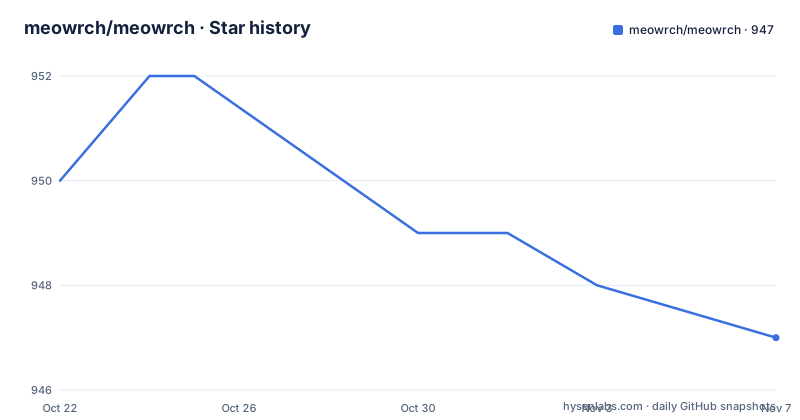
Star history
- meowrch/meowrch947 ★ · -3
| Repository | 2026-10-22 | 2026-11-07 |
|---|---|---|
| meowrch/meowrch | 950 | 947 |
-3 Stars in the last 16 days, measured from the daily GitHub snapshot. Compare with other projects
Editorial analysis
The pitch is a finished desktop, not a pile of config files
The README opens with a complaint about ready-made desktop setups for Arch: they solve either beauty while eating RAM, performance while looking plain, or functionality while leaving you with code you cannot fix yourself. Meowrch is presented as the alternative, built on the principle of maximum results with minimum resources, and the concrete claim attached to that principle is a startup memory figure of 1 GB.
The rest of the feature table backs the claim with a list of choices rather than adjectives. Optimizations are taken from the ARU project and from CachyOS. A community theme store lets you change the appearance of the whole system with one command. Installation is advertised as taking 10 minutes with no manual config editing. Hotkeys are described as thought out down to the smallest detail, which is a claim you can check for yourself by reading the keybinding files in the clone rather than taking on trust.
Two environments are supported: BSPWM on X11 and Hyprland on Wayland. The README frames that choice as stability against modernity, and it is a real fork in the road, since a keybinding written for one window manager does not transfer to the other.
Mewline replaces the tray, the bar, the notifier and the launcher
The most concrete part of the project is Mewline, a separate utility in its own repository, described as a dynamic island for Linux. The README is emphatic that all of this lives in one utility, and it names the stack it replaces: Rofi plus Waybar plus Dunst plus wlogout plus network-manager-applet plus a clipboard manager, collapsed into one installation command.
The feature list divides into two groups. The first is a permanent strip: system tray for background applications, workspaces for quick switching, date and time, brightness, volume, battery and charging status, a power management menu, and OCR for text recognition from a selected screen area.
The second is an interactive control center reachable by hotkey. Compact mode shows information about the active window and playing music. There is an information menu with a calendar and notification history on Super+Alt+D, an application launcher on Super+Alt+A, wallpaper switching with preview on Super+Alt+W, an emoji picker on Super+Alt+., clipboard history on Super+Alt+V, network management for Wi-Fi and Ethernet on Super+Alt+N, a windows and workspaces manager on Super+Alt+Tab, and Bluetooth device management on Super+Alt+B.
A system tray and an OCR box in the same utility is unusual, and it is worth knowing that a panel that does everything is also a panel with a single point of failure.
Two of the tools exist because of long-standing Linux complaints
Beyond the rice itself, the project highlights two utilities it wrote to fix problems it says the wider community has complained about for years.
Nemo Tags is a tagging system for the Nemo file manager. The README states the community requested file tagging for Nemo for over 10 years, that developers ignored the request, and that the project built it. The result it advertises is file organisation of the kind associated with the macOS Finder.
BlueVein addresses a different annoyance: Bluetooth pairing that breaks when you dual boot between Windows and Linux, so that after every OS switch you reconnect your mouse, keyboard and headphones. The project claims to have solved that problem.
The framing matters for judging the project. These are not ports of existing tools but small utilities written to close specific gaps, which means they carry their own maintenance burden and their own bug surface. The README notes that all of the tools are open source and work outside Meowrch, aimed at the whole Linux community rather than only at people running this desktop setup.
The installer overwrites your configuration, so test it on a new user
Installation is three commands, and the warning above them is the most important paragraph in the README. The installer is designed for a clean Arch Linux system, and on a configured system the installation will overwrite configurations. The advice given is to create a new user for testing, and to switch over completely only if you like the result.
# 1. Clone the repository
git clone https://github.com/meowrch/meowrch --depth 1 --single-branch
cd meowrch

# 2. Run the installer
sh install.sh

# 3. Reboot
reboot
The clone is shallow and single branch, which is the right choice for a scripts-and-configs repository, and the installer is a plain shell script you can read before running it. The top-level layout makes the pieces visible: `install.sh` at the root, a `home/` directory that presumably holds what lands in your home directory, a `Builder/` directory, a `misc/` directory, a `tests/` directory, a `VERSION` file, and a `.gitmodules` file.
That `.gitmodules` entry is worth a look before you install, since submodules pull in content from other repositories and the pinned commits are part of what you are about to trust. A `tests/` directory at the top level is unusual for a desktop configuration project and is where you would look to see what the project checks about itself.
Community ports for NixOS and MacBook sit outside the Arch installer
The README documents community-maintained alternatives to the standard Arch installation, listed in a table with a platform, a description and a repository column. The navigation links at the top of the README point to a NixOS version and a MacBook version in addition to the Arch path.
That distinction is worth taking seriously. A NixOS port in particular cannot use the same install.sh, because a port has to manage configuration differently from an Arch installer. A port that reproduces the same desktop therefore has to solve a different problem, and the way it does so is not described in the Arch README.
The same applies to the MacBook version, where hardware support for specific laptops is the hard part rather than configuration layout. If you are not on Arch, the practical first step is to read the port's own repository rather than to assume the Arch instructions transfer.
Version 4.1.1 is the current tag, with the last push in August 2026
The release list shows Meowrch v4.0.0 on 2026-07-01, v4.1.0 and v4.1.1 both on 2026-07-19. Two releases on the same day suggests a quick fix shipped shortly after a minor feature release, and the repository carries a VERSION file that the installer and the update path presumably read.
The last push to the repository was on 2026-08-16. The project is not archived, and the version numbering has been moving through 4.x, so upgrades have been landing on the default branch.
The licence field on the repository says MIT, and the LICENSE file sits at the top level. That is a permissive licence covering modification and redistribution in commercial and closed source use, with the notice requirement being the part to respect. It is a reading of the identifier rather than legal advice, and it applies to the configuration and scripts in this repository rather than to the separate tools such as Mewline, which live in their own repositories under their own terms.
The upgrade cost of a setup like this is the part that does not appear in a release list. Because the installer rewrites configuration files, a re-run of `sh install.sh` after an update is not a package upgrade, it is a configuration overwrite. That is the reason the README tells you to test on a new user, and it remains the reason after the first install.
Editorial conclusion
Meowrch suits a Linux user who is starting from a clean Arch Linux install, or from a NixOS or MacBook port, and wants a finished desktop with a panel, hotkeys and a theme in one pass rather than a weekend of config work. It does not suit anyone with an existing system they care about, because the installer overwrites configurations, and it does not suit Debian or Fedora users looking for a package. Before running `sh install.sh`, read the warning at the top of the install section, create a separate user to test with, and check the `home/` and `Builder/` directories in the clone to see what the installer will place in your home directory.
Frequently asked questions
How do I install Meowrch on Arch Linux?
Clone the repository with `git clone https://github.com/meowrch/meowrch --depth 1 --single-branch`, change into the `meowrch` directory, run `sh install.sh` and reboot. The README warns that the installer is designed for a clean Arch Linux system and will overwrite configurations on a configured one.
Does Meowrch support Hyprland and BSPWM?
Yes, two environments are supported: BSPWM on X11 and Hyprland on Wayland. The README presents the choice as stability against modernity, and hotkey configuration for one window manager does not carry over to the other.
What is Mewline and what does it replace?
Mewline is a separate utility in its own repository, presented as a dynamic island for Linux that bundles a system tray, workspaces, brightness, volume, battery, power, OCR, a launcher, clipboard history, network and Bluetooth management into one panel. The README says it replaces the Rofi, Waybar, Dunst, wlogout, network-manager-applet and clipboard manager combination.
What are Nemo Tags and BlueVein used for?
Nemo Tags adds file tagging to the Nemo file manager, which the README says the community requested for more than 10 years. BlueVein addresses Bluetooth devices disconnecting when you switch between Windows and Linux on a dual-boot machine.
Can I install Meowrch on a system I have already configured?
The README explicitly warns that installation will overwrite configurations on an already configured system and recommends creating a new user for testing first. Community ports exist for NixOS and MacBook as an alternative route.
Official sources
Add this badge to your README
If you maintain this project, the badge below links readers to this analysis and shows its maintenance status from the daily GitHub snapshot. Paste the markdown into your README; add ?metric=license or ?metric=stars to the image URL for a different field.

[](https://hysenlabs.com/projects/meowrch-meowrch)Star history chart for your README
[](https://hysenlabs.com/projects/meowrch-meowrch)Was this useful?