Mezon Web Client Setup and Architecture
Mezon is a new way to communicate with your team. It's faster, better organized, better for WFH.
At a glance
- What is it?
- Mezon is a TypeScript web client for a real-time communication platform spanning chat, voice, video, communities, and developer integrations. It fits web-focused contributors, but the repository does not contain the native clients or media stack described by the project.
- Who is it for?
- Adopt this repository if you need to modify Mezon chat, admin, or discovery interfaces in an Nx and React codebase. Do not treat it as a complete build of the desktop, iOS, Android, or native media platform.
- Can I use it commercially?
- Not without permission. GitHub finds no licence file in the repository, and without a licence all rights are reserved by default: you may read the code but not reuse it. Check the README, or ask the authors, before using it.
- Is it still maintained?
- Yes. The repository last received commits 1 day ago.
- What is it written in?
- Mainly TypeScript, according to GitHub's language statistics.
Answers come from the project's GitHub data, last synced on November 7, 2026, and from our analysis. They are not legal advice.
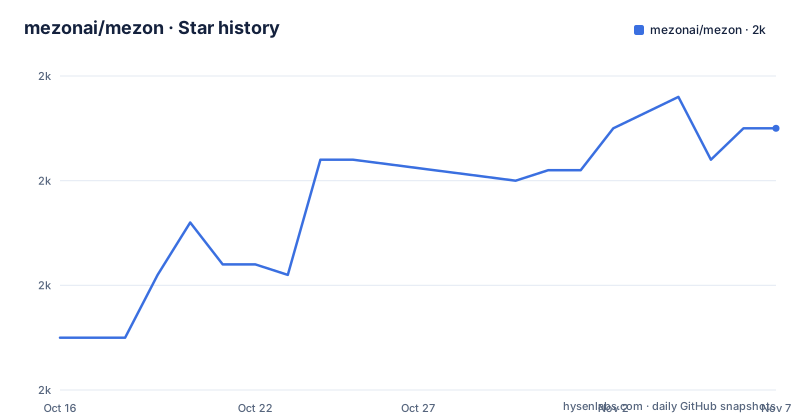
Star history
- mezonai/mezon2,015 ★ · +20
| Repository | 2026-10-16 | 2026-11-07 |
|---|---|---|
| mezonai/mezon | 2k | 2k |
20 Stars in the last 22 days, measured from the daily GitHub snapshot. Compare with other projects
Editorial analysis
Mezon's split repository model for teams and communities
Mezon addresses two overlapping communication needs: organizing work among professional teams and giving gaming communities, creators, and personal groups a shared space for chat and media. According to the README, the platform includes channels, threads, reactions, file sharing, voice and video calls, screen sharing, permissions, event scheduling, moderation, translation, and meeting summaries. Its intended users therefore extend beyond conventional workplace messaging. The same client is presented as suitable for gaming communities with voice chat and streaming integration, creators seeking community and monetization features, and private groups.
The repository examined here is not the whole Mezon product. The README identifies it as the web client and describes it as an Nx and React monorepo written primarily in TypeScript. Separate repositories hold the Rust desktop application, the native iOS application, and the native Android application. The top-level layout also separates deployable applications under `apps/`, reusable code under `libs/`, and build configuration in files such as `nx.json`, `package.json`, and `tsconfig.base.json`. This makes the repository a web application codebase rather than a single-client SDK.
That boundary matters when judging adoption. A team interested in a hosted communication product can use the web application at `https://mezon.ai`. A developer joining this repository can work on chat, administration, or discovery interfaces, but cannot obtain the native clients merely by cloning `mezonai/mezon`. The README also says that the server stack uses C components, including `mezon-sfu`, `libmeziaa`, and `mezon-proto-server`, plus a custom WebRTC SFU, a C11 media engine, `io_uring`, and a binary data plane. Those details describe the broader platform architecture, not modules that can be assumed to live in this TypeScript repository.
How the Nx web client maps to Mezon services
The repository layout indicates an Nx monorepo with multiple application targets and shared libraries. `package.json` defines a chat development target that runs `nx run chat:serve` against `127.0.0.1` on port `4200`. It also defines separate `admin` and `discover` targets. Their build scripts produce distinct base paths: the chat and discovery builds use `/`, while the administration build uses `/developers/`. This separation suggests that Mezon treats the consumer chat surface, developer administration interface, and discovery experience as independently served web applications inside one workspace.
The documented communication model extends beyond ordinary request and response calls. The README says Mezon provides REST and WebSocket APIs and describes secure binary sockets as part of its zero-knowledge architecture. Those statements indicate a mix of HTTP-based application operations and persistent real-time connections. Messages, voice, and video are documented as end-to-end encrypted, while client-side encryption is listed under the zero-knowledge design. The README also says the server-side media path uses a custom WebRTC SFU and native media components. It does not provide a detailed message envelope, authentication handshake, protocol schema, or key exchange sequence, so those implementation details cannot be inferred from the repository overview.
The feature list also places several capabilities at the client or platform boundary. Markdown rendering, reactions, threads, safe message rendering, and content validation affect the React interface. Calls, recordings, streaming, and the custom SFU concern media handling across client and server components. Bots, SDK support, webhooks, and more than 100 listed integrations indicate extension points, but the README does not document a complete bot API, its authentication method, or a minimal event subscription example. Developers should distinguish documented product capabilities from locally callable APIs until they inspect the relevant source or developer guide.
Running the Mezon chat client for the first time
The README documents the shortest source-code path for the web chat application. Clone the repository, enter its directory, install dependencies with Yarn, and start the `chat` Nx target. The documented development requirements are Node.js 18 or later, Yarn 1.22.4 or later, and at least 4 GB of RAM.
git clone https://github.com/mezonai/mezon.git
cd mezon
These commands retrieve the web repository and make its root directory the current working directory. The README points contributors to `docs/developer/SETUP.md` for detailed setup information.
yarn installThis installs the dependencies recorded through the repository's Yarn configuration and lockfile. No alternative package manager command is documented in the README.
yarn dev:chatThe `dev:chat` script starts the Nx chat application with host `127.0.0.1` and port `4200`. The reader should then open `http://localhost:4200/`. Binding to `127.0.0.1` means the documented development command is local to the machine rather than exposed on every network interface by default.
The same package file provides related first checks and targets. `yarn lint` runs the `lint` target across all Nx projects, while `yarn format` runs `nx format:check`. Production chat output is generated by `yarn build:chat`, which disables source maps and builds `chat` in production mode with `/` as its base href. The administrator and discovery clients have their own scripts, so they are not merely alternate names for the local chat view.
Native clients as an alternative to web-only access
A real alternative to using the web client is adopting one of Mezon’s native clients from its separate repository. The difference is implementation and distribution, not simply a second theme for the same interface. The README identifies `mezon-desktop` as a Rust and GPUI desktop application that renders directly on the GPU. It describes `mezon-ios` and `mezon-android` as native mobile repositories. By contrast, this repository is the Nx and React web codebase.
For a contributor, that distinction determines the technology and likely platform constraints. The documented desktop application targets Windows, macOS, and Linux, while the native mobile clients correspond to iOS 13.0 or later and Android 8.0 or later, with API level 26. The web client has browser requirements of Chrome 90 or later, Firefox 88 or later, Safari 14 or later, or Edge 90 or later. A web-focused organization can begin from this repository without adopting the Rust desktop codebase. A team that specifically needs native mobile rendering or desktop GPU integration must work in the corresponding repository instead.
There is also an operational distinction between consuming the hosted web app and running its development server locally. The README says the hosted application requires no installation. The local source path assumes a compatible Node.js and Yarn environment and starts only the chat target. Neither path establishes that a developer can replace all hosted Mezon services with this repository alone, because the documentation points to separate native clients and describes a broader native server and media stack.
Where Mezon documentation leaves implementation questions open
Mezon presents several ambitious product claims, including sub-millisecond responses, support for millions of concurrent connections, calls for as many as 1,000 users, translation across more than 100 languages, and files up to 500 MB. These numbers come from the README. No benchmark method, workload definition, deployment topology, hardware description, or independent comparison is included there, so they should be treated as project claims rather than proof of performance in a prospective environment.
The security documentation is similarly broad. The README lists end-to-end encryption for messages, voice, and video, a zero-knowledge architecture, client-side encryption, secure binary sockets, and XSS protection. It does not publish an audit report, key management design, threat model, retention policy, cryptographic library selection, or recovery model in the visible documentation. Engineers evaluating sensitive workloads need those details before treating the labels as a complete security assessment.
The largest repository-level limitation is scope. Native clients and the native media stack are not contained here, and the visible package file marks the root package as private even though it declares `MIT` for this package. The README's license section was truncated, while `package.json` identifies the package license as MIT. This supports an MIT licensing statement for the repository package, but it does not establish the license status or distribution terms of every external service, client, SDK, asset, and integration.
Mezon release cadence and maintenance boundaries
The repository is not archived, and its last push was on 2026-10-16. Recent releases include `2.0.4` on 2026-10-14, `2.0.3` on 2026-10-13, and `2.0.2` on 2026-10-05. These dates show recent repository activity, but they do not reveal the size or compatibility implications of each release.
The root `package.json` declares version `2.0.0`, even though the release list names `2.0.4`. That mismatch is plausible for a monorepo whose applications and libraries are versioned independently, but the repository files do not explain the release process. The presence of `migrations.json`, multiple application targets, shared libraries, migrations, and lint and format checks suggests that upgrades can involve more than installing a new package version. The README does not document migration execution, rollback, release channels, or upgrade compatibility.
For maintainers, the strongest cost signal is the breadth of the codebase. A single chat change may sit within an Nx workspace that also contains admin, discovery, and mobile targets. The package file includes dedicated `lint`, `format`, Android, iOS, build, and analysis commands. Separate native repositories add another coordination boundary when behavior must remain consistent across web, desktop, iOS, and Android. Before adopting Mezon for long-term product work, confirm ownership and release coordination for each client and service boundary that the intended feature will touch.
Editorial conclusion
Adopt this repository if you need to modify Mezon chat, admin, or discovery interfaces in an Nx and React codebase. Do not treat it as a complete build of the desktop, iOS, Android, or native media platform. First verify that `yarn install`, `yarn dev:chat`, and the required service configuration work in your environment, then assess the separate client and backend repositories before planning a full platform deployment.
Frequently asked questions
How do I install and start the Mezon web client?
Clone `mezonai/mezon`, run `yarn install`, and start the chat client with `yarn dev:chat`. The README says the development server will be available at `http://localhost:4200/`.
Does the Mezon repository contain the desktop and mobile clients?
No. The README identifies this repository as the Nx and React web client. The desktop, iOS, and Android applications live in separate `mezon-desktop`, `mezon-ios`, and `mezon-android` repositories.
What license does the Mezon repository use?
The root `package.json` declares `MIT` and marks the package as private. The visible README section does not add further licensing terms before it is truncated.
Official sources
Add this badge to your README
If you maintain this project, the badge below links readers to this analysis and shows its maintenance status from the daily GitHub snapshot. Paste the markdown into your README; add ?metric=license or ?metric=stars to the image URL for a different field.

[](https://hysenlabs.com/projects/mezonai-mezon)Star history chart for your README
[](https://hysenlabs.com/projects/mezonai-mezon)Was this useful?