ESPTimeCast: Browser-Based WiFi Clock and Weather Setup
ESPTimeCast™ is a sleek, WiFi-connected LED matrix clock and weather display built on ESP8266/ESP32 and MAX7219. It combines real-time NTP time sync, live OpenWeatherMap updates, and a modern web-based configuration interface — all in one compact design.
At a glance
- What is it?
- ESPTimeCast combines an ESP8266 or ESP32, a MAX7219 LED matrix, NTP time synchronization, OpenWeatherMap data, and browser-based setup. It suits makers who want a dedicated desk display without maintaining a conventional Arduino build workflow, although board pin mapping and USB behavior require verification.
- Who is it for?
- ESPTimeCast fits makers who want a dedicated MAX7219 clock with browser-based flashing, WiFi configuration, and weather data without building a firmware interface from scratch. It does not suit users who require guaranteed offline operation, a fully documented standalone Arduino workflow, or a standard open-source license classification.
- Can I use it commercially?
- Check first. The repository uses a licence we do not classify automatically, so read its LICENSE file before any commercial use.
- Is it still maintained?
- Yes. The repository last received commits 5 days ago.
- What is it written in?
- Mainly C++, according to GitHub's language statistics.
Answers come from the project's GitHub data, last synced on November 6, 2026, and from our analysis. They are not legal advice.
Star history
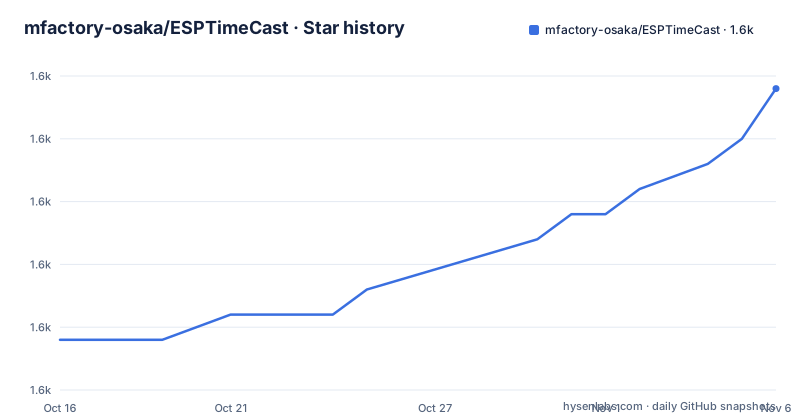
- mfactory-osaka/ESPTimeCast1,562 ★ · +10
| Repository | 2026-10-16 | 2026-11-06 |
|---|---|---|
| mfactory-osaka/ESPTimeCast | 1.6k | 1.6k |
10 Stars in the last 21 days, measured from the daily GitHub snapshot. Compare with other projects
Editorial analysis
ESPTimeCast's Dedicated Clock and Weather Function
ESPTimeCast solves a specific hardware problem: turning an ESP8266 or ESP32 and a MAX7219 LED matrix into a compact clock that can correct its time and display weather without a phone or computer remaining connected. The project targets people building a desk display, bedside clock, workshop indicator, or other small information panel around a microcontroller and an LED matrix. Its functions converge in one device: the controller obtains network time through NTP, retrieves weather information from OpenWeatherMap, and presents both on the hardware display.
That focus distinguishes it from a generic tutorial for driving a MAX7219. The README does not present ESPTimeCast only as a set of display examples. It describes a complete device concept with WiFi connectivity, a web-based configuration interface, browser flashing, and later updates. The repository layout reinforces that this is firmware for complete controllers rather than a library intended solely for inclusion in another sketch. Separate ESPTimeCast_ESP32/ and ESPTimeCast_ESP8266/ directories provide platform-specific source trees.
The project is not limited to a single ESP32 model. The documented chip families are ESP8266, ESP32, ESP32-S2, ESP32-S3, and ESP32-C3. The README lists specific boards as officially tested, including the ESP8266 Wemos D1 Mini and ESP12-F, ESP32 Dev Module, ESP32-C3 SuperMini, several S2 and S3 boards, and ESP32-S3-Zero. Other development boards may work because they use one of these chips, but the project explicitly warns that pin mapping and USB behavior can vary. A compatible processor therefore does not guarantee an identical flashing and wiring experience.
ESPTimeCast's Network, Time, Weather, and Display Path
Based on the repository description and README, ESPTimeCast has a straightforward device-side data path. The ESP8266 or ESP32 connects to WiFi. NTP supplies the current time, while OpenWeatherMap supplies weather data. Firmware for the selected MCU family controls the MAX7219 matrix, and the browser interface provides configuration outside the firmware source. The README does not expose the API request format, polling interval, cache behavior, timezone fields, retry policy, or failure display, so those implementation details should not be inferred.
The platform split is a meaningful architectural clue. ESPTimeCast_ESP32/ and ESPTimeCast_ESP8266/ indicate that support for different WiFi SoCs is not being treated as interchangeable. The device must also have sufficient flash, RAM, and networking support for WiFi time synchronization, weather retrieval, web configuration, display updates, and firmware updates. The README does not state memory consumption or minimum board specifications, so those remain adoption checks rather than confirmed guarantees.
An optional ESPTimeCast Companion Extension expands the role beyond time and weather. According to the README, the browser extension detects titles from services including YouTube, Spotify, Twitch, Prime Video, Vimeo, Dailymotion, and SoundCloud. It can send messages and timers and control brightness, modes, and rotation. Firmware v1.5.0 or later is required. The extension runs locally on the network and can cast to multiple ESPTimeCast devices. This is a separate client capability, not an inherent feature of the clock firmware alone, and the README does not explain its message transport or device discovery process.
Browser-Based ESPTimeCast Installation and First Setup
The documented installation path does not begin with an Arduino IDE command or a platformio.ini file. The README directs users to the project website and describes it as a Web Installer that flashes ESPTimeCast directly from a browser, without Arduino IDE, drivers, or manual configuration. The explicit first-use procedure is the website-based flow.
Open https://esptimecast.com in a browser. The README says that after flashing, the user should connect to the ESPTimeCast WiFi access point to complete setup. A first real use therefore begins with selecting the supported board in the browser installer, connecting the board by the method requested by the installer, flashing the firmware, and joining the access point created by the device. The next action is not described as editing source code. It is opening the device's configuration interface and supplying the settings it requests.
After configuration, the expected result is a MAX7219 matrix showing synchronized time and weather information. If the display remains blank, the first distinctions are physical wiring, correct board selection, and whether the phone or computer actually joined the ESPTimeCast access point rather than another nearby WiFi network. Those checks follow from the documented hardware and connection flow. They do not establish that any particular symptom has one fixed cause. The README does not document exact setup fields, API keys, weather location settings, or configuration URLs.
OTA and USB Update Paths for Existing ESPTimeCast Devices
ESPTimeCast documents two update routes, each with a clear boundary. OTA updates happen over WiFi through the Web UI and avoid a cable. The README says they are fully supported for devices installed with the Web Installer. Manual installations, including Arduino IDE setups, may have limited OTA support. A user who compiled and uploaded firmware outside the browser installer should not assume the same update experience.
The USB path uses the Web Installer again. It works on all supported devices and offers an option to preserve settings without erasing them. The README identifies Chrome, Edge, Firefox, and Brave as Web Serial compatible browsers for this path. This provides a recovery option when OTA is unavailable, although it still depends on the browser exposing Web Serial and on the computer or operating system presenting the board correctly. The documentation does not describe every board-specific USB bridge, bootloader mode, or driver condition.
For an installation that contains WiFi credentials or other device settings, the settings-preserving USB option is the most specific documented choice for an update. The README does not define what happens if preservation is selected but the storage format changes, and it does not promise rollback to an earlier firmware image. GitHub also has no releases for this repository. Upgrading is therefore tied to the installer or web update interface rather than a published sequence of tagged releases.
Hardware Compatibility Limits for ESPTimeCast Makers
The strongest limitation is the gap between a compatible chip family and a verified board. ESPTimeCast officially lists eight board or board-form models, but it says other boards using the same processors may work. It does not say they will behave identically. Pin mapping can differ, and USB behavior can vary. A maker choosing an ESP32-C3 board outside the tested list must verify the matrix connections and browser flashing path rather than relying on the processor name alone.
The README directs advanced users to a hardware connection table, but the quoted README does not include that table. Consequently, this review cannot confirm which GPIO pins are used for a specific controller or how many modules may be chained. It would be wrong to invent a pin map for an ESP8266, ESP32-S2, or ESP32-S3. This matters because the repository supports several chip families, and the hardware configuration can differ even when the display controller is a MAX7219.
WiFi dependence is another boundary. NTP time and live OpenWeatherMap updates require network access, while initial browser flashing requires a browser toolchain and a physical connection. The README does not document a complete offline operating mode, local weather sensor input, or fallback behavior when either network service cannot be reached. ESPTimeCast can serve as a clock only within the limits of what its firmware retains or calculates when connectivity is absent, and those details are not stated. Users who need guaranteed offline behavior should verify them before choosing the project.
A Custom Arduino Build as the ESPTimeCast Alternative
A direct alternative approach is to write an Arduino sketch that connects a chosen ESP8266 or ESP32 to a MAX7219, implements NTP synchronization, and adds weather retrieval and configuration independently. Such a build can fit a particular pin map and omit services or browser components that the finished device does not need. Its cost is that the integrator must assemble and maintain those parts. ESPTimeCast instead packages the clock, weather, browser setup, updates, and optional extension workflow into a device-oriented firmware project, which is useful when the goal is a complete display rather than a custom firmware exercise.
The enclosure is optional, but the support model differs. The official ESPTimeCast case design is a paid STL download. The README also points users toward community MAX7219 cases on Printables and Cults3D. This gives hardware builders more choice, but compatibility still depends on dimensions and mounting requirements that the README does not confirm for any particular model.
License review needs particular care. The repository is labeled with a custom license that GitHub cannot classify, and the README does not reproduce the contents of LICENSE. ESPTimeCast should therefore not be described as MIT, Apache-2.0, GPL, or another standard open-source license. Anyone planning to redistribute modified firmware or incorporate source into a product must inspect the actual LICENSE file first. A public repository and community case links do not resolve the permissions or obligations in that custom text.
ESPTimeCast Maintenance and Upgrade Boundaries
The repository is not archived, and its last push was on 2026-10-09. That indicates recent repository activity, but it does not by itself establish how each firmware family is tested or how releases are governed. GitHub currently has no releases for this repository, so there is no tagged-release sequence to consult when comparing firmware versions. The README identifies firmware v1.5.0 as the minimum version for the Companion Extension, but it does not provide a formal release policy or changelog for that version.
Upgrade cost depends on how the device was installed. Web Installer installations have a documented OTA route through the Web UI and can also use the USB installer, including an option to preserve settings. Manual Arduino installations may have limited OTA support, making the browser-based USB route more relevant. The USB route still has browser and USB compatibility requirements, and the README does not document rollback. Firmware upgrades and enclosure changes are separate concerns: an electrical or physical modification can remain unaffected by firmware, while pin or USB behavior may affect flashing.
The optional extension also creates a version boundary. Users who want browser media titles, messages, timers, or remote display controls need firmware v1.5.0 or later. Basic clock and weather users do not need to adopt the extension, but they still need to account for the web interface and OpenWeatherMap setup rather than treating the device as a standalone offline clock.
Editorial conclusion
ESPTimeCast fits makers who want a dedicated MAX7219 clock with browser-based flashing, WiFi configuration, and weather data without building a firmware interface from scratch. It does not suit users who require guaranteed offline operation, a fully documented standalone Arduino workflow, or a standard open-source license classification. Before adoption, verify the exact board's pin mapping, read the custom LICENSE file, and confirm that browser-based USB flashing and settings preservation work with the chosen hardware.
Frequently asked questions
How do I install ESPTimeCast without the Arduino IDE?
The README directs users to https://esptimecast.com and says its Web Installer can flash ESPTimeCast from the browser without Arduino IDE or driver setup. After flashing, connect to the ESPTimeCast WiFi access point to complete setup.
Which boards are officially tested with ESPTimeCast?
The README lists ESP8266 Wemos D1 Mini and ESP12-F, ESP32 Dev Module, ESP32-C3 SuperMini, Wemos S2 Mini, Adafruit ESP32-S2 Feather, ESP32-S3 WROOM-1, ESP32-S3 SuperMini, and ESP32-S3-Zero. It supports five chip families but warns that pin mapping and USB behavior can vary on other boards.
Can ESPTimeCast be updated without connecting a USB cable?
The README says OTA updates through the Web UI are fully supported for devices installed with the Web Installer. Manual installations may have limited OTA support, while the Web Installer's USB route works on all supported devices and can preserve settings.
Official sources
Add this badge to your README
If you maintain this project, the badge below links readers to this analysis and shows its maintenance status from the daily GitHub snapshot. Paste the markdown into your README; add ?metric=license or ?metric=stars to the image URL for a different field.

[](https://hysenlabs.com/projects/mfactory-osaka-esptimecast)Star history chart for your README
[](https://hysenlabs.com/projects/mfactory-osaka-esptimecast)Was this useful?