deep-email-validator returns a per-validator report instead of a single boolean
Validates regex, typos, disposable, dns and smtp
At a glance
- What is it?
- deep-email-validator is a TypeScript library for Node.js that checks an address on five axes: format, common typos, disposable domains, MX records and an SMTP mailbox probe. The interesting design choice is the response, which reports each check separately so a caller can decide which failure actually matters, and which checks to run at all.
- Who is it for?
- Adopt deep-email-validator when you need to distinguish a typo from a disposable domain from a dead mailbox during signup, and verify first that your Node.js version is 20 or later and that your network permits outbound SMTP on port 25. Do not adopt it as a single boolean gate on a high volume form, because the SMTP probe is a network round trip per address and the library offers no caching layer.
- Can I use it commercially?
- Yes. MIT is a permissive licence: you can use, modify and sell software built on it, as long as you keep its copyright and licence notices.
- Is it still maintained?
- Yes. The repository last received commits 56 days ago.
- What is it written in?
- Mainly TypeScript, according to GitHub's language statistics.
Answers come from the project's GitHub data, last synced on November 7, 2026, and from our analysis. They are not legal advice.
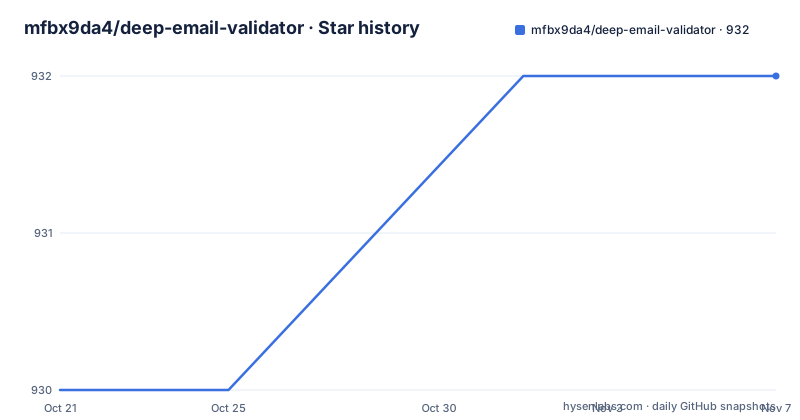
Star history
- mfbx9da4/deep-email-validator932 ★ · +2
| Repository | 2026-10-21 | 2026-11-07 |
|---|---|---|
| mfbx9da4/deep-email-validator | 930 | 932 |
2 Stars in the last 17 days, measured from the daily GitHub snapshot. Compare with other projects
Editorial analysis
Five checks, and the reason they are separate
Most email validation is a single yes or no, which throws away the most useful information. deep-email-validator splits the decision into five independent checks, each of which can pass or fail on its own. The format check is structural. The README describes it as containing an @, a . in the domain, and no spaces or control characters. That is a syntax rule, not a deliverability rule. The typo check compares the domain against a list of commonly mistyped domains, so [email protected] is caught. It is built on the mailcheck library. The disposable check asks whether the domain belongs to a disposable email service, using the disposable-email-domains data set. The MX check looks up DNS records to see that the domain has mail exchangers. That is the first check that touches the network and the first one that can fail for reasons unrelated to the address itself. The SMTP check goes further. It confirms that an SMTP server is running and that the mailbox exists on it, which is the only check that can tell you the address will bounce. Each of these answers a different question, and a form usually cares about a different subset. That is the argument for the design, and it is why the library exposes options to switch checks on and off rather than hiding them behind one function.
The response reports every validator, not just the first failure
The README's usage example shows the shape of the result.
import { validate } from 'deep-email-validator'

const res = await validate('[email protected]')
The returned object carries a top-level valid flag and a reason, and a validators object holding one entry per check.
// {
//   "valid": false,
//   "reason": "smtp",
//   "validators": {
//       "regex": {
//         "valid": true
//       },
//       "typo": {
//         "valid": true
//       },
//       "disposable": {
//         "valid": true
//       },
//       "mx": {
//         "valid": true
//       },
//       "smtp": {
//         "valid": false,
//         "reason": "Mailbox not found.",
//       }
//   }
// }
Read that as a shape rather than a transcript of a particular address. The example shows the case where the format, typo, disposable and MX checks pass while the SMTP check fails, and the top-level reason names the failing stage. The nested reason strings are the interesting part for an application. The top-level reason tells you which stage rejected the address, and each validator entry carries its own reason when it fails. So a caller can render a specific message, for example a suggestion to correct a typo, without re-running anything. The library is written in TypeScript and shipped with type definitions, so this structure is typed for the caller rather than being an untyped object.
Turning off the checks you do not want to pay for
The options object is the second half of the API, and it is where the design pays off.
await validate({
  email: '[email protected]',
  sender: '[email protected]',
  validateRegex: true,
  validateMx: true,
  validateTypo: true,
  validateDisposable: true,
  validateSMTP: true,
})
Each check has its own boolean switch, and there is a sender field alongside the email field, which is what an SMTP conversation needs when the probe has to introduce itself. The defaults are documented in the source, at src/options/options.ts in the repository, and the README links directly to that file. That is worth noting as a practice. Rather than describing the defaults in prose that can go stale, the documentation points at the file that defines them. The natural use of this switch is to run the cheap local checks at one moment and the network checks later, or to run the full set only for addresses that have passed the earlier stages. A signup form that rejects a typo instantly feels different from a signup form that rejects a dead mailbox after a two second pause. One property the README calls out is that the library sanitizes inputs to prevent SMTP command injection. That matters because the SMTP check takes input that came from a user and puts it into a conversation with a mail server.
Custom TLDs and the boundary of the typo check
The typo check is only as good as the domain list behind it, and here the library draws a line you will hit in practice. By default the accepted top level domains come from the mailcheck defaults. If you need to validate a domain whose TLD is not in that list, the additionalTopLevelDomains option extends it.
await validate({
  email: '[email protected]',
  additionalTopLevelDomains: ['ir'],
})
This is not a rare edge case for a global product. A country code TLD that is perfectly normal in one market is simply absent from a list maintained around English language domains, and without the option your users get a false rejection for a typo that does not exist. The extension is per call, which means the caller owns the list of TLDs it accepts. That is the right default for a library, since the set of legitimate TLDs is a product decision rather than a technical one, but it does mean the burden sits with the application. The README links to the mailcheck defaults file so you can see exactly which TLDs are covered before you decide what to add.
The SMTP probe is the expensive check, and the one with edge cases
Two things constrain how you should use this library, and both come from the SMTP stage. The first is cost. The MX lookup is a DNS query and the SMTP stage opens a connection to the mail server and performs a conversation to test whether the mailbox exists. On a form with many signups, that is network work per address, and the README gives no caching or deduplication layer to soften it. The second is fragility. Mail servers are allowed to be unhelpful. A server may accept the connection, respond to the greeting, and still refuse to answer the question about the mailbox, which is why the SMTP reason strings in the example include a specific message such as Mailbox not found rather than a simple boolean. Some networks block outbound SMTP entirely, and the README does not document any fallback behaviour for that case. The library is also explicitly server side only and not browser compatible, and it requires Node.js 20 or later. That is not an accident of packaging. A browser cannot open an SMTP connection, so the deepest check in the set is impossible there by design. So the sensible deployment is a server side call with the SMTP validator enabled for high value signups, and the cheaper validators only for a fast first response.
Packaging: ESM, CommonJS and a Node 20 floor
The package metadata describes a modern dual build.
{
  "name": "deep-email-validator",
  "version": "0.1.27",
  "type": "module",
  "main": "./dist/index.cjs",
  "module": "./dist/index.js",
  "types": "./dist/index.d.ts",
}
The package is type module, with an import condition pointing at an ES module build and a require condition pointing at a CommonJS build, and type definitions shipped for both. That covers projects that are still on CommonJS, and the README documents the CommonJS usage in a collapsed section.
const { validate } = require('deep-email-validator')

const res = await validate('[email protected]')
The runtime requirement is declared in the engines field as node >=20, and the README states that Node.js 20 or later is required and that the library is server side only. The build and test tooling is ordinary for the ecosystem. The build script runs tsup, the test scripts run vitest, and the lint script combines tsc --noEmit with eslint. The published files field is limited to dist, and the version in the package metadata is 0.1.27. Two runtime dependencies carry the data heavy parts: disposable-email-domains and mailcheck, both with matching type packages in devDependencies. Everything else, including the DNS and SMTP handling, is written in the package itself, and src/ is the only source directory shipped in the repository alongside test/ and the build configuration.
MIT licensed, one tagged release, and a version number to watch
The licence field on the repository says MIT, and the author is listed as David Alberto Adler. For a library that most applications call from their own server and never redistribute, a permissive licence removes almost every question you would otherwise have. On activity, the last push was on 2026-09-13 and the repository is not archived. The version in package.json is 0.1.27 while the only tagged release listed is v0.1.23, dated 2026-04-21. That gap between the published tag and the working tree is normal for a package that publishes from a release branch, and it means the version you install from npm may be older than the source you read on GitHub. A version number below 1.0 is also a signal worth weighing. It tells you the author does not consider the public API frozen, so treat the response shape and the options names as things that can change. The library sits on top of two community maintained datasets, mailcheck and disposable-email-domains, and both have their own update cadence. A stale blacklist is a real failure mode here: a domain newly registered as a disposable service will pass the check until the dataset catches up. That is an argument for keeping the dependency versions current rather than pinning them at install time.
Editorial conclusion
Adopt deep-email-validator when you need to distinguish a typo from a disposable domain from a dead mailbox during signup, and verify first that your Node.js version is 20 or later and that your network permits outbound SMTP on port 25. Do not adopt it as a single boolean gate on a high volume form, because the SMTP probe is a network round trip per address and the library offers no caching layer. Before going live, read the default options in src/options/options.ts, because which validators run by default decides both your latency and your false rejection rate.
Frequently asked questions
How do I install deep-email-validator?
Run npm install deep-email-validator. The package requires Node.js 20 or later and is server side only, not browser compatible.
What does deep-email-validator check?
It validates email format, common typos using mailcheck, disposable email services using disposable-email-domains, the presence of MX records in DNS, and whether the SMTP server is running and the mailbox exists on it. It also sanitizes inputs to prevent SMTP command injection.
Can I run only some of the validations?
Yes. Pass an options object with the individual switches validateRegex, validateMx, validateTypo, validateDisposable and validateSMTP, along with email and sender fields. The defaults are defined in src/options/options.ts in the repository.
How do I validate a domain with an unusual TLD?
Use the additionalTopLevelDomains option, for example additionalTopLevelDomains: ['ir']. The list of TLDs supported by default comes from the mailcheck defaults.
Why does deep-email-validator reject a valid looking address?
The response includes a top-level reason and a per-validator breakdown, so you can see which check failed. A failure at the smtp stage usually means the mailbox was not found on the server, while the disposable and typo stages report their own reasons.
Official sources
Add this badge to your README
If you maintain this project, the badge below links readers to this analysis and shows its maintenance status from the daily GitHub snapshot. Paste the markdown into your README; add ?metric=license or ?metric=stars to the image URL for a different field.

[](https://hysenlabs.com/projects/mfbx9da4-deep-email-validator)Star history chart for your README
[](https://hysenlabs.com/projects/mfbx9da4-deep-email-validator)Was this useful?