MFEM is a finite element toolbox where you write the discretization and it writes the linear algebra
Lightweight, general, scalable C++ library for finite element methods
At a glance
- What is it?
- MFEM is a modular parallel C++ library for finite element methods, built by LLNL and released under BSD-3-Clause. It supplies spaces, meshes, forms and solvers, and leaves problem formulation to you.
- Who is it for?
- Choose MFEM if you write C++ and want to assemble your own high-order discretization, with H(curl) or H(div) spaces, AMR or GPU back ends, and you are willing to learn through the examples directory. Do not choose it for point-and-click analysis or a ready-made solver for one physics problem, because it is a library you compile your own program against.
- Can I use it commercially?
- Yes. BSD-3-Clause is a permissive licence: you can use, modify and sell software built on it, as long as you keep its copyright and licence notices.
- Is it still maintained?
- Yes. The repository received new commits within the last day.
- What is it written in?
- Mainly C++, according to GitHub's language statistics.
Answers come from the project's GitHub data, last synced on November 25, 2026, and from our analysis. They are not legal advice.
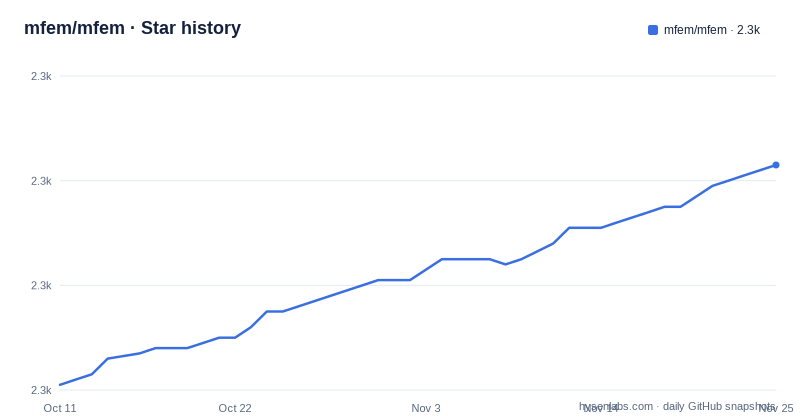
Star history
- mfem/mfem2,303 ★ · +42
| Repository | 2026-10-11 | 2026-11-25 |
|---|---|---|
| mfem/mfem | 2.3k | 2.3k |
42 Stars in the last 45 days, measured from the daily GitHub snapshot. Compare with other projects
Editorial analysis
A toolbox modeled on what MATLAB does for linear algebra
MFEM describes itself as a modular parallel C++ library for finite element methods. Its stated goal is high-performance, scalable discretization research and application development on platforms from laptops to supercomputers. The analogy it picks is MATLAB for linear algebra: building blocks for finite element algorithms, not a finished simulator.
In practice that means you write C++ against classes for spaces, meshes, forms and solvers. The repository layout reflects it: fem/, mesh/, linalg/ and general/ hold the library code, mfem.hpp is the umbrella header, and mfem-performance.hpp sits beside it. A problem is expressed as finite element objects, and MFEM turns it into linear algebra vectors and operators.
No GUI, no input-file format for a fixed physics model and no scripting layer appear in the README. You compile a program. The examples directory is where the working programs live.
Five families of finite element space, all in 2D and 3D
The spaces listed are arbitrary high-order H1-conforming, discontinuous (L2), H(div)-conforming, H(curl)-conforming and NURBS. All are stated for 2D and 3D, with bilinear, linear and nonlinear forms defined on them.
The discretization approaches the README says can be prototyped are Galerkin methods, mixed finite elements, Discontinuous Galerkin (DG), isogeometric analysis, hybridization and Discontinuous Petrov-Galerkin (DPG). The practical point is that the H(curl) and H(div) spaces needed for electromagnetics and mixed formulations are in the base library, so you do not bolt them on from another package.
The cost is that this is a toolbox for people who know which space their problem needs. The README does not say how to choose between them. If you do not know why a problem calls for H(curl), the examples are where you find out by reading code. The README lists mixed finite elements next to these spaces, and the numbered examples are the place to see which space each one uses.
Mesh types, curved elements and adaptive refinement
The mesh classes handle triangular, quadrilateral, tetrahedral and hexahedral meshes, plus surface meshes and topologically periodic ones. Refinement is general, including local conforming and non-conforming adaptive refinement, which the README labels AMR.
Element transformations are arbitrary, so high-order mesh elements with curved boundaries are supported. That matters for geometry with curved boundaries.
The README lists those mesh types and nothing else. It does not mention a mesh generator, so you bring meshes from elsewhere or build them in code. A data/ directory sits in the repository root. Which external mesh formats import cleanly is not stated in the README, so check the source. The README gives no per-mesh-type limits, so a mesh type you need that is not in this list is not supported by anything the README states.
The finite element to linear algebra translator and the solvers that come with it
When used as a finite element to linear algebra translator, MFEM takes a problem described with finite element objects and produces vectors and operators. Those operators can be fully or partially assembled, for example global sparse matrices or matrix-free operators. Matrix-free operators avoid forming the global matrix.
Built-in solvers are simple smoothers and Krylov methods named PCG, MINRES and GMRES. Sequential sparse direct solves come through the SuiteSparse library. Beyond linear solves there is a Newton method for nonlinear problems, LOBPCG for eigenproblems, and several explicit and implicit Runge-Kutta time integrators.
The limit to note is that the README attaches SuiteSparse to sequential direct solvers only. For parallel runs, it points to hypre for linear solvers, so a scalable direct solve is not among the things the README promises from the library itself.
Parallelism: MPI throughout, GPUs since version 4.0
MPI-based parallelism is supported throughout the library, and MFEM can be used as a scalable unstructured finite element problem generator. The README states that applications need minimal changes to move from a serial to an MPI-parallel version, where they can use the integrated linear solvers from hypre.
GPU acceleration starts with version 4.0. The programming models named are CUDA, HIP, OCCA, RAJA and OpenMP. The examples show the split: ex1.cpp is serial and ex1p.cpp is its parallel counterpart, and the same pairing runs through ex10 and ex10p up to ex19 and ex19p. The listing also shows ex0.cpp and ex0p.cpp, which the README does not describe.
External packages named are PETSc, SUNDIALS and libCEED, giving access to more linear and nonlinear solvers, preconditioners and time integrators. Each external package is an extra dependency with its own build, and the README does not say which versions pair with which MFEM release.
Where a new user starts: examples, miniapps and GLVis
The README says the best starting point for new users is to review the examples and miniapps at mfem.org/examples. In the repository these are the examples/ and miniapps/ directories. The examples directory includes subfolders for amgx and caliper next to the numbered exNN.cpp files, and its CMakeLists.txt lets the CMake build compile them.
Visualization goes through GLVis, an OpenGL tool distributed separately at glvis.org. MFEM does not draw results itself, so a run that writes solution files still needs GLVis, or another viewer, to look at them. A .binder/ directory also sits in the repository root.
For containers, the README sends you to the separate mfem/containers repository. The Docker images are not built from this tree.
Building is documented in INSTALL, and releases arrive a few times a year
The README gives two ways to find build instructions: read the INSTALL file, or type "make help". The root has both a makefile and a CMakeLists.txt, along with a config/ directory. The README does not give a copy-and-run install command, so the INSTALL file is the only place to look.
Releases are v4.10 on 2026-09-01, v4.9 on 2025-12-11 and v4.8 on 2025-04-09. The repository was last pushed on 2026-10-25 and is not archived. CHANGELOG, CONTRIBUTING.md, CITATION.cff and CODE_OF_CONDUCT.md are all in the root.
Licensing is BSD-3-Clause, and all new contributions must be made under it. The README also gives LLNL Release Number LLNL-CODE-806117 and a DOI of 10.11578/dc.20171025.1248. Citation details for papers are in CITATION.cff.
The tests/ directory exists, and CI configuration for AppVeyor, GitLab and a codecov setup is in the tree. How to run the test suite is not written in the README.
Editorial conclusion
Choose MFEM if you write C++ and want to assemble your own high-order discretization, with H(curl) or H(div) spaces, AMR or GPU back ends, and you are willing to learn through the examples directory. Do not choose it for point-and-click analysis or a ready-made solver for one physics problem, because it is a library you compile your own program against. Before committing, read the INSTALL file for your platform and build ex1.cpp from examples/, since the README gives no build command beyond "make help".
Frequently asked questions
What is MFEM used for?
MFEM is a modular parallel C++ library for finite element methods. It is aimed at high-performance, scalable discretization research and application development, from laptops to supercomputers.
Does MFEM support GPUs?
Starting with version 4.0, MFEM supports GPU acceleration and programming models such as CUDA, HIP, OCCA, RAJA and OpenMP.
What license does MFEM use?
MFEM is distributed under the BSD-3-Clause license, and all new contributions must be made under it. See the LICENSE and NOTICE files for details.
Official sources
Add this badge to your README
If you maintain this project, the badge below links readers to this analysis and shows its maintenance status from the daily GitHub snapshot. Paste the markdown into your README; add ?metric=license or ?metric=stars to the image URL for a different field.

[](https://hysenlabs.com/projects/mfem-mfem)Star history chart for your README
[](https://hysenlabs.com/projects/mfem-mfem)Was this useful?