MiBee NVR: A Single-Binary Go NVR for Low-Power ARM and Multi-Protocol Cameras
Lightweight self-hosted NVR in Go — single static binary, zero dependencies, embedded web UI. RTSP/ONVIF/Xiaomi/GB28181 cameras, RTMP/SRT/WebRTC push-in ingest, WebRTC/HLS/FLV live view, audio, timelapse, continuous playback, browser-side AI detection. Runs on low-power ARM.
At a glance
- What is it?
- MiBee NVR is a self-hosted network video recorder written in Go, packaged as a single static binary with an embedded web UI. It targets low-power ARM devices and supports a wide range of camera protocols, including RTSP, ONVIF, Xiaomi, and GB/T 28181.
- Who is it for?
- Adopt MiBee NVR if you need a lightweight, self-hosted NVR that runs on a Raspberry Pi 3B or similar ARM device with a 512MB memory budget, and if you value a single binary with no cloud dependencies. Avoid it if you require a mature, production-grade GB/T 28181 implementation, as it is marked experimental and default off.
- Can I use it commercially?
- Yes, with strict conditions. AGPL-3.0 is a network copyleft licence: if people use a modified version over a network, for example as a hosted service, you must offer them its source code under the same licence.
- Is it still maintained?
- Yes. The repository last received commits 19 days ago.
- What is it written in?
- Mainly Go, according to GitHub's language statistics.
Answers come from the project's GitHub data, last synced on October 4, 2026, and from our analysis. They are not legal advice.
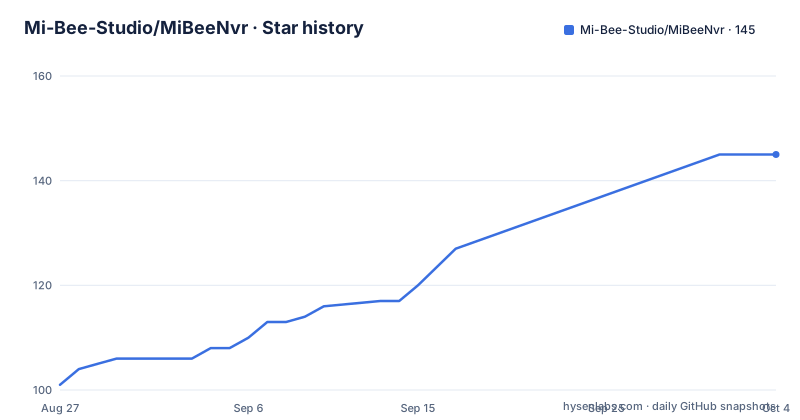
Star history
- Mi-Bee-Studio/MiBeeNvr145 ★ · +44
| Repository | 2026-08-27 | 2026-10-04 |
|---|---|---|
| Mi-Bee-Studio/MiBeeNvr | 101 | 145 |
44 Stars in the last 38 days, measured from the daily GitHub snapshot. Compare with other projects
Editorial analysis
What MiBee NVR Solves and Who It Is For
MiBee NVR addresses a specific pain point: turning a low-power ARM device into a functional NVR without the overhead of a full Linux distribution, a database server, or a cloud subscription. The README claims a 60-second setup from a single binary, and the design goal is to run within a 512MB memory budget on a Raspberry Pi 3B as the minimum baseline. This makes it suitable for home users and small businesses that already own ARM boards and want a self-hosted surveillance system without vendor lock-in. It is also for users who need to ingest cameras that speak different protocols, including RTSP, ONVIF, Xiaomi cloud cameras, and GB/T 28181, a common standard in China. The project is written in Go and uses an embedded Svelte 5 web UI, so there are no separate frontend files to serve. The target audience is technically comfortable with command-line installation and willing to manage their own storage and network.
Architecture and Data Flow: Single Binary, Multiple Protocols
The core architecture is a single Go binary compiled with CGO_ENABLED=0, meaning no external C libraries are needed at runtime. The README states that the binary embeds the Svelte 5 single-page application, so the web UI is served directly from the executable. Data flows from cameras into the NVR through various input protocols: RTSP (H.264/H.265/MJPEG), HTTP JPEG snapshots, ONVIF discovery, Xiaomi CS2 and TUTK, and push-in ingest via RTMP and SRT. The NVR then records MP4 segments to disk, with per-camera retention policies. For live viewing, the NVR outputs HLS (with LL-HLS), WebRTC (WHEP), HTTP-FLV, RTMP, SRT, and WebSocket streams. A notable design choice is that AI detection runs in the browser using ONNX Runtime Web with WebGPU acceleration, not on the server. This offloads inference to the client, which keeps the server load low but shifts the computational burden to the viewer's device. The system also includes a self-healing mechanism for ONVIF cameras that change IP addresses; it relocates them by serial number and reconnects, which is a practical feature for Wi-Fi roaming scenarios.
Installation and Configuration: Real Commands and Keys
The quickest path is the one-click install script, which downloads the binary, creates a system user named nvr, generates a config, and installs a systemd service. The data directory is set to /var/lib/mibee-nvr. For manual installation, you download a pre-built binary for your architecture, for example mibee-nvr-amd64 for most PCs or mibee-nvr-arm64 for Raspberry Pi 4/5. After making it executable, you run the init command with a password: ./mibee-nvr-amd64 init --password yourpassword. This generates a config file named mibee-nvr.yaml. Then you start the service with ./mibee-nvr-amd64 -config mibee-nvr.yaml and open http://localhost:9090. The Docker option uses a docker-compose.yml file, where you can adjust the volume mount and the NVR_DATA_DIR environment variable to match an external drive path. The build-from-source route is a simple git clone followed by make build. The configuration is atomic and validated, according to the README, and authentication uses BasicAuth with bcrypt password hashing. There is also a REST API for automation and Prometheus metrics integration.
Protocol Coverage and the Experimental GB/T 28181
The protocol table in the README lists a broad set of supported directions. RTSP, HTTP JPEG, HLS, WebRTC, HTTP-FLV, RTMP (ingest), SRT (ingest), RTMP (relay), RTSP (relay), ONVIF, Xiaomi, and GB/T 28181 are all marked as done. However, the GB/T 28181 feature is explicitly labeled as experimental and default off. This is a genuine limitation: if you rely on GB/T 28181 for a production deployment, you should treat it with caution. The feature includes SIP registration, catalog, PTZ, voice intercom, device-side recording search and playback, and alarm subscription, but being experimental means it may have bugs or incomplete edge cases. The README does not provide details on how to enable it or what configuration keys are needed, so you would need to consult the full documentation. The Xiaomi support is also specific: it covers the CS2 model and legacy TUTK protocol for seven models, which is a narrow slice of Xiaomi's camera lineup. For any other Xiaomi camera, you would need to rely on RTSP or ONVIF if available.
Limitations and Cases Where It Is the Wrong Tool
The most obvious limitation is the experimental status of GB/T 28181. If you are deploying in a context where that standard is mandatory, such as a Chinese government or enterprise project, you should not bet on this feature without thorough testing. Another limitation is the browser-side AI detection. While it avoids backend inference, it requires the viewing client to have a compatible browser with WebGPU support and sufficient processing power. On a low-power ARM device used as the NVR, the server is fine, but if you view from an old laptop or a phone, the AI overlay may be sluggish or unavailable. The README mentions a 512MB memory budget, but that budget likely applies to the NVR process itself, not to the browser doing inference. Additionally, the project is relatively young, with the latest release v0.11.0 in August 2026, and the v0.10.0 release is labeled as the stable version. That suggests the project is still evolving, and APIs or configuration formats may change between minor versions. For users who need a rock-solid, long-term stable NVR with a large community, this may be a risk. Also, the AGPL-3.0 license means that if you modify the code and offer it as a network service, you must release your modifications under the same license. This is a legal consideration for commercial or closed-source deployments.
Alternatives and the Difference in Approach
A common alternative is Frigate, an open-source NVR that also targets low-power devices and supports RTSP and ONVIF cameras. Frigate's approach is different: it focuses heavily on real-time AI object detection using a dedicated Coral TPU or a GPU, and it runs detection on the server side, not in the browser. Frigate uses a Python-based backend with a web UI, and it typically requires a more complex setup with Docker and a database like PostgreSQL. In contrast, MiBee NVR is a single Go binary with no dependencies and runs AI in the browser, which reduces server load but shifts the hardware requirement to the client. Another alternative is Shinobi, which is a Node.js-based NVR that supports many protocols and has a plugin system. Shinobi is not a single binary; it requires Node.js and a database, and it is heavier on resources. The key difference is that MiBee NVR aims for zero-dependency simplicity and low memory usage, while Frigate and Shinobi offer more mature AI pipelines or plugin ecosystems. If your priority is a minimal footprint and you can accept client-side AI, MiBee NVR is a better fit. If you need server-side detection with a Coral or GPU, Frigate is the more appropriate choice.
Maintenance, Upgrades, and License Implications
The project is actively maintained, with a release in August 2026, and the CI workflow is present in the repository. The v0.11.0 release adds GB/T 28181 access and a continuous playback timeline, which indicates ongoing feature development. The single-binary design simplifies upgrades: you replace the binary and restart the service, and the configuration file is separate, so it can persist. The Docker option makes upgrades even easier by pulling a new image. The data directory is separate from the binary, so recordings are not lost during an upgrade. However, the README does not document a migration path for config files between versions, so you should back up the mibee-nvr.yaml before upgrading. The license is AGPL-3.0, which is a strong copyleft license. If you distribute modified versions or provide the software as a network service, you must make the source code available. This is not a problem for personal use, but it is a critical factor for a company that might want to embed or modify the NVR. The project also has a homepage at mlsbs.top, which suggests a commercial entity behind it, but the README does not mention any paid support or enterprise edition, so you should assume community support only.
Editorial conclusion
Adopt MiBee NVR if you need a lightweight, self-hosted NVR that runs on a Raspberry Pi 3B or similar ARM device with a 512MB memory budget, and if you value a single binary with no cloud dependencies. Avoid it if you require a mature, production-grade GB/T 28181 implementation, as it is marked experimental and default off. Before deploying, verify the AGPL-3.0 license implications for your use case, test the GB28181 feature with your specific camera models, and confirm that the browser-side AI detection meets your performance needs on low-power hardware, since inference runs on the client, not the server.
Frequently asked questions
What is MiBeeNvr?
A self-hosted network video recorder written in Go, shipped as a single static binary with an embedded Svelte 5 interface and no external dependencies. It records from RTSP, ONVIF, Xiaomi and GB/T 28181 cameras, accepts RTMP and SRT push-in streams, and serves live view over HLS, WebRTC and HTTP-FLV.
How do I install MiBeeNvr?
Four ways are documented. A one-line root install script that downloads the binary, creates a system user, generates a config and installs a systemd service; a prebuilt binary for 64-bit x86, 64-bit ARM or 32-bit ARMv7 followed by an init command and a start command; a container started with compose against the file under the deploy directory; or a source build with make build. The interface is then on port 9090.
Does MiBeeNvr run on a Raspberry Pi?
Yes, and the readme names a Raspberry Pi 3B as the minimum baseline it was validated on, with a stated memory budget of 512MB on a device with 1GB of RAM. Prebuilt binaries are published for both 64-bit ARM and 32-bit ARMv7, and the Go build disables cgo so no C toolchain is needed on the device.
Does MiBeeNvr do server-side AI detection?
No. Detection is described as browser-side, running on ONNX Runtime for the web with WebGPU acceleration and no backend inference, which is what keeps the recorder inside its memory budget. The server handles health monitoring, automatic remediation, real-time events, quality scoring and alerting around it.
What happens to recordings when the NVR IP changes?
The readme describes self-healing for ONVIF cameras whose address changes, for example when a camera roams between wireless access points. Such cameras are relocated by serial number and reconnected, and the probing is described as unicast so it works across routed subnets rather than only on one broadcast domain.
Official sources
Add this badge to your README
If you maintain this project, the badge below links readers to this analysis and shows its maintenance status from the daily GitHub snapshot. Paste the markdown into your README; add ?metric=license or ?metric=stars to the image URL for a different field.

[](https://hysenlabs.com/projects/mi-bee-studio-mibeenvr)Star history chart for your README
[](https://hysenlabs.com/projects/mi-bee-studio-mibeenvr)