opencode-power-pack scopes its sandbox to a command tree and fails closed
54 rigorous skills for Codex, OpenCode, and Pi: code review, security audit, feature development, frontend design, MCP tools, Hugging Face ML/training, and more.
At a glance
- What is it?
- Fifty-four workflow skills installable into four different coding agents, plus an opt-in sandbox runner that promises containment for a command and its descendants. It is careful to say what it does not promise.
- Who is it for?
- Use this package if you want a reviewed set of workflows rather than hand-written prompts, and if you run more than one coding agent, since the same skills install into all four through different surfaces. Read the sandbox compatibility note before enabling it, because the guarantee covers a command and its descendants only, and whole-agent isolation is explicitly not claimed.
- Can I use it commercially?
- Yes. MIT is a permissive licence: you can use, modify and sell software built on it, as long as you keep its copyright and licence notices.
- Is it still maintained?
- Yes. The repository last received commits 6 days ago.
- What is it written in?
- Mainly Python, according to GitHub's language statistics.
Answers come from the project's GitHub data, last synced on November 15, 2026, and from our analysis. They are not legal advice.
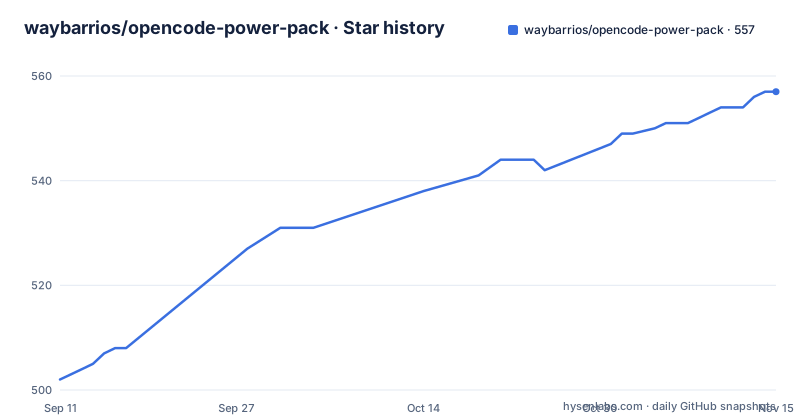
Star history
- waybarrios/opencode-power-pack557 ★ · +55
| Repository | 2026-09-11 | 2026-11-15 |
|---|---|---|
| waybarrios/opencode-power-pack | 502 | 557 |
55 Stars in the last 65 days, measured from the daily GitHub snapshot. Compare with other projects
Editorial analysis
The guarantee covers the command tree and nothing above it
The sandbox feature is described with a boundary statement first, which is worth reading carefully. The install path is three commands: install the CLI, verify the boundary from the active agent session, then run a command under a trusted profile.
npm install --global @waybarrios/[email protected]
opencode-power-pack sandbox doctor --json
opencode-power-pack sandbox exec --skill code-review -- git status --short
The doctor step is the one to run first, because it reports what the host can actually provide before any skill relies on it. The current guarantee is that the command and its descendants are shell-contained. Automatic host routing and whole-agent isolation are not claimed yet, and a separate compatibility specification exists for the full detail. Isolation is native rather than containerised: Seatbelt on macOS and Bubblewrap on Linux, with one contained command tree and no container image, daemon or persistent sandbox to manage. Four least-privilege profiles exist, named observe, develop, network-read and publish, and skills default to one of them with explicit checks for escalation. The failure behaviour is the part worth internalising: unavailable isolation, an undeclared escalation, a missing confirmation or a backend failure stops execution instead of retrying outside the sandbox. The word doing the work there is stops, not degrades.
Four agents, four install mechanisms, one shared skills directory
The same fifty-four skills reach four agents through genuinely different surfaces. Claude Code takes two slash commands inside the agent, a marketplace add followed by a plugin install, and asks for a plugin reload if the installation summary requests it. Codex takes two command line calls:
codex plugin marketplace add waybarrios/opencode-power-pack --ref main
codex plugin add opencode-power-pack@opencode-power-pack
after which you start a new session and confirm in the plugins view or invoke a workflow by name. Pi takes a single git URL, with a project-local variant that records the install in a settings file and a list command to verify it. Separately, the npm installer writes into a shared agents skills directory that Codex, OpenCode and Pi all recognise, which is the one path that avoids four separate installs. Skills are namespaced, so explicit invocations carry the package prefix rather than a bare name.
The package is scoped, the executable is not
There are two identifiers and they exist for different reasons. The npm package is scoped, which the documentation says is to give it an unambiguous registry identity, so it cannot collide with an unscoped name anyone else might claim. The executable it installs keeps the short unscoped form for direct command line use, so typing the shorter name still works. No global installation is required when you use the one-off runner, which fetches the latest installer without keeping a copy. The runtime requirements are declared in the manifest rather than in prose: Node at 20.11.0 or newer, and OpenCode at 1.18.7 or newer. That second floor is enforced in practice too, because the smoke script pins a specific OpenCode version to test against rather than testing whatever happens to be installed.
Profiles and a dry run replace installing all fifty-four
The installer treats selection as the normal case. A list command inspects every profile and every skill without changing anything, and an install command takes either a profile name or explicit skill names, so you can ask for two skills rather than the catalogue:
# Inspect every profile and skill
npx @waybarrios/opencode-power-pack list

# Install the balanced recommended profile for your user
npx @waybarrios/opencode-power-pack install --profile recommended

# Install individual skills
npx @waybarrios/opencode-power-pack install code-review security-review

# Preview a selection without writing anything
npx @waybarrios/opencode-power-pack install --profile security --dry-run
Two scoping flags matter. A project flag records the selection against the current repository only, and a dry run previews a selection without writing to disk at all. The profiles themselves encode editorial judgements about what belongs together. The recommended profile is described as balanced software development without the specialised security and machine learning catalogs, which means it deliberately leaves those out. The review profile is described as broad and focused code review plus quality and differential review. The feature-dev profile is an end-to-end workflow that pulls in its explorer, architect and reviewer dependencies, so choosing it chooses a team rather than a task.
Two registries, and npmjs is the one recommended to users
Each release can be published to two places. The GitHub Packages page receives an artifact built from the immutable release tag, and the npmjs registry receives the normal package. The documentation states the preference plainly: npmjs remains the recommended public source because it works without GitHub authentication. The mirror needs setup. You authenticate with a GitHub personal access token of the classic type carrying the read:packages scope, then select the GitHub registry explicitly rather than relying on a default. The publishing side is described in more detail than most projects give it. A release event publishes automatically while a manual run requires an existing release tag. The workflow verifies that the tag matches the version in the manifest, uploads the artifact already verified by required release checks without re-running lifecycle scripts, and authenticates with the repository-scoped token, with no package token stored in the repository.
Publishing is gated on a test suite that uses no framework
The test story is unusually lean. The test script runs Node's built-in test runner rather than pulling in a framework, and there is a separate sandbox script naming three specific files: a policy test, a runtime test and a runtime integration test. The line that matters most is the prepublish hook, which runs the suite, so a package cannot reach the registry without tests passing. Alongside the unit tests there is a separate evaluation harness with a run mode and an accept mode, and an evaluations directory in the repository. That split matters for a package whose deliverable is instructions rather than a library: unit tests can check that a profile resolves and that sandbox policy is enforced, but whether a review skill actually produces a better review is a behavioural question that needs a different kind of check. The manifest also declares a Pi-specific block pointing at the skills directory, which is how the agent discovers the fifty-four workflows from the installed package.
A dual licence expression with a third-party notices file
The manifest declares the licence as MIT AND Apache-2.0 rather than picking one, which is the correct shape for a package that vendors code under both terms. The supporting files match that decision: a licences directory at the repository root, a third-party notices document, and an upstreams file that records where the vendored pieces came from. That inventory is the reason the licence expression is honest, since a skills bundle that reuses material from several projects cannot claim a single permissive licence without accounting for the sources. The published file list is correspondingly explicit, naming the skills directory, the four per-agent plugin directories, the binary, the sandbox directory, a single compatibility document, the assets, the skillsets file, the upstreams file, the notices document and the licences directory. A scanner configuration and an ignore file for one agent sit at the root alongside them.
Editorial conclusion
Use this package if you want a reviewed set of workflows rather than hand-written prompts, and if you run more than one coding agent, since the same skills install into all four through different surfaces. Read the sandbox compatibility note before enabling it, because the guarantee covers a command and its descendants only, and whole-agent isolation is explicitly not claimed. Install selectively with a profile and preview with a dry run rather than copying all fifty-four, and prefer the npmjs registry over the GitHub Packages mirror so you do not need a token to install.
Frequently asked questions
How do I install opencode-power-pack for Codex?
Add the marketplace with the main branch ref, then add the plugin, start a new Codex session and confirm in the plugins view. You can also invoke a bundled skill directly by name once the session is running.
What does the opencode-power-pack sandbox actually isolate?
The command and its descendants, which the documentation calls shell-contained. It uses native Seatbelt on macOS and Bubblewrap on Linux. Automatic host routing and whole-agent isolation are explicitly not claimed yet.
What happens when the opencode-power-pack sandbox cannot start?
It fails closed. Unavailable isolation, an undeclared escalation, a missing confirmation or a backend failure stops execution instead of retrying outside the sandbox.
Can I install only some of the opencode-power-pack skills?
Yes. The installer takes individual skill names or a named profile, and offers a project-only flag for the current repository plus a dry run that previews a selection without writing anything.
Do I need a global npm install for opencode-power-pack?
No. The one-off runner fetches the latest installer without keeping a global copy. A global install is optional and gives you the shorter executable name, and the package is scoped for registry identity while the binary keeps the short form.
Why is opencode-power-pack published to two registries?
Every release can also go to GitHub Packages from its immutable tag. The npmjs registry is the recommended source because it works without GitHub authentication, while the mirror needs a classic personal access token with read:packages.
Official sources
Add this badge to your README
If you maintain this project, the badge below links readers to this analysis and shows its maintenance status from the daily GitHub snapshot. Paste the markdown into your README; add ?metric=license or ?metric=stars to the image URL for a different field.

[](https://hysenlabs.com/projects/waybarrios-opencode-power-pack)Star history chart for your README
[](https://hysenlabs.com/projects/waybarrios-opencode-power-pack)Was this useful?