PandaOCR.Pro for Windows OCR, Translation and Screen Workflows
多功能多引擎OCR文字识别、翻译、朗读、语音合成、日漫游戏机翻汉化、验证码识别、图床上传、以图搜图、扫码工具
At a glance
- What is it?
- PandaOCR.Pro is a Windows-oriented OCR and translation utility rebuilt from the earlier PandaOCR project. It targets users who need more than basic text recognition, including private API integrations, offline OCR engines, screen comparison translation, image search, QR scanning and game text translation, with some features reserved for an activated professional state.
- Who is it for?
- PandaOCR.Pro suits Windows users who need a broad desktop OCR and translation workflow, especially those willing to configure private APIs. It is a poor choice for users who need a documented open source build process, a clear license or a fully free set of advanced features.
- Can I use it commercially?
- Not without permission. GitHub finds no licence file in the repository, and without a licence all rights are reserved by default: you may read the code but not reuse it. Check the README, or ask the authors, before using it.
- Is it still maintained?
- Yes. The repository last received commits 145 days ago.
- What is it written in?
- GitHub does not report a main language for this repository.
Answers come from the project's GitHub data, last synced on October 23, 2026, and from our analysis. They are not legal advice.
Star history
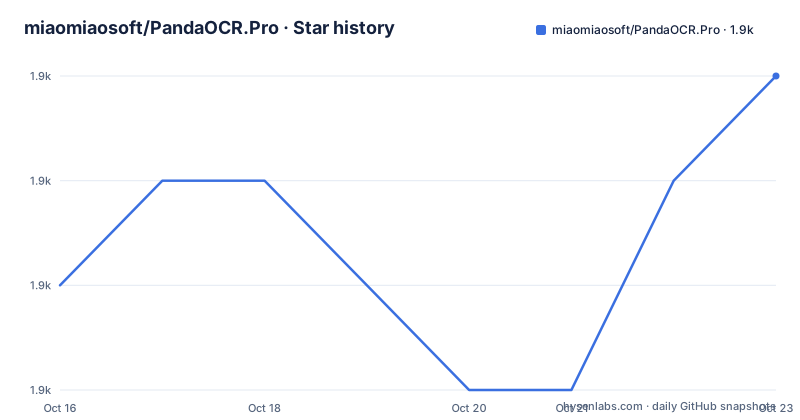
- miaomiaosoft/PandaOCR.Pro1,932 ★ · +2
| Repository | 2026-10-16 | 2026-10-23 |
|---|---|---|
| miaomiaosoft/PandaOCR.Pro | 1.9k | 1.9k |
2 Stars in the last 7 days, measured from the daily GitHub snapshot. Compare with other projects
Editorial analysis
PandaOCR.Pro's Rebuild and Intended Users
PandaOCR.Pro is positioned as a rebuilt version of PandaOCR rather than a small extension to it. The README says the earlier project accumulated a large amount of poorly organized code, so the author restarted the implementation and renamed the result PandaOCR.Pro to distinguish it from the previous version. The stated purpose is broad desktop text processing: OCR, translation, text-to-speech, game text modification, CAPTCHA image recognition, image hosting, image search and QR-code scanning.
The project is aimed especially at people who use private API interfaces. Its documentation says that demo endpoints are often unstable and require repairs, so the professional version is designed around private API integrations. That is an unusual positioning. PandaOCR.Pro is therefore not simply an offline image-to-text utility. Its full feature set depends on a mixture of local processing, configured API providers and activation state.
The free state is important to the adoption decision. According to the README, users who have not activated the professional version can use all non-advanced features. OCR and translation can use the demo interface or the Baidu API interface, which the README says is sufficient for ordinary use. Activating the professional version removes the stated restrictions and enables advanced functions such as batch image and text recognition, local interface calls, screen comparison translation, on-screen button display, button sound playback and quick-phrase translation.
That split creates a clear boundary. A user searching for a self-contained replacement for every OCR platform will find that PandaOCR.Pro has a large surface area but also dependency and licensing questions that the README does not resolve in full. It is more appropriate for Windows users with specific desktop workflows than for developers looking for a small library or a transparent command-line OCR engine.
OCR Engines, API Routing and Desktop Data Flow
The documented architecture combines image capture, selectable processing modes and output windows. PandaOCR.Pro can call multiple offline OCR engines, and its screenshot component lets the user choose a mode such as search by image, QR scanning, image-host upload or formula recognition before returning to the main interface. This avoids repeatedly switching modes in the application window and indicates that the screenshot component acts as an entry point for several distinct image operations.
For ordinary recognition, the application can send an image through the demo interface or a Baidu API interface. The README also documents private API integrations and a local interface feature intended for developers. The local interface tutorial is linked separately, so the repository documentation treats that feature as an integration path rather than providing its request format in the main README.
The project also changes image handling before recognition. Its release notes say that the professional version uses improved GDI image transcoding and that this is intended to avoid the quality loss caused by transcoding an image twice in the older version. The exact implementation is not shown in the repository files, but the documented purpose is clear: preserve more image detail before OCR processing. That matters for small text, difficult screenshots and cases where conversion artifacts can cause missed characters.
PandaOCR.Pro does not present OCR as one fixed path. The user can select among local engines and configured interfaces, then use the recognized text for translation, speech, layout adjustment or other application functions. The README also mentions experimental layout by OCR position. This is a useful direction for documents where reading order matters, but the experimental label means it should not be treated as a settled formatting engine.
Downloading PandaOCR.Pro and Completing a First Use
The repository does not document a source build, package-manager installation or command-line setup. It directs users to download release 5.59 from the listed cloud-storage links, with a GitHub releases page serving as the update log. The README also points to the ShowDoc tutorial area and the project wiki. No executable command, configuration file or installation script is documented for a first-use tutorial.
The documented first step is therefore acquisition rather than installation through a command. The README lists the latest version as 5.59 and gives these download destinations:
- Blue cloud storage, with access code 8888 - Baidu cloud storage, with access code kpgh - Tencent Weiyun
The reader should expect to obtain a packaged desktop application from those locations and then consult the linked tutorial for the interface-specific setup. The README does not state the supported Windows versions, required runtime, administrator permissions, API key format or exact location of the executable. Those omissions matter because a downloaded executable from a third-party file host should not be treated as equivalent to a reproducible package-manager installation.
After launching the application, the most defensible first use is to select the screenshot operation and choose the required processing mode. For a basic OCR request, the README indicates that the demo interface or Baidu API interface can be selected. The application then presents recognition results in its editing and preview windows. For translation or speech, the user must configure the relevant interface or function first; the main README does not provide the exact settings sequence. The project wiki and linked tutorials are therefore required for a complete configuration walkthrough.
Feature Trade-offs and Activation Boundaries
PandaOCR.Pro is unusually broad for a desktop OCR tool. Beyond recognition and translation, the README lists text-to-speech, speech synthesis, image-host upload, image search, QR scanning, formula recognition, game text translation, screen comparison translation and configurable preview windows. This concentration can reduce the number of separate tools needed for a screenshot-heavy workflow. It can also make the application harder to reason about, because each mode may depend on a different engine, API or window integration.
The clearest limitation is the professional-state split. Basic OCR and translation are available without activation through demo or Baidu API access, according to the README. Batch processing, local interface calls, screen comparison, on-screen key display, button sounds and quick-phrase translation are listed as professional features. A user evaluating the free state should therefore check the exact feature list rather than assuming that every advertised mode is available immediately.
The project also makes network and account decisions part of OCR quality. A demo endpoint may be unstable, while private API use requires configuration that the main README does not specify. Offline OCR engines reduce that dependency, but the README does not enumerate every engine, its installation method, its language coverage or its licensing terms. The experimental OCR-position layout is another boundary. It is useful to investigate for structured documents, but its status means formatting output should be checked on representative pages before adoption.
There is no documentation here about automated updates, rollback, offline licensing behavior, log retention or service outage handling. The absence of those details does not prove that the features are absent, but it means that an engineer cannot make a production adoption decision from the README and repository layout alone.
PandaOCR.Pro Compared with a Focused OCR Library
The closest practical alternative is a focused OCR library or desktop utility that exposes one recognition engine and a small integration API. The difference is not simply the number of features. PandaOCR.Pro routes desktop screenshots through selectable modes and combines recognition with translation, speech, image services and screen interaction. A focused library generally leaves those workflows to separate applications and makes it easier to inspect the recognition interface, replace an engine or control deployment.
PandaOCR.Pro may be the better fit for a Windows user who wants a single interface for repeated screenshot operations. Its screenshot mode selection, configurable preview window and position-based layout are application features rather than library capabilities. The built-in comparison translation and game text workflows also target desktop use cases that a plain OCR package does not cover.
The trade-off is dependency and maintenance visibility. The repository is not archived, and its last push was on 2026-05-31. Releases include 5.59 on 2026-05-31, 5.58 on 2025-05-29 and 5.57 on 2024-12-20. That release history shows versioned desktop distribution, but the README does not explain the upgrade process or compatibility policy. A focused OCR library with a documented API and package release may be easier for developers to automate, pin and integrate. PandaOCR.Pro is more directly aligned with interactive desktop automation.
Maintenance, Licensing and Adoption Checks
The repository is not archived, and the last push was on 2026-05-31. The README does not provide a license identifier, so the terms for redistribution, modification and commercial use cannot be established from the repository information. The README says the software is free to use and distinguishes an activated professional state, but that product description is not a substitute for a software license or an activation terms document. Users should inspect the downloaded package and its accompanying terms before redistributing it.
Upgrade cost is also unclear. The presence of releases such as 5.59, 5.58 and 5.57 suggests packaged releases, but the README does not say whether settings migrate automatically, whether private API credentials remain local, whether old versions can be restored or whether release notes describe compatibility changes. The project's dependency on third-party APIs adds another operational variable. An upgrade can change recognition quality or availability even if the desktop application itself launches successfully.
The first checks should therefore be concrete: confirm the package origin and checksum if the distribution provides one, identify the Windows requirements, configure only the API needed for the intended workflow, test the chosen offline engine on representative screenshots and verify that the required advanced functions are available in the intended activation state. If those checks pass, PandaOCR.Pro offers a wider desktop workflow than a standalone OCR engine. If reproducibility, licensing clarity or unattended integration is the priority, the missing documentation is a material limitation rather than a minor omission.
Editorial conclusion
PandaOCR.Pro suits Windows users who need a broad desktop OCR and translation workflow, especially those willing to configure private APIs. It is a poor choice for users who need a documented open source build process, a clear license or a fully free set of advanced features. Before adoption, verify the Windows package, API configuration, activation requirements and whether the available release satisfies your required OCR and translation functions.
Frequently asked questions
What is PandaOCR.Pro used for?
PandaOCR.Pro is a desktop utility for OCR, translation, text-to-speech, game text translation, image search, QR scanning and related screenshot workflows. The README also lists CAPTCHA image recognition, image-host upload and formula recognition.
Does PandaOCR.Pro require activation for OCR and translation?
No. The README says that OCR and translation can use the demo interface or the Baidu API interface without activating the professional version. It lists batch processing, local interface calls, screen comparison translation and several other functions as professional features.
How do I install PandaOCR.Pro?
The README does not document a command-line installation or source build. It directs users to download version 5.59 from listed cloud-storage links and links to the project tutorials and wiki for setup details.
Official sources
Add this badge to your README
If you maintain this project, the badge below links readers to this analysis and shows its maintenance status from the daily GitHub snapshot. Paste the markdown into your README; add ?metric=license or ?metric=stars to the image URL for a different field.

[](https://hysenlabs.com/projects/miaomiaosoft-pandaocr-pro)Star history chart for your README
[](https://hysenlabs.com/projects/miaomiaosoft-pandaocr-pro)Was this useful?