zsh-you-should-use: Zsh Alias Reminders and Enforcement
📎 ZSH plugin that reminds you to use existing aliases for commands you just typed
At a glance
- What is it?
- MichaelAquilina/zsh-you-should-use is a Zsh plugin that detects existing aliases after a command is typed, including global aliases and Git aliases. It can recommend a matching alias or refuse command execution in hardcore mode.
- Who is it for?
- Adopt this plugin if you already maintain aliases and want prompts or selective enforcement that reduces forgotten shorthand. Do not choose it if automatic alias suggestions would interfere with commands whose longer form is intentional.
- Can I use it commercially?
- Yes, with conditions. GPL-3.0 is a copyleft licence: if you distribute software that includes it, you must release that software's source code under the same licence. Running it internally without distributing it does not trigger that obligation.
- Is it still maintained?
- Yes. The repository last received commits 166 days ago.
- What is it written in?
- Mainly Shell, according to GitHub's language statistics.
Answers come from the project's GitHub data, last synced on November 6, 2026, and from our analysis. They are not legal advice.
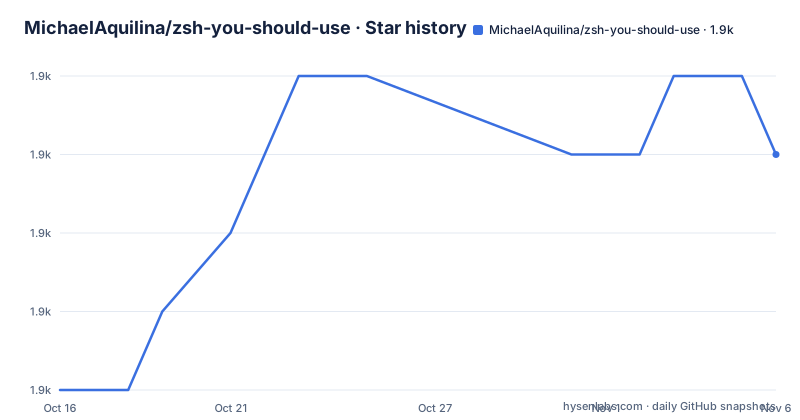
Star history
- MichaelAquilina/zsh-you-should-use1,938 ★ · +3
| Repository | 2026-10-16 | 2026-11-06 |
|---|---|---|
| MichaelAquilina/zsh-you-should-use | 1.9k | 1.9k |
3 Stars in the last 21 days, measured from the daily GitHub snapshot. Compare with other projects
Editorial analysis
Why zsh-you-should-use targets forgotten aliases
zsh-you-should-use solves a narrow workflow problem in Zsh: a user has already defined aliases but still types the longer command form. Instead of requiring a separate lookup, the plugin checks a command as it is entered and reports a matching alias. The intended users are Zsh users who maintain shorthand for common shell, global, and Git operations.
The plugin is not an alias manager. It does not create aliases, judge whether an alias is efficient, or decide which command you should type in every situation. Its purpose is feedback. The README describes the default reminder as a message that tells the user when an existing alias was found for the command just typed. This suits users who already have an established `.zshrc` but want to become more consistent with it.
The scope is narrower than a general command dispatcher. The repository describes support for ordinary aliases, global aliases, and Git aliases. It does not claim to find aliases in every command environment, including aliases provided by unrelated programs or other shells. The README gives no examples of such coverage, so those cases should not be assumed.
How zsh-you-should-use inspects Zsh commands
The plugin hooks into the command-entry flow so it can inspect a command after the user types it but before execution. In its default mode, it searches for matching aliases and displays the best match. The README says that global aliases and Git aliases are also detected, so the same mechanism is not limited to aliases stored in the ordinary shell alias list.
The message identifies the typed command, the type of alias detected, and the alias being suggested. Its default format contains the placeholders `%alias_type`, `%command`, and `%alias`. By default, only the best matching alias is shown. Setting `YSU_MODE` to `ALL` changes the result to include every match found. This distinction helps users compare several possible aliases, although the README does not document the ranking algorithm or its tie-breaking behavior.
The plugin can also display its message after execution by setting `YSU_MESSAGE_POSITION` to `after`. This changes when feedback appears, not the matching concept. The README does not document persistent reminders, shell integration beyond `.zshrc`, or behavior for commands that open interactive prompts.
Installing zsh-you-should-use with a Zsh plugin manager
The README officially supports Zsh versions 5.1 onwards. It says older versions might work, but they were not part of the CI test process. For users of ZPlug, Antigen, or Zgen, installation consists of adding the repository declaration to `.zshrc`.
For ZPlug, add this line to `.zshrc`:
zplug "MichaelAquilina/zsh-you-should-use"For Antigen, use:
antigen bundle "MichaelAquilina/zsh-you-should-use"For Zgen, use:
zgen load "MichaelAquilina/zsh-you-should-use"No separate activation step is documented after installation. Once the plugin is loaded, it checks commands entered in the shell and displays a reminder when it finds a matching alias. A first practical check is to define `ll='ls -lh --group-directories-first'`, enter `ls -lh`, and look for the suggestion. The README uses `ll` as the alias for `ls -lh`.
Manual installation for oh-my-zsh and Arch Linux
For oh-my-zsh, the README documents cloning the repository into the plugin directory and adding the plugin name to the `plugins` array. The clone command below comes directly from the README, including its use of `${ZSH_CUSTOM:-~/.oh-my-zsh/custom}`.
git clone https://github.com/MichaelAquilina/zsh-you-should-use.git ${ZSH_CUSTOM:-~/.oh-my-zsh/custom}/plugins/you-should-useThen add the plugin to `.zshrc`:
plugins=(
    # ...
    you-should-use
    # ...
)
The Arch Linux package route uses the documented `yay` command:
yay -S zsh-you-should-useThat installation requires sourcing the plugin file from `.zshrc`:
source /usr/share/zsh/plugins/zsh-you-should-use/you-should-use.plugin.zshThe README does not provide a separate verification command after installation or an update procedure for these package-manager paths. The repository has no GitHub releases, so it does not provide a release-based upgrade path through that mechanism.
Controlling message placement and displayed matches
The plugin exposes environment variables for its most visible behavior. `YSU_MESSAGE_POSITION` controls whether feedback appears before or after command execution. The README documents `after` as the alternative to the default pre-execution position.
export YSU_MESSAGE_POSITION="after"`YSU_MODE` controls result selection. `BESTMATCH` is the default and displays one best match. `ALL` displays every match the plugin finds.
export YSU_MODE=BESTMATCHexport YSU_MODE=ALLThe message itself can be changed through `YSU_MESSAGE_FORMAT`. Its placeholders have specific meanings: `%alias_type` represents an alias, Git alias, or global alias; `%command` represents the typed command; and `%alias` represents the matching alias. The README includes this example for red terminal output:
export YSU_MESSAGE_FORMAT="$(tput setaf 1)Hey! I found this %alias_type for %command: %alias$(tput sgr0)"These settings belong in `.zshrc` if they should persist across interactive shells. The README does not specify reload behavior for an open shell, so start a new shell or reload `.zshrc` before expecting an edited environment variable to take effect.
Hardcore mode and selective alias enforcement
Hardcore mode changes a reminder into command enforcement. When `YSU_HARDCORE` is set to `1`, the plugin can refuse to execute a command when an alternative alias exists. The README presents this as a way to enforce alias use, but it also introduces a stronger failure mode than a passive notification.
export YSU_HARDCORE=1For selective behavior, `YSU_HARDCORE_ALIASES` accepts an array of alias names. The README uses `gs`, `ll`, and `gco` as examples.
export YSU_HARDCORE_ALIASES=("gs" "ll" "gco")The full `YSU_HARDCORE` setting takes precedence over the selective array. Ignored aliases take precedence over hardcore behavior. This ordering matters when an alias appears in both `YSU_HARDCORE_ALIASES` and `YSU_IGNORED_ALIASES`: it will not trigger hardcore mode. The README does not define matching behavior for every command form, so enforcement should be tested with aliases that accept arguments or expand to multiple commands.
The principal limitation is operational. A reminder can be ignored, while a refusal can interrupt a workflow where the longer command was deliberate. Hardcore mode is better suited to an interactive shell whose aliases are already understood than to an environment where automatic substitution would be inconvenient.
Alias usage checks, upgrades, and GPL-3.0
The plugin includes a convenience function named `check_alias_usage`. According to the README, it analyzes how often aliases have been used and prints counts beside aliases and their definitions. Its documented output includes entries for aliases such as `curl`, `gco`, `json`, `less`, `ll`, `vim`, and `watch`.
The README presents this command as a way to identify aliases that may no longer be useful or aliases worth remembering. It does not explain how usage is recorded, whether the plugin stores history separately, or how aliases with unusual quoting are handled. The README excerpt also does not document a command for resetting usage data, so users should not assume that resetting means deleting shell history.
The repository is not archived, and its last push was on 2026-05-26. It has no GitHub releases, so versioned release notes are not available through GitHub Releases. Repository entries include `CHANGELOG.md`, `.circleci/`, `.pre-commit-config.yaml`, and `.zunit.yml`, which show that change history and test-related configuration exist, but the README does not provide enough detail to prescribe an exact upgrade workflow.
The project uses GPL-3.0. That license may affect how modified or distributed versions are handled, but this review does not interpret its legal obligations. Users who plan to modify or redistribute the plugin should read the repository's `LICENSE` file directly.
Editorial conclusion
Adopt this plugin if you already maintain aliases and want prompts or selective enforcement that reduces forgotten shorthand. Do not choose it if automatic alias suggestions would interfere with commands whose longer form is intentional. Verify first how `YSU_HARDCORE`, `YSU_HARDCORE_ALIASES`, `YSU_IGNORED_ALIASES`, and `YSU_MODE` interact with your own Zsh configuration.
Frequently asked questions
How do I install zsh-you-should-use for Zsh?
The README provides installation commands for ZPlug, Antigen, Zgen, oh-my-zsh, and the Arch Linux package. It officially supports Zsh versions 5.1 onwards.
What does zsh-you-should-use detect?
It detects existing aliases that match a command you typed. The README specifically documents ordinary aliases, global aliases, and Git aliases.
How can I make zsh-you-should-use show every matching alias?
Set `YSU_MODE` to `ALL`. The default is `BESTMATCH`, which shows one best match.
Can zsh-you-should-use block a command instead of warning me?
Yes. Set `YSU_HARDCORE=1` to enable hardcore mode. You can also use `YSU_HARDCORE_ALIASES` to select aliases, subject to the documented precedence rules.
How do I check how often I use my aliases?
Run `check_alias_usage`. The README says this function analyzes alias usage and prints counts with the aliases and their definitions.
Official sources
Add this badge to your README
If you maintain this project, the badge below links readers to this analysis and shows its maintenance status from the daily GitHub snapshot. Paste the markdown into your README; add ?metric=license or ?metric=stars to the image URL for a different field.

[](https://hysenlabs.com/projects/michaelaquilina-zsh-you-should-use)Star history chart for your README
[](https://hysenlabs.com/projects/michaelaquilina-zsh-you-should-use)Was this useful?