evo reads odometry output so you can compare SLAM runs instead of eyeballing them
Python package for the evaluation of odometry and SLAM
At a glance
- What is it?
- evo is a Python package with five command line executables for computing absolute and relative pose error on TUM, KITTI, EuRoC and ROS bag trajectories. It is built for researchers and engineers who need one metric tool across datasets and trajectory formats, and it deliberately refuses to reimplement any single published evaluation protocol.
- Who is it for?
- Adopt evo when you evaluate several SLAM systems across mixed trajectory formats and want association, alignment and scale options under your own control. Skip it if you need to reproduce a specific published protocol number or if your team cannot work in Python.
- Can I use it commercially?
- Yes, with conditions. GPL-3.0 is a copyleft licence: if you distribute software that includes it, you must release that software's source code under the same licence. Running it internally without distributing it does not trigger that obligation.
- Is it still maintained?
- Yes. The repository last received commits 16 days ago.
- What is it written in?
- Mainly Python, according to GitHub's language statistics.
Answers come from the project's GitHub data, last synced on November 15, 2026, and from our analysis. They are not legal advice.
Star history
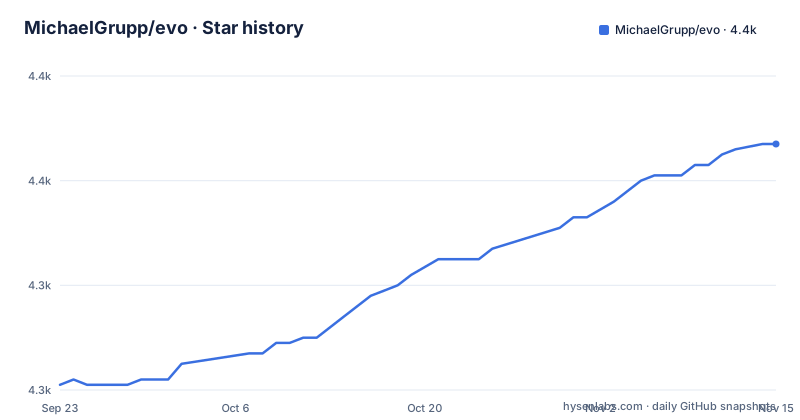
- MichaelGrupp/evo4,367 ★ · +46
| Repository | 2026-09-23 | 2026-11-15 |
|---|---|---|
| MichaelGrupp/evo | 4.3k | 4.4k |
46 Stars in the last 53 days, measured from the daily GitHub snapshot. Compare with other projects
Editorial analysis
Two metric executables and three helper tools, nothing else on the PATH
Installation puts five commands on your PATH: `evo_ape` for absolute pose error, `evo_rpe` for relative pose error, and `evo_traj`, `evo_res` and `evo_config` for analysis, result comparison and settings. That is the whole public surface, and the split matters for how you structure a benchmark. The two metric commands each produce a result file, and `evo_res` reads those result files back so you can compare runs that were scored on different days or in different directories. `evo_config` is the only command that writes global state.
Underneath the executables sit two libraries, `core` and `tools`, which the project documents as the extension points for custom formats or custom metrics. The examples folder makes that concrete with `alignment_demo.py` and `custom_app.py`. So the intended audience is not only someone who wants a number; it is someone who will end up writing a reader for their own output format, and the README is written with that reader in mind.
The licence is GPL-3.0. That matters if you embed the library inside a closed-source evaluation harness, because the copyleft reaches the derived work. Running the executables as a separate process on data you already have is the straightforward case.
Association, alignment and scale are options you switch on, not defaults you inherit
Most tools bake one comparison procedure into the binary. evo does not, and the README states the reason plainly: it is "not a 1-to-1 re-implementation of a particular evaluation protocol tailored to a specific dataset." The practical consequence is that a number you get out of evo carries the settings you chose, and you have to record them alongside the result.
The knobs cluster around three problems. Association decides which estimated poses are paired with which reference poses when the two streams do not share timestamps. Alignment decides whether the trajectories are compared as recorded or first brought into a common frame, and the repository ships `examples/alignment_demo.py`. Scale adjustment is for monocular SLAM, where the estimated trajectory is defined only up to a global factor and a scale-free comparison is meaningless without it.
Read the settings before you trust a comparison. Run `evo_config show` to see the active plot backend and other stored values, because the same file also decides whether PyQt6 or TkAgg drives your figures. Two engineers running the same command with different stored settings can get two different plots from one evaluation.
Format readers cover KITTI, TUM, EuRoC and bag files, but /tf still needs a ROS install
The reader set is the reason to reach for evo rather than a script written for one dataset. It parses TUM trajectory files, KITTI pose files, the EuRoC MAV csv ground truth plus TUM trajectory pair, and ROS or ROS2 bag files carrying `geometry_msgs/PoseStamped`, `geometry_msgs/TransformStamped`, `geometry_msgs/PoseWithCovarianceStamped`, `geometry_msgs/PointStamped` or `nav_msgs/Odometry` topics.
Bag reading is the interesting part. Reading bags works without a ROS installation at all, because the `rosbags` package ships as a required dependency and handles both ROS 1 and ROS 2 files. The exception is stated in the README without hedging: reading transform topics needs the buffer implementation from ROS, so that one topic type still requires a working ROS installation. Everything else in the bag path is pure Python. The test suite is run against ROS Lyrical, and `Dockerfile.ros-lyrical` exists for that case.
Optional extras are separate and small. `contextily` is what lets you add geographic map tiles to plots of geo-referenced data, PyQt6 swaps the TkAgg matplotlib backend for the qtagg one, and `pip install rerun-sdk` plus a `--rerun` flag streams results into the Rerun viewer. Each is an extra you opt into rather than a dependency you inherit.
pip install evo in an isolated environment, and never with sudo
The latest version requires Python 3.11 or newer, and the README is unusually blunt about how to install it. Use a proper environment such as uv, uvx, pipx, a venv, Pixi or a classic virtual environment. The README explicitly rules out `pip install --user`, anything with `--break-system-packages`, and worst of all `sudo pip install`.
For just the executables, PyPI is enough:
pip install evoTo upgrade an existing install, the README gives `pip install --upgrade evo`. For development, run the editable install from the repository base folder:
pip install --editable .Pixi is the third path, for an isolated development environment: run `pixi add evo` in an existing environment, or clone the repository and run `pixi shell` to open the dev shell. The dependency list is resolved automatically, and `pyproject.toml` holds the authoritative set: numpy, matplotlib, scipy, pandas, seaborn, argcomplete, pyyaml and `rosbags>=0.11.1` among them. Tab completion comes from argcomplete once you run `activate-global-python-argcomplete` after installing.
First run on the bundled KITTI files: plot two trajectories, then score them
Example trajectories ship in the repository under `test/data`, so the first run needs no data of your own. Change into that folder, then plot two estimated KITTI pose files against the ground truth, with the reference passed via `--ref` and the projection set to `--plot_mode=xz`:
evo_traj kitti KITTI_00_ORB.txt KITTI_00_SPTAM.txt --ref=KITTI_00_gt.txt -p --plot_mode=xzYou should get a figure with the ground truth and both estimates in one view; the README attaches the same plot rendered in 3D and in the xz plane. `evo_traj` analyses, plots or exports one or more trajectories, so the same tool is also how you inspect a single trajectory before scoring anything.
The second step scores one of those estimates. `evo_ape` takes the estimated trajectory, its format keyword, and the reference file, then writes a result file you can hand to `evo_res` later. `evo_rpe` takes the same shape and measures relative pose error over a delta instead. `--help` on any of the five commands lists the options, and tab completion is available on UNIX-like systems. The pattern is: plot to see whether the trajectories even overlap, then score, then compare result files across runs.
evo refuses to be a protocol, so a number without settings means nothing
The sharpest limitation is a design decision, and it cuts both ways. Because evo is not tied to a dataset protocol, the number you get reflects whatever association, alignment and scale choices are currently active.
The second limitation is the transform gap. If your ROS pipeline publishes transform topics rather than pose or odometry messages, you need a ROS installation for reading them, even though every other bag path avoids one. The README names ROS Lyrical as the distro the package is tested with, and `Dockerfile.ros-lyrical` covers that case.
The third is the version floor. Classifiers in `pyproject.toml` list Python 3.11 through 3.15, and `requires-python` is `>=3.11`, so on an older interpreter evo is simply not installable from PyPI.
The repository also has no GitHub releases, so version tracking happens through PyPI, where the README suggests subscribing to new releases via libraries.io.
Where evo sits against a single-protocol tool and against your own script
The alternative worth naming is not another package but the pattern evo is written against: a fixed evaluation script that ships with one benchmark and hard-codes its association rule, its alignment and its output format. If your group runs exactly one dataset family and only ever reports one number, that script is shorter, has no Python version floor beyond your own, and produces results a reviewer of that benchmark will recognise.
evo is the better fit when the opposite is true. The format readers mean a KITTI run, a EuRoC run and a live ROS bag can be scored by the same command, and the result files from `evo_ape` can be compared later with `evo_res` even if they were generated by different people. The cost is that the flexibility is on you. Someone has to decide and record the alignment mode and the scale handling, and a reviewer has to read those settings to know what the figure means.
Against writing your own loader, the comparison is narrower than it looks. The `core` and `tools` libraries are meant to be imported, so the real question is whether your custom logic fits the library's data model or fights it. The repository ships `examples/custom_app.py` and a `notebooks/` directory, which is where that judgement gets made.
Editorial conclusion
Adopt evo when you evaluate several SLAM systems across mixed trajectory formats and want association, alignment and scale options under your own control. Skip it if you need to reproduce a specific published protocol number or if your team cannot work in Python. Before the first run, check that your reference frame has the same timestamps and units as the estimated trajectory, and record the alignment and scale settings you used before you quote a result.
Frequently asked questions
How do I install evo for SLAM evaluation?
Run `pip install evo` inside a proper environment such as uv, pipx, a venv or Pixi. The latest version requires Python 3.11 or newer, and the README explicitly rules out `pip install --user`, `--break-system-packages` and `sudo pip install`. For development, `pip install --editable .` from the repository base folder installs it in editable mode.
Which executables does evo install and what does each one do?
Five commands are installed: `evo_ape` for absolute pose error, `evo_rpe` for relative pose error, `evo_traj` for analyzing, plotting or exporting trajectories, `evo_res` for comparing result files, and `evo_config` for global settings and config file manipulation. Every option is listed by calling the command with `--help`.
Does evo implement the official KITTI or TUM evaluation protocol?
No. The project states that evo is not a 1-to-1 re-implementation of a particular evaluation protocol tailored to a specific dataset. It offers options for association, alignment and scale adjustment instead, so the settings you choose determine what the resulting figure means.
Can evo read ROS bag files without a ROS installation?
Yes for most topics. The rosbags package is a required dependency and reads both ROS 1 and ROS 2 bags in plain Python, so no ROS install is needed for pose, transform, odometry or point message types. The one documented exception is transform tree topics, which need the buffer implementation from ROS.
How do I add map tiles or send results to the Rerun viewer?
Map tiles on geo-referenced plots require the optional contextily package. For Rerun, install the optional rerun-sdk dependency and add the --rerun flag to the command. Both are declared as extras in pyproject.toml rather than as required dependencies.
Official sources
Add this badge to your README
If you maintain this project, the badge below links readers to this analysis and shows its maintenance status from the daily GitHub snapshot. Paste the markdown into your README; add ?metric=license or ?metric=stars to the image URL for a different field.

[](https://hysenlabs.com/projects/michaelgrupp-evo)Star history chart for your README
[](https://hysenlabs.com/projects/michaelgrupp-evo)Was this useful?