Go Micro v6: a pluggable RPC framework that now treats services as tools for agents
A Go agent harness and service framework
At a glance
- What is it?
- micro/go-micro is a Go framework for distributed systems that has grown an agent harness and an HTTP and MCP gateway on top of its RPC, discovery and messaging core. The design is coherent, but three major versions still ship releases, v6 requires Go 1.26, and most of the real documentation lives off the repository on go-micro.dev.
- Who is it for?
- Go Micro v6 suits Go teams that want RPC services, discovery and messaging behind replaceable interfaces, and who also want those services callable by agents through MCP or by Go Micro's own agent without writing a separate tool layer. It is a harder sell for teams pinned to an older Go release, since v6 declares go 1.26.0, or for anyone who needs offline documentation, because the guides live on go-micro.dev.
- Can I use it commercially?
- Yes. Apache-2.0 is a permissive licence: you can use, modify and sell software built on it, as long as you keep its copyright and licence notices.
- Is it still maintained?
- Yes. The repository last received commits 1 day ago.
- What is it written in?
- Mainly Go, according to GitHub's language statistics.
Answers come from the project's GitHub data, last synced on November 13, 2026, and from our analysis. They are not legal advice.
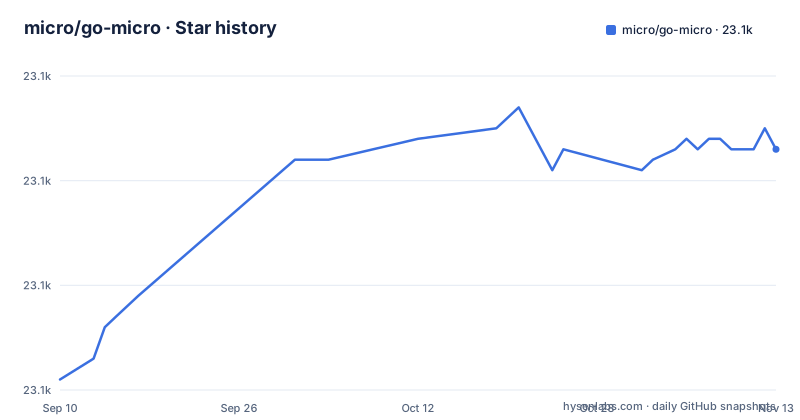
Star history
- micro/go-micro23,083 ★ · +22
| Repository | 2026-09-10 | 2026-11-13 |
|---|---|---|
| micro/go-micro | 23.1k | 23.1k |
22 Stars in the last 64 days, measured from the daily GitHub snapshot. Compare with other projects
Editorial analysis
Every component is a Go interface with a replaceable default
Go Micro describes itself as a Go framework for distributed systems development that provides RPC, service discovery, messaging, storage and configuration. The architectural rule is stated plainly: each component is a Go interface that ships with a default implementation you can replace. The top-level directories map onto those interfaces: registry/ for discovery, broker/ for messaging, transport/ and codec/ for how requests move and are encoded, selector/ for choosing a service instance, client/ and server/ for RPC, store/, cache/, config/, auth/, metadata/, wrapper/ and health/. RPC supports streaming.
The go.mod shows what alternatives the module is prepared to talk to. It requires client libraries for Consul, etcd, NATS (including nats-server), RabbitMQ through amqp091-go, Redis, MySQL, PostgreSQL through both pgx and lib/pq, SQLite and bbolt, plus gRPC, Prometheus, OpenTelemetry and zap. The cost of that breadth is a large dependency list in your go.sum the moment you import go-micro.dev/v6. The README itself does not say which implementation is the default for each interface, so check pkg.go.dev/go-micro.dev/v6 before assuming, for example, which registry a new service will use.
Agents call services as tools
The repository description now reads "A Go agent harness and service framework", and v6 puts both halves in one module. On the agent side the feature list covers models, conversation history, tools, background tasks and recovery, with code under agent/, model/ and flow/. The idea connecting the two halves is that agents use services as tools to carry out work, so an RPC handler you already wrote becomes something an agent can invoke.
The examples/ directory shows how far this goes beyond a chat demo. There are examples for a first agent, a durable agent, an agent that asks for human input, one that plans and delegates, one that wraps a tool, an agent running against Ollama, and agent-x402-buyer. Flow examples cover durable flows and loops. Next to them sit the classic service examples: hello-world, multi-service, grpc, grpc-interop, auth, web-service, graceful-stop and deployment.
The four getting started guides on go-micro.dev let you pick a path. Building and running a service needs Go code and RPC and no model. Exposing services to an existing agent goes through MCP, with a guide written around Claude Code. Building a service with an agent scaffolds, runs and chats with it, and chatting with services uses Go Micro's own agent from the terminal.
The gateway exposes services over HTTP and MCP, and chat does not need it
The gateway/ package is how services reach anything outside the Go process: it exposes them through HTTP and MCP for other applications and other agents. That makes MCP a first-class transport rather than an add-on, and examples/mcp shows the setup. If your goal is to let an external coding agent call your services, this is the component you run.
The README is explicit about one dependency that is easy to get wrong: chat does not require the gateway. Go Micro's built-in terminal agent can talk to services directly, so you do not need to stand up an HTTP and MCP endpoint just to try the agent. The gateway only becomes necessary when something outside your Go code needs access.
The container image makes the gateway its default. The Dockerfile sets the entrypoint to /usr/local/go/bin/micro with gateway as the default command and exposes port 8080. Running the image without arguments therefore starts a gateway, and running any other micro subcommand means overriding the command. Anyone deploying the gateway publicly should look at the auth/ package and the auth example, since an MCP endpoint in front of internal services is an entry point into them.
Three major versions ship releases in the same week
Go Micro has not retired its older lines. In the space of six days the project published v4.11.3 on 22 October 2026, v6.16.0 on 25 October and v5.30.1 on 27 October. The default branch is master, the last push was on 29 October 2026, and go.mod on master declares module go-micro.dev/v6.
The install command targets v6:
go get go-micro.dev/v6@latestBecause the major version is part of the import path, v4, v5 and v6 are separate modules as far as Go is concerned. Running the command above in a project that imports an older version adds v6 alongside it rather than upgrading anything. Older blog posts and examples written for v4 or v5 use different import paths, so check the import path in any example before copying it: the agent harness, the MCP gateway and the getting started guides described here are tied to v6. If you maintain a v4 or v5 service, the fact that those lines still receive releases gives you time, but the CHANGELOG.md and ROADMAP.md in the repository are where to check what each line will continue to get.
v6 requires Go 1.26
The go.mod for go-micro.dev/v6 declares go 1.26.0 and a toolchain of go1.26.10, and the Dockerfile copies the Go toolchain from golang:1.26.0-alpine. A project still on an older Go release has to move to 1.26 before it can import v6. In organisations where the Go version is pinned by a shared build image, that is a platform change that has to be scheduled before anyone can try the framework, not something a single team can do in an afternoon.
The dependency versions point the same way. The module requires google.golang.org/grpc v1.83.2, google.golang.org/protobuf v1.36.11, OpenTelemetry v1.44.0, golang.org/x/net v0.62.0 and golang.org/x/crypto v0.58.0. Adding Go Micro to an existing service with its own pinned versions of these libraries will raise them to at least these versions through minimum version selection, which can change behaviour in code that has nothing to do with Go Micro. Run your existing test suite after adding the dependency, not just the new service code.
For protobuf users, the generator lives in cmd/protoc-gen-micro with its own README, and the container image installs protoc and protoc-gen-micro alongside the micro binary.
The Dockerfile cannot be built from a plain checkout
The Dockerfile looks like a normal image definition, but it does not compile anything. It starts from alpine:latest, creates a micro user and group with UID and GID 1001 and home /micro, installs git, make, curl and protoc with apk, and copies the Go toolchain from golang:1.26.0-alpine. Then it copies two prebuilt binaries, $TARGETPLATFORM/micro and $TARGETPLATFORM/protoc-gen-micro, into /usr/local/go/bin.
Those binaries come from the release pipeline. The repository carries a .goreleaser.yaml, and the Makefile builds micro with the git tag injected through LDFLAGS into go-micro.dev/v6/cmd/micro's version variable, with gorelease-dry-run and gorelease-dry-run-docker targets using ghcr.io/goreleaser/goreleaser:latest. Running docker build in a fresh clone fails at the COPY step because the per-platform directories do not exist yet. To build your own image, produce the binaries with goreleaser first or adapt the Dockerfile to compile them.
Two details matter for production. The base image is alpine:latest and the goreleaser image is also latest, so builds are not reproducible over time without pinning. And the image runs as the non-root micro user, which is the right default but means mounted volumes need matching ownership for UID 1001.
The Makefile is a set of acceptance gates for the agent lifecycle
The Makefile's help target lists what the maintainers verify, and it reads like a specification of the intended developer experience. Beyond the usual targets:
make test
make test-race
make test-coverage
make lint
make harness
there are targets aimed at the agent side. composition-gate runs a restartable service, agent and flow acceptance fixture. recovery-gate runs restart and failure-injection tests. chat-smoke exercises chat setup, tools, approvals and recovery in a terminal. inner-loop verifies the scaffold, run, chat, inspect and deploy dry-run contract, and zero-to-hero-transcript checks the ordered lifecycle transcript. cli-wayfinding and docs-wayfinding check that the first-agent CLI and docs stay in sync, install-smoke checks the local install.sh and first-run path, and provider-conformance-mock runs a cross-provider harness against a deterministic mock model provider.
For someone evaluating the framework, these targets are the most concrete statement of what is supposed to work: restart and recovery, tool approvals and multiple model providers are tested behaviours, not just features in a list. The repository also carries AGENTS.md, CLAUDE.md and CODEX.md for coding agents working in the tree, alongside CONTRIBUTING.md, SECURITY.md and SUPPORT.md.
Editorial conclusion
Go Micro v6 suits Go teams that want RPC services, discovery and messaging behind replaceable interfaces, and who also want those services callable by agents through MCP or by Go Micro's own agent without writing a separate tool layer. It is a harder sell for teams pinned to an older Go release, since v6 declares go 1.26.0, or for anyone who needs offline documentation, because the guides live on go-micro.dev. Before adopting, confirm which major version your existing code and tutorials target, check which default implementation each component uses on pkg.go.dev, and plan to build the micro binary yourself if you want the container image.
Frequently asked questions
What is Go Micro used for?
Go Micro is used to build distributed systems in Go, providing RPC with streaming, service discovery, messaging, storage and configuration. In v6 it also runs agents that use those services as tools, and a gateway exposes services over HTTP and MCP.
Is Go Micro a Go framework specifically for microservices development?
Go Micro is a Go framework for distributed systems development, with RPC, service discovery, message encoding and messaging built around replaceable Go interfaces. It installs with go get go-micro.dev/v6@latest.
Which Go version does Go Micro v6 require?
The go.mod for go-micro.dev/v6 declares go 1.26.0 with toolchain go1.26.10, and the Dockerfile copies Go from golang:1.26.0-alpine.
Does Go Micro chat need the gateway?
No. Go Micro's terminal chat with services does not require the gateway; the gateway is only needed to expose services over HTTP and MCP to other applications and agents.
Official sources
Add this badge to your README
If you maintain this project, the badge below links readers to this analysis and shows its maintenance status from the daily GitHub snapshot. Paste the markdown into your README; add ?metric=license or ?metric=stars to the image URL for a different field.

[](https://hysenlabs.com/projects/micro-go-micro)Star history chart for your README
[](https://hysenlabs.com/projects/micro-go-micro)Was this useful?