MCP Toolbox for Databases: A dual-purpose MCP server for SQL and NoSQL access
MCP Toolbox for Databases is an open source MCP server for databases.
At a glance
- What is it?
- Google's open source MCP Toolbox for Databases offers both prebuilt generic tools and a custom tools framework for connecting AI agents to enterprise databases, with support for a wide range of SQL and NoSQL systems.
- Who is it for?
- Adopt MCP Toolbox if you need a single MCP server that speaks to many databases, want prebuilt tools like list_tables and execute_sql for quick IDE integration, or plan to build custom restricted tools with structured queries and semantic search. Skip it if you only need one simple database connection and prefer a minimal hand-rolled MCP server, or if you require a fully managed service and cannot run your own server.
- Can I use it commercially?
- Yes. Apache-2.0 is a permissive licence: you can use, modify and sell software built on it, as long as you keep its copyright and licence notices.
- Is it still maintained?
- Yes. The repository received new commits within the last day.
- What is it written in?
- Mainly Go, according to GitHub's language statistics.
Answers come from the project's GitHub data, last synced on November 14, 2026, and from our analysis. They are not legal advice.
Star history
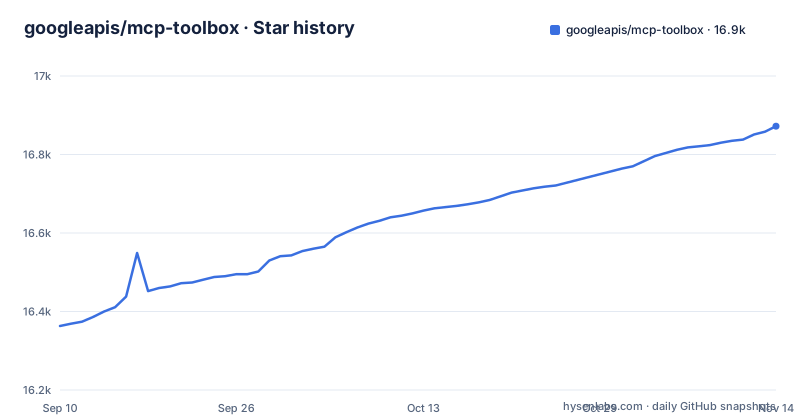
- googleapis/mcp-toolbox16,872 ★ · +509
| Repository | 2026-09-10 | 2026-11-14 |
|---|---|---|
| googleapis/mcp-toolbox | 16.4k | 16.9k |
509 Stars in the last 65 days, measured from the daily GitHub snapshot. Compare with other projects
Editorial analysis
What problem it solves and who it targets
MCP Toolbox for Databases addresses a specific gap: AI agents and IDEs lack a standardized, secure way to talk to enterprise databases. Instead of writing bespoke database glue code for each agent, you run one MCP server that exposes tools. The project targets two audiences. First, developers who want instant database access from Gemini CLI, Google Antigravity, Claude Code, Codex, or any MCP client, using prebuilt generic tools. Second, teams building production agents that need custom, restricted tools with structured queries, semantic search, or NL2SQL. The original name, Gen AI Toolbox for Databases, predates MCP, and the rename to mcp-toolbox reflects a shift toward MCP compatibility. This is not a niche experiment; it is a Google-backed project with a documented architecture and a full documentation site at mcp-toolbox.dev.
Dual purpose: prebuilt server versus custom tools framework
The README frames the project as serving a dual purpose. The first is a build-time MCP server with prebuilt generic tools like list_tables and execute_sql. You run the server with a --prebuilt flag and get a standard toolset for a given database. The second is a runtime framework for building custom tools. That framework lets you define structured queries, semantic search, and NL2SQL capabilities with safety controls. The distinction matters because it changes how you deploy. For quick exploration, you run the prebuilt server and point your client at it. For production agents, you write a configuration that defines your own tools, then run the Toolbox server with that config. The README claims integration with Agent Development Kit (ADK), LangChain, LlamaIndex, or custom agents in under ten lines of code.
How the underlying mechanism works
The README says the server handles connection pooling, integrated authentication (IAM), and OpenTelemetry observability out of the box. That means the Toolbox sits between your MCP client and the database, managing connections and auth. For Google Cloud databases like AlloyDB, BigQuery, Cloud SQL, Spanner, and Firestore, IAM integration suggests it can use Google's identity model rather than raw passwords. For prebuilt tools you set environment variables to connect; for custom tools, a source in tools.yaml takes keys such as host, port, database, user and password. The prebuilt tools are organized by database and by toolset. The syntax --prebuilt=postgres/data loads only SQL tools for PostgreSQL.
Getting it running: commands and configuration keys
The README gives a concrete quick start for prebuilt tools. You add an entry to your MCP client configuration file, typically mcp.json or claude_desktop_config.json. The example for PostgreSQL is:
{ "mcpServers": { "toolbox-postgres": { "command": "npx", "args": ["-y", "@toolbox-sdk/server", "--prebuilt=postgres", "--stdio"] } } }
That runs the server via npx, which pulls the @toolbox-sdk/server package. The --stdio flag indicates communication over standard input/output, which is what many MCP clients expect. Then you set environment variables to connect, as described in the Prebuilt Tools Reference. For custom tools, the README points to a separate quick start section. The README points to its Install & Run the Toolbox server section for Docker or binaries as alternative execution methods. If you want to use a specific toolset, you append it to the database name, like --prebuilt=postgres/data.
Supported databases and platform coverage
The project lists a broad set of supported databases. On the Google Cloud side: AlloyDB, BigQuery, Cloud SQL (PostgreSQL, MySQL, SQL Server), Spanner, Firestore, and Knowledge Catalog (formerly Dataplex). On the other side: PostgreSQL, MySQL, MariaDB, SQL Server, Oracle, MongoDB, Redis, Elasticsearch, CockroachDB, ClickHouse, Couchbase, Neo4j, Snowflake, and Trino. That is an unusual mix. Most MCP database servers focus on one engine or one cloud. Toolbox spans both relational and NoSQL, and includes search engines like Elasticsearch and in-memory stores like Redis. The breadth is a strength if you have heterogeneous data sources, but it also means each database integration may have different tool capabilities. The README says a full list of tools is in the Prebuilt Tools Reference, so you cannot assume that every database has the same set of tools. That is a real constraint to check before you commit.
Real limitations and cases where it is the wrong tool
The most obvious limitation is that this is not a managed service. You run the server yourself, either via npx, Docker, or a binary. That means you own patching, scaling, and availability. For a production deployment, that is nontrivial. The README mentions that Google Cloud MCP Servers provide a managed experience with prebuilt tools, which is a separate offering. If you want zero-ops, Toolbox is the wrong choice. Another limitation is the dependency on environment variables for configuration. The README does not show a config file for prebuilt tools, only environment variables. That can be brittle in containerized environments where secrets management is already complex. Also, the custom tools framework requires you to define your own tools, which has a learning curve. Finally, the project is written in Go, but the prebuilt server is distributed as an npm package. That is convenient for npx users but may confuse teams expecting a Go binary as the primary artifact.
Alternative approaches and how they differ
A direct alternative is to write a small custom MCP server using an SDK like the official MCP Python or TypeScript SDK. That approach gives you full control over the tools and connections, but you have to implement connection pooling, authentication, and observability yourself. Toolbox bundles those concerns, which is its main advantage. Another alternative is a database-specific MCP server, such as the official PostgreSQL MCP server or a vendor-provided one. Those are usually narrower in scope but simpler to configure. Toolbox differs by offering a unified interface across many databases and by providing a framework for restricted access and structured queries. For teams already on Google Cloud, the managed Google Cloud MCP Servers are a closer alternative, and the README links a page on the differences. The choice comes down to control versus convenience. Toolbox sits in the middle: more control than a managed service, less boilerplate than a hand-rolled server.
Licence, maintenance, and upgrade considerations
The project is licensed under Apache-2.0, which permits commercial use, modification, and redistribution, with the condition that you preserve copyright notices. That is a permissive licence and a common choice for Google open source projects. The repository is not archived, and the last push was on 2026-11-01, with releases v1.13.1, v1.14.0, and v1.15.0 coming roughly every two weeks from late September to late October 2026. That cadence suggests active maintenance, but it also means you should expect frequent updates. Each release may change tool definitions or configuration syntax, so you need a testing process before upgrading in production. The README notes a repository rename from genai-toolbox, which could break existing git remotes or documentation links. The project also offers SDKs in Python, JS/TS, Go, and Java, which is a maintenance surface of its own. If you adopt the custom tools framework, you are tying your code to the Toolbox configuration schema, which may evolve. Check the changelog for each release before upgrading, especially if you rely on custom tools.
Editorial conclusion
Adopt MCP Toolbox if you need a single MCP server that speaks to many databases, want prebuilt tools like list_tables and execute_sql for quick IDE integration, or plan to build custom restricted tools with structured queries and semantic search. Skip it if you only need one simple database connection and prefer a minimal hand-rolled MCP server, or if you require a fully managed service and cannot run your own server. Before adoption, verify that your target database appears in the supported list, check the exact prebuilt toolset syntax (for example --prebuilt=postgres/data), and confirm whether your MCP client can pass the required environment variables. Also confirm which SDK languages you need, since the project offers Python, JS/TS, Go, and Java SDKs, and note that the repository was renamed from genai-toolbox, so update your git remote accordingly.
Frequently asked questions
What is a MCP toolbox?
MCP Toolbox for Databases is an open source Model Context Protocol server, written in Go and released under Apache-2.0, that connects AI agents, IDEs, and applications directly to enterprise databases. It serves two purposes: a ready to use MCP server loaded with prebuilt generic tools, and a framework for building custom tools.
what is mcp toolbox for databases
It is a Go MCP server that gives agents, IDEs, and applications direct access to enterprise databases, plus the framework for defining your own sources and tools in tools.yaml. Supported engines include AlloyDB, BigQuery, Cloud SQL, Spanner, Firestore, Knowledge Catalog, PostgreSQL, MySQL, MariaDB, Oracle, MongoDB, Redis, Elasticsearch, CockroachDB, ClickHouse, Couchbase, Neo4j, Snowflake, and Trino.
how to install mcp toolbox
The quick start configures an MCP client with `npx`, the arguments `-y`, `@toolbox-sdk/server`, `--prebuilt=postgres`, and `--stdio`, then sets environment variables for the connection. The project also points to Docker images and released binaries as other execution methods, and the last recorded push to the repository is 2026-11-01.
Can I use MCP with chatgpt?
The project names Gemini CLI, Google Antigravity, Claude Code, and Codex as MCP clients, and says you can use the Toolbox in any MCP compatible IDE or client by configuring the MCP server. ChatGPT is not among the clients it lists.
mcp toolbox vs mcp server
MCP Toolbox for Databases is itself an MCP server for databases. Run it with a prebuilt generic toolset chosen by a flag such as `--prebuilt=postgres`, or serve the sources and tools you define yourself in tools.yaml and load with `--config tools.yaml`.
mcp toolbox vscode
The project says you can use it in any MCP compatible IDE or client by configuring the MCP server, and points to the client's configuration file, usually `mcp.json` or `claude_desktop_config.json`. VS Code is not named specifically among the clients it lists.
Official sources
Add this badge to your README
If you maintain this project, the badge below links readers to this analysis and shows its maintenance status from the daily GitHub snapshot. Paste the markdown into your README; add ?metric=license or ?metric=stars to the image URL for a different field.

[](https://hysenlabs.com/projects/googleapis-mcp-toolbox)Star history chart for your README
[](https://hysenlabs.com/projects/googleapis-mcp-toolbox)Was this useful?