DevSkim: security linting rules that an IDE or a CI job can both run
DevSkim is a set of IDE plugins, language analyzers, and rules that provide security "linting" capabilities.
At a glance
- What is it?
- DevSkim is a MIT-licensed .NET library and cross-platform command line tool that performs static security analysis of source code, with a flexible rule model, SARIF output and a fix command that applies suggested fixes. It ships IDE plugins, analyzers and default rules in one repository.
- Who is it for?
- DevSkim fits a team that wants security findings as lint warnings in the editor and as a check in the pipeline, using the same rules in both places, and that wants to write its own organisation-specific rules. It does not fit a team looking for a deep dataflow analyser, since the rule model is pattern based, and it does not replace a dedicated security scanner.
- Can I use it commercially?
- Yes. MIT is a permissive licence: you can use, modify and sell software built on it, as long as you keep its copyright and licence notices.
- Is it still maintained?
- Yes. The repository last received commits 1 day ago.
- What is it written in?
- Mainly C#, according to GitHub's language statistics.
Answers come from the project's GitHub data, last synced on November 7, 2026, and from our analysis. They are not legal advice.
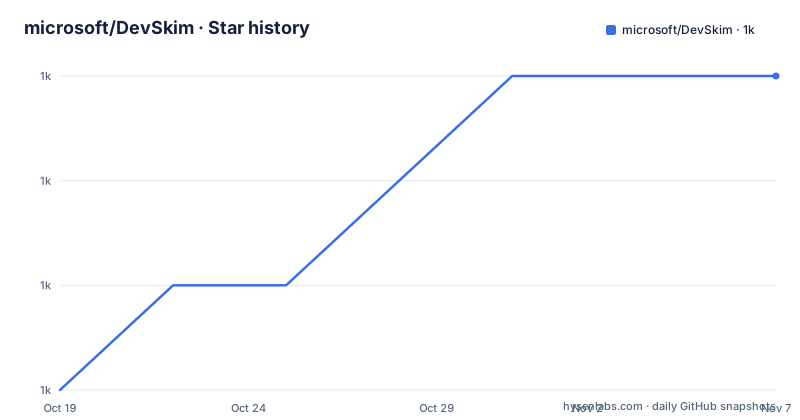
Star history
- microsoft/DevSkim1,017 ★ · +3
| Repository | 2026-10-19 | 2026-11-07 |
|---|---|---|
| microsoft/DevSkim | 1k | 1k |
3 Stars in the last 19 days, measured from the daily GitHub snapshot. Compare with other projects
Editorial analysis
One rule set, two places to run it
DevSkim is a set of IDE plugins, language analyzers and rules that provide security linting capabilities, The README describes it as a.NET library and cross-platform command line tool that performs static security analysis of source code.
The goal the README states is to identify security vulnerabilities as early as possible, fix them at the point of introduction, and help build security awareness for developers.
The design decision worth understanding is that the rules live in one place and are consumed by several front ends. The repository structure section says issues and contributions are accepted for four things: the DevSkim Library at `./DevSkim-DotNet/Microsoft.DevSkim/`, the DevSkim CLI at `./DevSkim-DotNet/Microsoft.DevSkim.CLI/`, the tests at `./DevSkim-DotNet/Microsoft.DevSkim.Tests/`, and the default rules and guidance at `./rules/default/` and `./guidance/`.
So a rule is written once, in the rules directory, and the same rule set is available through the library, through the CLI, and through the IDE plugins. The repository description mentions IDE plugins and language analyzers, and the topics list includes visual-studio-code-extension and visual-studio-extension, which is where the editor side of that arrangement lives.
This matters because a finding that only appears in a CI job is a finding the developer sees a day later. Running the same rule in the editor and in the pipeline closes that gap.
The licence is MIT, and the project is hosted by Microsoft, with the NuGet packages published under the Microsoft.CST prefix.
The rule model, and the paths it can match on
DevSkim has a flexible rule model that supports multiple programming languages, and the features list gives the shape of it.
There are built-in rules and support for writing custom rules. Rules can be expressed with JSONPath, XPath and YmlPath based selectors, which is the interesting part of the design. Those three path languages are the standard ways to address structure in JSON, XML and YAML documents, and applying them to source code means a rule can match a call to a particular API inside a function with a given name, or a string literal of a given shape, without needing a bespoke matcher for every language.
Language support is broad: C, C++, C#, Cobol, Go, Java, Javascript and Typescript, Python, and more, with a wiki page listing the supported languages. Cobol in that list is not a joke, and it tells you something about who this is for, since the project is used in environments where legacy mainframe code is still being maintained and where a security rule applied only to the new services would not be much use.
Beyond matching, the tool handles the practical parts of running a linter. Information and guidance are provided for identified security issues, so a finding is not just a line number. There is optional suppression of unwanted findings, so a team can accept a specific risk rather than disabling a whole rule. And there is automated application of suggested fixes from SARIF results, which is the difference between a linter that reports and one that repairs.
Installing the CLI three different ways
The installation options are arranged by how much of the .NET runtime you already have, and the recommended path is the global tool.
If the .NET SDK is installed, install the CLI as a .NET global tool:
dotnet tool install --global Microsoft.CST.DevSkim.CLIThat adds `devskim` to the PATH, and you then invoke it as `devskim`.
The self-contained route is for machines without a .NET runtime. Download the platform specific binary archive for Windows, Mac OS or Linux from the releases page, extract it, navigate to the DevSkim folder and invoke `devskim` or `devskim.exe`.
The runtime dependent variant is the middle case. Install the latest .NET runtime, download the netcoreapp archive from the same releases page, extract it, and run `dotnet devskim.dll`.
Platform specific binaries of the CLI are also published on the GitHub releases page, and the .NET Global Tool is available on NuGet as Microsoft.CST.DevSkim.CLI. The C# library for embedding DevSkim analysis in your own tools is a separate package, Microsoft.CST.DevSkim.
The release cadence is steady: v1.0.70 on 2026-01-29, v1.0.90 on 2026-07-17, and v1.0.100 on 2026-09-29. The last push was on 2026-10-09, and the repository is not archived.
Analyze, fix, suppress and verify
The CLI has four commands, and the names map onto the workflow of running a linter over a codebase and then dealing with what it finds.
The core one analyzes a directory and writes the results as SARIF:
devskim analyze --source-code /path/to/FilesToAnalyze --output-file results.sarifSARIF is the standard format for static analysis results, which is what lets the output be consumed by other tools rather than only by a human reading a terminal. The features list also names JSON and text output formats.
The `fix` command applies suggested fixes from a DevSkim SARIF file, which is the interesting one. A rule can carry a fix, and this command writes those fixes back into the source. That turns a security lint into an automated remediation step, which is the difference between a finding that sits in a backlog and one that is closed by a pull request.
The `suppress` command adds suppression comments for issues identified in a DevSkim SARIF file, which pairs with the optional suppression feature in the rule model. A team that has decided a specific finding is acceptable can record that decision in the code, next to the finding, rather than in a separate ignore file that drifts.
The `verify` command validates rule files, which is what you would run in CI to catch a malformed custom rule before it fails silently on every file.
For the full option set, `devskim --help` and `devskim <command> --help` are the reference, with a wiki page for the command line interface.
Building the library and the CLI yourself
DevSkim requires the .NET SDK, version 10.0 or later, and the build is two commands from the repository root:
cd DevSkim-DotNet
dotnet build Microsoft.DevSkim.sln
dotnet test Microsoft.DevSkim.Tests/Microsoft.DevSkim.Tests.csproj
The solution is inside the `DevSkim-DotNet` directory rather than at the root, which is consistent with the repository structure section. The test project is a separate csproj rather than a solution-wide test run, so the second command targets the tests directly.
Around the .NET tree, the repository has the pieces of a Microsoft-run open source project: a `Pipelines/` directory for the CI definitions, a `docfx_project/` for the API documentation site, `rules/` and `guidance/` for the default rules and their accompanying guidance, `media/` for images, a `version.json`, a `Directory.Build.props` for shared MSBuild properties, and a `nuget.config`. There is a `Changelog.md`, a `SUPPORT.md`, a `SECURITY.md` for reporting vulnerabilities, a `NOTICE.txt` and a `CONTRIBUTING.md`.
Two process details are worth knowing before you open a pull request. Most contributions require agreeing to a Contributor License Agreement, and a CLA bot will automatically determine whether you need to provide one and decorate the pull request, and you only need to do this once across all repositories using the Microsoft CLA. The project has also adopted the Microsoft Open Source Code of Conduct.
The `guidance/` directory sitting next to `rules/` is a nice touch. A rule that flags a pattern is only half the work, since the developer also needs to understand why the pattern is a problem and what to do about it, and shipping that explanation alongside the rule is what makes the finding actionable.
Editorial conclusion
DevSkim fits a team that wants security findings as lint warnings in the editor and as a check in the pipeline, using the same rules in both places, and that wants to write its own organisation-specific rules. It does not fit a team looking for a deep dataflow analyser, since the rule model is pattern based, and it does not replace a dedicated security scanner. Before adopting it, install the CLI with `dotnet tool install --global Microsoft.CST.DevSkim.CLI`, run `devskim analyze` over a directory to see what the default rules flag on your code, and read the Writing Rules wiki page before authoring a custom rule.
Frequently asked questions
What is DevSkim?
It is a .NET library and cross-platform command line tool that performs static security analysis of source code, plus IDE plugins and language analyzers. The goal is to identify security vulnerabilities early, fix them where they were introduced, and build security awareness among developers.
How do I install the DevSkim command line tool?
With the .NET SDK installed, run `dotnet tool install --global Microsoft.CST.DevSkim.CLI`, which puts devskim on the PATH. Self-contained and runtime dependent platform archives are also on the GitHub releases page, and the library is the separate Microsoft.CST.DevSkim NuGet package.
What output formats does DevSkim support?
SARIF, JSON and text. The basic analysis command is `devskim analyze --source-code /path/to/FilesToAnalyze --output-file results.sarif`, and the fix command applies suggested fixes from a DevSkim SARIF file.
Which languages does DevSkim support?
C, C++, C#, Cobol, Go, Java, Javascript and Typescript, Python, and more, with the full list on the Supported Languages wiki page. Rules can match using JSONPath, XPath and YmlPath based selectors.
What licence is DevSkim under and how do I report a vulnerability?
DevSkim is licensed under the MIT license, with the text in LICENSE.txt. Security vulnerabilities should be reported through the SECURITY.md file in the repository, and contributions require a Contributor License Agreement.
Official sources
Add this badge to your README
If you maintain this project, the badge below links readers to this analysis and shows its maintenance status from the daily GitHub snapshot. Paste the markdown into your README; add ?metric=license or ?metric=stars to the image URL for a different field.

[](https://hysenlabs.com/projects/microsoft-devskim)Star history chart for your README
[](https://hysenlabs.com/projects/microsoft-devskim)Was this useful?