DISKSPD storage load generation on Windows
DISKSPD is a storage load generator / performance test tool from the Windows/Windows Server and Cloud Server Infrastructure Engineering teams
At a glance
- What is it?
- DISKSPD is Microsoft's C++ storage performance testing tool for Windows, with command-line and XML profiles for configurable workloads and text or XML results. Version 2.3 changes default affinity and buffer placement, so earlier results may require rebaselining.
- Who is it for?
- DISKSPD fits Windows storage engineers who need configurable command-line or XML workloads and can preserve the version, target, processor placement, I/O path, and system context with each result. It does not fit non-Windows targets, casual users seeking a fixed benchmark, or hosts below the requirements of the selected DISKSPD path.
- Can I use it commercially?
- Yes. MIT is a permissive licence: you can use, modify and sell software built on it, as long as you keep its copyright and licence notices.
- Is it still maintained?
- Yes. The repository last received commits 50 days ago.
- What is it written in?
- Mainly C++, according to GitHub's language statistics.
Answers come from the project's GitHub data, last synced on October 23, 2026, and from our analysis. They are not legal advice.
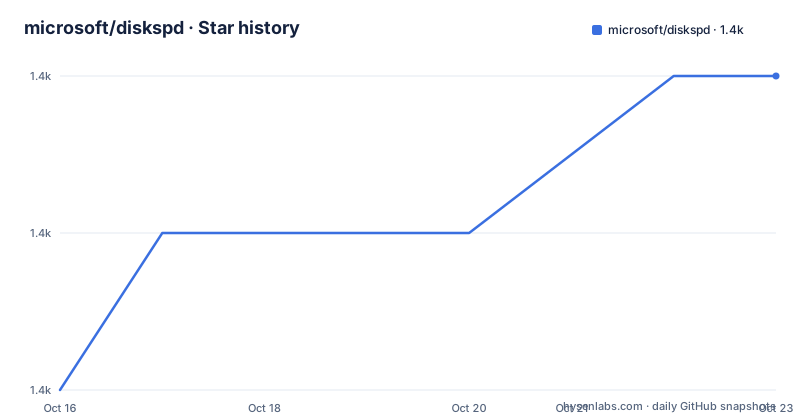
Star history
- microsoft/diskspd1,418 ★ · +2
| Repository | 2026-10-16 | 2026-10-23 |
|---|---|---|
| microsoft/diskspd | 1.4k | 1.4k |
2 Stars in the last 7 days, measured from the daily GitHub snapshot. Compare with other projects
Editorial analysis
Where DISKSPD fits in Windows storage testing
DISKSPD addresses a specific storage engineering problem: creating controlled I/O workloads against Windows or Windows Server systems and reporting the resulting throughput and latency. It comes from the Windows, Windows Server, and Cloud Server Infrastructure engineering teams at Microsoft. Its practical users are storage engineers and system administrators who need to characterize a volume or file before deployment, investigate a configuration change, or compare storage behavior under a repeatable load.
This is not a fixed, one-click disk benchmark. The command line and XML profiles expose targets, access patterns, request sizes, thread counts, run durations, affinity, and result collection. That configurability is useful when a team needs to ask a precise question, such as how a queue depth affects reported latency or how placement across processor core classes changes throughput.
The repository also hosts frameworks that use DISKSPD. VM Fleet is the documented example. The README describes it as a framework for Windows Server hyper-converged environments with Storage Spaces Direct. VM Fleet therefore targets a broader infrastructure scenario, while the DISKSPD executable remains the more direct choice for individual storage workloads.
Platform support is a hard boundary. The DISKSPD 2.3 binary release contains amd64 and arm64 builds. Its stated minimum operating system is Windows 10, version 1803. IoRing and BypassIO require Windows 11 or later, and BypassIO also requires NTFS. DISKSPD is therefore not a portable benchmark for Linux, macOS, or storage services whose API is outside the Windows file and volume model.
How DISKSPD turns profiles into storage results
The repository layout shows a staged processing architecture. `CmdLineParser` handles command-line input, while `XmlProfileParser` handles XML profiles. `CmdRequestCreator` turns either description into a workload request. `IORequestGenerator` performs the I/O work, and `Common` contains shared components. `ResultParser` and `XmlResultParser` handle conventional and XML output. `UnitTests` provides a test location, and `diskspd_vs` contains the Visual Studio project tree. The Visual Studio projects reportedly support Win32, x64, and ARM64 builds.
At the workload level, DISKSPD exposes traditional sequential and random I/O, mixed random and sequential distributions, and non-uniform distributions across a target. Throughput limits can be expressed in IOPS for a specified block size. Historical options also cover outstanding requests, memory-mapped I/O, write-through behavior, target weighting, request randomization, and IO priorities. XML profiles can carry related settings and results into machine-readable output.
DISKSPD also preserves information needed to explain results. Version 2.2 added socket, NUMA, core, and Power Efficiency Class details, plus active power-scheme reporting. Version 2.3 added processor-name and cache-topology reporting in text and XML results. These fields help an engineer check the environment in which a measurement was taken. They do not, by themselves, prove that every source of run-to-run variance has been removed.
The README does not document a public library API for embedding DISKSPD in another application. The evident integration surfaces are its command line, XML profiles, result output, XML profile output, and system-information-only output. Teams that need an application API would have to verify that requirement before selecting the project.
Preparing DISKSPD 2.3 for a first workload
The GitHub Releases page is the documented source for precompiled ZIP archives and source code. For the latest tool release, the README points to the following download path and alias:
https://github.com/Microsoft/diskspd/releases/latest/download/DiskSpd.zip
https://aka.ms/getdiskspd
The 2.3 archive contains amd64 and arm64 builds. Choose the archive matching the test host, extract it, and use the updated documentation in the DiskSpd wiki at `https://github.com/Microsoft/diskspd/wiki`. Since releases are distributed as precompiled ZIP files, this route does not require a C++ build environment.
The README does not provide one complete, current command that defines a target, duration, request size, access pattern, and thread count. Inventing one would not make a reproducible first-use tutorial. Start with a profile from the updated wiki and record every option that affects load, processor placement, or output. At minimum, the test record should identify the DISKSPD version, Windows build, storage layout, target or target set, access pattern, request size, thread count, queue depth, run duration, and affinity settings.
For the first run, choose a target and workload that match the system question. A queue-depth experiment should hold request size and duration fixed while changing outstanding requests. A core-affinity experiment should hold I/O settings fixed while changing placement. A mixed-workload test needs the random percentage and run-length distribution defined explicitly. DISKSPD offers controls for these distinctions, but an undocumented or implicit choice can make two results incomparable.
Save both the profile and the output. The `-Rp<text|xml>` option displays a specified parameter set in profile form, while `-X` works with XML profiles. Preserve the exact invocation because an exported profile is useful evidence only if it reflects the options actually used.
IoRing, BypassIO, and processor affinity in version 2.3
DISKSPD 2.3 adds separate controls for the Windows I/O path, buffer registration, completion handling, and thread placement. These controls allow a workload to represent more than one storage execution path, but they also increase the number of variables that must be documented.
The new IoRing path uses the option syntax `-u[n]<batchsize>[p]`. Registered buffers are enabled by default, and submission batching is configurable. This is relevant when the question concerns IoRing rather than the conventional I/O path. The README names the syntax but does not explain every accepted value or provide a complete command.
BypassIO has two modes. `-Sy` allows partial bypass, while `-SY` requires full bypass. The distinction is substantial because a partial-bypass run may still exercise part of the conventional route. Full BypassIO requires Windows 11 or later and NTFS. A profile using that mode should not be moved to a host that lacks either requirement without changing the question being measured.
Affinity changes can alter results independently of storage. Version 2.3 orders P-cores before E-cores within each group by default. The `-aup` switch restores unordered assignment. `-ac` assigns one thread per physical core before using SMT siblings, while `-as` spans processor groups before filling each group. The `-ap`, `-aP`, `-ae`, and `-aE` options control P-core and E-core ordering. Explicit affinity also supports CPU ranges and whole-group selection.
These defaults require extra care during upgrades. The 2.3 release notes warn that P-core-first affinity may change placement on heterogeneous systems and that it may require rebaselining. A result cannot be compared cleanly with an older run unless the team confirms the processor topology and restores or accounts for the earlier affinity behavior.
Buffer separation, completion depth, and trace integration
DISKSPD 2.3 separates I/O buffers by a PDE cache line through `-bsp`. The `-bsn` option restores the prior system-default allocation. Because this changes memory placement relative to the workload, it belongs in the baseline configuration rather than being treated as a cosmetic option. The release notes explicitly warn that the new default may require rebaselining.
The `-oc` option controls completion-port dequeue depth. DISKSPD 2.2 had already changed the asynchronous I/O loop to drain the completion queue more aggressively. According to the release notes, this reduced delays that affected latency measurement, especially for faster storage at higher queue depths. It also improved rates when latency measurement was disabled through `-D` or `-L`. Results with queue depths greater than one may therefore require rebaselining across that release boundary.
Repository files also provide a path into Windows tracing. `diskspd.wprp` is a Windows Performance Recorder profile, and the historical release notes describe Event Tracing for Windows support. That makes the repository more useful when a plain DISKSPD result needs to be examined alongside system events. The README does not document a complete WPR workflow, so an engineer should consult the Microsoft documentation for the WPR tooling rather than assume that running `diskspd.wprp` is sufficient by itself.
VM Fleet remains another project-specific extension point. It uses DISKSPD for the stated Windows Server hyper-converged and Storage Spaces Direct environment. A team should select VM Fleet when that infrastructure model is the subject, rather than adding framework complexity to a narrow file or volume experiment.
Validation, licensing, and the DISKSPD 2.3 upgrade boundary
DISKSPD needs a controlled validation process because several releases changed measurement behavior. Version 2.3 altered affinity ordering and buffer separation. Version 2.2 changed the asynchronous I/O loop for queue depths above one. Version 2.1 changed mixed random operations, non-uniform distributions, XML templates, and several output details. A test archive should therefore include the DISKSPD version and enough system context to identify the storage path and processor configuration.
The release cadence includes v2.1 on 2021-09-20, v2.2 on 2024-06-13, and v2.3 on 2026-09-04. The repository is not archived, and the last push was on 2026-09-04. This establishes current repository activity, but adoption still requires profile validation because default behavior has changed across those versions. The platform floor also moved. The 2.2 README notes support back to Windows 8 and Windows Server 2012, whereas 2.3 states a minimum of Windows 10, version 1803.
The repository is licensed under the MIT License. Its use, modification, distribution, and sublicensing are subject to the terms in `LICENSE`, including preservation of the applicable copyright and permission notice. Anyone building or redistributing a modified binary should inspect that file and the release archive rather than relying only on the release summary. This is not legal advice, but the license file is the controlling project artifact identified by the repository.
DISKSPD is the wrong tool when the workload does not run through Windows storage, when the host cannot meet the selected path's requirements, or when the tester cannot control target layout and processor placement. It is also a poor replacement for a casual benchmark that offers a single score with little configuration context. Its value comes from the ability to define and repeat the workload.
Editorial conclusion
DISKSPD fits Windows storage engineers who need configurable command-line or XML workloads and can preserve the version, target, processor placement, I/O path, and system context with each result. It does not fit non-Windows targets, casual users seeking a fixed benchmark, or hosts below the requirements of the selected DISKSPD path. Before adopting it, verify the current wiki profile syntax, confirm Windows and filesystem support, and determine whether the 2.3 affinity or buffer defaults require rebaselining. The first project-specific check is whether IoRing, BypassIO, or conventional I/O represents the storage mechanism you intend to measure.
Frequently asked questions
What operating systems support DISKSPD 2.3?
The stated minimum is Windows 10, version 1803. IoRing and BypassIO require Windows 11 or later, and BypassIO also requires NTFS.
Does the DISKSPD 2.3 release include amd64 and arm64 builds?
Yes. The README states that the 2.3 binary release contains amd64 and arm64 builds.
Why might DISKSPD 2.3 results differ from earlier versions?
Version 2.3 orders P-cores before E-cores within each affinity group by default and separates I/O buffers by a PDE cache line by default. The release notes warn that both default changes may require rebaselining.
Can DISKSPD measure a Windows Server hyper-converged environment?
The repository includes VM Fleet, a measurement framework that uses DISKSPD for Windows Server hyper-converged environments with Storage Spaces Direct.
Under which license is DISKSPD released?
The repository lists the MIT License and includes a `LICENSE` file.
Official sources
Add this badge to your README
If you maintain this project, the badge below links readers to this analysis and shows its maintenance status from the daily GitHub snapshot. Paste the markdown into your README; add ?metric=license or ?metric=stars to the image URL for a different field.

[](https://hysenlabs.com/projects/microsoft-diskspd)Star history chart for your README
[](https://hysenlabs.com/projects/microsoft-diskspd)Was this useful?