MCP Gateway: A Kubernetes Control Plane for Stateful MCP Server Routing
MCP Gateway is a reverse proxy and management layer for MCP servers, enabling scalable, session-aware stateful routing and lifecycle management of MCP servers in Kubernetes environments.
At a glance
- What is it?
- Microsoft's MCP Gateway is a C# reverse proxy and management layer that keeps session_id pinned to one MCP server while exposing REST CRUD over adapters and tools. It is built for teams already running Kubernetes and Entra ID, and it is a poor fit for anyone who just needs to proxy one local MCP process.
- Who is it for?
- Adopt MCP Gateway if you are already operating Kubernetes, want MCP servers deployed and deleted through REST rather than kubectl, and need requests carrying the same session_id to land on the same server instance.
- Can I use it commercially?
- Yes. MIT is a permissive licence: you can use, modify and sell software built on it, as long as you keep its copyright and licence notices.
- Is it still maintained?
- Yes. The repository last received commits 2 days ago.
- What is it written in?
- Mainly C#, according to GitHub's language statistics.
Answers come from the project's GitHub data, last synced on November 14, 2026, and from our analysis. They are not legal advice.
Star history
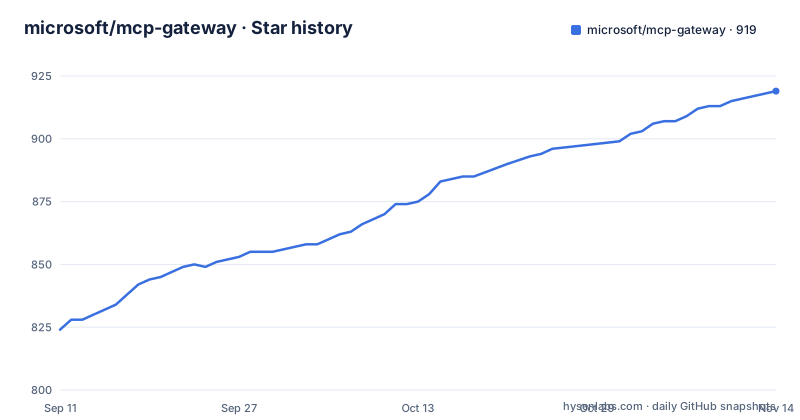
- microsoft/mcp-gateway919 ★ · +95
| Repository | 2026-09-11 | 2026-11-14 |
|---|---|---|
| microsoft/mcp-gateway | 824 | 919 |
95 Stars in the last 64 days, measured from the daily GitHub snapshot. Compare with other projects
Editorial analysis
The problem: MCP servers are stateful, but HTTP infrastructure assumes they are not
A streamable HTTP MCP server holds session state. Once a client opens a connection and receives a session_id, subsequent requests in that session need to reach the same server process. Ordinary round-robin load balancing breaks this. A request lands on pod A, the next on pod B, and pod B has never seen that session. The README names this directly as Session-Aware Stateful Routing: all requests with a given session_id are consistently routed to the same MCP server instance. That constraint is the reason a gateway exists here at all, and it is the first thing to evaluate against your own infrastructure. The second problem is operational. Deploying an MCP server, checking whether it came up, reading its logs, updating it, and removing it are separate chores if you do them with kubectl and a YAML file per server. MCP Gateway turns each of those into a REST call under the /adapters scope. The audience is therefore narrow and specific: platform engineers running MCP servers inside Kubernetes who want a control plane and a data plane rather than a folder of manifests.
Adapters, tools, and two routing paths through the same proxy
The architecture diagram in the README splits the gateway into a data plane and a control plane, and the split matters when you are deciding what to expose publicly. On the data plane there are two entry points. POST /adapters/{name}/mcp establishes a streamable HTTP connection to one named MCP server. POST /mcp routes instead to a Tool Gateway Router, itself described as an MCP server with multiple instances hosted behind the gateway, which dispatches tool execution requests to registered tool servers based on tool definitions. So the gateway is doing two different jobs: direct proxying to a named server, and definition-driven dispatch across many tool servers. The control plane is plain REST. Adapters are managed under /adapters with POST, GET, PUT, DELETE, plus /status and /logs sub-routes. Tools are managed under /tools with the same shape, and a tool carries metadata about its execution endpoint and input schema. The README notes that adapters are designed to coexist with other resource types such as /agents in a unified AI development platform, which tells you the resource model was chosen for extension rather than for a single-purpose proxy. One design note worth flagging: the README says multiple router instances may run behind the gateway for session affinity, which means affinity is a property you have to preserve end to end, not something the gateway can enforce on its own if something in front of it rebalances.
Authentication is role-based, and the role names are yours to choose
The README describes Entra ID authentication plus basic application role authorization for MCP servers and tools. The rules as stated: Read access goes to the resource creator, to principals assigned the configured requiredRoles values (the example given is mcp.engineer), and to anyone holding the mandatory administrator role mcp.admin. The fallback behaviour when requiredRoles is empty should be checked in the repository before you rely on it. What is clear is that the administrator role name is fixed as mcp.admin while the general role list is configuration, which means your identity provider has to be able to issue both. If your organization has a naming convention for application roles, mcp.admin will not match it, and you will be mapping or aliasing somewhere. The README also separates data plane auth from control plane auth in the diagram, which is the right shape: the bearer token that lets an agent call POST /mcp should not be the same token that lets someone call DELETE /adapters/{name}.
Getting it running: two documented paths, local and Azure
The README's table of contents lists exactly two getting-started routes: Local Deployment, and 1-Click Deploy to Azure. The repository topics include bicep, arm-deployments, docker, and powershell, which indicates the deployment tooling is Azure-native infrastructure as code rather than a Helm chart, though the README content supplied here does not include the command lines for either path. You can see that POST /adapters exists and that FoundrySettings:Endpoint is the configuration key gating the agent preview. Treat the repository's getting-started pages as required reading before you estimate setup effort. The one configuration key that is explicitly documented is FoundrySettings:Endpoint, and it is a hard gate: Agents and Sessions are disabled unless it is configured. The gateway runs as an ASP.NET Core application (the topics list asp-net-core), so a local run implies the .NET toolchain, while the Azure path implies a subscription and the Bicep templates in the repository. If your team does not deploy to Azure, the second path is not available to you and you are on the local path plus your own Kubernetes manifests.
Agents and Sessions are preview, opt-in, and not the reason to adopt this
The README is unusually explicit about the preview surface. Agents are metadata: a system prompt, a model, and an allowed tool list. Sessions are individual runs that stream events over Server-Sent Events. The routes are POST /agents, GET /agents, GET|PUT|DELETE /agents/{name}, POST /sessions, GET /sessions, GET|DELETE /sessions/{id}, POST /sessions/run to start a session and stream events, and POST /sessions/{id}/messages to continue an existing session with a new user message. All of it is off by default. The gating condition is FoundrySettings:Endpoint. If that is not set, none of these routes are available. Anyone evaluating MCP Gateway as an agent runtime should read this as a statement of maturity: the team has shipped the resource model and the streaming endpoints, labelled them Preview, and put them behind a configuration flag. The stable value in this project is the adapter and tool routing, not the agent layer. Building a product on the preview routes means building on an interface the project itself has marked as opt-in and subject to change.
Where it is the wrong tool, and what to use instead
MCP Gateway assumes Kubernetes. If you are running a single MCP server as a local process for one developer, the gateway adds a control plane, a metadata store, a deployment manager, and an authentication layer in front of a problem you do not have. The README's own architecture diagram shows a metadata store holding server and tool information, a deployment manager that deploys and monitors the cluster, and separate tool gateway router pods. That is a lot of moving parts for one process. The honest alternative for that case is to run the MCP server directly and let the client connect to it, with no proxy in between. For teams that need a proxy but not lifecycle management, a general-purpose reverse proxy such as Envoy or nginx configured with consistent-hash load balancing on the session identifier gives you the affinity half of this project without the CRUD half or the Kubernetes deployment manager. The difference in approach is real: a generic proxy routes bytes and knows nothing about MCP tool definitions, so it cannot dispatch a tool call to a registered tool server based on an input schema. If definition-driven dispatch is what you need, a generic proxy will not substitute. If it is not, you are paying for a control plane you will not use. The middle case, a team on Kubernetes that wants CRUD but not tool routing, is the one where the decision is genuinely close, and it comes down to whether the adapter API replaces work your team already does manually.
Maintenance cost and the MIT licence
The project is MIT licensed, which permits commercial use, modification, and redistribution provided the copyright notice and permission notice are retained. That is the permissive end of the spectrum and imposes no copyleft obligation on your own code. It says nothing about the operational cost of running the thing. What the README makes visible about that cost: there is a metadata store to keep available, a deployment manager that holds credentials sufficient to deploy and delete workloads in your cluster, and tool gateway router instances that must be scaled and kept behind the gateway for affinity. Upgrading means updating the gateway image and, if the adapter or tool resource schema changes between versions, reconciling existing registered resources. The repository has no published GitHub releases, so version-to-version compatibility cannot be assessed from release notes. The control plane is the part with the sharpest edge: whatever identity holds the token that can call DELETE /adapters/{name} can remove a running MCP server, so the role assignment around mcp.admin deserves more scrutiny than the data plane token.
Editorial conclusion
Adopt MCP Gateway if you are already operating Kubernetes, want MCP servers deployed and deleted through REST rather than kubectl, and need requests carrying the same session_id to land on the same server instance. Do not adopt it if you are running one MCP server on a laptop, if you cannot grant the gateway cluster-level deployment permissions, or if you need a stable agent API today, since Agents and Sessions are marked Preview and stay disabled until FoundrySettings:Endpoint is set. Before committing, verify three things in your own environment: that your ingress or load balancer preserves the session_id affinity the README promises, that your identity provider can issue the requiredRoles values you intend to configure, and that the adapter and tool CRUD routes cover the lifecycle operations your team currently performs by hand.
Frequently asked questions
What does the Microsoft mcp-gateway do?
It is a reverse proxy and management layer in front of MCP servers. Each MCP request is routed independently to a ready server instance, and a separate control plane handles deploying, updating and deleting those servers through REST endpoints for adapters and tools.
Is mcp-gateway stateful or stateless?
Stateless. Each request carries its own protocol metadata and is authorized independently, and legacy session headers plus the gateway's own session_id query alias do not determine routing. The repository description calls it session-aware and stateful, which contradicts the documented design; resource metadata is what persists, in Redis locally or Cosmos DB in the cloud.
What does the mcp-gateway require from MCP clients?
This build requires the 2026-07-28 revision of the protocol on both clients and adapters, and provides no legacy initialization, transport sessions or protocol downgrade. A separate migration document covers client requirements, request examples, deployment settings and rollback.
How does mcp-gateway handle authorization?
With Entra ID authentication and application role checks. Read access goes to the creator, principals in the resource's requiredRoles values, and holders of the mandatory mcp.admin role; write access is limited to the creator or mcp.admin. If requiredRoles is empty or omitted, only the creator and mcp.admin can read.
What is the mcp-gateway portal and is it authenticated?
It is a React single-page application served by the gateway at /portal/ that manages adapters and tools and includes an in-browser JSON-RPC test console for exercising an MCP server. Authentication follows the mode: anonymous in dev mode, with an optional dev-identity switcher, and MSAL with Entra ID in cloud mode.
Can one mcp-gateway endpoint serve several tool servers?
Yes. POST /mcp routes to the tool gateway router, an MCP server itself that decides at request time which registered tool server handles the call based on tool definitions. Multiple router instances are hosted behind the gateway so that requests need no transport-session affinity.
Official sources
Where developers are discussing it
Posts on Hacker News, dev.to and Lobsters that link to this repository, found by our scan of those communities. 1 in the last 30 days; newest first.
- 5 Best MCP Gateways in 2026: Bifrost, IBM ContextForge, Obot, Docker and Microsoft Compareddev.to · Nov 2, 2026 · 5 points · 0 comments
Add this badge to your README
If you maintain this project, the badge below links readers to this analysis and shows its maintenance status from the daily GitHub snapshot. Paste the markdown into your README; add ?metric=license or ?metric=stars to the image URL for a different field.

[](https://hysenlabs.com/projects/microsoft-mcp-gateway)Star history chart for your README
[](https://hysenlabs.com/projects/microsoft-mcp-gateway)Was this useful?