Playwright MCP: Browser Automation for LLMs Without the Screenshots
Playwright MCP server
At a glance
- What is it?
- Microsoft's Playwright MCP server gives LLMs a structured accessibility-tree view of web pages instead of pixel-based input. It is a focused tool for agentic loops that need persistent browser state, not a replacement for the Playwright CLI in coding agents.
- Who is it for?
- Adopt Playwright MCP if you are building an agentic workflow that needs persistent browser state, iterative reasoning over page structure, or self-healing tests. Skip it if you are a coding agent that must balance browser automation against large codebases within a tight context window; the README explicitly steers you to the Playwright CLI with SKILLS instead.
- Can I use it commercially?
- Yes. Apache-2.0 is a permissive licence: you can use, modify and sell software built on it, as long as you keep its copyright and licence notices.
- Is it still maintained?
- Yes. The repository received new commits within the last day.
- What is it written in?
- Mainly TypeScript, according to GitHub's language statistics.
Answers come from the project's GitHub data, last synced on November 13, 2026, and from our analysis. They are not legal advice.
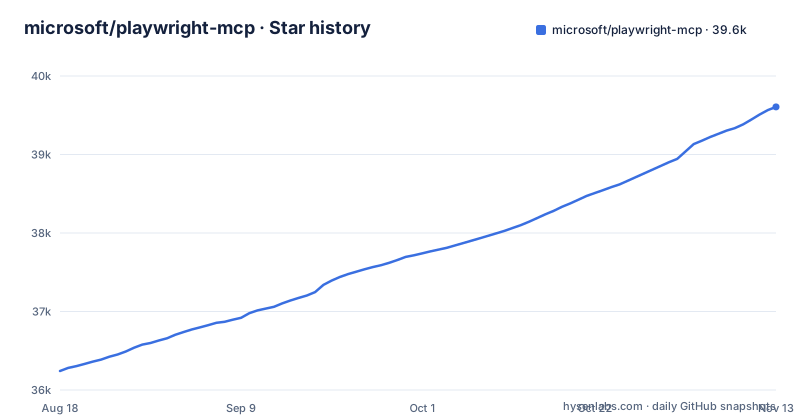
Star history
- microsoft/playwright-mcp39,606 ★ · +3,364
| Repository | 2026-08-18 | 2026-11-13 |
|---|---|---|
| microsoft/playwright-mcp | 36.2k | 39.6k |
3,364 Stars in the last 87 days, measured from the daily GitHub snapshot. Compare with other projects
Editorial analysis
What Problem This Server Actually Solves
Large language models are bad at reading pixels. Screenshot-based browser automation forces a vision model into the loop, and that is expensive and brittle. Playwright MCP sidesteps the problem by exposing web pages as structured accessibility snapshots. The LLM works with the same tree of roles, names, and states that a screen reader would use. This makes the interaction deterministic: the model issues a tool call, the server acts on the page, and the result comes back as data, not an image. The README is explicit that no vision models are needed. The intended users are not the average chatbot. They are specialized agentic loops: exploratory automation, self-healing tests, and long-running autonomous workflows where maintaining continuous browser context matters more than token economy.
Accessibility Tree Over Screenshots: The Core Mechanism
The mechanism is the accessibility tree, not the DOM and not the visual render. Playwright builds this tree from the browser's accessibility layer, which includes elements that are meaningful to assistive technology. The server serializes that tree into a snapshot and hands it to the model. The model then picks a tool, such as clicking a button or filling a field, and the server translates that into a Playwright call. Because the snapshot is structured text, the model does not need to guess coordinates or infer layout from an image. The README calls this 'deterministic tool application' and contrasts it with the 'ambiguity common with screenshot-based approaches.' That is the real technical bet here: structured data is cheaper and more reliable for an LLM than raw pixels. The trade-off is that anything not exposed in the accessibility tree is invisible to the model, which is a genuine limitation for canvas-heavy or visually complex pages.
Token Costs and the CLI Alternative
The README spends notable space comparing this package to the Playwright CLI with SKILLS. That comparison is not marketing filler; it is a genuine fork in the road for adopters. The CLI approach loads concise, purpose-built commands into the model context instead of large tool schemas and verbose accessibility trees. The README states that CLI invocations are more token-efficient and better suited for high-throughput coding agents that must balance browser automation with large codebases and tests within limited context windows. MCP, by contrast, keeps persistent state and rich introspection, which suits workflows that need iterative reasoning over page structure. If your agent is a coding agent that calls a browser occasionally, the CLI is likely the cheaper path. If your agent lives inside the browser for long stretches, MCP's persistent context wins. The decision is about context budget first, and this README gives you the vocabulary to make that call.
Getting It Running: Real Commands and Config Keys
Installation is a single npx command, but the configuration varies by client. The standard config, which the README says works in most tools, is a JSON block with an mcpServers key, a playwright entry, and a command of npx with args of @playwright/mcp@latest. Claude Code uses claude mcp add playwright npx @playwright/mcp@latest. Codex uses codex mcp add playwright npx "@playwright/mcp@latest" or a config.toml entry under [mcp_servers.playwright]. Copilot uses ~/.copilot/mcp-config.json with a type of local and a tools array. Cline expects a cline_mcp_settings.json with type stdio and a timeout of 30. Goose uses an extension flow with type STDIO. The README also covers Amp, Antigravity, Cursor, Factory, Gemini CLI, and Grok, each with its own syntax. The pattern is the same everywhere: spawn npx with the package name. The differences are in how each client declares the server. That is the first thing to verify before you adopt.
Requirements and Runtime Constraints
The hard requirement is Node.js 18 or newer. That is a low bar in 2026, but it still matters for teams stuck on older LTS releases. The server itself is TypeScript, published to npm as @playwright/mcp. The README also lists a broad set of MCP clients: VS Code, Cursor, Windsurf, Claude Desktop, Goose, Grok, Junie, and others. That breadth is a sign of maturity, but it also means the configuration surface is wide. Each client has its own quirks, and the README's per-client sections are the authoritative source. If your client is not listed, you are on your own to map the standard config to that client's expected format.
Limitations and Wrong-Tool Cases
The most obvious limitation is that the accessibility tree is not the visual page. A model using this server cannot see layout, color, or anything rendered on canvas. If your automation depends on visual regression or pixel-perfect checks, this is the wrong tool. The README also implies a second limitation: token cost. Accessibility snapshots can be verbose, and the README's own comparison with the CLI admits that loading these trees into the model context is expensive. For a coding agent that calls the browser once in a blue moon, that cost is unacceptable. A third limitation is less explicit: the server is a bridge, not a test runner. It does not replace Playwright's test framework. If your goal is to run a suite of assertions in CI, you should use Playwright Test directly, not an MCP server. The MCP interface is for agents that need to reason about a page, not for deterministic assertions.
Maintenance, Licensing, and Upgrade Path
The repository is under the Apache-2.0 license, which is permissive for commercial use. The project is active, with releases v0.0.82 through v0.0.84 landing between September and October 2026, and the last push on October 31, 2026. That cadence suggests ongoing maintenance, but the version number is still below 0.1, which means the API can change without a major-version warning. For a tool that lives inside an agent's context, upgrades are a real cost: you will need to re-test your client configuration and any custom tool invocations after each update. The npm package name @playwright/mcp is stable, so pinning a version in your config is straightforward. The README's standard config uses @latest, which is fine for evaluation but risky for production. Pin to a specific version if you depend on this server in a long-running workflow.
The Verdict: Who Should Adopt and Who Should Walk Away
The README gives you the decision rule in its own words. Use this MCP server when you need persistent browser state and iterative reasoning over page structure. That is the profile for self-healing tests, exploratory automation, and long-running autonomous workflows. Do not use it for coding agents that need to conserve tokens; the README points those users to the Playwright CLI with SKILLS. The server is lightweight in concept, but the token cost of accessibility snapshots is real, and the configuration surface across a dozen MCP clients is a maintenance burden. Before committing, run a small proof with your actual client and a representative page. Measure the snapshot size in tokens and see if your model can act on it reliably. If the snapshot is too big or the client config is too fiddly, the CLI is the better fit. If the snapshot works and the persistent context pays off, this package is a solid, Apache-licensed foundation for agentic browser automation.
Editorial conclusion
Adopt Playwright MCP if you are building an agentic workflow that needs persistent browser state, iterative reasoning over page structure, or self-healing tests. Skip it if you are a coding agent that must balance browser automation against large codebases within a tight context window; the README explicitly steers you to the Playwright CLI with SKILLS instead. Before adopting, verify your MCP client's configuration format (the README lists a dozen variants), confirm Node.js 18 or newer is available, and check whether the accessibility snapshot size fits your model's context budget in real workloads.
Frequently asked questions
how to install playwright mcp
Add an mcpServers entry whose command is npx and whose only argument is @playwright/mcp@latest. That standard block is stated to work in most clients, and Node.js 18 or newer is required. Individual clients also offer a one-line CLI command for adding the same server.
how to use playwright mcp with claude code
Run `claude mcp add playwright npx @playwright/mcp@latest` from the Claude Code CLI. Claude Desktop is configured differently, by following the Model Context Protocol install guide and using the standard mcpServers block.
how to use playwright mcp in cursor
Cursor offers a one-click install button for the Playwright server. To add it by hand, go to Cursor Settings, then MCP, then Add new MCP Server, choose the command type, and use `npx @playwright/mcp@latest` as the command.
What is MCP with Playwright?
It is a Model Context Protocol server that gives an LLM browser automation through Playwright. Pages are exposed as structured accessibility snapshots rather than screenshots, so the model can act on the page without a vision model or visually tuned input.
Is the Playwright MCP free?
The package is published under the Apache-2.0 licence and authored by Microsoft Corporation, and it runs locally through npx against the open source Playwright package. There is no hosted service or paid tier involved in the configuration described in the documentation.
Official sources
Where developers are discussing it
Posts on Hacker News, dev.to and Lobsters that link to this repository, found by our scan of those communities. 2 in the last 30 days; newest first.
- We Checked 10,659 Public MCP Configs. Two Thirds of the Servers Are Unpinneddev.to · Nov 8, 2026 · 2 points · 13 comments
- Debugging in the Agentic Eradev.to · Oct 31, 2026 · 3 points · 4 comments
Add this badge to your README
If you maintain this project, the badge below links readers to this analysis and shows its maintenance status from the daily GitHub snapshot. Paste the markdown into your README; add ?metric=license or ?metric=stars to the image URL for a different field.

[](https://hysenlabs.com/projects/microsoft-playwright-mcp)Star history chart for your README
[](https://hysenlabs.com/projects/microsoft-playwright-mcp)Was this useful?