The TypeScript website repo is a pnpm monorepo where a Gatsby site, the Playground and Twoslash ship from one v2 branch
The Website and web infrastructure for learning TypeScript
At a glance
- What is it?
- microsoft/TypeScript-Website holds typescriptlang.org and the packages behind it: the Playground sandbox, the tsconfig reference generator, Twoslash and a virtual file system. Pushes to v2 deploy straight to production, and translations live in a separate repository.
- Who is it for?
- Clone this repository if you want to fix a handbook page, change the Playground or reuse @typescript/twoslash or @typescript/vfs in your own documentation. It is a heavy setup for a one-word typo, since it needs pnpm workspaces, Node 20.19 or newer and watchman.
- Can I use it commercially?
- Yes, with credit. CC-BY-4.0 allows commercial use as long as you credit the authors and indicate what you changed. It is written for creative content, so check how it applies to any code.
- Is it still maintained?
- Yes. The repository received new commits within the last day.
- What is it written in?
- Mainly TypeScript, according to GitHub's language statistics.
Answers come from the project's GitHub data, last synced on November 25, 2026, and from our analysis. They are not legal advice.
Star history
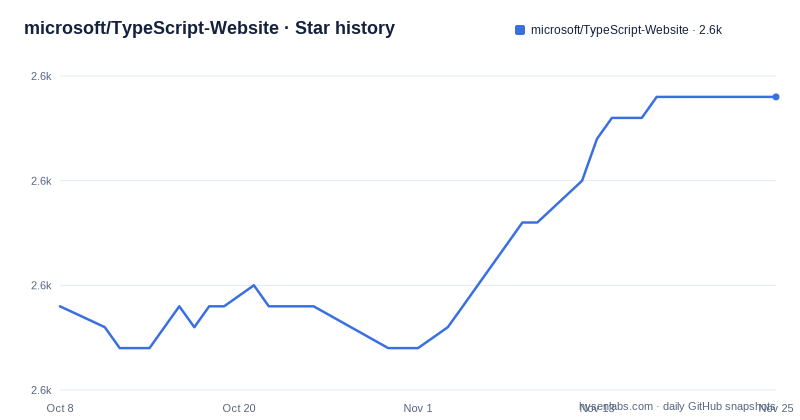
- microsoft/TypeScript-Website2,564 ★ · +10
| Repository | 2026-10-08 | 2026-11-25 |
|---|---|---|
| microsoft/TypeScript-Website | 2.6k | 2.6k |
10 Stars in the last 48 days, measured from the daily GitHub snapshot. Compare with other projects
Editorial analysis
One v2 branch deploys the site to typescriptlang.org with no manual step
Deployment is automatic. Pushes to the branch `v2` deploy to production at typescriptlang.org, and build logs are in GitHub Actions. There is no staging branch named in the README, so a merged pull request is live once the build passes.
The repository describes itself as the website and web infrastructure for learning TypeScript. Translations are not in this repository. They live in `microsoft/TypeScript-Website-Localizations`, and you pull them in only if you want them.
The docs content is licensed under CC-BY-4.0, and the repository carries a separate `LICENSE-CODE` file for code. The legal notices in the README grant a Creative Commons Attribution 4.0 International Public License for the documentation and other content.
Getting the site running needs Node 20.19, pnpm workspaces and watchman
The repository uses pnpm workspaces with Node 20 or newer, and `package.json` narrows that to `>= 20.19`. It also needs watchman, which Windows users can install via chocolatey. The commands are:
git clone https://github.com/microsoft/TypeScript-website
cd TypeScript-website
pnpm install
Then `pnpm bootstrap` prepares the packages. Translations are optional: `pnpm docs-sync pull microsoft/TypeScript-Website-localizations#main 1` fetches them. `pnpm start` starts the website on port `8000`.
The start command also creates a builder worker for every package in the repo, so a change outside the site is compiled and linted as you work. Every package has `pnpm build` and `pnpm test`, and all of them use `debug`, so `env DEBUG="*" pnpm test` prints verbose logs.
Setting NO_TRANSLATIONS makes the Gatsby site build English pages only
The main site is the `TypeScriptLang-Org` package, a Gatsby website that is statically deployed. The README gives one optimisation: set the environment variable `NO_TRANSLATIONS` to a truthy value and the website only loads pages for English.
That matters because a full run with every language is slower, and a contributor fixing English copy has no reason to wait for the rest. The cost is that you will not see how a change renders in the other languages.
The pnpm overrides in `package.json` pin `typescript` to `6.0.2` and `webpack` to `^5.105.3`, and a patch file at `patches/[email protected]` is applied to one Gatsby plugin. Both signal that the site tracks the TypeScript release and carries a local fix for its code-sample rendering.
The Playground is split into a sandbox, an AMD module, a worker and a plugin template
Several packages make up the Playground. `Sandbox` is the editor aspect of the Playground REPL, usable by any site that wants a Monaco editor with TypeScript or JavaScript code. `Playground` is an AMD module loaded at runtime in the Playground website. `Playground Worker` is a web worker that sits between the Playground and Monaco-TypeScript.
Plugins have a template. `Create Playground Plugin` generates a new one through `npm init playground-plugin [name]`. `Playground Handbook` holds the user-facing documentation, and `Playground Examples` holds the code samples across many languages.
The latest `@typescript/sandbox` release is 0.1.15, published on 22 September 2026. A zero-major version suggests the API is not promised to be stable, so pin it if you embed it.
Twoslash and VFS are published packages you can use outside this site
`TS Twoslash` is a code sample markup extension for TypeScript, on npm as `@typescript/twoslash`. `TypeScript VFS` runs TypeScript projects in memory in a browser or node environment, on npm as `@typescript/vfs`. Version 3.2.13 of twoslash and 1.6.5 of vfs were released on 22 September 2026.
Inside the repository, the `pnpm` overrides link `remark-shiki-twoslash` to the local `packages/ts-twoslasher` and `packages/typescript-vfs`, so the site uses its own source and not the registry copies.
Most of these packages build with a maintained fork of `tsdx`, at `weiran-zsd/dts-cli`. If you are copying a package out of the repository, expect to bring that build setup with it.
The tsconfig reference is generated from the compiler and also produces the JSON schema
The `tsconfig-reference` package holds tools and scripts that generate an API reference for the TSConfig JSON file. Two commands run the generation:
pnpm run --filter=tsconfig-reference generate-json
pnpm run --filter=tsconfig-reference generate-markdown
The first generates JSON from the TypeScript CLI, and the second jams them into a single file. Validation uses `pnpm run --filter=tsconfig-reference test`, or `lint` alone, or `lint resolveJson` for one doc.
The README admits the oddity that this same package creates the JSON schema for TSConfig files. Running `pnpm run --filter=tsconfig-reference build` writes it to `packages/tsconfig-reference/scripts/schema/result/schema.json`. The Documentation package was ported from `microsoft/TypeScript-Handbook` and then intermingled with `microsoft/TypeScript-New-Handbook`.
CI fails a pull request that touches a public package without a changeset
Versioning uses pnpm and changesets. CI fails if a pull request modifies a public package and has no changeset. You add one with `pnpm changeset`, pick the packages, and commit the new files under `.changeset`. The CLI's package picker lists `create-typescript-playground-plugin`, `@typescript/vfs`, `@typescript/twoslash`, `@typescript/sandbox` and `@typescript/ata`.
Website content updates do not need one. If you change a published package without touching published code, `pnpm changeset --empty` creates an empty changeset.
Most contributions require a Contributor License Agreement, and a CLA bot comments on the pull request. The README also links an hour-long video covering the codebase, deployment and tooling, plus short guides on converting Twoslash code samples, how i18n works for site copy and updating the TypeScript version.
Editorial conclusion
Clone this repository if you want to fix a handbook page, change the Playground or reuse @typescript/twoslash or @typescript/vfs in your own documentation. It is a heavy setup for a one-word typo, since it needs pnpm workspaces, Node 20.19 or newer and watchman. Before you start, read docs/Setup Troubleshooting.md, because the README itself sends setup problems there.
Frequently asked questions
How do I run the TypeScript website locally?
Install pnpm, Node 20 or newer and watchman, run pnpm install and pnpm bootstrap, then pnpm start. The site starts on port 8000.
What branch deploys the TypeScript website?
Pushes to the v2 branch deploy to production at typescriptlang.org, and build logs are in GitHub Actions.
Where are the TypeScript website translations?
They live in microsoft/TypeScript-Website-Localizations. You can fetch them with pnpm docs-sync, or set NO_TRANSLATIONS to build English pages only.
Official sources
Add this badge to your README
If you maintain this project, the badge below links readers to this analysis and shows its maintenance status from the daily GitHub snapshot. Paste the markdown into your README; add ?metric=license or ?metric=stars to the image URL for a different field.

[](https://hysenlabs.com/projects/microsoft-typescript-website)Star history chart for your README
[](https://hysenlabs.com/projects/microsoft-typescript-website)Was this useful?