vs-threading gives .NET apps a UI thread that can be blocked safely
The Microsoft.VisualStudio.Threading is a xplat library that provides many threading and synchronization primitives used in Visual Studio and other applications.
At a glance
- What is it?
- Microsoft.VisualStudio.Threading is a cross-platform library of async synchronization primitives, async collections and TPL and dataflow extensions, where the JoinableTaskFactory lets a UI thread block on async work. It suits any .NET application that mixes synchronous and asynchronous code, and it is not Visual Studio specific.
- Who is it for?
- Adopt vs-threading if you maintain a .NET application that mixes synchronous callers with asynchronous work, especially a UI application where blocking the UI thread on a task is currently a deadlock waiting to happen. Do not adopt it for a pure async service with no synchronous entry point, since the JoinableTaskFactory earns its keep in the mixed case.
- Can I use it commercially?
- Check first. The repository uses a licence we do not classify automatically, so read its LICENSE file before any commercial use.
- Is it still maintained?
- Yes. The repository last received commits 2 days ago.
- What is it written in?
- Mainly C#, according to GitHub's language statistics.
Answers come from the project's GitHub data, last synced on November 7, 2026, and from our analysis. They are not legal advice.
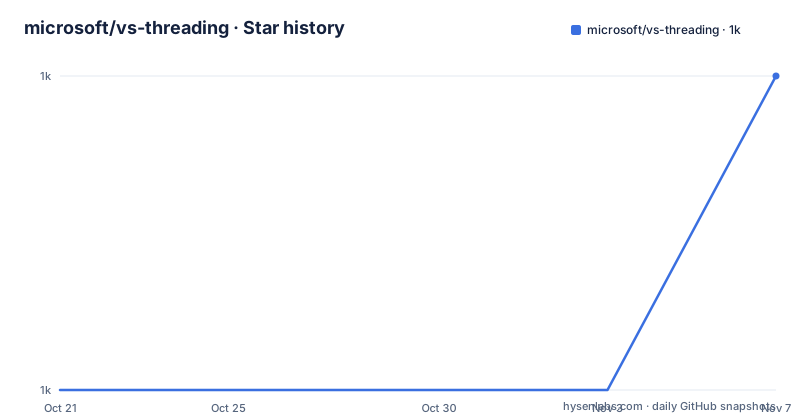
Star history
- microsoft/vs-threading1,041 ★ · +1
| Repository | 2026-10-21 | 2026-11-07 |
|---|---|---|
| microsoft/vs-threading | 1k | 1k |
1 Stars in the last 17 days, measured from the daily GitHub snapshot. Compare with other projects
Editorial analysis
It is a library, not a Visual Studio component
Microsoft.VisualStudio.Threading is a xplat library that provides many threading and synchronization primitives used in Visual Studio and other applications.
That phrase in the repository description carries the important qualifier, xplat, and the README repeats it in a way that answers the first question an adopter has. The package is applicable to any .NET application, not just Visual Studio. The name is a historical accident of where the code was born, and the library is published on NuGet for general consumption rather than only as part of the IDE.
The feature summary in the README is a single line that covers a lot of ground. Async synchronization primitives, async collections, TPL and dataflow extensions. And then the sentence that defines the centrepiece: the JoinableTaskFactory allows synchronously blocking the UI thread for async work.
That last capability is the whole reason this library exists rather than a general-purpose async helper. The problem it solves is specific and well known to anyone who has written a desktop application. A UI thread must not be blocked, because blocking it freezes the window. But a lot of existing code is synchronous, and some of it has to be, for example a legacy API with no async overload. The usual outcome is a deadlock, where the synchronous caller holds a lock the asynchronous continuation needs.
The JoinableTaskFactory solves that by making the wait cooperative. The UI thread blocks in a way that pumps the message loop, so the async work can complete and the continuation can run, and the thread becomes free again afterwards. You get to keep the synchronous shape of the calling code without the deadlock and without freezing the UI.
The repository is hosted under the microsoft organisation and the documentation site is microsoft.github.io/vs-threading, with a getting started page and a full list of features page.
A separate analyzer package catches the mistakes the library prevents
The second package in the repository is as interesting as the first, and it addresses a problem that is easy to underestimate.
Microsoft.VisualStudio.Threading.Analyzers is a static code analyzer to detect common mistakes or potential issues regarding threading and async coding. It is published as its own NuGet package, separate from the runtime library, and the README links a page of diagnostic analyzer rules.
Shipping the analyzer separately is a deliberate choice, and the reason is standard Roslyn practice. Analyzers are compile-time only, so there is no reason to force them onto a production deployment, and a separate package means a team can add it to a development dependency and get the diagnostics in their build while keeping the runtime dependency graph unchanged.
The value of the analyzer is that the mistakes it looks for are silent ones. A deadlock caused by blocking on a task inside a synchronization context does not fail a test, it hangs a UI. A missing await produces a warning at best and an unobserved exception at worst. A `Task.Run` inside a UI framework that already has a dispatcher creates a race that appears under load and nowhere else. These are the classes of bug that a code review cannot reliably catch and a test suite rarely reproduces, and a rule set that flags them at compile time is a genuine engineering asset rather than a nice-to-have.
The samples directory in the repository reflects the same concern. Alongside the samples project file there are three sample files with revealing names: DisableProcessing.cs, Polyfill.cs and SuppressRelevance.cs. Those are not application samples, they are demonstrations of how to interact with the analyzer itself, and SuppressRelevance.cs in particular is about deciding which diagnostics are relevant to your code. A library that tells you to suppress a diagnostic is at least honest that the rules are heuristics, and giving you the mechanism to scope them is better than forcing you to disable the analyzer wholesale.
The repository layout shows a mature internal library with a lot of ceremony
The top level of the repository tells you what kind of project this is, and the answer is a mature internal library that has been formalised over many years.
The build is entirely modern MSBuild. There is a Microsoft.VisualStudio.Threading.slnx solution file, the new XML-based solution format, along with Directory.Build.props, Directory.Build.targets, Directory.Build.rsp, Directory.Packages.props and Directory.Packages.Analyzers.props, and a Directory.Traversal.targets. Central package management is in effect, with the package versions declared in one place rather than in each project file, and the analyzer packages are separated into their own props file so the analyser dependency graph can be managed independently of the runtime one.
The rest of the tree is the standard set for a Microsoft-shipped .NET library. There is a src/ directory for the code, a test/ directory, a samples/ directory, a doc/ directory and a docfx/ directory for the API documentation build, a loc/ directory which is the localisation source directory, a tools/ directory, and a global.json that pins the SDK. StyleCop is configured through stylecop.json, and formatting through a .prettierrc.yaml.
The CI setup is Azure Pipelines, with azure-pipelines.yml at the root, an azure-pipelines/ directory, a separate azurepipelines-coverage.yml for the coverage run, and a CodeQL.yml for the static analysis. There is also a .github/ directory alongside the Azure setup, and a .azuredevops/ directory for the Azure DevOps specific configuration.
The interesting file for a consumer is version.json. Microsoft uses a shared versioning file to keep a set of related packages on one version, and its presence here explains the release numbers in the tags. The recent releases are v18.7.23 on 2026-06-22, v17.14.15 on 2025-06-13 and v17.13.61 on 2025-03-18, and the last push was on 2026-10-15.
There are also the process files you would expect from a project with external contributors: CONTRIBUTING.md, CODE_OF_CONDUCT via the usual mechanisms, SECURITY.md for reporting vulnerabilities, SUPPORT.md for where to get help, AGENTS.md, a .config/ directory, and an .agents/ directory. The presence of a .editorconfig and .prettierrc.yaml alongside stylecop.json shows the project treats formatting as a build-time concern across several tools.
The licence is not one of the usual OSI identifiers
The licence field for the repository is recorded as a custom licence that GitHub cannot classify, with a pointer to the LICENSE file, and the LICENSE file in the repository is the authoritative text. This is a licensing statement rather than legal advice.
It is worth pausing on that, because it is unusual for a Microsoft-published .NET library on NuGet. Most of the .NET ecosystem is MIT or Apache-2.0, and a corporate licence that GitHub's classifier cannot map is a detail that will come up in a compliance review. A team shipping this in a commercial product should read the LICENSE file rather than assume the usual permissive terms, particularly around redistribution of the binaries and around the trademark and support clauses that corporate licences often carry.
What the README does say about usage is narrow and clear. The package is applicable to any .NET application, not just Visual Studio, and the JoinableTaskFactory is the feature that makes blocking the UI thread on async work possible. The topics attached to the repository name the same territory: analyzer, async, dotnet, netstandard, nuget, synchronization-primitives, threading and ui-thread. The netstandard topic is a useful signal about the target surface, since it indicates the library is consumed from .NET Framework as well as modern .NET, which matters for a library that is meant to be dropped into an existing large codebase.
The two NuGet packages are Microsoft.VisualStudio.Threading and Microsoft.VisualStudio.Threading.Analyzers, and the documentation site carries both a getting started guide and a features page, plus the analyzer rules index. The separation of runtime library, analyzer and documentation is the same shape the repository uses for its source, tests, samples and docs, and it is a reasonable proxy for how the project expects to be consumed: add the library, add the analyzer in development, read the docs, and treat the samples as the last resort when the features page does not answer your question.
Editorial conclusion
Adopt vs-threading if you maintain a .NET application that mixes synchronous callers with asynchronous work, especially a UI application where blocking the UI thread on a task is currently a deadlock waiting to happen. Do not adopt it for a pure async service with no synchronous entry point, since the JoinableTaskFactory earns its keep in the mixed case. Before you integrate, run the Microsoft.VisualStudio.Threading.Analyzers package, because the analyzer rules exist to catch the mistakes this library is designed to prevent, and read the getting started documentation rather than assuming the Visual Studio behaviour applies unchanged to your app.
Frequently asked questions
What does Microsoft.VisualStudio.Threading provide?
It is a cross-platform library of async synchronization primitives, async collections, and TPL and dataflow extensions, used in Visual Studio and other applications. Its central feature is the JoinableTaskFactory, which allows synchronously blocking the UI thread for async work, and it is applicable to any .NET application rather than only Visual Studio.
What is the Microsoft.VisualStudio.Threading.Analyzers package for?
It is a static code analyzer that detects common mistakes or potential issues regarding threading and async coding, published as a separate NuGet package so it can be a development-only dependency. The README links a page of diagnostic analyzer rules.
How is the vs-threading repository built and tested?
It uses modern MSBuild with a Microsoft.VisualStudio.Threading.slnx solution and central package management through Directory.Packages.props and Directory.Packages.Analyzers.props. CI runs on Azure Pipelines with separate pipelines for the build and for coverage, plus a CodeQL workflow, and StyleCop and Prettier configurations are enforced from stylecop.json and .prettierrc.yaml.
What licence is vs-threading released under?
A custom licence that GitHub cannot classify, with the terms in the LICENSE file in the repository, which is the authoritative text. Since this is not a standard OSI identifier, read that file before redistributing the binaries in a commercial product.
How recent are the vs-threading releases?
The recent releases are v18.7.23 on 2026-06-22, v17.14.15 on 2025-06-13 and v17.13.61 on 2025-03-18, and the last push to the repository was on 2026-10-15. The version.json file at the repository root is the shared versioning file that keeps the related packages on a single version.
Official sources
Add this badge to your README
If you maintain this project, the badge below links readers to this analysis and shows its maintenance status from the daily GitHub snapshot. Paste the markdown into your README; add ?metric=license or ?metric=stars to the image URL for a different field.

[](https://hysenlabs.com/projects/microsoft-vs-threading)Star history chart for your README
[](https://hysenlabs.com/projects/microsoft-vs-threading)Was this useful?