MSSQL for Visual Studio Code: SQL Server Development in the Editor
Visual Studio Code SQL Server extension.
At a glance
- What is it?
- MSSQL for Visual Studio Code brings SQL Server connection management, query execution, schema design, object browsing, and database administration into Visual Studio Code. It is aimed at developers who want a database workflow centered in the editor, although some operations depend on SQL Server, Azure, Fabric, or a connected development environment.
- Who is it for?
- Adopt this extension when your team works primarily in Visual Studio Code and needs a broad SQL Server workflow there. Do not treat it as a replacement for a full database management tool when you require documented administrative operations outside the listed capabilities.
- Can I use it commercially?
- Check first. The repository uses a licence we do not classify automatically, so read its LICENSE file before any commercial use.
- Is it still maintained?
- Yes. The repository last received commits 1 day ago.
- What is it written in?
- Mainly TypeScript, according to GitHub's language statistics.
Answers come from the project's GitHub data, last synced on November 7, 2026, and from our analysis. They are not legal advice.
Star history
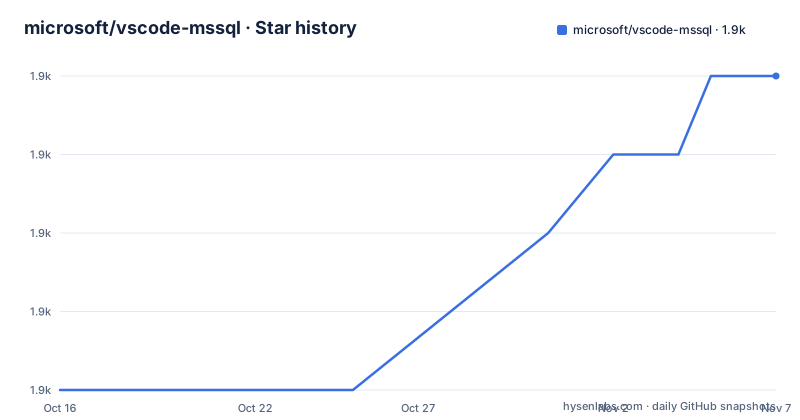
- microsoft/vscode-mssql1,919 ★ · +4
| Repository | 2026-10-16 | 2026-11-07 |
|---|---|---|
| microsoft/vscode-mssql | 1.9k | 1.9k |
4 Stars in the last 22 days, measured from the daily GitHub snapshot. Compare with other projects
Editorial analysis
MSSQL as a Visual Studio Code database workspace
The MSSQL extension for Visual Studio Code is designed for developers who need SQL Server work without moving every database task into a separate editor or management application. Its scope covers connection setup, object browsing, query execution, result inspection, schema work, data editing, and several database operations. The repository also includes separate extension targets, including `mssql`, `sql-database-projects`, and `data-workspace`, which indicates that the project is a monorepo for related SQL tooling rather than a single isolated command.
The primary audience is the developer working in a Visual Studio Code workspace, but the feature list also reaches database administrators and application developers who need to inspect a database while editing code. Connections can be created with parameters, connection strings, or Azure and Fabric browsing. Object Explorer presents database objects with filtering and search, while Database Object Search covers tables, views, stored procedures, and other objects across a database. That combination is useful when a developer needs both an object hierarchy and a faster lookup path.
The extension does not treat SQL as an isolated text format. It connects that editor workflow to results, execution plans, profiling, schema comparison, visual design, and local SQL Server containers. This makes the project more than a query runner, but it also makes the dependency surface wider than a minimal SQL client.
Connection, query, and database data flow
The documented workflow starts with a connection. The Connection Dialog supports parameters, connection strings, and Azure or Fabric browsing, and the README says connections can be organized into color-coded groups. Once connected, Object Explorer supplies a navigable view of the database, while Database Object Search provides type-aware search for objects such as tables, views, and stored procedures.
Query execution is coupled to a Query Results pane. The README states that users can view, sort, copy, and export results. For performance analysis, the Query Plan Visualizer supports interactive node navigation, and the Query Profiler monitors real-time database activity with Extended Events. These features address different stages of the same investigation: execute a statement, inspect its returned rows, examine a plan, then watch activity on the server.
Schema Designer provides a visual model with drag-and-drop layout, automatic layout, and generated T-SQL scripts. Table Designer covers table creation and management through a visual interface. View & Edit Data allows users to browse and modify table data without writing T-SQL. Schema Compare can compare and synchronize schemas between databases or DACPACs. Based on the feature descriptions, the extension delegates database operations to the connected server and presents their results or editable representations in Visual Studio Code. The repository files include SQL samples and a connection-sharing sample, but the README does not specify the internal transport or service boundaries.
Installing the extensions and completing a first connection
The README directs users to the official documentation at `https://aka.ms/vscode-mssql-docs` for setup and detailed usage. It does not provide a complete installation command, Marketplace extension identifier, or step-by-step first-use configuration in the text available for this review.
A first use should follow the documented connection path. Open the MSSQL connection dialog, choose the appropriate connection method, enter or select the required connection information, and then use Object Explorer to locate the database object needed for the task. The exact authentication fields and connection dialog labels should be taken from the linked Microsoft Learn documentation because the README does not enumerate them.
For an existing SQL script, the repository includes sample scripts under `samples/sql2016-crud-demo.sql` and `samples/sql2016-security-demo.sql`. These are repository examples, not documented commands. They can help identify the kind of SQL workflow the project supports, but the README does not state that they are installed automatically or run against a particular server. The repository also includes `samples/connection-sharing-sample/`, which is relevant to connection sharing, although its configuration contract is not described in the README.
Schema design and administration boundaries
The strongest distinction between this extension and a plain SQL editor is its visual and administrative surface. Schema Designer supports drag-and-drop modeling, auto-layout, and T-SQL script generation. GitHub Copilot integration adds natural-language chat and agent mode, and a separate Schema Designer integration supports natural-language schema design. These features are documented as part of the product, but the README does not specify which Copilot plans, accounts, regions, or feature flags are required.
Database Operations add rename, backup, restore, flat-file import, and database drop actions from Object Explorer. Fabric integration can browse workspaces and provision SQL databases, while Local SQL Server containers can create and manage containers locally. These are consequential operations. The feature list confirms that the commands exist, but it does not document permission requirements, confirmation behavior, recovery behavior, or whether every operation is available for every connection type.
That omission matters when selecting the extension. A team may need its developer workflow but still require a separate administrative tool for production access, backup governance, or incident response. The README does not claim that it replaces every SQL Server management utility, so its feature list should be treated as the boundary of the documented scope rather than as a complete operational runbook.
Build layout, maintenance, and licensing
The repository is not a packaged single extension with one obvious build target. Its root `package.json` identifies `vscode-mssql` as a private monorepo and declares `[email protected]` as its package manager. The documented repository scripts include `npm run install:targets`, `npm run build`, `npm run build:mssql:prod`, `npm run test`, `npm run smoketest`, and `npm run package`. The `install:targets` script runs `node scripts/bootstrap-install.mjs`, and the build entry point runs `node scripts/workspaces.mjs build`.
The repository has separate releases for MSSQL v1.46.0, SQL Database Projects v1.8.0, and Data Workspace v0.7.0. Its last push was on 2026-10-16, and the repository is not archived. That supports a current maintenance status, but it does not establish compatibility with every SQL Server version or guarantee the same release cadence for each extension target.
The repository identifies its license as a custom license that GitHub cannot classify, with the terms in `LICENSE.txt`. The README does not summarize redistribution, contribution, or compatibility rights, so adopters must inspect `LICENSE.txt` and `ThirdPartyNotices.txt` directly. The presence of build scripts and multiple workspace targets also means upgrades may involve more than installing one extension, depending on which capabilities a team uses.
When MSSQL is the wrong choice
MSSQL for Visual Studio Code is a poor fit for a workflow that requires only offline SQL editing and has no Visual Studio Code dependency. The repository is primarily a Visual Studio Code extension family, and the documented feature set centers on editor-based database operations. A standalone text editor or a SQL client built for a different environment may be simpler when connections, schema designers, query profiling, and database administration are not needed.
It is also a poor fit for unsupported platforms or environments. The documentation is oriented toward SQL Server, Azure, Fabric, and local SQL Server containers. The README does not claim support for arbitrary relational databases, so an engineer working primarily with PostgreSQL, MySQL, or another database should verify product scope before selecting it.
There is a second limitation around visibility. The feature table names many operations but does not document authentication behavior, least-privilege requirements, production safety controls, or recovery steps for destructive actions. A team should not infer that visual editing or database drop is safe by default. Those details require verification in the linked documentation and in the permissions of the actual connection.
Editorial conclusion
Adopt this extension when your team works primarily in Visual Studio Code and needs a broad SQL Server workflow there. Do not treat it as a replacement for a full database management tool when you require documented administrative operations outside the listed capabilities. Verify first that your target SQL Server, Azure, or Fabric environment, authentication method, permissions, and expected deployment process are supported by the linked documentation.
Frequently asked questions
How do I install MSSQL for Visual Studio Code?
The README directs users to the official documentation at `https://aka.ms/vscode-mssql-docs` for setup instructions. It does not provide a complete Marketplace command or installation sequence in the available text.
Can MSSQL for Visual Studio Code browse SQL Server objects?
Yes. Object Explorer provides database object browsing and filtering, while Database Object Search can find tables, views, stored procedures, and other objects across a database.
Does the extension support schema design and query execution?
Yes. Schema Designer supports visual modeling, auto-layout, and T-SQL script generation. Query execution is supported with a Query Results pane, and the Query Plan Visualizer supports interactive execution-plan navigation.
Official sources
Add this badge to your README
If you maintain this project, the badge below links readers to this analysis and shows its maintenance status from the daily GitHub snapshot. Paste the markdown into your README; add ?metric=license or ?metric=stars to the image URL for a different field.

[](https://hysenlabs.com/projects/microsoft-vscode-mssql)Star history chart for your README
[](https://hysenlabs.com/projects/microsoft-vscode-mssql)Was this useful?