WinUI Gallery: a C# reference app that builds against an experimental Windows App SDK
This app demonstrates the controls available in WinUI and the Fluent Design System.
At a glance
- What is it?
- Microsoft's WinUI Gallery shows WinUI 3 controls with their markup and codebehind, but building it needs Visual Studio 2026 or the winapp CLI, and it pins an experimental Windows App SDK whose APIs can change.
- Who is it for?
- Use WinUI Gallery if you write WinUI 3 apps in C# and want to read working markup and codebehind for a specific control, or if you want to see the newest Windows App SDK windowing APIs run. Skip it if you target WPF, if your build machine cannot run Visual Studio 2026 or the .NET 10 SDK, or if you need every API to be stable.
- Can I use it commercially?
- Yes. MIT is a permissive licence: you can use, modify and sell software built on it, as long as you keep its copyright and licence notices.
- Is it still maintained?
- Yes. The repository received new commits within the last day.
- What is it written in?
- Mainly C#, according to GitHub's language statistics.
Answers come from the project's GitHub data, last synced on November 23, 2026, and from our analysis. They are not legal advice.
Star history
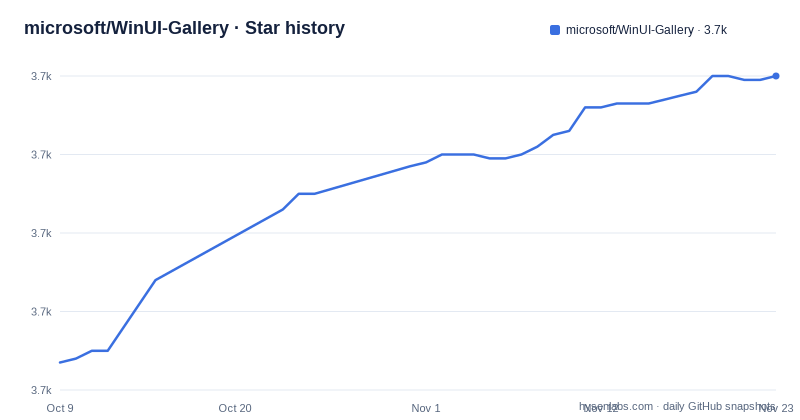
- microsoft/WinUI-Gallery3,740 ★ · +73
| Repository | 2026-10-09 | 2026-11-23 |
|---|---|---|
| microsoft/WinUI-Gallery | 3.7k | 3.7k |
73 Stars in the last 45 days, measured from the daily GitHub snapshot. Compare with other projects
Editorial analysis
Every control page prints the markup and codebehind behind the example
WinUI Gallery is the companion app for WinUI and the Windows App SDK. Its main feature is that each control page shows the markup and the codebehind used to create each example, so a developer sees the XAML and the C# next to the running control instead of searching documentation for a snippet. The app presents itself as the interactive companion to the Fluent Design guidelines, with samples, tools and code snippets.
The app uses the latest WinUI NuGet package and demonstrates controls such as NavigationView and SwipeControl, named in the project description. It also shows how each control responds to different form factors, and the app itself is responsive, so it doubles as an example of several methods for adaptive UI. Design and accessibility pages sit alongside the control pages. That mix makes it a reading tool first. It does not ship as a library you reference from your own project, so nothing in it is installed into another solution.
The four feature groups in the project description are control samples, the WinUI library, adaptive UI, and design and accessibility guidance. Of those, only the first is tied to a single page per control. The other three run through the whole app, so the quickest way to study adaptive layout is to resize the window while a control page is open and watch the navigation and content change.
Building needs Visual Studio 2026 or the winapp CLI, and running needs Windows 10 or later
There are two supported ways to build. The first is Visual Studio 2026 with the WinUI application development workload installed. The second is the winapp CLI, which asks for three things: Developer Mode enabled on the device, the .NET 10 SDK, and the CLI itself:
winget install --id Microsoft.WinAppCli --exact --source wingetThen clone the repository:
git clone https://github.com/microsoft/WinUI-Gallery.gitIn Visual Studio, open WinUIGallery.slnx, make sure WinUIGallery is the startup project, and press F5. With the CLI, run this from the repository root:
winapp run WinUIGallery\WinUIGallery.csprojBoth routes assume a Windows machine. Executing the app requires Windows 10 or later. Visual Studio 2026 is a recent requirement, so a team still on an older Visual Studio edition has to switch to the CLI path or upgrade before the first build succeeds.
standalone.props pins an experimental Windows App SDK and bundles the runtime
The gallery uses an experimental Windows App SDK to demonstrate upcoming features. The SDK version is pinned in standalone.props, and you build with the normal Debug or Release configuration. No special configuration name exists for the experimental channel.
Deployment is self-contained. The runtime is bundled with the app instead of referencing a shared Windows App SDK framework package. For someone copying patterns out of the gallery, this has a direct consequence: code that depends on the experimental SDK may not run against the stable framework package you have in your own project. The project spells out the risk itself, noting that experimental APIs can change or be removed before a stable release.
That sentence applies to every sample that touches the pinned version. A pattern you lift from the gallery today can break when you move to the next stable Windows App SDK, so check each sample against the stable API surface before it goes into production code.
The self-contained deployment also changes what a build produces. Because the runtime travels inside the app, the SDK version the app runs on is the one pinned in standalone.props and not one installed system-wide. Moving to a different SDK version means changing that pin and rebuilding the app.
The Windowing APIs page keeps one stable example beside labelled experimental ones
The Windowing APIs page combines stable window creation with experimental window sizing examples. Each experimental example has its own label and warning. The stable example retains its original APIs, which means the page holds both kinds of code in one place and tells you which is which.
This page is the clearest model of how the gallery handles its experimental pin. Rather than hiding unstable calls inside general samples, the project marks them at the point of use. A reader who only needs the stable path can copy the original window creation code and leave the sizing examples alone.
It is also the one place the README names a specific page in connection with the experimental SDK, so other pages that rely on pinned features are not enumerated. The label on each example is the only reliable signal about what is safe to reuse, and a page without a label gives no promise either way about stability in a future release.
A missing project.assets.json is fixed by deleting nuget.config
The one build failure called out in the project is a NuGet restore problem. The error reads that an assets file named project.assets.json under the obj folder of WinUIGallery was not found, with the instruction to run a NuGet package restore to generate it. The documented workaround is to delete the nuget.config file in the repository root and build again.
The project links this to issue #1659, titled Broken repo build. Deleting nuget.config changes the package sources the restore uses, so the fix works by falling back to whatever sources your machine already has configured. It also leaves a modified working tree, which matters if you plan to contribute a pull request, because that deletion should not travel with your change.
There is no second troubleshooting entry. A failure from an experimental package, a missing workload or a wrong .NET SDK has no documented remedy beyond the setup steps, so the first thing to compare against is the environment list: Visual Studio 2026 with the WinUI workload, or Developer Mode plus the .NET 10 SDK.
Releases ship as v3.0.4 on GitHub and through the Microsoft Store
End users get the app from the Microsoft Store badge on the project page. The latest GitHub release is v3.0.4, titled WinUI Gallery v3.0.4, dated 2026-10-13. Before it came v2.9.3 on 2026-05-27 and v2.9.0 on 2026-05-01. The last push to the main branch was on 2026-10-14, and the repository is not archived.
The release process is written for maintainers. A runbook in docs/PublishingNewVersion.md coordinates Microsoft Store publishing with a GitHub release, so the two channels are published together rather than one lagging the other by design. The pipeline definitions sit in a .pipelines folder at the top level.
For a reader, the dates show a cluster of releases in May 2026 followed by a gap until October. A developer who built from an older checkout in summer is therefore a major version behind the current v3 line, and the pinned SDK in standalone.props will differ between those checkouts.
The Store build and the GitHub build are two routes to the same app. Someone who wants to read source needs the clone, the Visual Studio 2026 or winapp CLI toolchain and a Windows machine. Someone who only wants to click through controls can take the Store route and skip every build step, at the cost of seeing only the markup and codebehind the app itself displays and not the surrounding repository.
What the repository does not do, and where contributions go
The gallery is a demonstration app, so several things are outside its scope. It does not compare WinUI with WPF or any other UI framework. It does not appear to be a template generator or a NuGet package, since the README gives no install command for consuming it. Its sample source lives in the WinUIGallery project, alongside a WinUIGallery.SourceGenerator project, a catalog folder, a packagestore folder, tests and tools directories, and an AGENTS.md file at the top level.
Contributions are invited. The project asks for issues to start a discussion, or better a pull request, and points newcomers to the help wanted label. Current work is tracked on a public project board under the Microsoft organization.
The license is MIT, and the primary language is C#. For anything beyond the samples, the project links to the Windows Dev Center, the microsoft-ui-xaml repository for WinUI itself, the WindowsAppSDK repository and the WindowsAppSDK samples, which is where framework questions belong rather than in this app's issue tracker.
Editorial conclusion
Use WinUI Gallery if you write WinUI 3 apps in C# and want to read working markup and codebehind for a specific control, or if you want to see the newest Windows App SDK windowing APIs run. Skip it if you target WPF, if your build machine cannot run Visual Studio 2026 or the .NET 10 SDK, or if you need every API to be stable. Before building, read standalone.props to see which experimental Windows App SDK version the checkout is pinned to.
Frequently asked questions
What is WinUI Gallery?
WinUI Gallery is Microsoft's companion app for WinUI and the Windows App SDK. It demonstrates WinUI 3 controls and styles with interactive samples, tools and code snippets, and shows the markup and codebehind for each example.
Is WinUI 3 free to explore through WinUI Gallery?
The WinUI Gallery source is MIT licensed and published on GitHub, and the app is offered through a Microsoft Store badge. Building it needs Visual Studio 2026 or the winapp CLI with the .NET 10 SDK.
Which Windows version does WinUI Gallery run on?
Executing WinUI Gallery requires Windows 10 or later. Building it requires Visual Studio 2026 or the winapp CLI with Developer Mode and the .NET 10 SDK.
Official sources
Add this badge to your README
If you maintain this project, the badge below links readers to this analysis and shows its maintenance status from the daily GitHub snapshot. Paste the markdown into your README; add ?metric=license or ?metric=stars to the image URL for a different field.

[](https://hysenlabs.com/projects/microsoft-winui-gallery)Star history chart for your README
[](https://hysenlabs.com/projects/microsoft-winui-gallery)Was this useful?