MicrosoftDocs/windowsserverdocs: Public Source for Windows Server Documentation
Public content repository for Windows Server content.
At a glance
- What is it?
- MicrosoftDocs/windowsserverdocs is the public content repository for Windows Server technical documentation published through Microsoft Learn. It is intended primarily for documentation contributors, while Microsoft employees may also use a separate private contribution workflow.
- Who is it for?
- Independent contributors and documentation users should adopt this repository when they need the public source or a transparent way to report Windows Server documentation problems. Microsoft employees creating major articles should first determine whether the private windowsserverdocs-pr workflow applies.
- Can I use it commercially?
- Yes, with credit. CC-BY-4.0 allows commercial use as long as you credit the authors and indicate what you changed. It is written for creative content, so check how it applies to any code.
- Is it still maintained?
- Yes. The repository last received commits 1 day ago.
- What is it written in?
- GitHub does not report a main language for this repository.
Answers come from the project's GitHub data, last synced on November 7, 2026, and from our analysis. They are not legal advice.
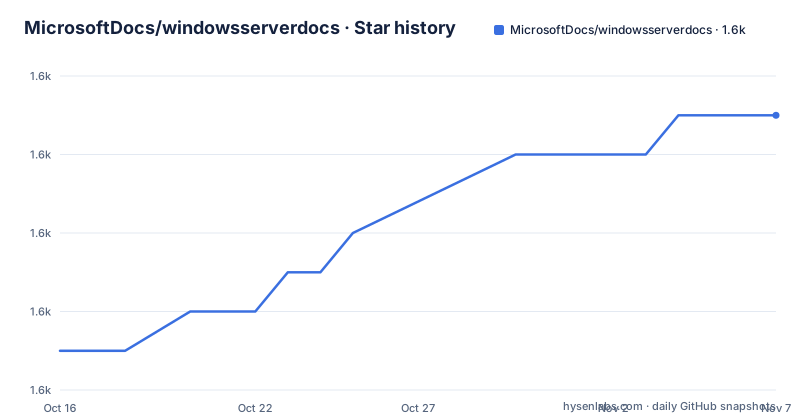
Star history
- MicrosoftDocs/windowsserverdocs1,635 ★ · +6
| Repository | 2026-10-16 | 2026-11-07 |
|---|---|---|
| MicrosoftDocs/windowsserverdocs | 1.6k | 1.6k |
6 Stars in the last 22 days, measured from the daily GitHub snapshot. Compare with other projects
Editorial analysis
The public repository for Windows Server technical content
MicrosoftDocs/windowsserverdocs exists to host the public source files for Windows Server technical content that is published on Microsoft Learn. According to the README, the public repository is one of two locations where that content is kept. The other is the private windowsserverdocs-pr repository. This distinction determines where a contributor is expected to work. People outside Microsoft must use the public location, while Microsoft employees have several contribution paths depending on whether they are creating an article or changing an existing one.
The intended audience is broader than Windows Server administrators. Contributors need a way to report spelling errors, obsolete links, incorrect instructions, bad command examples, and missing PowerShell parameters. Product operators use the documentation published from this source to learn about Windows Server, including material associated with the Windows Server home page and Windows Server Essentials. The repository itself is not the Windows Server product, a support client, or a package intended for installation on a server.
Repository structure and publishing boundary
Based on the repository layout, the documentation is divided into content-oriented areas such as WindowsServerDocs, EssentialsDocs, and HyperVServerDocs. Shared material also has dedicated locations, including includes/ and media/. Repository-level files include CODEOWNERS, localization configuration, Open Publishing configuration, and redirection configuration for areas such as failover clustering, identity, networking, remote access, security, storage, troubleshooting, and virtualization. These names show that the project combines article sources, reusable content, assets, ownership rules, localization settings, and publishing metadata.
The Open Publishing files also reveal an important boundary. This Git repository is not simply a set of rendered web pages. It participates in a content system that publishes Windows Server material to Microsoft Learn. Redirection configuration can direct changed or retired content to another location, while localization configuration records how content is handled across languages. The README does not document the complete publishing pipeline, including the exact validation and rendering services, so those stages should not be inferred beyond the stated connection to Microsoft Learn.
Choosing a contribution path in windowsserverdocs
The clearest operational distinction in the README is the separation between public and private repositories. A non-Microsoft employee must contribute to windowsserverdocs. The README points that group to CONTRIBUTING.md for the applicable process. A Microsoft employee may fork and clone windowsserverdocs-pr when creating a brand-new article, configure a remote branch, create the article, and submit a pull request for approval and publishing.
Microsoft employees have different routes for existing content. Large changes are covered by the guide titled "Edit an existing Windows Server article using GitHub and Visual Studio Code." Minor changes can follow "Update existing Windows Server articles using a web browser and GitHub." The repository therefore does not impose one contribution method on every editor. The size and ownership of the change determine the documented workflow. Users who are unsure whether a change is minor should consult CONTRIBUTING.md rather than assuming that the browser process applies to every revision.
Making a first documentation contribution without installing software
The README gives contribution destinations and linked guides, but it does not provide a standalone installation command for this repository. There is therefore no verified shell command to reproduce here. For an external contributor, the concrete first step is to open CONTRIBUTING.md in the public windowsserverdocs repository and follow its instructions. For a Microsoft employee creating a new article, the README identifies a longer setup involving a GitHub account and tools, a fork and clone of windowsserverdocs-pr, a remote branch, the new article, and a pull request.
A first useful public contribution can also be a narrowly scoped documentation issue. The README says to select the "This page" button under the Feedback section of the affected Microsoft Learn page. It also asks contributors to quote the location of the problem in the issue. This path is appropriate for an incorrect spelling, a broken or outdated link, instructions that no longer match the product, or incorrect command and PowerShell examples. The reader should see an issue directed at the exact passage rather than a general report that lacks enough context for a maintainer to locate it.
Separating documentation defects from Windows Server support
The repository has a deliberate feedback boundary. Its GitHub repository is monitored for documentation issues, not general troubleshooting. Product support for a specific scenario belongs with Microsoft Support. Bug reports, feature requests, product performance concerns, complaints about interface changes, and requests to restore a removed feature are also outside this repository's stated purpose.
This boundary prevents an issue in an article from being treated as evidence of a product defect. For example, a page may describe steps that no longer match the current product. That can be reported here as an outdated instruction. A software defect encountered while following otherwise current steps belongs in the product feedback channel instead. The README also points to the Feedback portal, Windows Feedback Hub, Microsoft TechNet, Microsoft Developer Network, and Microsoft Support Community. Those alternatives address product behavior or user support rather than edits to the published documentation source.
Licensing and maintenance implications for contributors
The repository is identified as using CC-BY-4.0, while its README directs readers to LICENSE, LICENSE-CODE, and ThirdPartyNotices for complete licensing information. It also links to Microsoft Open Source Code of Conduct information. Contributors should inspect those files for the exact terms and any separate treatment of code or third-party material rather than treating the repository label as a complete legal summary.
The last push was on 2026-10-14, and the repository is not archived. It has no GitHub releases, so there is no release-based upgrade path documented here. For a documentation source repository, upgrade work primarily means reviewing contribution guidance, repository metadata, and changes to the source files. The README states that the public and private repositories are actively managed, but consumers should still review relevant guides and configuration when they need to understand the current process. There is no package upgrade command to consider.
Editorial conclusion
Independent contributors and documentation users should adopt this repository when they need the public source or a transparent way to report Windows Server documentation problems. Microsoft employees creating major articles should first determine whether the private windowsserverdocs-pr workflow applies. Before submitting work, verify the contribution path, article ownership, referenced product behavior, applicable licensing files, and whether the issue concerns documentation rather than product support.
Frequently asked questions
Can non-Microsoft employees contribute to MicrosoftDocs/windowsserverdocs?
Yes. The README says non-Microsoft employees must contribute to the public windowsserverdocs repository and directs them to CONTRIBUTING.md for instructions.
What is the difference between windowsserverdocs and windowsserverdocs-pr?
windowsserverdocs is the public repository, while windowsserverdocs-pr is private. The README specifically assigns external contributors to the public repository and describes private-repository options for Microsoft employees.
Where should I report an error in Windows Server documentation?
Use the "This page" button under the Feedback section of the affected Microsoft Learn page to generate a GitHub issue. Quote the relevant passage and describe issues such as incorrect steps, broken links, or bad command examples.
Official sources
Add this badge to your README
If you maintain this project, the badge below links readers to this analysis and shows its maintenance status from the daily GitHub snapshot. Paste the markdown into your README; add ?metric=license or ?metric=stars to the image URL for a different field.

[](https://hysenlabs.com/projects/microsoftdocs-windowsserverdocs)Star history chart for your README
[](https://hysenlabs.com/projects/microsoftdocs-windowsserverdocs)Was this useful?