Phoniebox RFID Jukebox for Raspberry Pi: Setup and Limits
A Raspberry Pi jukebox, playing local music, podcasts, web radio and streams triggered by RFID cards, web app or home automation. All plug and play via USB. GPIO scripts available.
At a glance
- What is it?
- Phoniebox turns a Raspberry Pi into a contactless jukebox for local audio, playlists, podcasts, web streams, and Spotify. USB-based hardware and three control paths suit families and makers, but Version 2 and the still-maturing Version 3 have different adoption constraints.
- Who is it for?
- Phoniebox is appropriate for makers who want a card-based Raspberry Pi audio system and can accommodate the hardware setup required by their chosen RFID reader. It is a poor fit for users who need every Version 2 capability in Version 3 or require a fully documented upgrade and rollback procedure.
- Can I use it commercially?
- Yes. MIT is a permissive licence: you can use, modify and sell software built on it, as long as you keep its copyright and licence notices.
- Is it still maintained?
- Yes. The repository last received commits 19 days ago.
- What is it written in?
- Mainly PHP, according to GitHub's language statistics.
Answers come from the project's GitHub data, last synced on October 23, 2026, and from our analysis. They are not legal advice.
Star history
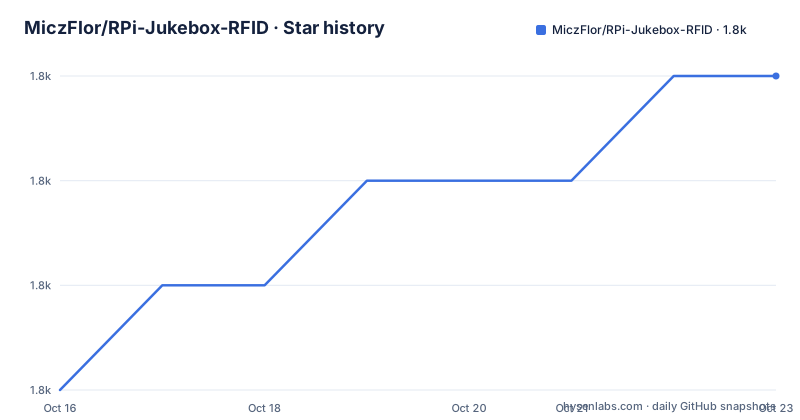
- MiczFlor/RPi-Jukebox-RFID1,815 ★ · +3
| Repository | 2026-10-16 | 2026-10-23 |
|---|---|---|
| MiczFlor/RPi-Jukebox-RFID | 1.8k | 1.8k |
3 Stars in the last 7 days, measured from the daily GitHub snapshot. Compare with other projects
Editorial analysis
What Phoniebox Adds to a Raspberry Pi
Phoniebox solves a specific interaction problem: making a Raspberry Pi audio player easy to operate without navigating a desktop interface for every task. It can play audio files, playlists, podcasts, web streams, and Spotify. A registered RFID card acts as the input, while the system turns that card into a playback or control action. This is intended for children, shared household spaces, workshops, or personal installations where a physical card is more convenient than entering commands or searching a small screen.
The repository also provides several other control routes. The web app can control playback, upload and move files, assign RFID cards, change settings, and operate from a phone, tablet, or PC. GPIO support covers hardware buttons and other attached controls. The repository description also includes home automation, although the README does not identify a particular home-automation protocol or configuration interface. That distinction matters because broad feature language should not be read as evidence that every automation platform has a documented integration.
Phoniebox emphasizes hardware accessibility. USB readers can be connected without soldering, and the documented reader options include RC522, PN532, and PC/SC readers, as well as multiple simultaneous readers. GPIO hardware provides another route when buttons are preferable to cards. These options make the project more adaptable than a card reader locked to one model, but they also mean the build is closer to an appliance project than a standard Python or PHP package.
The installer selects readers and configuration, while the resulting system spans web code, shell and Python components, audio folders, device settings, and optional hardware. This is not a single application with one configuration file. Its parts operate together to turn card scans and other inputs into playback actions, and each layer can introduce its own setup requirements.
RFID, Web App, and GPIO Control Paths
The central mechanism is card-based mapping. The web app can assign new RFID cards, and the RFID documentation covers playout as well as control functions such as setting maximum volume with a card. The README does not publish the card database format or assignment command, so an adopter must consult the linked web-app and RFID manual for those details.
This creates a useful division between input and output. The RFID reader supplies the physical trigger. Phoniebox resolves that card to an action, and the audio subsystem handles local media, playlists, podcast content, network streams, or Spotify depending on the installation. A GPIO installation substitutes hardware controls for some operations. The web app does not merely mirror playback; its documented scope includes file management and configuration, which makes it an administration surface as well.
Based on the repository layout, the implementation is not confined to `htdocs/`. Python dependencies and GPIO code coexist with PHP web code and configuration under `settings/`. The repository also contains `scripts/`, `components/`, `shared/`, and several requirement files. A problem may therefore originate in browser code, Python device handling, shell scripts, reader configuration, or installed operating-system packages. Phoniebox is an integrated system rather than a standalone class that another application imports.
The README says Version 3 aims to consolidate core behavior around Python, introduce a plugin system, and provide a responsive web client. It also states that not every Version 2 feature has been ported. A working Version 2 feature set is not evidence that the same feature exists in Version 3, so feature parity must be checked before choosing a major version.
Installing Phoniebox and Preparing Python Dependencies
The README sends Version 2 installers to the Phoniebox installation wiki and describes a one-line installer for Classic and Spotify variants. The README does not include that command in the displayed installation section, so it would be incorrect to reconstruct a shell URL, flag, configuration key, or credential prompt. Start from the repository's `Install Phoniebox Version 2` link. That installer is documented as handling reader selection and non-interactive installs based on a configuration file. Version 3 has a separate installation document on its release branch.
The repository's `requirements.txt` gives one exact dependency command for the Python code. Run it in the environment selected by the installation documentation because the file calls for system-level installation with `sudo`. The requirements include `evdev`, `SPI-Py`, `yt-dlp`, `pyserial`, and `rpi-lgpio`, along with test dependencies such as `pytest` and `pytest-cov`. Installing every entry is therefore broader than a minimal playback-only setup and also prepares the repository's test tooling.
The dependency file says this command must be run before the Python code can be run:
sudo python3 -m pip install --upgrade --force-reinstall -r requirements.txtThis command installs from `requirements.txt` in the current directory and requests upgraded, forcibly reinstalled packages. It also retrieves `SPI-Py` directly from GitHub because the requirements file defines it as a Git URL. The README does not give a first-card enrollment command or a sample expected interface response.
For the first real use, follow the web-app manual to open the administration interface, connect the selected reader, assign a card, place local or stream content in the documented locations, and trigger that card. The README confirms that card assignment and playback are supported, but it does not reproduce the exact browser path or configuration values. Choose Version 2 or Version 3 before beginning. The README says Version 2 is slowly entering maintenance mode with no new features, while Version 3 is maturing and still lacks some Version 2 capabilities. Mixing installation instructions from the two architectures would be a poor first step.
Version 3 Architecture and Feature Porting
Version 3 is a redesign rather than a cosmetic release. Its stated goals are a tidier codebase, Python as the language for the core, a plugin system, and a responsive web application. The presence of separate `future3/main` and `future3/develop` branches also indicates that release and ongoing integration work are kept apart. Contributors are directed to the release branch, development branch, status page, development documentation, and separate issue templates.
That architecture may simplify later extension, but it creates an adoption constraint now. The README directly states that not all Version 2 features have been ported. It does not include a complete migration matrix, so the linked feature-status file is the first document to check for a specific requirement, especially RFID assignment, GPIO operation, Spotify, file management, or a particular network source.
The recent release list adds another decision point. `v3.6.0` is associated with Bookworm GPIO support and 64-bit work, while `v3.7.0-alpha` is labeled as an alpha release. A separate `webapp-development` build is also listed. These labels show parallel development surfaces, but they do not establish compatibility among arbitrary web-app builds, core releases, and operating-system images. Pin a tested release combination and read its release notes before deploying it.
Version 2 remains relevant because the installer and many documented controls are presented there. Its PHP-oriented web application also explains why the repository lists PHP as its primary language even though Version 3 aims to center its core in Python. An adoption decision should therefore be made against a specific major version, not against the repository name alone.
Reader Compatibility, Spotify, and Network Boundaries
Phoniebox fits projects where USB attachment is preferred to soldering, but software installation does not remove hardware selection. RC522 and PN532 require the component-specific setup found under `components/rfid-reader/`, while USB and PC/SC readers have their own configuration paths. Multiple readers can be used simultaneously according to the README. A successful software installation still depends on correct wiring where applicable, operating-system device access, and the audio output configuration selected during setup.
Spotify is not part of every install. Version 2 provides a separate +Spotify installer and a `requirements-spotify.txt` file, while `packages-spotify.txt` reflects an operating-system package concern. The README does not state whether Spotify support has been fully ported to Version 3, so Version 3 adopters should verify the feature-status document rather than infer support from the Version 2 installer.
Network dependence also differs by source. Local files and stored playlists can operate without remote media services, while web streams, podcasts, and Spotify require suitable network access. Wi-Fi management is documented for Version 2. RFID cards can toggle Wi-Fi, and the system can read out its IP address when connecting to a new network. It can also expose a hotspot, with package files for `NetworkManager` and `dhcpcd`. The README does not specify every network configuration value, so those package names indicate supported environment paths rather than a complete setup guide.
Phoniebox is also not a general-purpose audio server with an abstract device API. Its documented value comes from tying Raspberry Pi hardware, readers, GPIO, local content, network sources, and a web interface into one dedicated jukebox. If those physical controls are unnecessary, adding an RFID subsystem and specialized administration interface introduces setup that a conventional media player would not require.
Maintenance, License, and a Media-Player Alternative
The repository is not archived, and the last push was on 2026-10-04. Release activity also includes `v3.6.0` and `v3.7.0-alpha` in March 2026, plus a development web-app build in August 2026. These facts indicate recent project activity, but they do not remove the transition between maintenance-mode Version 2 and a Version 3 that the README describes as still maturing.
Upgrade cost depends on the version in use. Version 2 users may face a smaller feature backlog but are moving toward a line that will receive no new features. Version 3 users gain the target architecture but may need to replace or defer missing Version 2 functions. The README does not document an in-place upgrade command, configuration converter, or rollback procedure. That omission makes backup and release-specific testing part of the adoption decision.
The repository is licensed under MIT. That identifies the published software license, but users remain responsible for reviewing the license text and complying with its notice and permission conditions. Music files, podcast subscriptions, web streams, and Spotify also carry their own access terms. The MIT software license does not grant rights to third-party media or services.
A real alternative is a general-purpose Raspberry Pi media server controlled through its own web interface or command-line tools. Such an approach avoids custom RFID assignment, reader-specific configuration, and the Phoniebox GPIO layer, but it does not provide Phoniebox's card-to-playback model. The meaningful choice is between a dedicated contactless appliance and a conventional network media player. Phoniebox justifies its extra setup when physical triggers are central to the installation.
Editorial conclusion
Phoniebox is appropriate for makers who want a card-based Raspberry Pi audio system and can accommodate the hardware setup required by their chosen RFID reader. It is a poor fit for users who need every Version 2 capability in Version 3 or require a fully documented upgrade and rollback procedure. Before adopting a release, verify the Version 3 feature status against the required play sources, reader type, GPIO controls, and web-app functions. The last push was on 2026-10-04.
Frequently asked questions
Does Phoniebox require soldering to add an RFID reader?
No. The README says supported USB readers are plug-and-play and do not require a soldering iron. Reader options also include RC522, PN532, and PC/SC, although those component-based choices have their own setup documentation.
Can Phoniebox play Spotify, podcasts, and local music?
Yes. The documented Version 2 feature set includes audio files, playlists, podcasts, web streams, and Spotify. Spotify is offered through a separate +Spotify install path, and Version 3 support should be checked in its feature-status document.
Should I install Phoniebox Version 2 or Version 3?
The README says Version 2 is entering maintenance mode with no new features, while Version 3 is becoming more stable but has not received every Version 2 feature. Check the Version 3 feature status against your reader, GPIO, audio-source, and web-app requirements before choosing.
Official sources
Add this badge to your README
If you maintain this project, the badge below links readers to this analysis and shows its maintenance status from the daily GitHub snapshot. Paste the markdown into your README; add ?metric=license or ?metric=stars to the image URL for a different field.

[](https://hysenlabs.com/projects/miczflor-rpi-jukebox-rfid)Star history chart for your README
[](https://hysenlabs.com/projects/miczflor-rpi-jukebox-rfid)Was this useful?