Phanpy: a Mastodon client that hides the buttons most timelines need
A minimalistic opinionated Mastodon web client
At a glance
- What is it?
- Phanpy is an opinionated alternative web client for Mastodon, written in Preact with Valtio and built on masto.js, and its design decisions are stated bluntly: status actions are hidden until you open a post, usernames appear without the instance domain, video does not autoplay, and URLs are hash based because there is no server behind it. The author also states it is not accessible yet.
- Who is it for?
- Phanpy fits a Mastodon user who finds the default timeline interface noisy, since the author's argument is that action buttons, autoplay and full usernames are attention mechanisms that the timeline does not need, and the implementation details like Boosts Carousel and hashtag collapsing show the argument taken seriously rather than cosmetically.
- Can I use it commercially?
- Yes. MIT is a permissive licence: you can use, modify and sell software built on it, as long as you keep its copyright and licence notices.
- Is it still maintained?
- Yes. The repository last received commits 1 day ago.
- What is it written in?
- Mainly JavaScript, according to GitHub's language statistics.
Answers come from the project's GitHub data, last synced on October 22, 2026, and from our analysis. They are not legal advice.
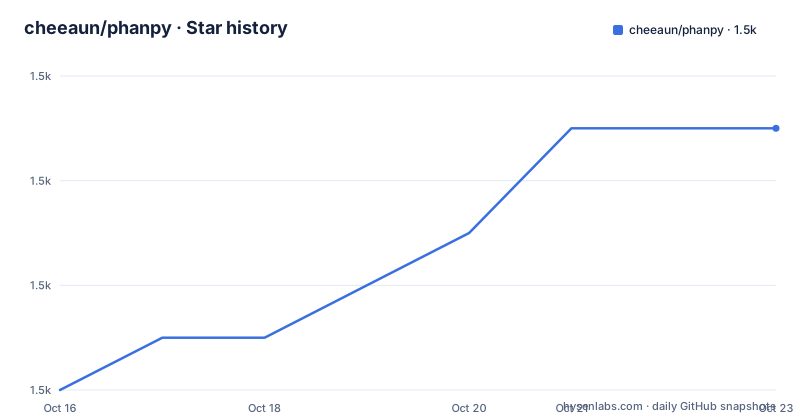
Star history
- cheeaun/phanpy1,507 ★ · +5
| Repository | 2026-10-16 | 2026-10-22 |
|---|---|---|
| cheeaun/phanpy | 1.5k | 1.5k |
5 Stars in the last 6 days, measured from the daily GitHub snapshot. Compare with other projects
Editorial analysis
Two deployments with deliberately different risk
The README publishes two hosted instances and describes them in terms of what you are willing to trade. Production lives at phanpy.social on the production branch: it breaks less often and gets slower fixes unless a fix is critical. Development lives at dev.phanpy.social on the main branch: you may see new things sooner, it may break more often, and it may be fixed much faster. That pairing is the sane pattern for a single maintainer project and it is worth using deliberately rather than by accident. Both have Uptime Robot status badges, which tells you the author expects readers to care about availability. The author also describes the whole thing as a personal side project to learn about Mastodon and experiment with UI ideas, which is the honest framing for how quickly the opinionated choices are likely to change.
Status actions are hidden until you open the post
The design decisions section is where this client is actually different, and the first item is a decision to remove rather than add. Status actions such as reply, boost, favourite and bookmark are hidden by default and appear only on an individual status page, with the stated reasons of reducing clutter and distraction and, honestly, that it may result in lower engagement but the author is not chasing numbers. So the timeline is read only by design. If you like reacting without opening a post, this is the wrong client for you, and no setting is documented to change it. The same philosophy shows up in the naming: boost is represented by a green rocket, because the double arrow used for retweet does not look right for the word boost, and the colour is purple because a green rocket looks weird.
Short usernames, no autoplay, hash based URLs
Three more decisions with stated reasoning. Timelines show the short @username rather than the full @username@instance, against the Mastodon guideline that decentralization must be transparent to the user, on the grounds that the full form does not need to be shoved in the user's face every single time; the README also notes screen reader accessibility concerns with the full username, then concedes that this web app is unfortunately not accessible yet. Video, GIF and other media do not autoplay in the timeline, with animated emojis named as the current exception, on the grounds that the timeline is already crowded with people, brands, news and media competing for attention. And URLs are hash based, because the app is not meant as a full replacement for Mastodon's own frontend: there is no SEO, no database, no serverless and no long running servers.
Boosts Carousel triggers on ratios, not on a setting
The subtle UI section documents the behaviours that are code rather than configuration, and Boosts Carousel is the best example. From the fetched posts, twenty per fetch in practice, the carousel appears if the number of boosts is more than a quarter of the total posts, or if there are more than three consecutive boosts. If more than three quarters of the fetched posts are boosts, the carousel is slotted at the end of that page's posts; otherwise it is slotted in between them. So the interface reorganises itself based on composition, and there is no user control described. It is the sort of rule that is invisible when it works and maddening when you want the posts inline,.
Hashtag stuffing is collapsed by paragraph
The same section documents hashtag stuffing collapsing, a rule set written down in enough detail to be reproducible. The first paragraph of post content with more than three hashtags collapses to a maximum of three lines. Subsequent paragraphs after the first with more than three hashtags collapse to one line, and adjacent paragraphs with more than one hashtag after a collapsed paragraph also collapse to one line. Text around or between the hashtags prevents collapsing. Collapsed hashtags get an ellipsis appended and are slightly faded to reduce visual noise, and opening the post view reveals them uncollapsed. Read as a whole, the rules are a defence against posts that are mostly a wall of tags, which is a real pattern on large instances and the reason this client feels calmer than others.
Thread numbers cost API requests, so they are capped at three
The thread number badge shows which post you are looking at inside a conversation, as Thread 1/X. The implementation is honest about its cost: it checks every post for inReplyToId, from cache or with additional API requests, walking until the root post is found, then shows the index number. The limit is three API requests, with the reason given that the root post may be very old or the thread may be extremely long. If the index cannot be found, the badge falls back to showing Thread without a number. That is a good example of a client that is explicit about trading accuracy for rate limit headroom, and it is the behaviour you should expect on long threads where the root lives on another instance.
Filtered posts: two levels, and a peek gesture
Server side filters are respected in two different ways, and the difference is a policy choice rather than a technical limit. Posts with a hide completely filter are hidden with no UI to reveal them at all. Posts with a hide with a warning filter are partially hidden, showing the filter name and the author name, with the content partially revealable on hover through a tooltip carrying the post text, clickable to open the post page, and revealed further by a long press or right click, which peeks the post in a bottom sheet. On the boosts carousel these warned posts are sorted to the end. So the strictest filter is honoured absolutely while the warning variant stays discoverable, which is the behaviour your instance admin's filter implies but rarely delivers.
The stack is Preact and Valtio, and the scripts are all you need
Development needs Node.js 22 or newer, and package.json is stricter than that text: engines requires node >=22.19.0 and npm >=10.3.0 <11.5.0. The stack is Vite for building, Preact for the UI, Valtio for state, React Router for routing, masto.js as the Mastodon API client, Iconify with MingCute for icons, and Lingui for translations. The scripts cover the whole loop:
npm install
npm run dev
npm run build
There are also npm run fetch-instances to refresh src/data/instances.json from joinmastodon.org servers, npm run messages:extract for the locale catalogs, npm run sourcemap which runs source-map-explorer on the production build, and npm test which is Playwright, with test:ui and test:headed variants. playwright.config.js at the root and tests/ mean the test suite is end to end rather than unit level, and wrangler.jsonc plus compose/ and rollbar.js show where hosting and error reporting sit.
Against the official web app
Phanpy describes itself as an alternative web client for Mastodon, with distinct design choices that prioritize reading over interaction and sharing. Those choices also come with accessibility limitations the author explicitly acknowledges. Pick it as a second client for browsing rather than as your only one if you do serious posting or support work, because the hidden actions and hash URLs will slow you down there. Pick the official app when you need links that work outside the session or when you rely on assistive technology.
Editorial conclusion
Phanpy fits a Mastodon user who finds the default timeline interface noisy, since the author's argument is that action buttons, autoplay and full usernames are attention mechanisms that the timeline does not need, and the implementation details like Boosts Carousel and hashtag collapsing show the argument taken seriously rather than cosmetically. Do not adopt it as your primary client if you rely on keyboard and screen reader navigation, because the README states the app is not accessible yet, and remember it is a personal side project by its author's own description, with a production deployment on a stable branch that breaks less often and gets slower fixes. The last push was on 2026-10-16, the most recent release tag is dated 2026.10.09, and it is MIT licensed with the hosted instance at phanpy.social and a development instance at dev.phanpy.social.
Frequently asked questions
What is the difference between the production and development instances of Phanpy?
Production runs from the production branch, breaks less often and gets slower fixes unless critical. Development runs from the main branch, may show new features sooner, may break more often, and may be fixed much faster.
How do I build Phanpy from source?
Install Node.js 22 or newer, with package.json requiring node >=22.19.0 and npm >=10.3.0 <11.5.0, then run npm install, npm run dev for a development server and npm run build for a production build. The test suite is Playwright, run with npm test.
Why are reply and boost buttons hidden in Phanpy?
They are a deliberate design decision: status actions are hidden by default and appear only on an individual status page, to reduce clutter and distraction. The author notes this may result in lower engagement but says they are not chasing numbers.
Official sources
Add this badge to your README
If you maintain this project, the badge below links readers to this analysis and shows its maintenance status from the daily GitHub snapshot. Paste the markdown into your README; add ?metric=license or ?metric=stars to the image URL for a different field.

[](https://hysenlabs.com/projects/cheeaun-phanpy)Star history chart for your README
[](https://hysenlabs.com/projects/cheeaun-phanpy)