LosslessCut: A Practical Look at FFmpeg's Frontend for Fast, Re-encode-Free Video Editing
GitHub describes it as The swiss army knife of lossless video/audio editing. The repository metadata lists TypeScript as its primary language. The metadata lists the GPL-2.0 license. This article stays within the project description and details documented in the GitHub repository README.
At a glance
- What is it?
- LosslessCut is an open-source, cross-platform GUI that wraps FFmpeg to trim, cut, remux, and rearrange video and audio without re-encoding. This review covers its workflow, limitations, and who should adopt it.
- Who is it for?
- Adopt LosslessCut if you need fast, lossless cuts of large camera or drone footage, want to remux containers without quality loss, or need to extract or reorder tracks without a full re-encode. Skip it if your workflow demands precise frame-accurate cuts with re-encoding or advanced color grading.
- Can I use it commercially?
- Yes, with conditions. GPL-2.0 is a copyleft licence: if you distribute software that includes it, you must release that software's source code under the same licence. Running it internally without distributing it does not trigger that obligation.
- Is it still maintained?
- Yes. The repository last received commits 2 days ago.
- What is it written in?
- Mainly TypeScript, according to GitHub's language statistics.
Answers come from the project's GitHub data, last synced on November 15, 2026, and from our analysis. They are not legal advice.
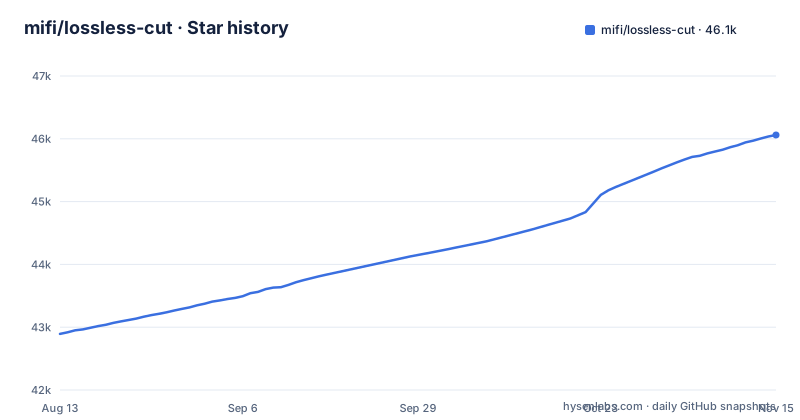
Star history
- mifi/lossless-cut46,061 ★ · +3,168
| Repository | 2026-08-13 | 2026-11-15 |
|---|---|---|
| mifi/lossless-cut | 42.9k | 46.1k |
3,168 Stars in the last 94 days, measured from the daily GitHub snapshot. Compare with other projects
Editorial analysis
What LosslessCut Solves and Who It Is For
The README's feature list covers lossless cutting and trimming, merging segments, adding, removing, replacing or extracting tracks, and remuxing between formats. These are all operations that benefit from lossless handling. The tool also supports merging files with identical codec parameters, which is common when you have multiple clips from the same camera. For anyone who works with raw or lightly compressed footage, the value proposition is immediate: save disk space and time without sacrificing quality. The project's description calls it the 'swiss army knife' of lossless editing, and the feature list backs that up, but the core identity remains a fast, lossless trimmer and remuxer.
The Mechanism: How LosslessCut Achieves Speed
The tool lets you add, remove, replace or extract tracks such as audio and subtitles, and change the container format (remux) without re-encoding. The underlying FFmpeg does the heavy lifting, and LosslessCut provides a GUI to orchestrate it. The project is written in TypeScript, but that is an implementation detail; the user-facing behavior is all about FFmpeg commands. The documentation states that everything is fast because it does an almost direct data copy, which is accurate for the lossless operations.
Getting It Running: Installation and Basic Usage
For a quick start, you download LosslessCut from a store or the manual downloads and open a video file. The tool also lets you remux to a different container, such as changing a MKV to MP4 without re-encoding. The process is fast because the video stream is copied, not re-encoded. The README warns that the PKG installer on macOS is broken, so that is a concrete pitfall to avoid. For Linux, the author publishes to the Snap Store, and manual tar.bz2 and AppImage downloads are also available. The README also links a Discord server and a Twitter account.
Limitations and Failure Modes
The most obvious limitation is the keyframe constraint. Because lossless cutting only works at keyframes, you cannot make cuts at arbitrary frames without re-encoding. An arbitrary-frame cut needs a re-encode, which is outside LosslessCut's lossless focus. The tool also does not handle re-encoding of the entire video for effects or transitions; it is not a full editor. If you need to add text overlays, color corrections, or complex transitions, LosslessCut is the wrong tool. The project's focus on lossless operations means that any operation that requires re-encoding is outside its core focus. Finally, the GPL-2.0 license means that if you distribute modified versions, you must make your source code available under the same license. This is a consideration for organizations that want to embed the tool in a proprietary product.
Alternatives: How LosslessCut Differs from Other Tools
The most direct alternative is using FFmpeg directly from the command line. FFmpeg can perform the same lossless cuts with a command like 'ffmpeg -i input.mkv -ss 00:01:00 -to 00:02:00 -c copy output.mkv'. The difference is that LosslessCut provides a graphical interface, which makes it easier to find the right cut points than guessing timestamps on the command line. LosslessCut also offers a GUI for track editing, which is cumbersome in the command line. Another alternative is a full video editor like Shotcut or Kdenlive, which are designed for re-encoding workflows. They offer frame-accurate cuts, transitions, and effects, but they are slower for simple cuts because they re-encode by default. LosslessCut's advantage is speed and quality preservation, but it sacrifices flexibility. A third alternative is LosslessCut's own CLI, which is mentioned in the documentation but not detailed in the README. If you need to automate cuts, the CLI might be a better fit, but you lose the visual interface. The choice depends on whether you prioritize speed and quality over editing capabilities.
Maintenance, Upgrade Cost, and License Implications
The project is actively maintained, with the latest release v3.70.2 published on 2026-10-28, following v3.70.1 and v3.70.0 on 2026-10-19. The release cadence suggests regular updates, which is a good sign for bug fixes and new features. The upgrade cost is low for users who download binaries: you simply replace the old executable with the new one. For users who install via the Mac App Store or Microsoft Store, updates are automatic, but you pay for the convenience. The project is licensed under GPL-2.0, which means it is free to use and modify, but if you distribute a modified version, you must provide the source code under the same license. This is a typical copyleft license and may be a concern for companies that want to integrate LosslessCut into a proprietary product. The project's reliance on FFmpeg means that new FFmpeg features or changes in codec support may affect LosslessCut's behavior, but the maintainer likely tracks FFmpeg releases. For users, the maintenance cost is minimal; you just download the latest release. The project also has a documentation folder and a recipe cookbook, which suggests that the maintainer invests in documentation. Overall, the project appears to be well-maintained, but the GPL license is the main legal consideration for commercial use.
Editorial conclusion
Adopt LosslessCut if you need fast, lossless cuts of large camera or drone footage, want to remux containers without quality loss, or need to extract or reorder tracks without a full re-encode. Skip it if your workflow demands precise frame-accurate cuts with re-encoding or advanced color grading. Before adopting, verify that your specific codecs and container combinations are supported by FFmpeg, test your cuts on a sample file, and check the project's issue tracker for known problems with your operating system. The tool is free and GPL-2.0 licensed, but it is not a replacement for a full NLE; it is a specialized utility that excels at one thing: moving media data without re-encoding.
Frequently asked questions
What is a LosslessCut?
It is a cross-platform desktop application for trimming, cutting and rearranging video, audio and subtitle files without re-encoding, with FFmpeg doing an almost direct data copy. It also handles track-level work: combining tracks from several files, removing tracks, remuxing into another container, editing metadata, and exporting frames as images.
Is LosslessCut free?
The manual executable downloads are described as always free, and the Apple App Store and Microsoft Store versions are the route the README frames as supporting the author's work in exchange for automatic updates. A Snap Store build is published for Linux, and the project is released under GPL-2.0.
How do I install LosslessCut?
The README points to the Apple App Store and the Microsoft Store for automatic updates, the Snap Store for Linux, or a manual download. On macOS the manual route is a DMG for Intel or Apple Silicon and the README notes that PKG does not work; on Windows it is a 7zip archive rather than an installer.
How do I use LosslessCut to trim video?
LosslessCut cuts and trims video and audio losslessly, with FFmpeg doing an almost direct data copy instead of a re-encode. The README's feature list also covers merging cut segments, segments and markers, and snapshots and frame export.
How do I combine videos with LosslessCut?
The README says LosslessCut can merge cut segments, or whole files with identical codecs, losslessly. It can also add, remove, replace or extract tracks and remux to a different format without re-encoding.
Is LosslessCut safe?
The store installations are described as a secure and simple installation process with automatic, stable updates, while manual executable downloads are always free.
Official sources
Add this badge to your README
If you maintain this project, the badge below links readers to this analysis and shows its maintenance status from the daily GitHub snapshot. Paste the markdown into your README; add ?metric=license or ?metric=stars to the image URL for a different field.

[](https://hysenlabs.com/projects/mifi-lossless-cut)Star history chart for your README
[](https://hysenlabs.com/projects/mifi-lossless-cut)Was this useful?