MaterialSearchView: A dated but functional search overlay for Android Toolbars
GitHub describes it as Cute library to implement SearchView in a Material Design Approach. The repository metadata lists Java as its primary language. The metadata lists the Apache-2.0 license. This article stays within the project description and details documented in the GitHub repository README.
At a glance
- What is it?
- MaterialSearchView adds a Material-style search field over your Android Toolbar with voice input and suggestions. It is simple, but it has not been updated since 2016 and targets the old support library APIs.
- Who is it for?
- Adopt MaterialSearchView if you are maintaining a legacy Android app that already uses the support library and needs a quick, no-frills search overlay with voice input and suggestions. Do not use it for new projects: the library has been untouched since 2016, depends on the old android.support.v7.widget.Toolbar, and offers no migration path to AndroidX or Jetpack Compose.
- Can I use it commercially?
- Yes. Apache-2.0 is a permissive licence: you can use, modify and sell software built on it, as long as you keep its copyright and licence notices.
- Is it still maintained?
- Probably not. The repository last received commits 76 months ago, on July 24, 2020.
- What is it written in?
- Mainly Java, according to GitHub's language statistics.
Answers come from the project's GitHub data, last synced on October 22, 2026, and from our analysis. They are not legal advice.
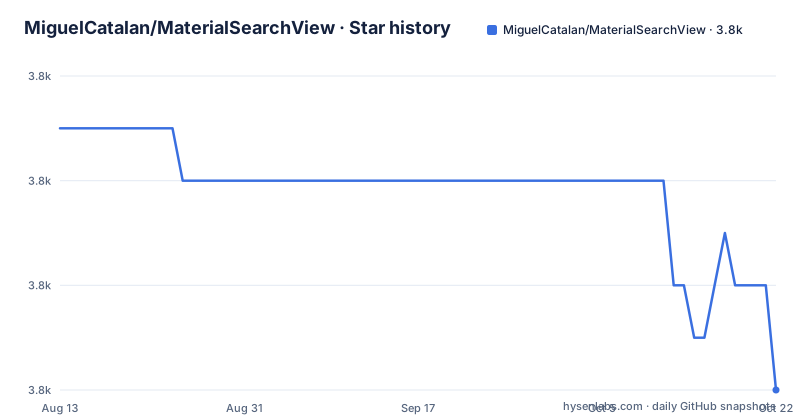
Star history
- MiguelCatalan/MaterialSearchView3,804 ★ · -5
| Repository | 2026-08-13 | 2026-10-22 |
|---|---|---|
| MiguelCatalan/MaterialSearchView | 3.8k | 3.8k |
-5 Stars in the last 70 days, measured from the daily GitHub snapshot. Compare with other projects
Editorial analysis
What this library actually does
MaterialSearchView is a custom View that drops a search field over your existing Toolbar. It solves a narrow problem: you have an Android app with a standard Toolbar and you want a Material Design styled search interaction without writing the animation, the input handling, and the suggestion list yourself. The intended user is an Android developer working with the support library (the README explicitly shows android.support.v7.widget.Toolbar) and targeting API 14 and above. The library gives you a search box that expands from the toolbar, a text input, a voice search button, a clear button, and a list of suggestions fed from a string array. It does not provide any search logic or data filtering. You supply that through the listener callbacks.
How the search flow is wired
The data flow is straightforward. You add a MaterialSearchView to your layout, positioned inside a FrameLayout that also contains your Toolbar. The README stresses that this block must be last in the layout so the search view draws over the rest of the UI. You then connect a menu item to the view in onCreateOptionsMenu by calling searchView.setMenuItem(item). When the user taps that menu item, the search view expands. Text changes and submissions fire the OnQueryTextListener callbacks, where you run your own search logic. Voice search works through the standard Android recognizer: you enable it with setVoiceSearch(true), and the result arrives in onActivityResult using the request code MaterialSearchView.REQUEST_VOICE. The library extracts the first recognized string from the Intent extras and calls setQuery on the view. This is a simple, synchronous flow. There is no adapter, no cursor, no background thread. The library is a UI shell.
Getting it running: Gradle and layout steps
The README gives a precise setup sequence. First, add the dependency to your build.gradle: compile 'com.miguelcatalan:materialsearchview:1.4.0'. Note that the latest release tag in the repository is vv1.3.1 from January 2016, but the README instructs you to use version 1.4.0. That discrepancy is worth checking before you trust the artifact. Next, add the view to your layout inside a FrameLayout that also holds your Toolbar. The README shows the view with a width of match_parent, but the snippet is truncated before the height attribute. You then inflate a menu with a search item and call setMenuItem. After that, you set the query listener and the search view listener. Finally, you can override onBackPressed to close the search view if it is open. The README also shows how to define a string-array resource for suggestions and pass it to setSuggestions. No build variants, no custom permissions, no extra modules. It is a single dependency.
Styling and customization limits
The library exposes a set of styleable attributes: searchBackground, searchVoiceIcon, searchCloseIcon, searchBackIcon, and further icon attributes for suggestions. You define a style named MaterialSearchViewStyle and apply it to the view. You can also set a custom cursor drawable through setCursorDrawable. These are all visual tweaks. There is no documented way to change the layout of the suggestion list, the animation duration, or the behavior when the search view loses focus. The README shows an example for using the library with an AppBarLayout, but the snippet is incomplete and the text admits it is tricky. That suggests the library was designed for a plain Toolbar, and coordinating with CoordinatorLayout behaviors is an afterthought. If you need deep customization, you are on your own.
The maintenance reality: frozen since 2016
The last push to the repository was on 2016-01-07, and the latest release listed is v1.3.1 from that same date. The README references version 1.4.0, which may exist in the Maven repository but is not tagged in the GitHub releases. The project is not archived, but it is effectively unmaintained. The code uses the android.support.v7.widget.Toolbar, which was deprecated years ago in favor of AndroidX. Any new Android project using androidx.appcompat.widget.Toolbar will have to add a compatibility layer or use the support library artifacts, which is not a viable path for modern apps. The library also predates AndroidX, Jetpack Compose, and the Material Components library. If you are starting a new project, this is the wrong tool. The README itself points to the official Material Design search/filter documentation as a native alternative, which is a candid admission that the library is a stopgap.
Where it falls short and when to avoid it
The biggest limitation is the lack of any search logic. The library only collects the query string and hands it to your listener. There is no built-in filtering of a RecyclerView or ListView, no debouncing, no async support. If you need those, you must implement them from scratch. The suggestion list is static and set once via setSuggestions; there is no API to update suggestions dynamically based on the query text, which is a common pattern in search UIs. Voice search relies on the system recognizer, so it will not work on devices without Google app or a compatible speech service. The library also requires you to manually handle the back button, as shown in the bonus section. The README warns that using it with AppBarLayout is tricky, which suggests the view's z-ordering and interaction with CoordinatorLayout may be fragile. For any app that needs a modern, maintained search component, this library is a liability.
Alternatives and what to check before adopting
The README itself links to the official Material Design search/filter pattern as the native approach. That is the first alternative: use the standard SearchView widget from the Android framework or the Material Components library, which is actively maintained and integrated with AndroidX. Another alternative is to build your own search overlay using a BottomSheet or a full-screen dialog, which gives you full control over the animation and the suggestion list. The difference in approach is that MaterialSearchView is a self-contained View that you drop into a layout, while the native options are either a widget that you configure or a pattern you implement with standard components. If you still want to use MaterialSearchView, verify the artifact exists at the version you plan to use, check the AAR for the exact support library version it depends on, and test it on the API levels you target. Also confirm that the library's custom attributes do not clash with your existing style resources.
Editorial conclusion
Adopt MaterialSearchView if you are maintaining a legacy Android app that already uses the support library and needs a quick, no-frills search overlay with voice input and suggestions. Do not use it for new projects: the library has been untouched since 2016, depends on the old android.support.v7.widget.Toolbar, and offers no migration path to AndroidX or Jetpack Compose. Before adopting, verify that the compiled AAR still resolves against your current Gradle setup, and check whether the native Material Components search widgets or the official search/filter pattern (linked in the README) cover your needs first.
Frequently asked questions
What does MaterialSearchView do?
It is a library that implements a search view following the Material design approach for Android. The search bar overlays your toolbar and expands over the rest of the content, with support for voice search, a list of suggestions, a custom text cursor, and theming through style attributes. It is stated to work from Android API 14 upwards.
How do I add MaterialSearchView to my layout?
Add the dependency, then place the view inside a frame container together with your toolbar, with the search view as the last element so that it layers above the rest. You also need a search item in your menu resource, and to find that item in your options menu callback and pass it to the view with setMenuItem, because the library does not hook the menu up itself.
Does MaterialSearchView support voice search and suggestions?
Voice search is enabled with a boolean call, after which you handle the result in your activity's result callback, comparing against the request code the library exposes and passing the first recognised phrase to the view. Suggestions are different: they are declared as a string array resource and passed to the view, so the list is fixed at build time rather than dynamic.
Official sources
Add this badge to your README
If you maintain this project, the badge below links readers to this analysis and shows its maintenance status from the daily GitHub snapshot. Paste the markdown into your README; add ?metric=license or ?metric=stars to the image URL for a different field.

[](https://hysenlabs.com/projects/miguelcatalan-materialsearchview)Star history chart for your README
[](https://hysenlabs.com/projects/miguelcatalan-materialsearchview)