wabt: 1:1 round-trips and five opt-in proposals
The WebAssembly Binary Toolkit
At a glance
- What is it?
- wabt is the WebAssembly community's binary toolkit: eleven command line programs written in C and C++ for converting, validating, disassembling, stripping and interpreting wasm files, plus a C backend and a spec test runner. It is deliberately not an optimizer, and its proposal table is the map of what the tools will accept today.
- Who is it for?
- Adopt wabt if you need faithful conversion, validation or a spec interpreter in your toolchain, and you want to know exactly which proposals your build accepts. Do not adopt it to shrink or speed up wasm, because optimization is explicitly out of scope.
- Can I use it commercially?
- Yes. Apache-2.0 is a permissive licence: you can use, modify and sell software built on it, as long as you keep its copyright and licence notices.
- Is it still maintained?
- Yes. The repository last received commits 3 days ago.
- What is it written in?
- Mainly C++, according to GitHub's language statistics.
Answers come from the project's GitHub data, last synced on November 14, 2026, and from our analysis. They are not legal advice.
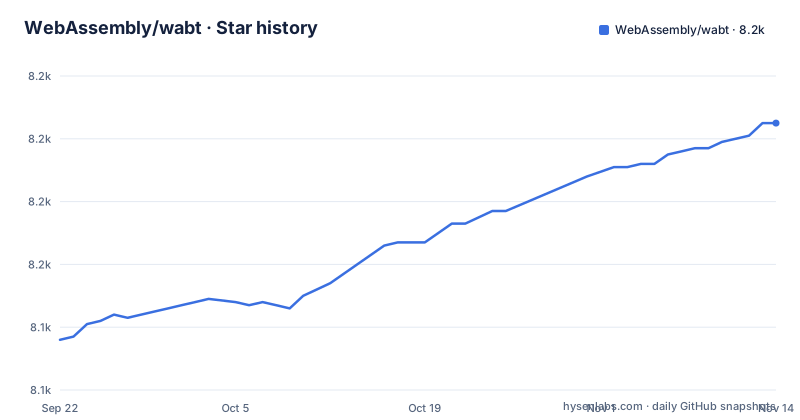
Star history
- WebAssembly/wabt8,205 ★ · +69
| Repository | 2026-09-22 | 2026-11-14 |
|---|---|---|
| WebAssembly/wabt | 8.1k | 8.2k |
69 Stars in the last 53 days, measured from the daily GitHub snapshot. Compare with other projects
Editorial analysis
Eleven tools, and the two that do the work
wabt, which the README notes is pronounced wabbit, is a suite of tools for WebAssembly. Two of them are the inverse pair everyone starts with: wat2wasm translates from the WebAssembly text format to the binary format, and wasm2wat does the reverse, turning a binary back into the text form known as a .wat.
Around them sit tools for looking at and validating files. wasm-objdump prints information about a wasm binary and is described as similar to objdump. wasm-validate validates a file in the binary format. wasm-strip removes sections from a binary. wasm-stats outputs statistics for a module. wat-desugar parses .wat text as the spec interpreter supports it, s-expressions, flat syntax or a mix, and prints the canonical flat form.
Three tools do more than transform. wasm-interp decodes and runs a binary using a stack-based interpreter. spectest-interp reads a Spectest JSON file and runs its tests in that interpreter. wast2json converts a file in the wasm spec test format into a JSON file and the associated wasm binaries. And wasm2c converts a binary into C source and a header, which is the one that puts WABT into a build rather than a shell.
Full fidelity, and an explicit refusal to optimize
The README says what these tools are for in one sentence: they are intended for use in, or for the development of, toolchains or other systems that want to manipulate WebAssembly files.
Then two comparisons, and both matter. Unlike the WebAssembly spec interpreter, which is written to be as simple, declarative and speccy as possible, the WABT tools are written in C and C++ and designed for easier integration into other systems. Unlike Binaryen, these tools do not aim to provide an optimization platform or a higher-level compiler target. Instead they aim for full fidelity and compliance with the spec, for example 1:1 round-trips with no changes to instructions.
That sentence is the contract. If you convert a .wat to a .wasm and back, you get the same instructions back, which is exactly what you want when a binary has to survive a build step untouched and still validate. It is also why WABT is the wrong tool if your goal is a smaller file.
The practical split: WABT aims for full fidelity in file handling, and the projects that rewrite code are the ones it points you away from.
Most proposals are on by default, five are not
The proposals table is the most information-dense part of the README, and it is organised by what the tools can do with each feature: a flag, whether it is on by default, and then five capability columns for binary, text, validate, interpret and wasm2c.
Most entries are enabled by default and carry a disable flag rather than an enable one: `--disable-exceptions` for exception handling, `--disable-mutable-globals`, `--disable-saturating-float-to-int`, `--disable-sign-extension`, `--disable-simd`, `--disable-multi-value`, `--disable-tail-call`, `--disable-bulk-memory`, `--disable-reference-types`, `--disable-memory64`, `--disable-multi-memory`, `--disable-extended-const` and `--disable-relaxed-simd`.
Five are the other way round and need an enable flag: `--enable-threads`, `--enable-custom-page-sizes`, `--enable-compact-imports`, `--enable-function-references` and `--enable-wide-arithmetic`.
The capability columns are where the gaps show. relaxed-simd has no wasm2c support, so a C backend build cannot consume it. compact-imports has binary support and can be validated, but has no text-format support. annotations is readable in text and not in binary, and has no validation column. If your pipeline converts to C, that column decides which proposals you can use.
Cloning without --recursive leaves the test suite behind
The cloning section has a warning in the first line: clone as normal, but don't forget to get the submodules as well.
$ git clone --recursive https://github.com/WebAssembly/wabt
$ cd wabt
$ git submodule update --init
The reason is given after the commands: this will fetch the testsuite and gtest repos, which are needed for some tests. There is a `.gitmodules` file at the repository root, so the two submodules are declared rather than vendored.
That is a small thing that costs an afternoon if you skip it. A shallow-looking `--recursive` clone is the documented path, and the `git submodule update --init` line is there for the case where the first clone was already done.
The build instructions that follow are deliberately plain, and they note that you must create a separate directory for the build artifacts.
CMake out of tree, and a Makefile that fans out to five toolchains
Building on Linux and macOS with CMake directly is four commands:
$ mkdir build
$ cd build
$ cmake ..
$ cmake --build .
That produces build files using CMake's default build generator, and the README points at the CMake documentation for anything else.
The Makefile at the repository root is for the project's own matrix rather than for users. It defaults `USE_NINJA` to 1, and it fans out across five compiler configurations, GCC, GCC_I686, CLANG, CLANG_I686 and EMCC, two build types, DEBUG and RELEASE, and five sanitizers, ASAN, MSAN, LSAN, UBSAN and FUZZ. The 32-bit variants pass `-m32` for both C and C++, and each sanitizer has its own flag such as `-DUSE_ASAN=ON`.
EMCC in that list is the emscripten configuration; the README notes that WABT has been compiled to JavaScript via emscripten for its online demos.
Four Python linters and a UBSan blacklist in a C++ repository
The top-level file list has more variety than a C++ toolkit usually does. Alongside `.clang-format` there is `.ruff.toml`, `.flake8` and `.style.yapf`, plus a `requirements-dev.txt`, which configure Python linting and formatting tools.
That is a sign of where the auxiliary tooling lives: `scripts/` and the docs build are Python, while the library and the eleven tools are C and C++. The `wasm2c/` directory holds the C backend's own sources, `test/` the test suite, `third_party/` the vendored pieces, and `man/` the manual pages that the README's per-tool links point to.
Then two files that describe a specific kind of testing. `fuzzers/` and `fuzz-in/` are a fuzzing setup with its own corpus, and `ubsan.blacklist` is a suppression list for the undefined behaviour sanitizer. `SECURITY.md` and `Contributing.md` sit next to the Apache 2.0 `LICENSE`.
Release cadence is steady and unremarkable: 1.0.40 on 2026-03-11, 1.0.41 on 2026-05-07 and 1.0.42 on 2026-09-15, with the last push on 2026-11-02 and the repository not archived.
The online demos are the same tools through emscripten
WABT has been compiled to JavaScript via emscripten, and the README links three demos: an index page, a wat2wasm demo and a wasm2wat demo. That is the whole browser story, and it is enough to try a conversion without installing anything.
What is missing from that list is as informative as what is there. There is no browser demo for wasm-interp, for wasm2c, for wasm-stats or for the spec test runner. Besides the index page, the two demos are wat2wasm and wasm2wat.
So the demos answer the question most newcomers have, which is whether the text format is what they expect, and they do not answer the question the second-nearest newcomer has, which is whether their binary validates and what its sections are. For that, wasm-validate and wasm-objdump are installed tools.
The documentation is per tool: every entry in the tool list links to its own page, wat2wasm.1.html and the rest, under webassembly.github.io/wabt/doc.
Editorial conclusion
Adopt wabt if you need faithful conversion, validation or a spec interpreter in your toolchain, and you want to know exactly which proposals your build accepts. Do not adopt it to shrink or speed up wasm, because optimization is explicitly out of scope. Before you wire it into a build, read the proposals table for the flags you will need to pass, and clone with --recursive so the testsuite is present when you run the tests.
Frequently asked questions
What is WABT used for?
It is a suite of tools for WebAssembly written in C and C++, intended for toolchains and other systems that manipulate WebAssembly files. It converts between the text and binary formats with wat2wasm and wasm2wat, validates and disassembles binaries, runs them in an interpreter, strips sections, and converts a binary to C source with wasm2c.
How do I build WABT from source?
Clone it recursively, or run `git submodule update --init` afterwards to fetch the testsuite and gtest repos. On Linux and macOS, create a separate build directory and run CMake there: `mkdir build`, `cd build`, `cmake ..`, then `cmake --build .`. The project also ships a Makefile covering GCC, Clang, their 32-bit variants and emscripten.
Does WABT optimize or shrink WebAssembly binaries?
No. The README says that, unlike Binaryen, these tools do not aim to provide an optimization platform or a higher-level compiler target, and that instead they aim for full fidelity and compliance with the spec, with 1:1 round-trips and no changes to instructions.
Which WebAssembly proposals need a flag to turn on?
Five are off by default and need an enable flag: --enable-threads, --enable-custom-page-sizes, --enable-compact-imports, --enable-function-references and --enable-wide-arithmetic. The rest are on by default with matching disable flags such as --disable-simd and --disable-exceptions.
Official sources
Add this badge to your README
If you maintain this project, the badge below links readers to this analysis and shows its maintenance status from the daily GitHub snapshot. Paste the markdown into your README; add ?metric=license or ?metric=stars to the image URL for a different field.

[](https://hysenlabs.com/projects/webassembly-wabt)Star history chart for your README
[](https://hysenlabs.com/projects/webassembly-wabt)Was this useful?