MilkDrop3 Audio Visualizer Features and Preset Workflow
MilkDrop 3.0, supports any audio source, double-preset (.milk2), loading presets based on beat detection and much more...
At a glance
- What is it?
- MilkDrop3 is a portable C++ audio visualizer for Windows music players and streaming services, with beat-driven preset changes, double-presets, and MilkDrop and projectM compatibility. It fits preset-oriented visualists, but its crash-prone deep mashups and incompletely documented setup require caution.
- Who is it for?
- Adopt MilkDrop3 if you want a Windows visualizer centered on editable presets, simultaneous double-presets, and audio-triggered transitions. Do not adopt it if you require a documented package manager, a known license, or predictable deep-mashup behavior.
- Can I use it commercially?
- Not without permission. GitHub finds no licence file in the repository, and without a licence all rights are reserved by default: you may read the code but not reuse it. Check the README, or ask the authors, before using it.
- Is it still maintained?
- Yes. The repository last received commits 41 days ago.
- What is it written in?
- Mainly C++, according to GitHub's language statistics.
Answers come from the project's GitHub data, last synced on November 7, 2026, and from our analysis. They are not legal advice.
Star history
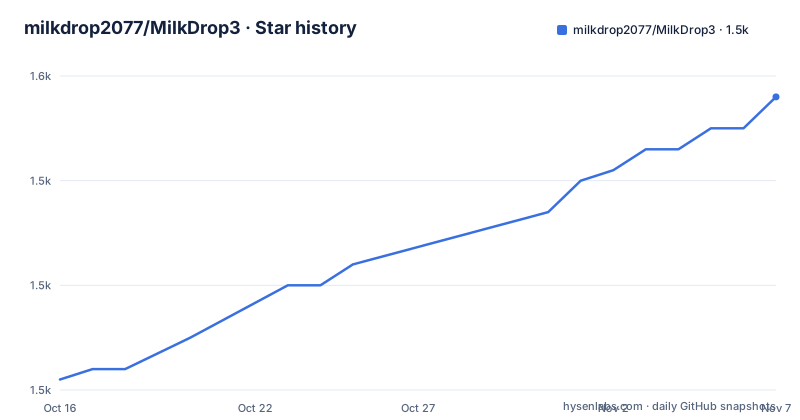
- milkdrop2077/MilkDrop31,548 ★ · +27
| Repository | 2026-10-16 | 2026-11-07 |
|---|---|---|
| milkdrop2077/MilkDrop3 | 1.5k | 1.5k |
27 Stars in the last 22 days, measured from the daily GitHub snapshot. Compare with other projects
Editorial analysis
MilkDrop3's Audio-Reactive Preset Focus
MilkDrop3 addresses the visual side of music playback for users who want more control than a fixed spectrum analyzer. It is intended for people running Windows music players or browser-based sources such as Spotify, YouTube, and SoundCloud. The README describes the program as portable and states that it supports any audio source, although it does not document the underlying capture mechanism. That distinction matters: compatibility with a service is stated, but the repository does not explain how system audio reaches the renderer or which Windows versions are supported.
The project is aimed at users who work with presets. Its roots in BeatDrop and compatibility with presets made for MilkDrop and projectM mean that adopting MilkDrop3 does not require discarding an existing preset library. The README also says MilkDrop3 retains what MilkDrop2 could do. Its additions concern preset generation, visual composition, transitions, audio-reactive loading, and interactive controls.
This is a desktop creative tool rather than a library for embedding audio visualization in another application. The README discusses keyboard-driven operation, preset files, monitor stretching, and playback controls, but it does not provide a public API, command-line interface, or integration guide. Engineers should therefore treat MilkDrop3 as an end-user program unless another source documents those interfaces.
How BeatDrop Presets Drive MilkDrop3 Rendering
Based on the repository description and README, preset compatibility is the core of MilkDrop3's architecture. BeatDrop provides the preset lineage, while MilkDrop and projectM files can be loaded into the program. A preset supplies the visual transformations, effects, and values that respond during playback. The README does not expose the internal rendering modules, so claims about a particular shader pipeline or scene graph would go beyond the documented design.
MilkDrop3 adds a double-preset format called `.milk2`. Rather than switching between one `.milk` preset and another, a `.milk2` file represents two presets rendered simultaneously with a blending pattern. The user can choose patterns such as "zoom", "side", and "plasma", force the blend progress, reload random pattern values, flip the two presets, and control whether the blend moves inward or outward. Those random values are stored in the `.milk2` file, which makes a mixed preset reproducible after it is saved.
Audio can also control preset changes. The documented `hardcut1` mode loads a new preset when `bass > 1.5`, with a minimum delay of 0.2 seconds. Other modes use treble thresholds and longer delays, while `hardcut7` injects an effect when `treb > 2.9` rather than loading a new preset. These rules operate on detected audio bands, so the mechanism is more direct than trying to synchronize transitions manually. The README does not state how bass and treble values are normalized, which limits precise prediction across different audio sources.
Download and First MilkDrop3 Preset
The README does not provide command-line installation instructions, package names, dependencies, or a documented installer command. It instead directs users to a download and installation video at `https://youtu.be/OQdZFlOHe5o`. Because the repository does not document a portable archive location or executable name, there is no verified `git clone` or launch command to reproduce here.
After obtaining the program through the route linked by the project, a practical first use begins with loading a compatible `.milk` preset. The README says compatible presets can come from MilkDrop or projectM, but it does not specify the preset directory, included starter library, or first-launch behavior. Once a preset is running, press the spacebar to cycle through transition effects. The documented names include the original "zoom", "side", "plasma", and "cercle" effects, plus additional transitions such as "plasma2", "snail", "donuts", "checkerboard", "wave", and "curtain".
For a first audio-driven check, press `F8` to enable automatic preset changes based on beat detection. The effect depends on audio reaching MilkDrop3, but the README does not provide a diagnostic page that confirms the detected levels. The key `n` is documented as opening substantial debug information, which is the closest documented control for investigating preset creation or double-preset mashups. There is no documented method for recording a preset transition, exporting rendered video, or capturing frames.
Creating and Saving MilkDrop3 Double-Presets
MilkDrop3 allows users to create a double-preset through a short keyboard workflow rather than editing preset code. Press `F9` to enter double-preset mode, then press the spacebar to create a mix of two presets. Press `s` to save it, and the program creates a `.milk2` file. The separate tutorial linked by the README, `https://youtu.be/AdcUPpp1O0k`, is presented as the fuller guide for creating these files.
Several controls operate on the active mix. Press `p` to change the blending pattern. Press uppercase `P` through `Shift+p` to force blending progress in increments such as 10 percent. Press `o` to reload random values used by patterns such as plasma. Because those values are saved in the `.milk2` file, reloading them before saving can produce a different result from the previous save operation. Press `u` to flip preset 1 and preset 2, and uppercase `U` through `Shift+u` to force the blending direction.
The filter key `f` can restrict the preset list to normal `.milk` files, double `.milk2` files, or all files. The README also states that commands including `A`, `D`, `M`, `Z`, and `F9` automatically switch the list to classic presets to avoid mash-up errors. This automatic filtering reduces one class of accidental operation, but it also means the active filter may change without an explicit request from the user.
Frame Rates, Monitor Stretching, and Crash Boundaries
MilkDrop3 offers direct controls for display setup. `F2` cycles real-time frame-rate settings such as 60fps, 90fps, and 120fps. The README warns that some presets may not work well at high frame rates, so increasing the rate is not uniformly safe. The exact command-line representation of those settings is not given, and the frame counter is toggled interactively rather than through a documented configuration file.
Window and monitor controls include always-on-top mode through `F7`, borderless mode, and multiple-monitor stretching using `ALT+SHIFT`. The README credits `milkdropper` for the stretching code, but it does not explain whether stretching is limited to specific GPU or display configurations. Users should also note that `CTRL+right` and `CTRL+left` change tracks on any player, while fast-forward and rewind commands are documented as Winamp-only.
The clearest failure mode is deep-mash-up support. The README says deep-mash-up includes all five bins rather than only warp and comp mashups, and explicitly warns that complex presets can crash MilkDrop3. That makes the feature unsuitable for unattended playback unless the chosen preset set has already been exercised under the same transition, blend, frame-rate, and monitor settings. The README does not define recovery after a crash or provide a safe-mode command.
MilkDrop3 Compared With Standard Audio Analyzers
MilkDrop3 differs from a conventional audio analyzer because its main output is a preset-driven visual composition rather than a fixed bar meter, oscilloscope, or spectrum display. A conventional player visualization generally maps current audio levels directly to simple shapes or bars. MilkDrop3 instead loads presets that contain effect logic and can combine audio bands with mashups, blend patterns, generated colors, and transitions.
Its compatibility with MilkDrop and projectM presets is the practical alternative to creating every visual from scratch. Users can reuse existing preset files, while `.milk2` adds a project-specific layer for displaying two presets at once. Compared with BeatDrop, the README positions MilkDrop3 as an expanded program with added controls and features. Compared with MilkDrop2, it retains existing behavior while adding features such as higher shape and wave counts, deeper mashups, expanded variables, better search, and beat-based loading.
The trade-off is predictability. The keyboard model and rich preset vocabulary support live experimentation, while unstable deep mashups and undefined audio normalization make automated or long-running use harder to plan. The README also does not identify a license, dependency list, or platform matrix beyond the Windows-oriented player controls and the presence of a `linux/` repository entry.
MilkDrop3 Maintenance and License Boundaries
The repository is not archived, and its last push was on 2026-09-27. The release list includes MilkDrop 3.37 on 2026-09-17. These facts show recent repository and release activity, but the README does not define a maintenance policy, support period, compatibility promise, or upgrade procedure. The presence of `code/` and `linux/` entries indicates source organization, but the repository does not explain whether the Linux directory is complete, buildable, or intended for end users.
Upgrade cost cannot be reduced to a documented dependency update because no dependencies or build commands are provided. The visible release naming suggests that users may encounter version-specific features, but the README does not state whether older presets or `.milk2` files remain compatible across releases. A user assessing an upgrade would need to check release documentation before assuming that generated color state, saved random blend values, or beat-trigger behavior is unchanged.
The repository metadata does not identify a known license. That is a concrete adoption constraint, not a minor metadata omission. Users should obtain the applicable license terms from the project owner before redistributing source, bundling the executable, or distributing modified presets. No legal conclusion can be drawn from the missing license designation.
Editorial conclusion
Adopt MilkDrop3 if you want a Windows visualizer centered on editable presets, simultaneous double-presets, and audio-triggered transitions. Do not adopt it if you require a documented package manager, a known license, or predictable deep-mashup behavior. Verify the download route, audio capture with the intended player, compatibility with your display setup, and whether your preset collection is stable under the selected transition and frame-rate settings.
Frequently asked questions
How do I install MilkDrop3?
The README points to a download and installation video at `https://youtu.be/OQdZFlOHe5o`. It does not provide a package-manager command, archive name, or step-by-step text installation procedure.
How do I create a double-preset in MilkDrop3?
Press `F9` to enter double-preset mode, press the spacebar to mix two presets, and press `s` to save the result as a `.milk2` file. The `p` and `P` controls change the blend pattern and force its progress.
Does MilkDrop3 support audio from Spotify and YouTube?
The README states that MilkDrop3 supports audio sources including Spotify, YouTube, SoundCloud, and Winamp. It does not document the underlying system-audio capture configuration or Windows version requirements.
Can MilkDrop3 change presets from beat detection?
Yes. Pressing `F8` enables automatic preset changes based on beat detection. The documented `hardcut` modes use bass or treble thresholds and minimum delays, while `hardcut7` injects an effect instead of loading a new preset.
Is MilkDrop3 suitable for live high-frame-rate use?
It supports toggling frame rates such as 60fps, 90fps, and 120fps with `F2`, but the README warns that some presets may not work well at high frame rates. It also warns that deep mashups can crash the program.
Official sources
Add this badge to your README
If you maintain this project, the badge below links readers to this analysis and shows its maintenance status from the daily GitHub snapshot. Paste the markdown into your README; add ?metric=license or ?metric=stars to the image URL for a different field.

[](https://hysenlabs.com/projects/milkdrop2077-milkdrop3)Star history chart for your README
[](https://hysenlabs.com/projects/milkdrop2077-milkdrop3)Was this useful?